
Branded Content on Instagram: Ultimate Guide
Instagram branded content guide: enable pro tools, add paid partnership labels, tag brands, confirm eligibility, and run compliant ads.
Instagram branded content guide: enable pro tools, add paid partnership labels, tag brands, confirm eligibility, and run compliant ads.
4.98 /5 - from 58k reviews
Trusted by 50,000+ creators — get real engagement delivered to your profile in minutes, not days.
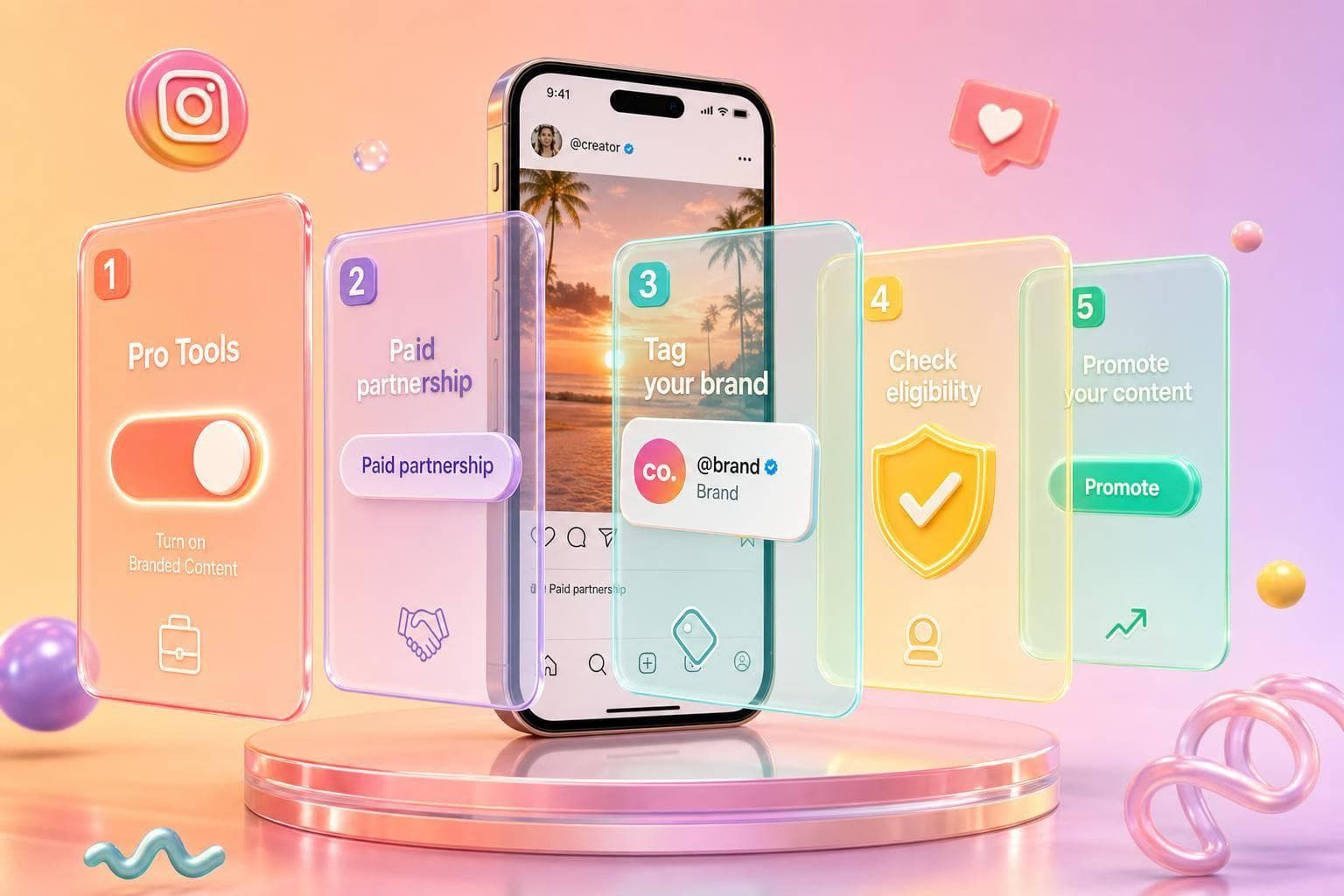
If a brand gives you money, free products, travel, discounts, or any other value, you need to disclose it on Instagram. That means using the paid partnership label, tagging the right brand account, and checking that both sides meet Meta’s rules.
Here’s the short version:
A few points stand out fast. Instagram allows up to two brand partners on eligible content. Both the creator and the advertiser need accounts in good standing. And if a sponsored post is unlabeled, it can lead to reduced reach, removal, or loss of access to tools.
This also affects campaign reporting. When the label is in place, brands can run partnership ads through Meta Ads Manager and review post data more easily. That saves time and lowers the chance of setup mistakes.
| Topic | What I’d check first |
|---|---|
| Account setup | Is the account set to Creator or Business? |
| Disclosure | Is the paid partnership label turned on? |
| Brand tag | Is the official handle tagged? |
| Ad use | Is Allow brand to promote enabled if needed? |
| Policy risk | Does the post avoid blocked product areas? |
My takeaway: if you post sponsored content on Instagram, the safest path is simple: label it, tag it, check eligibility, and review it again after launch.
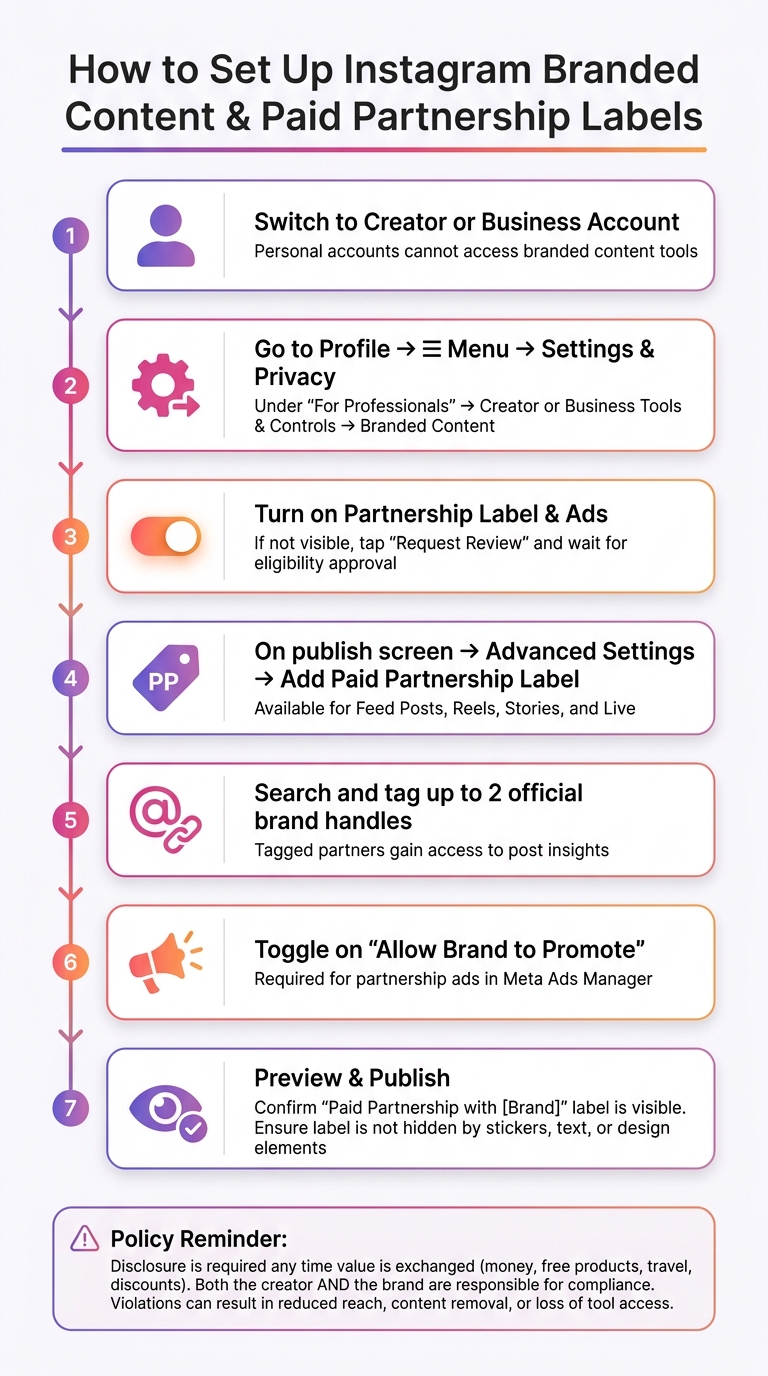
How to Set Up Instagram Branded Content & Paid Partnership Labels
Before you can use branded content tools, your Instagram account needs to be a professional account - either Creator or Business. Personal accounts don't get full access to these features.
Which one should you pick? It comes down to how you use Instagram. Individual creators and public figures usually go with Creator. Companies, agencies, and brands usually use Instagram for business accounts. Both give you access to the settings area where branded content tools live. Instagram may also check your account's authenticity and policy history before access is approved.
Once your account is eligible, you can turn the tools on in Settings.
After your professional account is set up, go to your Profile, tap the three lines (≡) in the top-right corner, and open Settings and privacy. Then, under For professionals, choose Creator tools and controls or Business tools and controls, based on your account type. From there, tap Branded content.
If the tools are available, you'll usually see options like Partnership label and ads and Approved business partners. If you don't see those yet, Instagram may show Set up branded content tools or Request review instead. That's a sign your account still needs to be checked for eligibility. If Instagram denies access, remove any content that breaks its rules and apply again.
Once the tools are on, the next step is simple: add the label to each branded post before it goes live.
For feed posts and Reels, make your content the usual way. On the last screen before publishing, tap Advanced settings. Under Ads and monetization, open Partnership label & ads, switch on Add paid partnership label, and tap Add brand partners. You can search for and tag up to two brand partners using their official Instagram handles.
For Stories, open the Story editing screen, tap the tagging or link icon, switch on Add paid partnership label, and add up to two partners. For Live, set the branded content label in the Live setup screen before you start streaming, so viewers can see it during the broadcast.
Before you publish, take one last look at the preview. Make sure the Paid partnership with [Brand] label shows near the top and isn't blocked by stickers, text, or other design elements. Also, tag only the brand's official handle. Tagged partners can see post insights.
After setup, eligibility and policy status decide whether branded content tools stay available. Instagram requires a professional account, a track record of original content, and a clean policy record.
It’s not just the creator, either. Both the creator and the brand partner need to be in good standing. That means staying away from policy violations, fake engagement, and ad-related restrictions. If something goes wrong, fix violations fast and appeal any enforcement decision that seems wrong.
There’s also no minimum follower count for branded content tools. So you don’t need a huge audience to get access. That said, eligibility can still depend on location, and some monetization features are only available in certain countries. Political and government accounts can’t use monetization features at all, no matter how large the account is.
Once eligibility is clear, the next thing to watch is category-level limits. Instagram bans branded content in several areas, including tobacco products, vapes, e-cigarettes, drugs and drug-related products, unsafe supplements like anabolic steroids, weapons, ammunition, many adult products or services, and high-risk financial products and schemes.
Disclosure is another big one. Hidden sponsorships can trigger enforcement, so disclosures need to be clear, prominent, and easy to understand. Don’t bury the paid partnership label. If money, free products, or any other value is exchanged, use a clear disclosure.
| Factor | Compliant Branded Content | Unlabeled Sponsored Post | Organic Content |
|---|---|---|---|
| Disclosure requirement | Paid partnership label used whenever value is exchanged | No label despite value exchanged | No disclosure needed |
| Partner tagged | Business partner is tagged | Business partner not tagged | No brand partnership |
| Partnership ad eligibility | Can be used to create a partnership ad | Not eligible | Not eligible |
| Enforcement risk | Low when compliant | High - removal, reduced reach, or access loss | None |
Here’s the simple version: if a creator gets free products or any other kind of value and posts about them without the paid partnership label, that post does not follow Instagram’s disclosure rules. And the responsibility doesn’t sit with just one side. Both the creator and the brand are responsible for getting it right.
If a post clears these checks, the next move is partnership-ad activation and campaign review.
Once a post clears branded content rules, the next step is partnership ads. These are paid promotions that keep the creator’s profile, caption, and paid partnership label in place while the ad runs from the advertiser’s ad account.
There are two main ways to set them up.
Creators can also generate a partnership ad code inside Instagram and send it to the brand. The brand then uses that code in Ads Manager to access the post. No password sharing, no messy workarounds.
Payment is handled off-platform. Brands and creators sort out compensation through contracts and invoices.
Run the same review twice: before launch and again after the ad is live. It sounds basic, but it can save a lot of back-and-forth later.
A good pre-launch review should cover both account status and asset status. At the account level, confirm that the campaign account has the right tools turned on, there are no active policy violations on either side, business partners are listed correctly and match the legal entities named in your contracts, and the ad account has a valid payment method.
At the asset level, check that each sponsored post has the paid partnership label applied, the right business partner is tagged, Allow brand to promote is turned on, and the assets meet Meta’s format specs.
After launch, look again at the live placements and make sure the paid partnership label still shows. Small creative edits can sometimes remove disclosures, and that’s the kind of problem that sneaks up on teams.
Then watch performance in Ads Manager. Pay close attention to reach, impressions, cost per result, and conversion metrics. It also helps to split reporting by partnership ads versus standard ads so you can see what’s pulling its weight.
Creators should keep an eye on organic engagement and growth and comment sentiment too. If followers start reacting badly to the sponsored nature of a post, it’s better to spot that early. Agencies should review active campaigns on a regular basis.
Use the right workflow before launch to avoid rework. The table below shows how each option differs in control, visibility, and permissions.
| Factor | Creator-led partnership ad | Brand-led ad using creator content | Standard brand ad |
|---|---|---|---|
| Who controls the content | Creator controls the post and labeling; brand controls targeting, budget, and schedule | Brand controls creative and targeting | Brand controls everything |
| Billing | Brand's ad account | Brand's ad account | Brand's ad account |
| Creator identity visible in ad | Yes - creator's profile and caption are shown | No - the ad appears from the brand profile | No - brand profile only |
| Insights visibility | Primarily in brand's Ads Manager; creator sees organic engagement plus some engagement data | Managed in the brand's Ads Manager | Managed in the brand's Ads Manager |
| Permissions required | Creator must enable promotion on each post | Brand receives raw assets from the creator and the creator explicitly approves the ad | None beyond standard ad account access |
| Workflow complexity | Moderate - requires creator coordination and post-level permissions | Moderate - asset handoff and brand-side build | Low - fully internal |
Once your labels and approvals are set, the next thing that matters is audience quality. That’s not just a performance issue. It’s also a compliance issue. Low-quality audiences can drag down campaign results, which is why real-follower growth matters.
UpGrow supports that process with AI targeting and human-managed support focused on real-follower growth. Its targeting filters include location, age, gender, language, and interests. That gives you a way to build an audience that lines up with a brand partner’s target audience instead of pulling in random followers who won’t engage.
When your targeting matches the brand’s audience, Instagram Insights becomes much easier to read. You’re not guessing whether the numbers mean anything. On top of that, the live analytics dashboard and 24/7 monitoring can help flag sudden drops or follower spikes before they start hurting campaign performance.
For agencies, one of the biggest advantages is cleaner reporting across multiple creator accounts. UpGrow’s agency-friendly solutions bring performance tracking and audience data into one place. That means teams can use consistent targeting settings across creators and share exportable performance summaries with brand stakeholders without piecing everything together by hand.
The Boost™ tool can scale visibility during key campaign windows while keeping growth real and measurable. For creators and agencies juggling deadlines, partner requests, and reporting needs, that kind of setup makes the workflow a lot easier to manage.
In practice, branded content works best when disclosure, eligibility, and audience quality stay in sync. Apply the paid partnership label every time. Confirm monetization eligibility before running partnership ads. Run account checks before launch and again after the campaign starts. Then pair all of that with real-audience growth, so the followers behind your metrics can stand up to advertiser review.
Yes. Under FTC guidelines, gifts like free products, PR packages, trips, event invites, or other perks create a material connection. If you post about them, you need to disclose that.
Use clear labels like "Gifted by [Brand]" or "PR package from [Brand]". Instagram’s branded content label is also a good idea when a benefit-based partnership exists.
You might not see branded content tools if your Instagram account doesn't meet the platform's eligibility rules or isn't set up for professional use. First, make sure your account is a professional or creator account.
If the tools still don't show up, check that your account follows Instagram's community guidelines and terms of service. It also helps to update the app to the latest version.
Missing the paid partnership label can create a major compliance risk. Disclosures need to be clear and conspicuous so people can spot them right away and understand what they mean.
And here’s the part many brands and creators miss: a platform label by itself isn’t enough. If you don’t use the branded content tool, add a plain-language disclosure like Ad or Sponsored in the first line of the caption or on-screen within the first 1–2 seconds of the video.


