
Best Instagram Comment Reply Apps in 2026
Compare top Instagram comment-reply tools for comment-to-DM flows, moderation, team inboxes, and AI-driven growth.
Compare top Instagram comment-reply tools for comment-to-DM flows, moderation, team inboxes, and AI-driven growth.
4.98 /5 - from 58k reviews
Trusted by 50,000+ creators — get real engagement delivered to your profile in minutes, not days.

If you want the short answer: ManyChat is the top pick for comment-to-DM flows, CommentGuard is best for safety, Sprout Social and Agorapulse fit team inbox work, and UpGrow fits AI-written replies tied to growth tracking.
I’d break this list down by one simple question: what job do you need the app to do? In 2026, Instagram automation tools go far past auto-posting a basic “thanks.” They now handle post-based triggers, public replies, keyword filtering, DM handoff, team routing, and reporting. Pricing in this group starts at free and runs to $97+ per month, with UpGrow starting at $39/month.
Here’s what stands out right away:
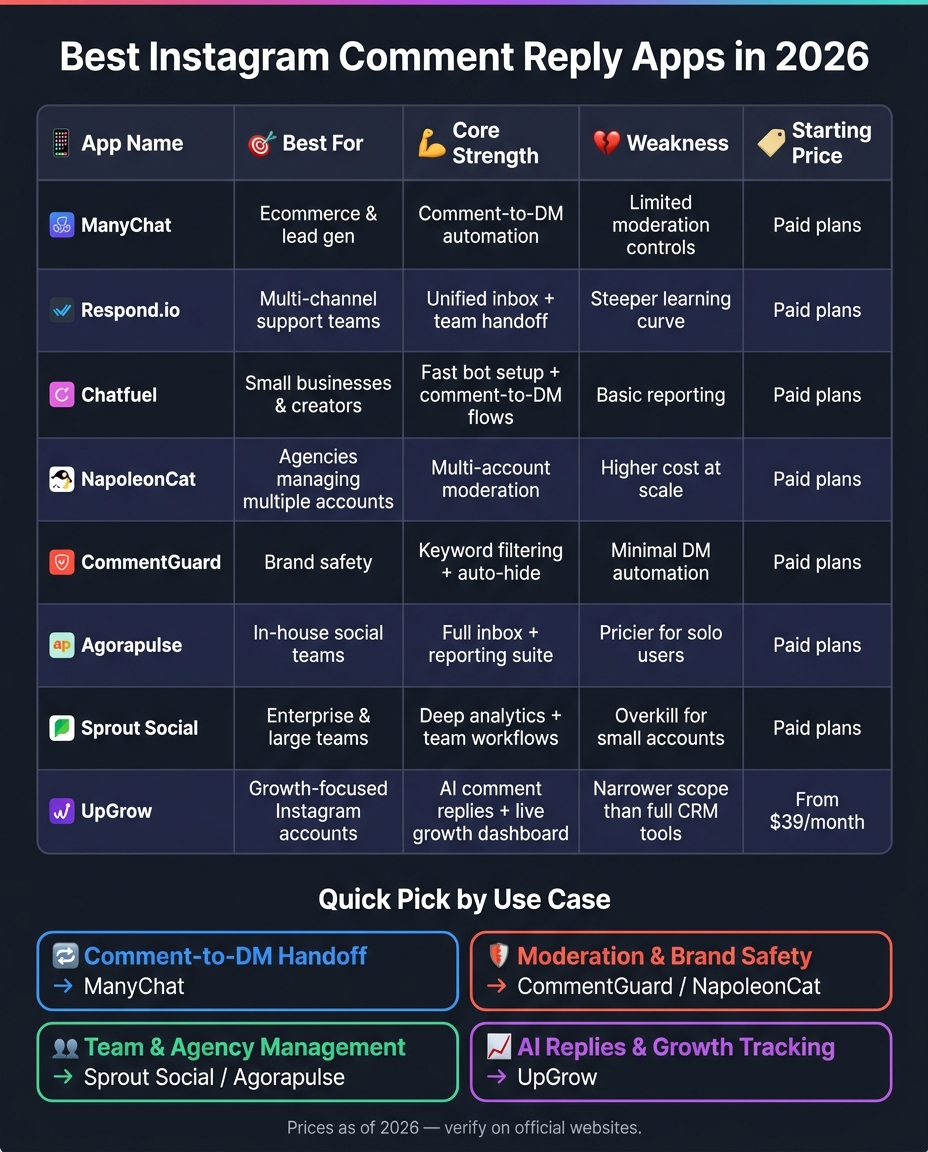
Best Instagram Comment Reply Apps in 2026: Side-by-Side Comparison
| App | Best For | Main Use |
|---|---|---|
| ManyChat | Ecommerce and lead gen | Comment-to-DM automation |
| Respond.io | Support teams | Shared inbox and handoff |
| Chatfuel | Small businesses and creators | Fast bot and DM flow setup |
| NapoleonCat | Agencies | Multi-account moderation |
| CommentGuard | Brand safety | Keyword filters and auto-hide |
| Agorapulse | In-house social teams | Inbox management and reporting |
| Sprout Social | Large teams | Analytics and team workflows |
| UpGrow | Growth-focused accounts | AI replies and live growth tracking |
What I like about this roundup is that it separates reply automation from team inbox software and from growth tools. That makes the decision easier: if you need moderation, pick a moderation-first tool; if you need DM handoff, use a bot-first tool; if you want to use Instagram analytics for growth data with AI-assisted replies, UpGrow fits that lane.
This roundup looks at eight apps built around post triggers, moderation, DM handoff, reporting, and team workflows. UpGrow is part of the list because of its AI-driven comment replies and growth dashboard.
First, here’s a quick side-by-side look at where each app fits.
| App | Best For | Core Strength | Weakness |
|---|---|---|---|
| ManyChat | Ecommerce & lead gen | Post-specific triggers + DM handoff | Limited moderation controls |
| Respond.io | Multi-channel support teams | Unified inbox + team handoff | Steeper learning curve |
| Chatfuel | Small businesses & creators | Fast bot setup + comment-to-DM flows | Basic reporting |
| NapoleonCat | Agencies managing multiple accounts | Multi-account moderation | Higher cost at scale |
| CommentGuard | Brands focused on comment safety | Keyword filtering + auto-hide | Minimal DM automation |
| Agorapulse | In-house social teams | Full inbox + reporting suite | Pricier for solo users |
| Sprout Social | Enterprise & large teams | Deep analytics + team workflows | Overkill for small accounts |
| UpGrow | Growth-focused Instagram accounts | AI comment replies + live growth dashboard | Narrower scope than full CRM tools |
Each app had to do more than show off a long feature list. The focus was on actual workflow use: post-specific triggers, comment moderation, comment-to-DM handoff, reporting quality, and fit for solo users, in-house teams, or agencies.
The next section breaks down each app by workflow fit, pros, and limits.
Each app below follows the same review structure: how comment replies work, trigger setup, moderation controls, DM handoff, reporting depth, and who it fits best.
UpGrow centers on AI-driven follower growth, targeting filters, and real-time analytics and free growth tools. It’s not built for comment moderation or DM handoff. If your brand wants Instagram engagement tied to measurable audience growth, pricing starts at $39/month.
Here’s the short version of where UpGrow fits in a comment-reply workflow.
| App | Reporting Depth | Team Workflow | Comment/DM Workflow | Growth Focus | Starting Price |
|---|---|---|---|---|---|
| UpGrow | Real-time growth analytics | Agency-friendly | No core DM handoff | AI targeting + Boost™ | $39/month |
Its main strength is growth analytics, not inbox-style comment handling.
Best fit: brands and agencies that care more about growth analytics than comment moderation.
If your team needs comment automation and moderation, the next tools are a better match.
Pick the app that fits the job you need done: automation, moderation, DM handoff, or reporting.
If you want simple comment automation, UpGrow works well for light, AI-assisted replies without pulling you into a big inbox setup.
After that, the main choice is pretty simple: do you need comment automation, or do you need a team inbox built for shared work?
If reporting, oversight, and teamwork matter most, social inbox tools like Sprout Social and Agorapulse make more sense. They’re built around a unified inbox, assignment workflows, and client management, not just comment automation.
| Use Case | Best Fit | Key Strength |
|---|---|---|
| Lightweight comment replies | UpGrow | AI-assisted replies and automated replies |
| Moderation and safety | NapoleonCat, CommentGuard | Keyword filtering and auto-hide |
| DM handoff from social interactions | ManyChat, Chatfuel | Comment-to-DM flows |
| Team collaboration and customer support | Sprout Social, Agorapulse | Unified inbox, assignment workflows, reporting |
After the feature-by-feature breakdown, the best way to choose is simple: go with the workflow that slows you down the most.
Use this quick guide to match each tool to your main use case:
Start with the app that fixes your biggest workflow bottleneck first.
Pick the app that fits how you work, not the one with the longest feature list. The big thing to check is whether it supports the triggers you need, like comment-to-DM funnels or keyword-based automation, and whether it runs on Meta’s official Graph API and OAuth. If a service asks for your Instagram password, skip it.
It also helps to look for human review on AI replies, along with multi-account workspaces and reporting if you handle several accounts or work at an agency. And if there’s a free trial, use it. It’s one of the easiest ways to see whether the setup works in your day-to-day routine.
Yes - if you want to scale Instagram engagement without getting buried in manual replies, both can help.
Comment automation lets you reply right away when someone uses a set keyword in a comment or Story reply. That cuts down on manual work and helps you avoid missing leads or customer questions.
A team inbox puts conversations in one place, which makes handoffs from automated flows to human agents much smoother when someone needs more detailed help.
UpGrow can help with Instagram comment moderation by sending AI-powered, human-like replies and managing engagement through Instagram-compliant, API-based automation. It also supports brand-consistent responses, which helps keep your voice steady across comment threads.
That said, there’s a limit to what’s described in the available information. It does not mention full moderation controls such as:
So, while UpGrow appears useful for reply management and guided engagement, the listed details don’t confirm deeper moderation features.


