
How to Use Location Filters for Instagram Growth
Use geotags, Story stickers, and AI targeting to attract local followers, increase engagement, and drive nearby conversions.
Use geotags, Story stickers, and AI targeting to attract local followers, increase engagement, and drive nearby conversions.
4.98 /5 - from 58k reviews
Trusted by 50,000+ creators — get real engagement delivered to your profile in minutes, not days.
Location filters on Instagram help you connect with users in specific areas, making your content more discoverable and boosting engagement. Whether you're a business, event organizer, or creator, targeting local audiences increases the likelihood of turning followers into customers or attendees.
By combining Instagram's free tools with advanced AI-powered platforms, you can efficiently grow your local presence and attract engaged followers.
To make the most of location filters, it's essential to prepare your Instagram account for local discovery. A few simple adjustments can significantly improve your visibility in your area.
If you're still using a personal account, it’s time to make the switch to a Business account. This upgrade offers several key features like a clickable location field (which links to your maps app), contact buttons (email, phone, directions), Instagram Insights, and even better search engine visibility for your posts. These tools are not available with personal accounts.
Here’s how to switch: Go to Profile → Menu (☰) → Settings → Account → Switch to Professional Account, then select Business. Choose a specific category that fits your brand (e.g., Restaurant, Home Service, Retail Store), and connect your Instagram to a Facebook Business Page to ensure your address syncs correctly.
"Instagram reports that profiles with contact buttons enabled get 30% more profile visits." - Siddharth Gangal, Founder, theStacc
Next, make sure your location details are correct. Go to Edit Profile → Contact Options, add your physical address, and enable "Display contact info". If your location isn’t appearing in searches, use Facebook’s Check In feature to create a custom place. Keep in mind that syncing this information can take up to two weeks.
For personal brands or creators who don’t want to share their home address, there’s a workaround: add a Google Maps link to your general neighborhood or city in the External Link field.
Once your profile settings are in place, it’s time to analyze your audience to see if your efforts are reaching the right people.
After optimizing your profile, take a closer look at your current audience. Use Instagram Insights → Audience → Top Cities and Countries to check where your followers are located. This step is crucial for ensuring that your audience aligns with your target regions.
"If your followers are growing but most of them are too far away to buy, your issue is not content volume alone. It is audience geography." - Sup Growth
Pay attention to engagement metrics like story replies, saves, shares, and profile visits after posting location-specific content. These indicators will help you figure out if your audience has the potential to become local customers or if you need to adjust your targeting strategy.
Once your account is set up and you've analyzed your audience data, it’s time to make the most of Instagram’s location tools. These features are free and can help you connect with local users more effectively.
Using Instagram geotags is one of the simplest ways to increase local engagement. Posts with location tags can see up to 79% more interaction and are prioritized in Instagram’s local map searches. For feed posts, tap “Add Location” before publishing and select the most specific venue you can find - like a particular store, restaurant, or landmark, instead of just the city name. For Reels, add the location on the “Share” screen before posting. Considering Reels have an average reach rate of 30.81%, compared to just 12% for static posts, accurate location tagging can make a big difference.
"Every post without a location tag is a missed opportunity. Location tags put your content on the Instagram Map and in local search results."
- Siddharth Gangal, Founder, theStacc
Stories are perfect for sharing real-time moments, and location stickers can make them discoverable to a broader audience. When you add a location sticker, your Story can appear on the Explore page for users searching for content in that area - even if they don’t follow you. Stories with location stickers tend to get 30% more replies and have 15–20% higher completion rates than those without. Always choose a specific venue or business listing over a general city name. Pairing the location sticker with 3–5 relevant hashtags can increase tap-through rates by as much as 45%. To make it even easier for viewers to act, consider adding a Link Sticker that directs them to your booking page, menu, or map directions.
"If you only use one location feature on Instagram, use the Story location sticker consistently. It sends a clean local signal and gives viewers an easy mental link between your content and your place."
- Sup Growth
Don’t just wait for local users to find you - go out and engage with them. Use Instagram’s “Places” tab in the search bar or the Map icon in the Explore tab to find recent posts tagged at specific locations. A great strategy here is geotag mining: check posts tagged at your business location, nearby competitors, or complementary spots. For example, a personal trainer might look at posts tagged at a nearby health food store to connect with fitness-focused locals. Before interacting, review the account’s bio and “About this Account” section to confirm they’re likely local residents, not just visitors. Start with small gestures, like viewing their Story or liking a post, before reaching out directly.
"If a location tag is too broad to tell you why the person was there, it's too broad for prospecting."
- Sup Growth
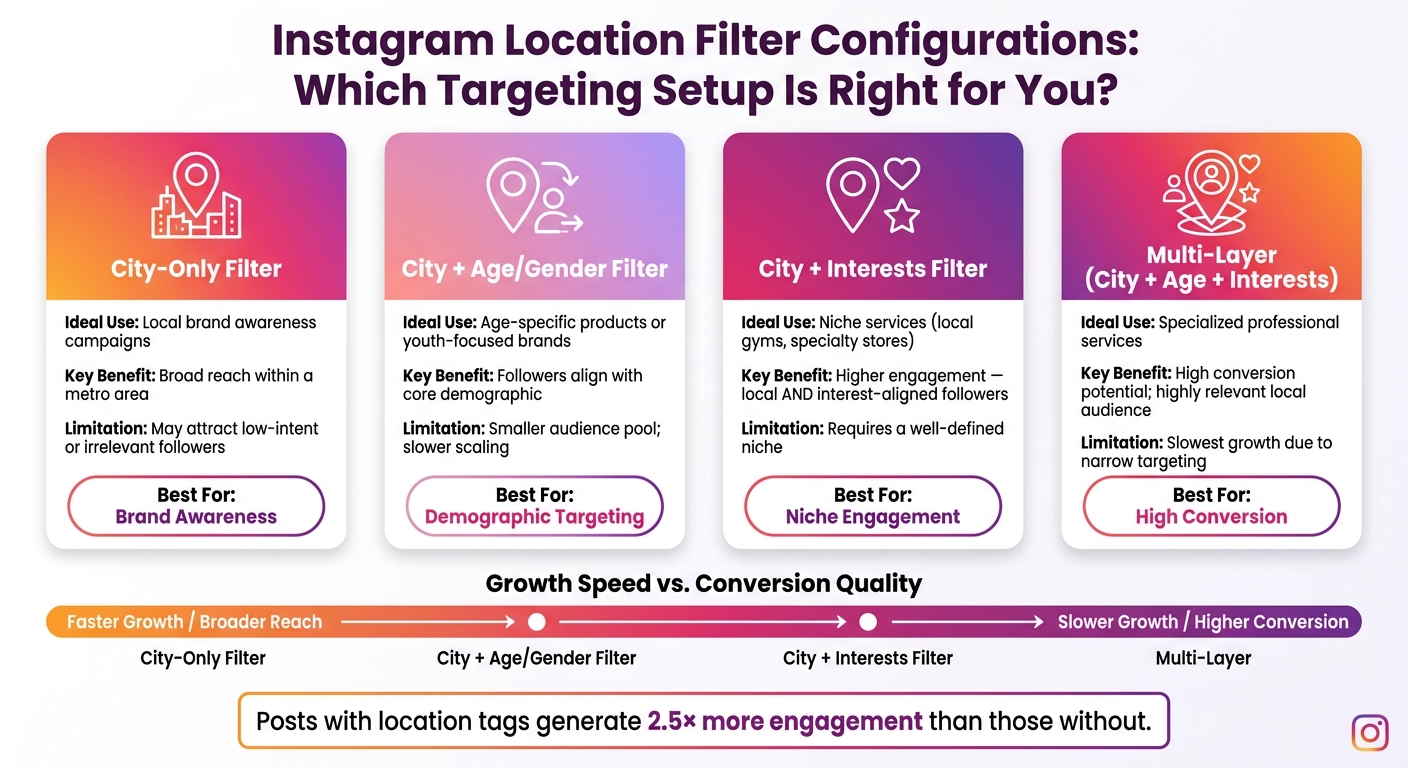
Instagram Location Filter Configurations: Which Targeting Setup Is Right for You?
Instagram's built-in tools are a great starting point, but AI-powered platforms like UpGrow take location targeting to the next level. Once you're comfortable with Instagram's features, advanced targeting tools help you zero in on the audience that truly matters.
Using a broad filter like "Austin, TX" might bring in a mix of tourists, students, remote workers, and retirees - many of whom may never become regular customers. With UpGrow's targeting dashboard, you can refine your audience by layering city filters with criteria like age, gender, language, and interests. For example, you can target followers of local competitors or complementary businesses, ensuring your audience is both local and engaged. This level of precision turns basic location tagging into a powerful strategy that aligns with your growth goals. For niche services, narrowing filters by city, age, and interests can drive higher conversion rates, though it may slow down audience growth due to the smaller pool.
"If the right people are using the right tools and analyzing the right data, the performance will speak for itself." - AdvertiseMint
Setting up filters is just the beginning. Instagram analytics help you separate meaningful engagement from vanity metrics by showing which configurations are driving active interactions. With UpGrow's Live Growth Web Dashboard, you can track real-time follower growth and engagement metrics - such as likes, comments, and story views - to identify which filters are attracting engaged followers versus passive ones.
If a city-only filter brings in followers who don't engage, you can refine your criteria by adding an age range or interest category and monitor the results. For deeper insights, the Turbo plan ($129/month) includes downloadable PDF growth reports, perfect for long-term performance analysis.
Different targeting setups work best for different goals. Here's a quick comparison of the main configurations:
| Configuration | Ideal Use | Benefits | Limitations |
|---|---|---|---|
| City-Only Filter | Local brand awareness campaigns | Broad reach within a metro area | May attract low-intent or irrelevant followers |
| City + Age/Gender Filter | Age-specific products or youth-focused brands | Ensures followers align with your core demographic | Smaller audience pool; slower scaling |
| City + Interests | Niche services like local gyms or specialty stores | Higher engagement - local and interest-aligned followers | Requires a well-defined niche to avoid being overly restrictive |
| Multi-Layer (City + Age + Interest) | Specialized professional services | High conversion potential; draws a highly relevant, engaged local audience | Slowest growth due to narrow targeting |
The "Optimize with AI" button simplifies the process by automatically refining your filter combination based on performance data. It's a helpful tool for removing guesswork and creating a streamlined, repeatable workflow for your campaigns.
A solid location-based strategy begins with content that feels genuinely connected to the community - not just generic posts with a city tag slapped on. Think about showcasing neighborhood highlights, tying posts to local events, or referencing well-known landmarks. This kind of content signals to both Instagram's algorithm and users that your account is deeply rooted in their community.
Start by exploring three key geotag categories: your own location, competitors' locations, and complementary businesses. This ensures you're covering current followers, potential buyers, and related audiences. Posts with location data tend to generate 2.5× higher engagement compared to those without it. This makes investing in localized content a smart move, laying the groundwork for targeted, automated engagement.
Once your local content strategy is ready, take things a step further with UpGrow. This tool uses location filters to automate engagement. Simply set your target city or region in the dashboard, and the AI will interact with users in that area 24/7. Its pattern-recognition technology even scales activity during peak hours in your chosen location - all without manual intervention.
With plans starting at $39/month, the Basic tier offers filters for location, age, gender, and language. It's a straightforward setup that provides a strong starting point without unnecessary complexity. After automation is in place, keep an eye on performance metrics to refine your strategy as needed.
A successful location strategy isn’t static - it needs constant testing and tweaking. Use the first 30 days to experiment with UpGrow’s Live Growth Web Dashboard. This tool helps you identify which locations are driving the most engaged followers. If engagement rates are underwhelming, the dashboard offers insights to guide adjustments. For instance, you might replace a broad metro tag with a more specific neighborhood or add filters like age or interests for better targeting.
"The only guarantee is that [social platforms] will show your ads and take your money. The rest is all a game. Constantly moving. Constantly adapting." - AdvertiseMint
A/B testing is another effective way to refine your approach. Compare different combinations of location and content, try posting at various times, and analyze the results. To maintain high-quality engagement, regularly remove tourists, inactive accounts, and mass-follow users from your target lists. The goal isn’t to cast the widest net - it’s to connect with the most relevant audience.
Location filters on Instagram are an effective way to connect your content with users in specific areas. Posts that include geotags see 2.5× more engagement than those without, making them a smart choice for boosting visibility and interaction.
Start by ensuring your Professional account is set up correctly and use strategic geotagging to build a strong local presence. Incorporating a variety of local geotags can help attract a consistent stream of relevant, nearby followers.
Tools like UpGrow take things a step further by combining location filters with criteria like age, gender, language, and interests. This targeted approach has been proven to drive growth - users of UpGrow's Boost™ feature have seen a 275% increase in monthly followers.
Keep refining your strategy with the help of AI insights. Pay attention to which locations generate the most engaged followers and adjust your focus as needed. For example, narrowing from large metro areas to specific neighborhoods can yield better results. Regularly optimizing your efforts over a 90-day period is far more effective than relying on sporadic tactics.
"UpGrow replaces a full social media marketing team. Focus on what matters for your business and let us build your Instagram following – automagically!" - UpGrow
When deciding where to tag, it all boils down to your objectives and the area you serve. If you're running a physical store or venue, radius targeting (within 1–10 miles) works best to attract nearby customers. For citywide services or events, city targeting makes more sense. On the other hand, if you're focusing on a very specific neighborhood or area, postal code targeting is the way to go.
To take it a step further, tools like UpGrow's AI-powered location filters can fine-tune these strategies, ensuring your content reaches the perfect audience at just the right spot.
Dive into your Instagram Insights to pinpoint the top cities and neighborhoods where your audience is located. This data helps you figure out if your followers align with the areas you serve. To get an even clearer picture, compare this information with internal data, like sales records or the number of walk-ins at your physical location.
For a deeper analysis, consider using tools like UpGrow. These can help you assess regional engagement and fine-tune your targeting efforts.
Also, keep an eye on key metrics like profile visits, direct messages (DMs), and saves from geotagged posts. These numbers can reveal whether your online efforts are translating into real-world actions.
When aiming to connect with a more specific audience, consider adding filters like age and interests. While targeting by city alone can help you reach a wider group, narrowing it down by demographics or behaviors ensures your message lands with the right people - especially when promoting high-value products or services. Tools like UpGrow’s AI can fine-tune these filters to drive precise, efficient Instagram growth.


