Instagram Fake Followers: Safe Removal Checklist
Audit followers, secure your account, remove fakes in small batches, and track results over 30 days to boost real engagement.
If you remove fake followers too fast, you can trigger Instagram flags. The safe path is simple: audit first, remove in small batches, then track results for 30 days.
I’d boil the article down to this:
- Check follower quality first by looking for weak engagement, odd growth spikes, and spam-like profiles.
- Save a baseline before you remove anyone: follower count, likes, comments, Story views, saves, and reach.
- Lock down your account with 2FA, login checks, and app access review.
- Remove the clearest fake accounts by hand in short sessions, not all at once.
- Track Day 7, Day 14, and Day 30 to see if engagement rate and audience quality improve.
- Watch for new spikes after giveaways, viral posts, or off-topic campaigns.
A few numbers stand out. The article notes that when fake followers make up 25%+ of an audience, engagement per real follower can drop by up to 83%. It also uses 1%–3% as a basic engagement-rate checkpoint and flags 200+ new followers in one day as a sign to review new accounts if that jump does not match your content or ads.
The core idea is not “remove as many as possible.” It’s remove the most obvious fake accounts carefully, protect the account while doing it, and measure what changes after.
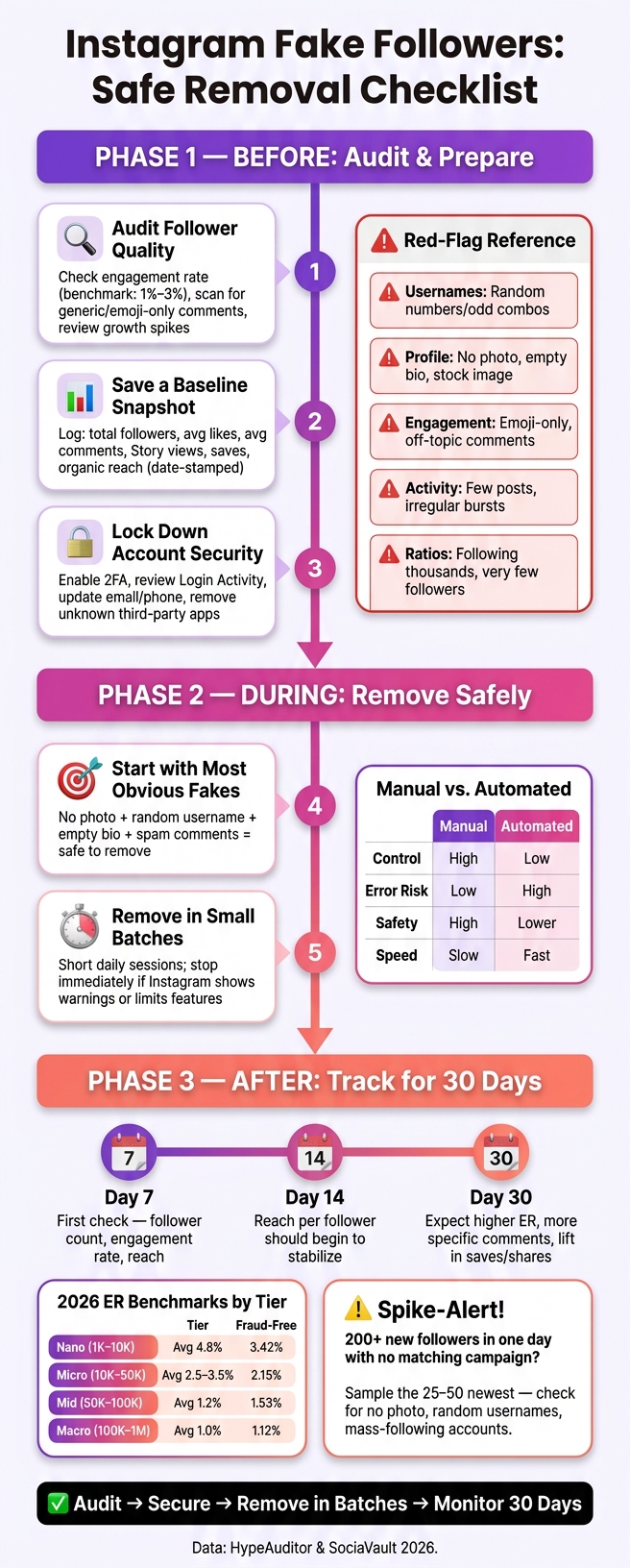
Instagram Fake Followers: Safe Removal Checklist (Step-by-Step)
How To Remove Fake Followers on Instagram (Safe Method)
Before You Remove Anyone: Audit and Risk Checks
Use this checklist to spot trouble before you remove followers.
Audit Follower Quality and Recent Growth
Start with your engagement rate. 1%–3% is a handy baseline. If you're well below that, take a closer look. Then scan your comments for generic replies, emoji-only comments, or responses that don't fit the post at all.
Next, check your follower growth history. Sudden jumps that don't match a campaign launch or a viral post can be a warning sign. After that, review suspicious profiles by hand and look for patterns like these:
| Red Flag Category | What to Look For |
|---|---|
| Usernames | Random number strings; odd word combinations |
| Profile Quality | No photo, stock images, empty bio |
| Engagement | Emoji-only, generic praise, off-topic replies |
| Activity | Very few posts; long gaps, then bursts |
| Ratios | Following thousands; very low follower counts |
Save a Baseline Snapshot Before Cleanup
Before you remove even one account, write down where things stand. Open a spreadsheet and log your total follower count, average likes per post, average comments, Story views, saves, and organic reach. Add a date to each entry in a consistent format, such as Aug. 8, 2026, so it's easy to compare before and after cleanup at a glance.
If your audit tool shows an Audience Quality Score, add that to your baseline too.
Check Account Security and Account Status First
Make sure your account is locked down before you start removing people. Check for Instagram warnings, review Login Activity for sessions you don't recognize, and confirm that your email address and phone number are up to date and still accessible. If two-factor authentication (2FA) isn't on yet, turn it on now.
Then go to Accounts Center and review any connected third-party apps. Remove access for anything you don't recognize or don't use anymore. Also, pause mass following, unfollowing, and bulk commenting until the cleanup is done. Doing all of that at once can increase spam risk.
Once those checks look clean, begin with the most obvious fake accounts and remove them in small batches.
During Cleanup: How to Remove Fake Followers Safely
Now it's time to remove the clearest fake accounts, and do it in small batches.
Start with the Most Obvious Fake Accounts
Start with accounts that hit several red flags at the same time: no profile photo, barely any posts, a random username packed with numbers, and a generic bio. You can also flag accounts that follow thousands of people but have very few followers of their own, or accounts that leave spam comments.
These are usually the safest accounts to remove because the signs are plain. Still, take a quick look for any sign of real activity before you remove them. A real person usually leaves some kind of trail, even if it's small. If the account looks empty from top to bottom, remove it.
Once you've cleared out the most obvious fakes, switch to short daily sessions.
Remove in Small Batches Across Multiple Sessions
Work in short sessions over several days. Going too hard with bulk removal can trigger security checks, temporary reach limits, or even suspension by violating Instagram rules.
Review a small set of profiles, remove the obvious ones, then stop. If Instagram shows a warning about suspicious automation or limits a feature while you're cleaning up, stop right away and reassess before you continue.
When you finish the last batch, start the 30-day tracking window.
Manual Removal vs. Automated Cleanup: Key Differences
Pick the method that fits your risk tolerance. Manual removal takes more time, but it's usually safer.
| Feature | Manual Removal | Automated Cleanup Tools |
|---|---|---|
| Control | High; you review each account before deletion. | Low; tools often rely on broad filters. |
| Error Risk | Low; reduces the chance of deleting real followers. | High; may remove quiet real followers by mistake. |
| Safety | High; looks more like normal user behavior. | Lower; bulk actions can trigger security flags. |
| Compliance | Lower policy risk when done manually. | May violate API policies. |
| Speed | Slow and gradual. | Fast and instant. |
After the cleanup, track follower quality and engagement changes over the next 30 days.
After Cleanup: Track Results for 30 Days
Track the next 30 days to make sure the cleanup did its job and to spot new fake-follower spikes before they turn into a bigger mess. Start with the same metrics from your baseline snapshot so you're comparing like with like.
Check Metrics on Day 7, Day 14, and Day 30
At each checkpoint, track at least six core metrics: total follower count, engagement rate, average reach per post, Story views, non-generic comments, and saves and shares per post. Log everything in a simple spreadsheet with three rows for Day 7, Day 14, and Day 30. Then color-code each cell:
- Green for improvement
- Yellow for flat
- Red for a sharp drop
Compare each checkpoint against your pre-cleanup snapshot.
Use Instagram analytics dashboards or native Insights to look at trends over time instead of panicking over a one-day dip. Some early movement is normal. By Day 14, reach per follower should start to settle. By Day 30, a cleanup that worked will often show a higher engagement rate, more specific comments from actual people, and a slow lift in saves and shares.
Use these 2026 engagement benchmarks by follower tier:
| Follower Tier | Population Avg ER | Fraud-Free Median ER |
|---|---|---|
| Nano (1K–10K) | 4.8% | 3.42% |
| Micro (10K–50K) | 2.5–3.5% | 2.15% |
| Mid (50K–100K) | 1.2% | 1.53% |
| Macro (100K–1M) | 1.0% | 1.12% |
Source: HypeAuditor and SociaVault 2026 Data
If your engagement rate is moving closer to the fraud-free median for your tier, that's a good sign the cleanup is working. If the numbers look worse at all three checkpoints, take another look. You may not have removed enough fake followers. Or your remaining audience may no longer line up with your niche. It's also worth checking whether content quality or posting consistency changed during the same window.
Once the main numbers settle down, keep an eye out for fresh follower spikes.
Watch for New Suspicious Follower Spikes
Fake-follower spikes can come back after a viral Reel, giveaway, or feature. A jump of 200+ new followers in a single day - especially if it doesn't line up with your ad spend or content performance - is a strong reason to dig in.
When that happens, sample the 25–50 most recent new followers. Check for accounts with no profile photo, random-character usernames, bios stuffed with unrelated links, accounts following thousands of people with almost no posts, or groups of new followers from countries or languages you don't usually attract. Add any suspicious handles to a rolling log with a short note like "no posts; following 4,800; spam DM." Check them again 48–72 hours later. If they still show no real activity, remove them.
Bring any repeat spike pattern into your monthly audit.
Build a Monthly Audience-Quality Routine
Use that spike log as part of your monthly check. Run a monthly audit to keep audience quality high: sample a small share of new followers, check for quality signals, and update your suspicious accounts log. Follow essential security tips to prevent hacking, such as turning on two-factor authentication, reviewing active logins, and checking connected apps.
It also helps to review your growth tactics. If one tactic - like a broad giveaway or an off-topic collaboration - keeps bringing in low-quality followers, change it or stop using it. If you use UpGrow, review the live dashboard and smart targeting filters between audits.
Conclusion: The Safe Removal Checklist from Start to Finish
Follow the checklist in order: audit, secure, remove in small batches, then monitor for 30 days.
When the checklist is done, measure the result by audience quality, not only by follower count. Follower count means less if the audience behind it is weak. A smaller group of real people can beat an inflated audience in reach, conversions, and brand trust.
After cleanup, keep growth organic and audience quality high. Once removals are done, keep new growth clean. Use UpGrow to keep growth organic and monitor audience quality with real-time analytics.
Key Points to Remember
Stick to four rules: don't rush removals, avoid mass-automation tools, track before-and-after metrics, and treat audience quality as more important than follower count. Slow, manual, metric-based cleanup beats bulk removal every time.
FAQs
How many followers should I remove per day?
To lower the chance of tripping Instagram’s automated flags, remove 100 to 200 followers per day.
Want to play it a bit safer? Space each session 6 to 12 hours apart. And if you’re cleaning up a big chunk of followers, stretch the work across 7 to 10 days so the pace stays gradual.
Can removing fake followers hurt my reach at first?
Yes. Removing fake followers can cause a short-term drop in your follower count. You might also see a brief dip in reach or visibility.
But this move is often good for your account over time. When you remove fake or inactive accounts, your engagement rate can improve. And that gives Instagram a better signal about who should see your posts.
The goal is simple: show your content to real people who are actually interested.
Many accounts start to see better engagement and reach within 7 to 30 days after a gradual cleanup.
How can I tell a quiet real follower from a fake one?
Look for a pattern of red flags.
Fake accounts often share the same tells:
- No profile photo
- Generic or stock-looking images
- An empty or promo-heavy bio
- Random usernames
- A follower-to-following ratio that feels off
Quiet real followers may not post much. But they still tend to have a more personal profile and more balanced activity.
One sign by itself doesn’t prove much. But when you see several of these signs together, there’s a good chance you’re looking at a fake account.