Instagram Caption Length Study 2026
When to use short, medium, or long Instagram captions by format and goal—optimize for likes, saves, comments, or reach.
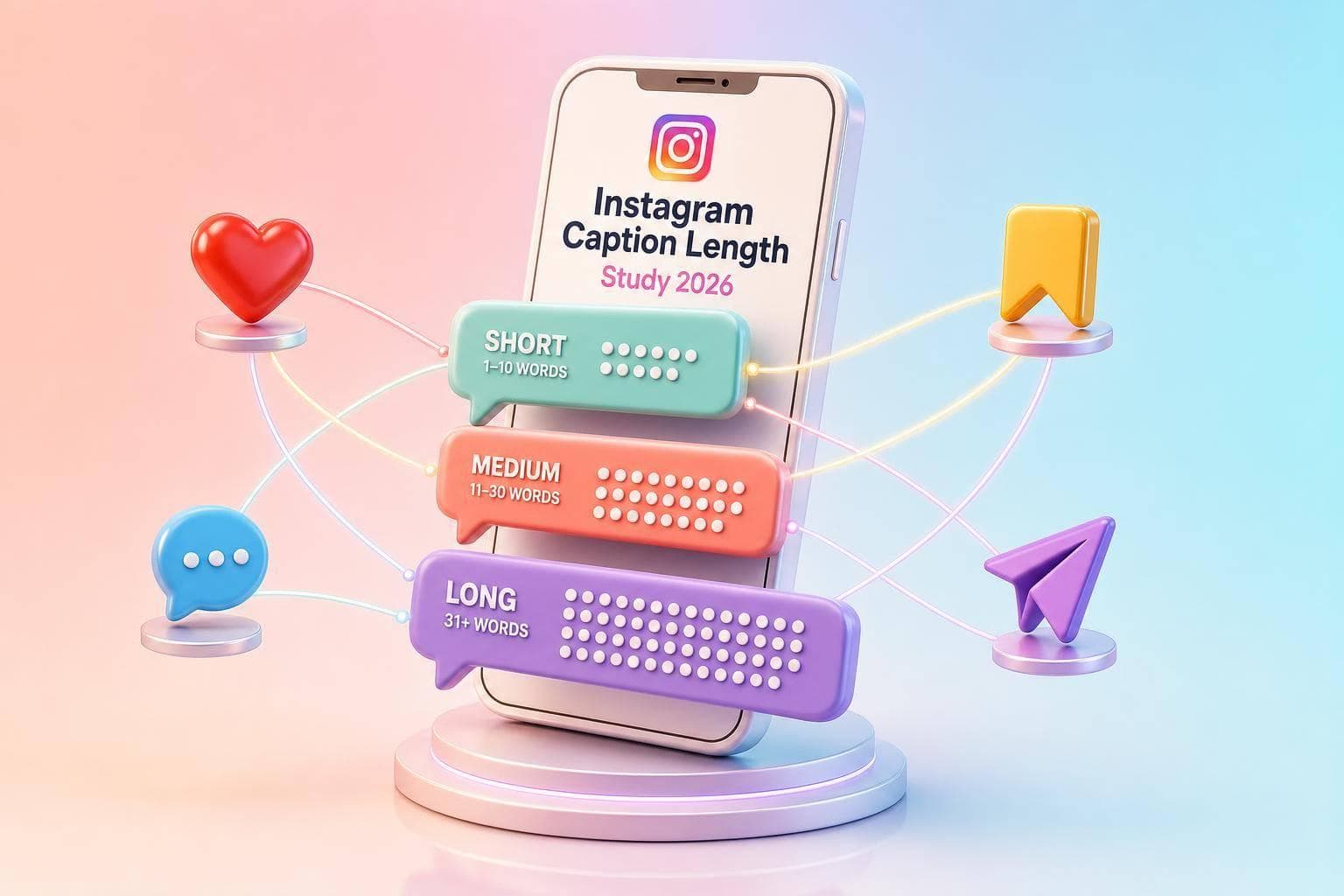
There’s no single best Instagram caption length in 2026. From what I see in the data, short captions tend to help with fast likes, medium captions are the safest default, and long captions often do better for saves and comments.
If you want the short answer, here it is:
- Use short captions when the image or video says most of the message
- Use medium captions when you want a solid default for feed posts
- Use long captions when you’re teaching, telling a story, or asking for replies
- Match caption length to format because Reels, carousels, and feed posts do not act the same
- Track more than likes using Instagram Insights because saves and comments often show more user intent
A few numbers make the pattern easy to see:
- In one 2026 study, 1–50 character captions had 6.23% median engagement and 433 median reach
- 301–800 character captions reached 4.20% median engagement
- 800+ character captions dropped to 87 median reach, but often worked better for deeper actions like saves and comments
- On Reels, engagement stayed close across lengths, but reach fell once captions went past 500 characters
Quick Comparison
| Caption length | Best use | What it tends to help | Main downside |
|---|---|---|---|
| Short (0–150) | Reels, visual-first posts | Likes, fast reactions, scroll speed | Less room for context |
| Medium (151–800) | Feed posts, brand updates, many carousels | Steady engagement, room for a hook and CTA | Can feel flat if the copy says too little |
| Long (801–2,200) | How-tos, stories, opinions, case-study style posts | Saves, comments, time spent | Lower reach in many cases |
One more point matters: Instagram only shows about 125 characters before the “More” cut, so the opening line has to do a lot of work. If the first sentence falls flat, the rest of the caption may never get read.
So if I were setting a simple test plan from this study, I’d do this:
- Feed posts: start with 126–300 or 301–800 characters
- Educational carousels: test 750–1,500 characters
- Story-led carousels: test 500–1,200 characters
- Reels: keep it tighter at 100–220 characters
Bottom line: I’d start with medium captions, go short when the visual is strong, and go long when the post needs detail. Then I’d judge results by the one metric that fits the post’s job: likes, saves, comments, or reach.
Short vs. medium vs. long captions: core engagement patterns in 2026
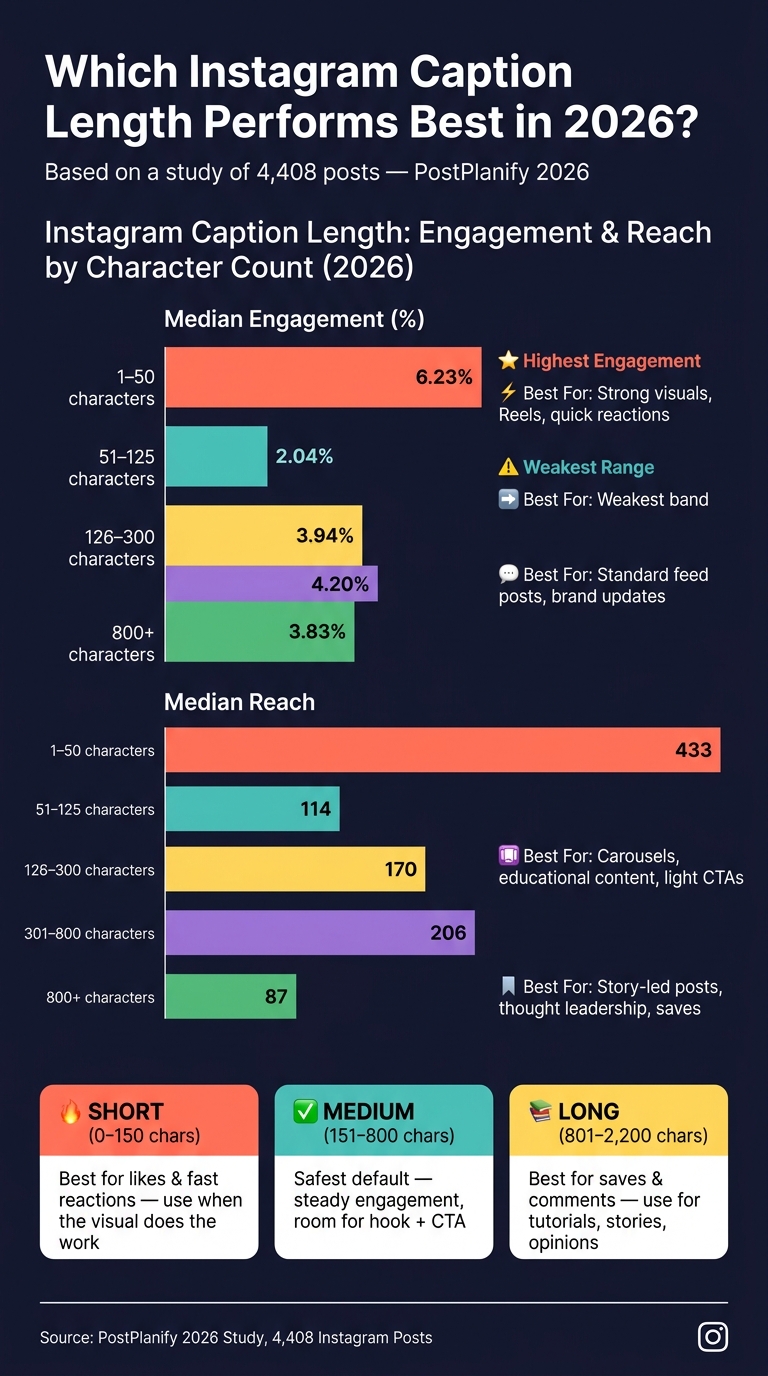
Instagram Caption Length: Engagement & Reach by Character Count (2026)
The 2026 data points to a pretty clear split: short captions help drive fast likes, medium captions are the steadiest option, and long captions tend to do better for saves and comments.
Why ultra-short captions often get more likes
When the image or video is doing most of the work, a short caption can help. Think product photos, creator selfies, event recaps, and fast-moving Reels. In those cases, captions under 150 characters often perform well because they don't slow people down.
A Socialinsider-linked analysis of more than 9 million Instagram posts found that captions under roughly 30 words drove higher engagement rates than longer captions, with engagement dropping as caption length went up. For carousels, the gap was even clearer: posts with 0–30 words averaged 0.84% engagement, while posts with 90+ words fell to 0.30%.
Short captions lower friction. People see the post, get it at a glance, and tap like without pausing.
That changes once the goal shifts from quick reactions to saves and comments.
Why medium captions are the most stable default
Medium captions give you enough room to say something useful without feeling heavy. You can fit a hook, a short benefit, and a light CTA in one clean block.
A 2026 analysis of 4,408 posts found that the 126–800 character range delivered the steadiest engagement. Posts in the 126–300 character range averaged 3.94% median engagement, while 301–800 characters reached 4.2%.
The same study found that 51–125 characters was the weakest range, with 2.04% median engagement. That range often lands in an awkward middle. It's long enough to interrupt the scroll, but too short to say much.
For brands and small businesses that don't have a clear short- or long-caption playbook yet, or need Instagram caption ideas, 126–300 characters is a strong place to start.
When long captions outperform shorter ones
Long captions don't win across the board. But they do tend to perform better when you want people to spend more time with the post.
A Hootsuite experiment that paired identical photos with short and long captions found that longer captions got more comments in every pair and more likes in two of the three pairs. Saves, deeper comments, and profile taps often lean toward long-form captions, especially when the post is educational, story-led, or opinion-based.
There is a tradeoff, though. Posts with 800+ characters showed a median reach of just 87, compared with 206 for posts in the 301–800 character range. So while long captions can build authority and drive saves, they often reach fewer people.
| Caption Length | Median Engagement | Median Reach | Best For |
|---|---|---|---|
| 1–50 characters | 6.23% | 433 | Strong visuals, Reels, quick reactions |
| 51–125 characters | 2.04% | 114 | Weakest band |
| 126–300 characters | 3.94% | 170 | Standard feed posts, brand updates |
| 301–800 characters | 4.20% | 206 | Carousels, educational content, light CTAs |
| 800+ characters | 3.83% | 87 | Story-led posts, thought leadership, saves |
Source: PostPlanify 2026 study, 4,408 posts.
That split becomes even more useful once you stop looking only at likes and start tracking saves and comments.
Saves, comments, and when long captions pull ahead
Once likes are out of the way, the next thing to look at is where longer captions start to pay for themselves. The short-vs.-long split gets attention, but saves and comments tell you more about intent. Likes are easy. Saves and comments usually mean someone wants more than a quick scroll-by, so caption length matters most when you're aiming for depth instead of raw reach.
How caption length affects saves on educational posts
When someone saves a post, they're planning to come back to it. That usually happens when the caption gives them something they can use later: a step-by-step process, a checklist, a framework, or a clear how-to. Studies looking at thousands of posts found that long captions in the 700–2,000 character range generated up to 3.1x more saves than short captions on educational content.
That tracks with how people use Instagram. If a post teaches something, readers often don't want to act on it right away. They save it and return when they have time to try it. So for how-tos, checklists, and frameworks, long captions tend to work better because they give people a reason to revisit the post.
How caption length affects comment volume on story-led posts
Story-led posts work a bit differently. Here, the upside of a longer caption often shows up in comments, not saves.
Longer story-led captions usually get more comments because they add context and end with a clearer prompt. Personal stories, founder updates, behind-the-scenes content, and opinion posts tend to drive more comments when the caption runs longer and closes with a specific question.
Across tests, longer captions also keep pulling more comments, even when the overall engagement rate gets a bit softer.
So instead of treating caption length like one fixed rule, it makes more sense to test it by post format.
What to test next by format: feed posts, carousels, and Reels
Use format-specific tests. What works on a carousel often falls flat on a Reel. The goal here is simple: turn your earlier engagement patterns into a test plan for each format.
Starting caption ranges to test for feed posts, carousels, and Reels
A 4,408-post study from July 2026 found that feed posts in the 301–800 character range earned a median engagement rate of ~4.2%, compared with 2.04% for the commonly recommended 51–125-character range. Reels showed a different pattern. Engagement stayed mostly flat across caption lengths at around 3.3–3.6%, but reach dropped hard once captions went past 500 characters - median reach fell from ~380 to ~141. That split is big enough to treat Reels captions as their own test bucket.
| Format | Test Range | Primary Metric to Watch | Risk |
|---|---|---|---|
| Feed photos | 126–300 characters | Engagement rate per impression, reach | Too vague; no CTA or clear value |
| Educational carousels | 750–1,500 characters | Saves per impression, comments per impression | Dense text; repeats slide content |
| Story-led carousels | 500–1,200 characters | Comments per impression, saves per impression | Long narrative with no clear prompt |
| Reels | 100–220 characters | Reach, video completion rate | Caption too long; hook gets buried |
Start with these ranges, then change only caption length so the results stay clean.
How to run a clean caption length test
Keep the visual style, posting time, topic, and CTA format consistent across posts. If you change too many things at once, you won’t know what moved the numbers.
Track each metric on its own: engagement rate per impression, saves per impression, comments per impression, and reach. That matters because a caption tweak can lift saves and comments while slightly lowering likes. If you roll everything into one blended score, that shift gets lost.
How UpGrow supports caption testing with targeting and live analytics
This is where live analytics helps most. UpGrow's live dashboard and AI targeting help you keep test audiences consistent and monitor caption performance in real time.
Conclusion: The 2026 takeaway on Instagram caption length
The pattern across the study is clear: 2026 data does not point to one best caption length for every post. The right length depends on the job the post needs to do.
Short captions tend to work best when the visual is doing most of the work and you want fast likes. Medium captions are the safest starting point. They give you enough space for a hook, useful info, and a CTA without slowing people down. Long captions fit posts like tutorials, founder stories, opinion posts, and case studies, where extra detail can lead to more saves and comments.
Format matters too. Reels usually do better with shorter captions. Carousels can handle more depth. Feed posts give you the most room to play with length.
A simple way to approach it:
- Start with medium captions as your default
- Use short captions when the message is simple
- Use long captions when the post needs depth
When you measure results with Instagram analytics, don't look at likes alone. Saves and comments often tell you more about whether the caption did its job.
And if you want a clean read on what works, test one format at a time, keep the creative the same, and track one main metric. That's how you figure out which caption length fits your audience.
FAQs
How many posts should I test before choosing a caption length?
Run a structured test for 7 to 30 days. One simple setup is a 4-week test that compares short captions under 150 characters against longer captions in the 400 to 700 character range.
For each variation, aim for 1,000 to 5,000 impressions. If that number feels out of reach, use a second benchmark: 50 to 100 meaningful interactions per variation, like saves, comments, and profile visits.
Should I count emojis and hashtags in caption length tests?
Yes, but treat emojis and hashtags as separate variables instead of folding them into your main text length.
They can affect engagement and reach in different ways than plain text. So if you test them on their own, you get a cleaner read on what’s working.
Test emojis for engagement and hashtags for discoverability. Keep both light:
- Emojis: 1 to 3
- Hashtags or targeted keywords: 3 to 5
What matters more for long captions: the hook or the CTA?
Both matter, but the hook comes first.
Those first 125 characters do the heavy lifting. They need to stop the scroll and make someone tap “more.” If the hook falls flat, the rest of the caption - including the CTA - might never get seen.
Once the hook pulls people in, the CTA helps turn attention into action. A clear, focused CTA can increase engagement by 2 to 3 times.