
Influencer Co-Creation for Instagram: Guide 2026
Co-creation playbook for niche Instagram campaigns: one goal, audience-fit creators, format focus, approvals, AI selection, and tracking.
Co-creation playbook for niche Instagram campaigns: one goal, audience-fit creators, format focus, approvals, AI selection, and tracking.
4.98 /5 - from 58k reviews
Trusted by 50,000+ creators — get real engagement delivered to your profile in minutes, not days.

If I want better Instagram results in a niche market, I need to keep the campaign tight: pick one goal, one audience segment, one main format, and creators whose followers match the people I want to reach.
The article’s main point is simple: co-creation works best when the brand and creator build the post together, then track it with clear links, codes, and reporting. It also shows why smaller creators often outperform bigger ones in niche spaces, with nano influencers averaging 8.4% engagement and 4.5% conversion, and why Reels often lead reach at 33.8% of followers.
Here’s the short version:
A fast way to think about it: good co-creation is part content plan, part partner vetting, and part measurement system.
| Area | What matters most |
|---|---|
| Partner choice | Audience match, U.S. audience share, post quality, comment depth |
| Format | Reels for discovery, Stories for action, Instagram Collabs for shared reach |
| Planning | Scope, approval rounds, usage rights, post timing |
| Tracking | Reach, saves, shares, clicks, leads, purchases |
| Scaling | Templates, naming rules, weekly and monthly reports |
If I keep those five areas under control, I give the campaign a much better shot at producing clicks, leads, sign-ups, or sales instead of just views.
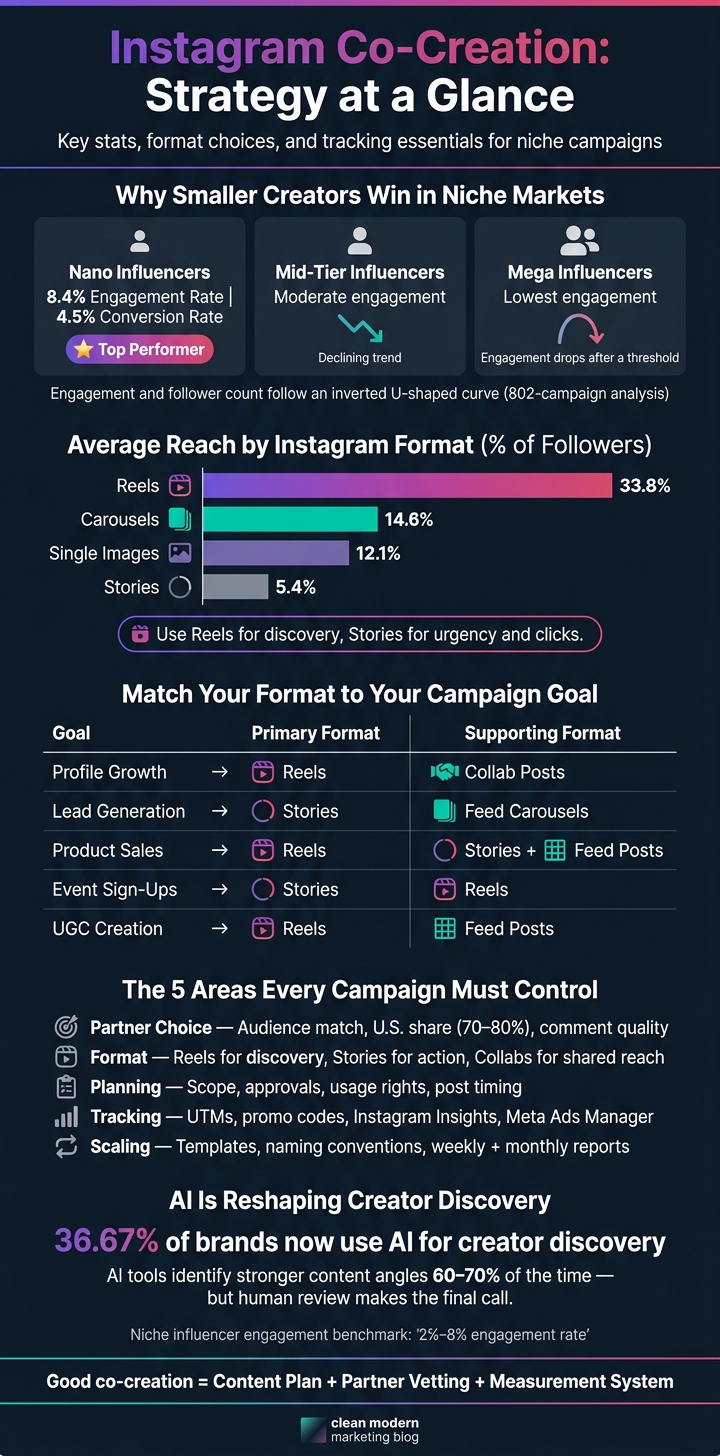
Instagram Influencer Co-Creation: Format vs. Goal & Engagement by Creator Size
After partner fit comes campaign design: one goal, one audience, one format mix. Niche audiences tend to respond to relevance, so the campaign should stay narrow from the start.
Pick one main outcome - profile growth, leads, sales, event sign-ups, or UGC - and set one measurable target tied to Instagram metrics. Then narrow the campaign to one niche, one offer, and one audience segment.
Be clear about three things:
For example: drive 150 paid sign-ups for a $99 virtual design workshop aimed at freelance designers in the U.S.
Write that target in a single sentence before outreach starts. It keeps the creator, the brand, and the content plan on the same page from day one.
Once the target is set, the next step is choosing the format that best moves that result.
Each Instagram format plays a different part in the path from discovery to conversion. The best mix depends on your main goal. Match the format to the result you want, not to whatever seems easiest to make.
| Campaign Goal | Primary Format | Supporting Format | Why It Works |
|---|---|---|---|
| Profile growth | Reels | Collab posts | Reels reach new users; Collab posts share engagement. |
| Lead generation | Stories | Instagram carousels | Stories drive clicks; carousels explain the offer. |
| Product sales | Reels | Stories + Feed posts | Reels create awareness; Stories create urgency. |
| Event sign-ups | Stories | Reels | Stories drive urgency; Reels show the experience. |
| UGC creation | Reels | Feed posts | Reels prompt participation; Feed posts sustain momentum. |
A 2026 analysis found that Reels reach an average of 33.8% of followers, compared with 14.6% for carousels and 12.1% for single images, while Stories averaged 5.4% reach of followers.
Use one main format for the primary goal and one supporting format to back it up. That kind of focus usually makes the campaign easier to plan, easier to brief, and easier to measure.
Once your campaign goal and format are set, the next move is finding creators who can actually deliver.
Don’t start with follower count. Research keeps pointing in the same direction: on Instagram, follower count and engagement rate often move in opposite ways. One large analysis of 802 Instagram campaigns found an inverted U-shaped pattern. Engagement goes up as follower size grows, but only to a point. After that, it starts to drop.
For niche campaigns, audience fit and engagement quality matter more than raw size. The audience boundaries in your brief should guide the shortlist from the start.
Your search method should match the audience segment you already mapped out. Before you look at creators, define the audience in concrete terms: location, age range, language, and interests.
For U.S.-focused campaigns, a useful benchmark is that 70% to 80% of a creator’s audience should be U.S.-based. You can check this by asking for Instagram Insights screenshots that show top countries and cities.
Then search where that audience already spends time:
When you find possible partners, don’t just skim the grid and move on. Review 12 to 24 months of posts, Reels, and Stories to check style match, posting consistency, and comment quality. A good sign is 3 to 4 posts per week plus regular Stories.
Also, make sure the creator is already good at the format you chose, especially Reels or Stories. That sounds obvious, but it’s easy to miss. Someone can have a nice-looking feed and still fall flat on video.
Comments tell you a lot too. Look for real conversation: questions, personal stories, and product feedback. A comment section full of random emoji reactions doesn’t tell you much.
Once a creator looks like a fit, check safety and performance.
Go through their full content history for anything that clashes with your brand values. That includes captions, comments, and tagged posts - not just the polished content on their main feed. You should also check whether they use Instagram’s "Paid partnership" tag and clear #ad or #sponsored disclosures on a steady basis. Creators who handle disclosure the right way lower your regulatory risk.
After that, look at whether they can help with your campaign goal. Ask for past campaign summaries with hard numbers like promo code redemptions, click-through rates, cost per acquisition in USD, or sales impact.
A creator who does well on awareness isn’t always the right pick for a campaign built around paid sign-ups. That gap matters. Repeat partnerships can be a strong signal that the fit worked before. Pair that with steady engagement per post and meaningful Story interaction, and you’ll have a better read on whether the audience is real before you commit.
After you collaborate with influencers on Instagram, lock down the brief, approvals, rights, and posting order before production begins. In niche markets, loose approvals and vague messaging can go sideways fast.
Each plan should spell out the goal, deliverables, role assignments, timeline, approvals, rights, and who publishes first.
Deliverables need to be precise. Don’t stop at “a few Reels.” Write the exact scope: 3 Instagram Reels, 15–30 seconds each, vertical 9:16, product demo format. If the campaign also includes Story frames, feed posts, or Collab posts, list each one as its own line item with its own specs.
Role assignments should be clear at every stage of production. A simple split often works best: the brand or agency sets direction and must-have messages, while the creator handles filming, editing, and their usual voice. Captions are often drafted by the creator and approved by the brand. Publishing is usually the creator’s job unless it’s a Collab post. In that case, the creator publishes first, and the brand accepts the invite.
For timelines, use MM/DD/YYYY format and name the time zone every time - for example, Final approval by 09/15/2026; post between 10:00–11:00 a.m. PT. Leave at least 2 business days for each review round. Keep revisions to two rounds per asset, and define what counts as a normal edit versus a full reshoot.
Usage rights need their own line in the plan. Price paid usage and creator-account ads separately, and set the duration, platforms, and Partnership Ad rights up front.
| Format | Approval Flow | Paid Use | Best Use |
|---|---|---|---|
| Collab Post | Creator posts; brand accepts invite | Can later be boosted as a Partnership Ad | Shared visibility across both accounts |
| Branded Content / Partnership Ad | Creator adds Paid Partnership label; brand requests Ad Creation Access | Runs as a paid ad using creator's handle | Paid amplification with disclosure |
| Organic Creator Post | Brand reviews before posting; no platform-level approval required | Paid use requires a separate usage rights agreement | Organic reach with brand mention |
Instagram now allows Partnership Ads to run without an organic post going live first. Advertisers can request Ad Creation Access at the account level, and the creator still keeps veto rights. That permission step should be built into the campaign timeline before production starts.
With the plan locked, use AI to match creators, audiences, and themes faster.
Finding niche creators by hand takes time, and it’s easy to miss the mark. AI filters make that job much easier. You can line up your campaign brief - location, language, age, gender, interests, and engagement patterns - against creator and audience data to check fit before you send a single outreach message.
For U.S. campaigns, start with geography and language. Then narrow by age and gender. According to industry data, 36.67% of brands now use AI for creator discovery.
Once you have a shortlist, look past follower count. What matters more is engagement quality. Niche influencers often see 2%–8% engagement. Engagement calculators can help you check that fast, while fake follower checkers can spot padded audiences before you spend money on a partnership.
After you know the fit is there, AI can help you decide which content angle has the best shot.
Once your shortlist is ready, the focus shifts from who to what. Tools that review past post results, saves, shares, and comment patterns can point to hook styles that are more likely to connect with a given audience segment. Reviews of AI analytics tools suggest that the top systems identify stronger content angles 60% to 70% of the time, which makes them useful for sorting options even if they can’t call the next viral hit.
Use AI to guide the hook, format, and profile signals behind the planned post. A co-created Reel might send people to a creator’s profile and still flop if the bio is vague, the highlights feel messy, or there’s no clear next step for a new visitor. Before launch, check the creator’s bio, pinned posts, visual consistency, profile links, and highlights against the campaign theme.
UpGrow supports this pre-launch flow with smart AI-targeting filters for location, age, gender, and language, along with profile optimization tools, a live analytics dashboard, and a viral content library. It’s useful for solo teams and agencies managing multiple campaigns.
AI helps cut down the options. Human review makes the call. Use AI to narrow the field, then confirm the shortlist with live results and brand-safety review. AI trims the shortlist; tracking shows what converts.
Once the campaign is live, the job shifts from picking creators to tracking performance. What you measure depends on the goal.
For awareness campaigns, look at reach and views. For engagement campaigns, focus on saves, shares, comments, and profile visits. For conversion campaigns, track clicks, leads, and purchases.
You’ll usually need different tools for content performance, paid media results, and reporting across clients.
| Tool | Metric Range | Conversion Tracking |
|---|---|---|
| Native Instagram Insights | Strong for organic content: views, reach, saves, shares, comments, profile visits, and top follower sources | Low - limited downstream conversion visibility |
| Meta Ads Manager | Strong for paid campaigns: CPM, CTR, cost per lead, ROAS, purchase events, and lead form completions | High - tracks conversions via pixel and Conversions API |
| External reporting dashboards | Deep - combines Instagram, Ads Manager, web analytics, and CRM data; supports custom KPIs and historical reporting | Very high - strongest when all sources are connected |
Before launch, set up unique UTMs and per-creator promo codes. Without them, attribution gets muddy fast.
If you’re running several Instagram co-creation campaigns at the same time, loose reporting turns into chaos. The fix is simple: every campaign should follow the same system.
That usually means using a campaign template, a naming convention, an approval checklist, a shared asset library, and a fixed reporting schedule.
A single naming format across files and reports helps keep everything lined up. For example, use Client_Influencer_Objective_YYYYMM, such as AcmeCo_chefjane_Leads_202610, so Ads Manager, your reporting tool, and your asset library all match.
Weekly reporting is where you catch day-to-day issues and make tactical fixes. Focus on views, saves, shares, top follower sources, and ad results. Monthly or end-of-campaign reviews should go deeper: which content themes drove the most followers, which creators produced the best ROAS, and which audience segments responded best.
When you keep the reporting structure the same across campaigns, it becomes much easier to compare creators, formats, and niche segments over time. Standard templates also make creator comparisons, client reporting, and campaign scaling faster.
Start small. Test one or two creator partnerships first so you can see what lines up with your goals and budget.
When you spot a format that works, scale up to 15 to 25 creators per campaign. For bigger pushes, use a tiered mix of 5 to 20 creators. That gives you room to pair macro-influencers for awareness with micro-influencers for engagement and conversions.
One thing matters more than raw follower count: audience fit.
Set your budget around a balanced influencer mix:
That split gives you a smart mix of reach, cost control, and content volume.
Also, don’t budget ONLY for creator fees. Team hours, software, and product gifting can add another 30%–50% to your total spend.
If you want to cut content costs, AI-generated UGC can help in a big way. It can lower expenses by 44%–77%, with an average cost of $5–$15 per asset compared with $150–$500 for customer-created content.
Run tests on a 4-week cycle before you decide what’s working or start putting more budget behind a winner. Each content variation should get at least 2,000 to 3,000 impressions so the data is less skewed.
While the test is running, track:
Influencer campaigns can keep driving results after the initial post, so don’t judge ROI too early. Use a 60–90 day attribution window to get a better read on total return.


