
7 Steps to Scale UGC Campaigns with AI
Turn UGC into a repeatable AI workflow: set one goal, define audiences, score creators, test one variable, and scale winners.
Turn UGC into a repeatable AI workflow: set one goal, define audiences, score creators, test one variable, and scale winners.
4.98 /5 - from 58k reviews
Trusted by 50,000+ creators — get real engagement delivered to your profile in minutes, not days.

If your UGC campaign feels random, the fix is simple: build a 7-step system and let AI handle the repeat work.
I’d boil the article down to this: set one clear goal, define 2–3 audience segments, score creators on a 15-point scale, review assets in one queue, test one variable at a time for 48–72 hours, watch results in real time, and stick to a daily, weekly, and monthly update cycle.
Here’s the full idea in plain English:
A few numbers stand out. The article suggests pausing ads after $50–$100 in spend without a conversion, flagging assets that fall 40% below group CTR, and reviewing top performers by the top 10% while archiving the bottom 20% by CPA. That gives you rules, not guesswork.
What I like most is the main point: AI should sort, tag, score, and report. People should judge brand fit, approve edge cases, and decide what goes live. That split keeps the process steady without turning the campaign into a mess.
If I were using this checklist, I’d treat it as a working loop:
goal → audience → creator intake → review → testing → reporting → updates.
Then I’d carry one lesson into the next campaign and test just one new variable each time.
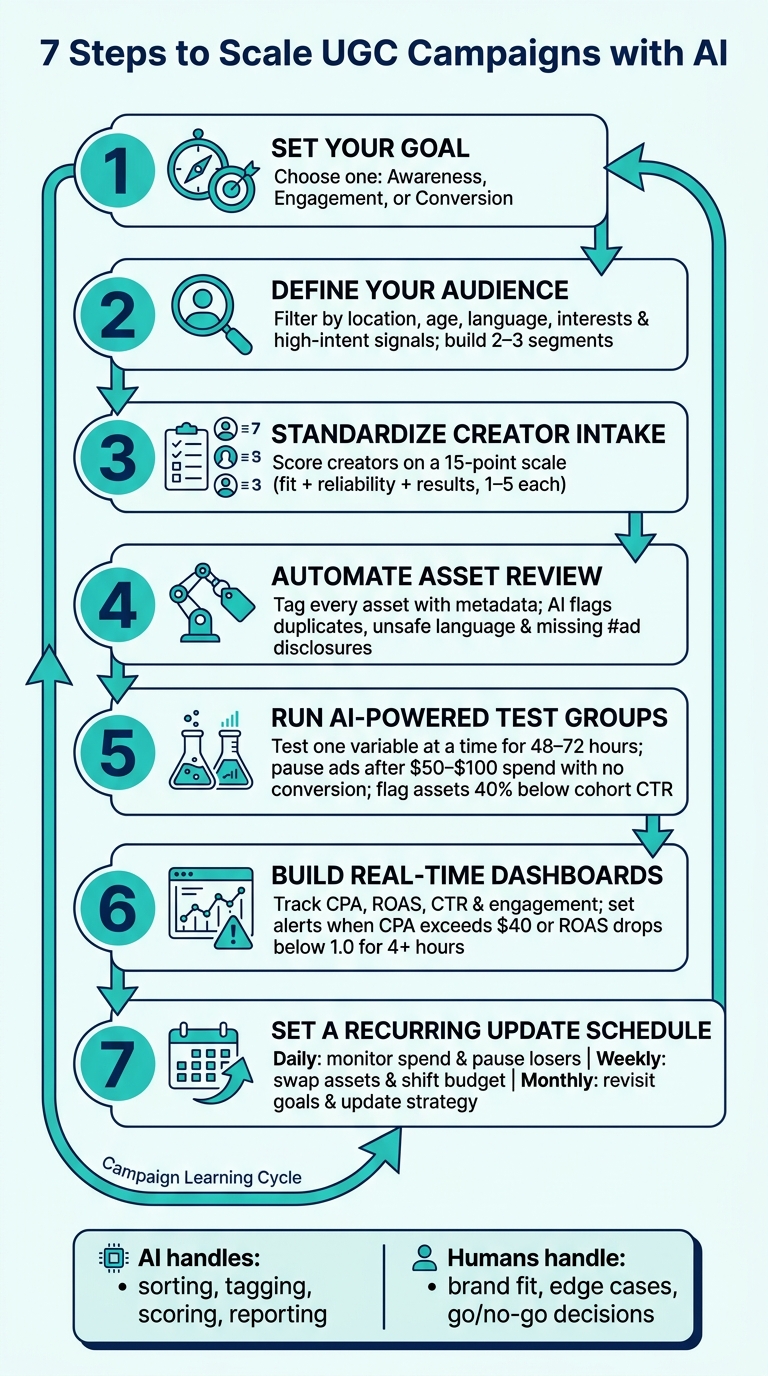
7-Step AI-Powered UGC Campaign System
Before any creator films even a second of content, lock in three things: what the campaign needs to do, who it needs to reach, and who will make the content. Miss one of these early, and you’ll usually feel it later when the campaign is already live and harder to fix.
Pick one primary goal for each campaign. Then line up the content, metrics, and reporting around that goal. Tie the campaign to the funnel stage you want to affect most:
Here’s how those three goal types shape both content and measurement:
| Awareness | Engagement | Conversion | |
|---|---|---|---|
| Creative focus | Short Reels, trend-based UGC, simple product shots, broad messaging, first-impression formats | Interactive hooks, questions, challenges, longer captions that invite comments | Strong CTAs, benefit-focused scripts, product demos, clear offers like discounts or bundles |
| Primary KPIs | Reach, impressions, unique viewers, frequency, follower growth, video completion rate | Engagement rate, saves, shares, comments per post, story replies | Conversion rate, CPA in USD, ROAS, attributed revenue |
| Review cadence | Weekly reviews over 30–60 days | Rolling 7–14 day windows | Daily or every 3 days to monitor spend and reallocate fast |
A good goal is specific and measurable. For example, you might aim to increase Instagram follower count by 25% in 60 days, or hit a $3 CPA on email signups by 09/30/2026. That gives the campaign a clear target.
Vague goals like “grow our brand” don’t give AI much to work with. You need a target it can optimize toward. It also helps to compare against your last 90 days of Instagram performance so you know what “better” means in plain terms.
Once the goal is clear, the next step is deciding exactly who AI should go after.
Turn the goal into a clear audience segment. Start with U.S. location filters, then layer in age, gender when it matters, and language. Those filters should line up with the UGC format you want to test.
Next, add interest categories, related hashtags, and engagement signals. Not all signals carry the same weight. Saves, shares, profile visits, link clicks, and 75% video views are stronger than likes. That matters because a like can be casual, while a save or a link click usually shows more intent.
Build at least two or three separate audience segments so you can test response by group. A high-intent engager segment and a broader awareness audience may react very differently, even when the creative is exactly the same. That kind of split tells you where the content is doing its job and where it’s missing.
UpGrow can automate audience filtering with user-set location, age, gender, language, and interest filters, plus performance analytics.
With audience rules set, the next job is making creator intake consistent.
A standard intake process cuts down on random judgment when choosing creators. The core checklist should include the application form, niche fit, portfolio links, availability, rates in USD, usage rights, ad permissions, and an onboarding brief.
Get usage rights and ad permissions in writing before onboarding.
Score each creator on three areas: fit, reliability, and previous results. A simple 1–5 scale for each gives you a total score out of 15. From there, rank creators by score so you know who to contact first and who should get the next assignment.
Here’s a simple way to split the work:
| Intake Task | Status | Owner |
|---|---|---|
| Collect application data (form, contact info) | Automated | Form tool / CRM |
| Pull portfolio links and follower stats | Automated | API / integration |
| Evaluate audience fit (location, age, interests) | AI-assisted | AI tool + UGC manager |
| Score engagement quality, flag unusual patterns | AI-assisted | AI tool + manual review |
| Assess creative style and brand fit | Manual | UGC manager |
| Negotiate rates, usage rights, and ad permissions in USD | Manual | UGC manager / legal |
| Deliver onboarding brief and answer questions | Manual | UGC manager |
From there, automate intake so the review process can keep up as volume grows.
After intake, move approved assets into review. This is where AI fits neatly into the workflow.
Send approved assets into one review queue. From the start, tag every submission with structured metadata: creator name and ID, campaign, format (Reels, Stories, vertical video, image), product shown, language, platform, and rights status. For U.S. brands, also mark whether FTC-required disclosures like #ad or #sponsored are present.
Then use AI to spot duplicates, unsafe language, and missing disclosures. If sponsored content is missing #ad or #sponsored, route that asset to Remove, Flag, or Manual Review.
For brand-safety calls, a hybrid setup works best for most brands. AI handles the heavy flow. Humans step in for edge cases and judgment calls that software can miss.
Once review is done, test approved assets one variable at a time. That could be the hook style, compare creators, product angle, format, CTA, or audience segment. If you test too many variables at once, it becomes hard to tell what moved the result.
Run each group for 48–72 hours with a small controlled budget. Keep the rest of the setup the same. Then pause any creative that spends $50–$100 without a conversion, or lands more than 40% below the cohort average in CTR.
Track each test round with the same core metrics:
Use AI to rank groups and flag the winners for scaling.
Once test results start coming in, reporting tells you where the next dollar should go. The goal is simple: see which creators, audiences, and assets are worth more budget, and spot weak spots before they burn spend.
Track spend, returns, engagement, and conversion metrics in real time. To keep the view clean, organize reporting into three main panels: a Performance Overview, a UGC Creator & Asset Breakdown, and an Audience & Targeting Insights panel.
The Performance Overview should show today, the last 7 days, and the last 30 days with clear U.S. date ranges like 08/01/2026–08/17/2026. That way, nobody wastes time guessing which window they're looking at.
The Creator & Asset Breakdown should let you filter by creator name, asset type, placement, and campaign. This makes it much easier to spot the combinations that are meeting your scale rules, like ROAS of 2.5+ or CPA of $25.00 or less.
The Audience & Targeting Insights panel should break results down by age bracket, gender, state or metro area, language, and interest cluster. Sometimes the pattern is obvious. Sometimes it's buried in one metro area, one interest group, or one placement that's quietly doing the heavy lifting.
Segment results by creator, audience, asset type, and placement. Set alerts when CPA goes above $40 or ROAS drops below 1.0 for more than 4 hours. That gives your team a clear trigger to step in instead of waiting until the next review.
UpGrow's live dashboard and performance analytics support this kind of real-time Instagram monitoring, giving you visibility into follower growth, engagement, and audience segments without constant manual data pulls. Pipe those alerts into your weekly review so scaling decisions happen on a set schedule, not on gut feel.
A fixed daily, weekly, and monthly rhythm keeps strong content in motion and pushes weak content out before it drags results down.
| Task | Frequency | Owner | Key Inputs |
|---|---|---|---|
| Monitor spend, CPA, ROAS, follower growth; pause unprofitable assets | Daily | Performance marketer / growth analyst | Live dashboard, ad platform reports |
| Update briefs, swap weak assets, and shift budget to winners | Weekly | UGC lead + performance marketer | Weekly performance report, ad platform data |
| Revisit primary goals and success metrics; assess UGC themes by revenue impact; update budget allocations; align creator recruitment with strategy | Monthly | Marketing director / head of growth | CRM data, performance analytics, ad platform reports |
Weekly reviews help keep the campaign tied to what the numbers are saying. A focused 60–90 minute session should review top-line metrics for 08/10/2026–08/17/2026, identify the top 10% of assets by ROAS and saves/shares, flag the bottom 20% by CPA for archiving, and update creator briefs with the angles and hooks that are winning.
Between those formal reviews, real-time monitoring can show shifts in follower growth and engagement as they happen. If one U.S. city or one interest group suddenly starts responding, your team can move fast instead of waiting for the next meeting.
When a segment starts to hit, use UpGrow's viral content library to pull post formats that have already performed well and brief creators on fast-turn variations that match what's already landing.
Once your update schedule is set, UGC stops feeling random and starts working like a system. AI handles the sorting, tagging, testing, and reporting. Your team stays focused on brand fit and the human side of the work.
That split matters. AI can process a lot of inputs fast, but your team still decides what feels on-brand, what sounds right, and what should actually go live.
Each step cuts down on guesswork. Goals, targeting, intake, review, testing, reporting, and updates all shape the next campaign. Over time, that creates a loop where each campaign teaches you something useful for the one that follows.
One primary goal per campaign. If AI is trying to optimize for several competing goals at once, effort gets spread too thin and reporting gets harder to use. Pick one main goal, then line up the rest of the campaign around it.
Standardize before you scale. Creator intake, asset review, and test group design only give you data you can compare when the process stays the same each time. If the inputs change from campaign to campaign, it becomes much harder to tell what actually moved the needle.
Treat each campaign as a learning cycle. Take what worked, whether that's insights, targeting rules, or winning assets, and carry it into the next round.
Use the next campaign to test one new variable while keeping the rest of the system stable.
Pick one measurable outcome that lines up with what you want from the campaign. That could be brand awareness, engagement, conversions or sales, app downloads, lead capture, event sign-ups, UGC creation, or profile growth.
Then set a clear target and track it with the right KPIs, such as ROAS, engagement growth, content velocity, or authenticity ratings. That target should guide every step and make success easy to define.
AI should take care of the repetitive, data-heavy work: finding and tagging UGC, filtering for relevance and safety, predicting which assets are likely to perform well, creating variants for A/B tests, scheduling, and real-time reporting.
Your team should keep final oversight where human judgment matters most. That includes approvals, creator relationships and permissions, brand safety and legal compliance, and bigger-picture choices like goals, audience strategy, and creative direction.
Pause a UGC asset when the numbers show it’s not doing the job. If CTR falls below 0.8%, stop the ad and move to the next version instead of trying to squeeze more out of it with endless tweaks.
You should also pause or rotate the asset when creative fatigue starts to show up. That can look like weaker hooks or lower retention in the first 3 seconds. For testing, use a 4-week cycle and wait until each variation gets around 2,000 to 3,000 impressions before you decide whether to scale it or shut it off.


