
How to Recover After Fake Follower Spike
Secure your account, remove suspicious followers carefully, and track non-follower reach weekly to restore Instagram performance.
Secure your account, remove suspicious followers carefully, and track non-follower reach weekly to restore Instagram performance.
4.98 /5 - from 58k reviews
Trusted by 50,000+ creators — get real engagement delivered to your profile in minutes, not days.

A fake follower spike is usually a cleanup and account-safety job, not proof of an Instagram penalty. If your follower count jumps for no clear reason, I’d do four things first: check Account Status, review login activity and apps, remove suspicious followers in small batches, and track non-follower reach for the next few weeks. You can also use free Instagram tools to monitor your progress.
Here’s the short version:
One research summary cited in the article reviewed 38 studies and found that fake followers add little meaningful engagement. So I wouldn’t judge recovery by follower count alone. I’d judge it by whether your account starts reaching the right people again.
If I had to put the whole process into one line, it would be this: lock down the account, clean up the spike, then measure reach week by week.
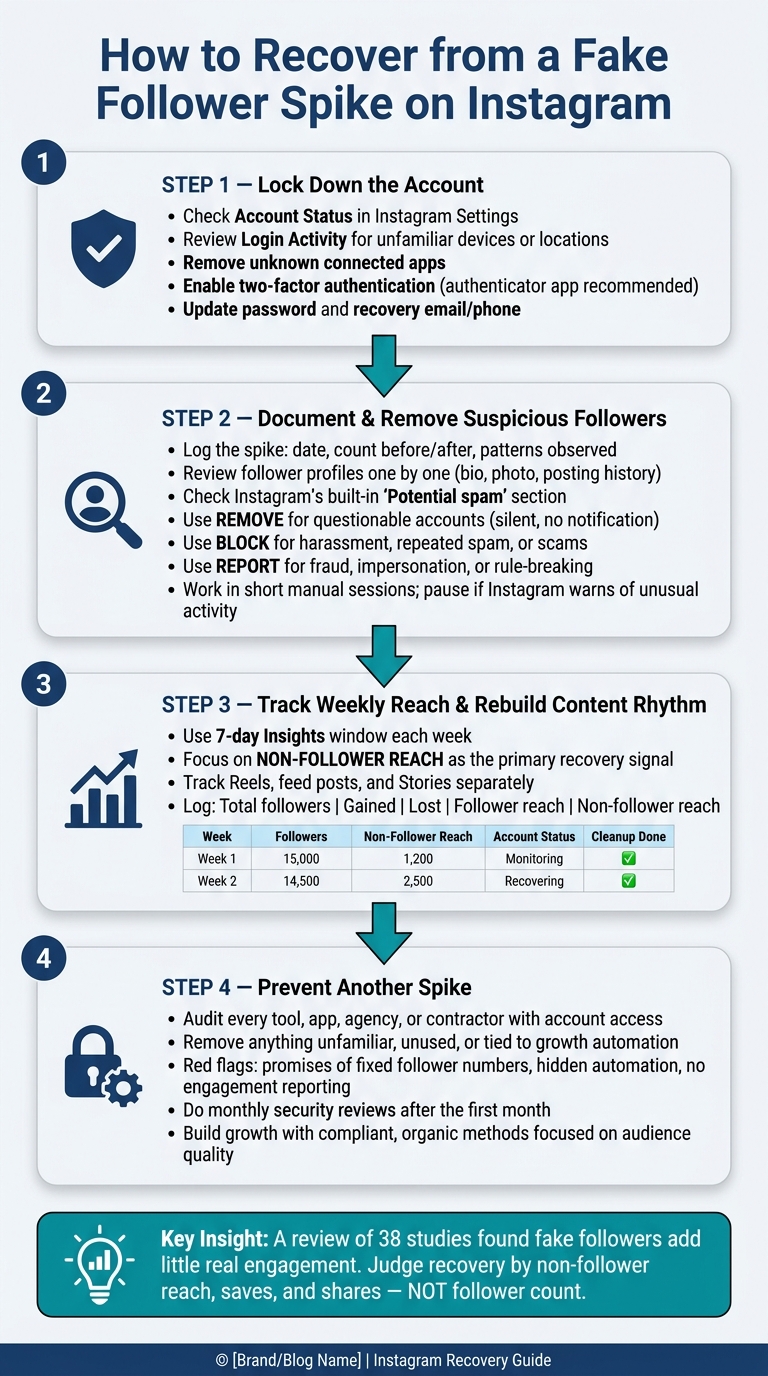
How to Recover from a Fake Follower Spike on Instagram
Before you remove any followers, check Instagram’s security and status tools. A sudden spike can mean a few different things: suspicious followers, a recommendation limit, or someone getting into your account. Those are NOT the same problem, so they shouldn’t get the same fix.
Use this quick map to sort out whether you’re dealing with security, content, or follower quality.
| Visible symptom | What to check | Right response |
|---|---|---|
| Follower count jumps with no post, campaign, or mention to explain it | Follower profiles, Account Status, Login Activity, connected apps | Document the spike; investigate account access and tools before mass removal |
| New followers have generic names, empty profiles, or little activity | A sample of accounts | Treat the accounts as suspicious, but avoid assuming every unusual account is fake |
| Non-follower reach drops and Account Status shows a recommendation notice | Account Status, affected content, and the cited guideline | Edit or remove content when appropriate, or request a review if the decision appears wrong |
| An unfamiliar device, location, linked account, or app appears in security settings | Login Activity, Accounts Center, recovery email, phone number, and authorized apps | Use Instagram's security controls, change the password, remove unknown access, and enable two-factor authentication |
| Reach is lower but Account Status and security checks show no issue | Weekly reach, impressions, engagement quality, posting history, and audience response | Do not assume a penalty; record a baseline and continue with a normal, non-automated posting rhythm |
Open Account Status in Instagram’s settings or in the More info and support area. You’ll see sections for removed content, content that may affect recommendation eligibility, and any feature limits. Sometimes a post still shows up to your current followers but gets left out of discovery surfaces. So if reach drops, that doesn’t automatically mean your account was hacked or disabled.
Before you edit or delete anything, write down each notice: the date, the post or profile element affected, the policy reason Instagram gives, and what actions are available. That small bit of recordkeeping can save a lot of guesswork later.
If a flagged item clearly breaks the cited rule, edit or remove it and don’t repost the same material. If the decision seems off, use Request a review inside Account Status instead of making a bunch of random changes while you wait. Recovery time varies, so keep your attention on the notice itself and the fix Instagram asks for.
Go to Accounts Center → Password and security → Where you're logged in and review every device, approximate location, and active session listed there. If something looks unfamiliar, use Instagram’s This wasn't me flow, then change your password right away to something new that you haven’t used anywhere else. Location data isn’t always exact, so look at the device, session time, and your own travel history together.
Then check connected apps and websites in Instagram or Meta’s Accounts Center. Remove anything you don’t recognize, no longer use, or that ties back to a Instagram bots or automation tools. After that, make sure your recovery email and phone number are current and that you can still access them.
Turn on two-factor authentication next. An authenticator app like Duo Mobile or Google Authenticator is a practical pick because it doesn’t rely only on SMS delivery. Save any backup codes Instagram gives you in a secure place, and never share login codes with anyone.
Once the account is locked down, move to follower cleanup and remove only the accounts that match the pattern. If you don’t find any sign of unauthorized access, go to the next step and document suspicious followers one by one.
Once your account is locked down, go straight to your follower list and inspect the spike itself. Start by logging what happened: the date and time, your follower count before and after, and the main patterns you’re seeing. Common signs include generic usernames, empty profiles, matching bios, or the same comments showing up over and over. You can also use an Instagram fake follower checker to help identify these accounts automatically. Save a few screenshots or note a handful of usernames that show the pattern. That record gives you something solid to refer back to later as you track reach and engagement recovery.
Open your Followers list in the app and review each account on its own. Check the profile photo, bio, and username. Do they look copied, random, or half-finished? Then look at the rest of the profile. Does the account show a clear identity, original posts, and a normal posting pattern? Or does it look like a spam dump with a sudden burst of low-quality posts?
If the account has commented or sent DMs, inspect those too. Are the messages repetitive, off-topic, salesy, or pasted across many accounts? Don’t rely on one clue alone. Use a few signals before labeling an account as likely legitimate, uncertain, or clearly suspicious.
Also check whether Instagram has placed any accounts in a Potential spam section at the top of your Followers list. When this appears, Instagram is surfacing accounts it has already marked as likely spam and lets you review or remove them inside the app. Still, verify each one before you remove it.
As you go, keep a simple log with:
Use that log as your baseline when you review whether reach and engagement start to recover.
For most cleanup, Remove is the best first move. It quietly removes the account from your follower list without notifying the person, which makes it a good fit for accounts that look off but aren’t plainly harmful.
Block is the stronger option. Use it when an account is sending harassment, repeated spam, scam messages, or other persistent unwanted contact. It also makes sense when you want to stop that account from following you again.
Report is for clear rule-breaking: spam, fraud, scams, abusive behavior, or impersonation. If someone is pretending to be another person, open the profile, tap Report → Report Account, and choose the option saying it’s pretending to be someone else.
| Native action | Use when | Main caution |
|---|---|---|
| Remove follower | Account is questionable but not abusive | It does not necessarily stop a public account from viewing public content or attempting to follow again. |
| Block | Harassment, repeated spam, scams, or impersonation | Stronger than needed for ordinary uncertainty - base it on behavior. |
| Report | Spam, fraud, scams, abusive content, or impersonation | Choose the most accurate category; a report is not a guaranteed removal. |
Work in short manual sessions. If Instagram warns you about unusual activity, pause and come back later.
Now that the suspicious followers are gone, shift your attention to measurement. Your total follower count may dip, and that’s fine. What matters now is whether Instagram is starting to show your content to real non-followers again.
After a cleanup, follower count matters less than audience quality. A smaller, real audience is a better starting point than a bloated one. Once you’ve got that clean baseline, track recovery week by week before you change how often you post.
Use a 7-day Insights window each week. Start with non-follower reach because that tells you whether discovery is coming back. Even if your follower count drops after cleanup, a rise in non-follower reach is a good sign. Track Reels, feed posts, and Stories on their own so you can see what’s improving and what’s lagging.
Keep it simple. Add one row per week, then add post-level rows only if you need a closer look.
| Week | Total followers | Gained | Lost | Follower reach | Non-follower reach | Reels/feed/Stories performance | Account Status | Cleanup completed |
|---|---|---|---|---|---|---|---|---|
| Sept. 7–13 | 9,420 | 86 | 214 | 3,180 | 1,040 | Reel: 2,400; post: 620; Stories: 160 | Eligible | Removed 180 suspicious accounts |
After each cleanup round, check Account Status and log the result. If Account Status shows a problem, deal with that first. Also, save screenshots of your weekly Insights when you can. Comparison ranges in the dashboard can move around, so having your own record helps.
Once you have one or two weeks of clean tracking data, go back to a steady publishing rhythm. Use the same cadence you had before the spike. Don’t flood your account with a bunch of new posts all at once. If you do, Instagram has less time to assess each post on its own.
Stick with original content, write clear captions, and use hashtags that fit the post. Reply to comments and DMs as you normally would. And unless there’s a clear reason, don’t delete and repost content. That wipes out the post’s performance history and makes week-over-week tracking messy.
| Safer recovery behavior | Riskier behavior |
|---|---|
| Keep a stable, familiar posting cadence and measure results over several weeks. | Panic-posting many pieces of content to replace removed followers quickly. |
| Publish original content and compare Reels, feed posts, and Stories separately. | Reposting the same material repeatedly, especially with visible watermarks. |
| Review Insights using follower and non-follower reach, format, and time period. | Judging recovery from follower count or one unusually weak post. |
| Make a considered correction, then continue monitoring. | Deleting and reposting content repeatedly to force a new performance cycle. |
| Respond to comments and DMs normally. | Using automated replies, engagement pods, or artificial interaction services. |
| Check Account Status and follow any stated recommendation or content guidance. | Claiming a shadowban solely because reach fell for a few days. |
If reach starts to level out, the next move is putting growth safeguards in place so the spike doesn’t come back.
After cleanup, the next move is prevention.
Start with a simple list of every tool, app, agency, or contractor that has ever had access to your account. That includes scheduling tools, analytics platforms, browser extensions, and anyone who has managed the account. For each one, note:
Then review Instagram's connected apps, Account Center security settings, and Login Activity. Remove anything unfamiliar, unused, or no longer needed. That includes access tied to a business, agency, or shared device.
Use these red flags to help trace the source of the spike.
| Red flag | Why it matters |
|---|---|
| Password requested outside Instagram's normal authorization flow | Gives a third party direct access to the account |
| Promises a fixed number of followers or unusually rapid growth | Real audience growth does not happen on a fixed schedule |
| Uses hidden automation or automated engagement | Suggests concealed automated activity |
| Cannot explain how followers are sourced | Makes audience quality impossible to judge |
| Provides no engagement and audience-quality reporting | Follower count alone does not show real growth |
| Cancellation or data-deletion process is unclear | Leaves access and data handling unresolved |
A follower spike without matching lifts in profile visits, comments, saves, shares, or reach is a strong sign of artificial growth. Before you pin down the cause, compare the timing of the spike with invoices, logins, tool activity, and account changes.
For the first month after cleanup, do a short weekly review. After that, switch to monthly checks. Look for:
Once the account is locked down, the goal changes. You're not trying to replace removed followers as fast as possible. You're trying to build steady growth from people who fit your content.
Judge any growth method by the audience it brings in, not the top-line number. A small group of the right followers can do more for your account than a huge batch of random ones. For example, 300 followers who watch and share your posts on a regular basis may matter more than 3,000 accounts that never interact or seem unrelated to your niche.
Stick with compliant growth systems that focus on real followers, clear targeting, and audience-quality reporting.
Recheck Account Status and recommendation eligibility from time to time. Also, don't judge recovery by one day's follower count. Look at a few weeks of reach, profile visits, saves, shares, and relevant engagement instead.
If another unexplained spike shows up, pause any questionable tools, document what happened, review Login Activity and connected apps again, and contact Instagram through its official support channels.
Once the account is locked down and suspicious followers are removed, recovery turns into a tracking job. A fake follower spike is both a security issue and a data-quality issue. If you treat it as only one of those, you leave the account exposed. Secure the account, remove suspicious followers, and then watch weekly reach for the next several weeks.
Recover by securing the account, cleaning suspicious followers, and measuring weekly reach and engagement - not daily follower totals.
The biggest mindset shift is simple: stop using follower count as the main sign of recovery. Research summarizing 38 studies found that fake followers distort audience evaluation and add little real engagement or sharing. A smaller audience that actually watches, saves, and shares your content is a much stronger base than an inflated number that never interacts.
Recovery does not show up after one cleanup session. You see it over several consecutive weeks: stable or improving reach, more reach from non-followers, and engagement that fits your content and niche. Instagram's Account Status is your most reliable reference point for checking whether recommendation eligibility has been affected - more reliable than informal "shadowban" claims.
Trust comes back through steady, rule-following activity over time, not a quick fix. Document each cleanup, review your weekly log, and let several weeks of stable reach and real engagement show whether recovery is happening.
First, check your account security. Look at Login Activity for sessions you don’t recognize, and review Accounts Center for connected third-party apps you don’t know or no longer use. If you shared your password with a third-party service, that’s a major security risk and violates Instagram’s terms.
Next, compare the spike against your content calendar and ad spend. If it doesn’t line up with a viral post or paid campaign, sample 25 to 50 new followers and look for bot-like signs. Also check Account Status for automated behavior flags.
Recovery after a fake follower spike takes time. You might notice early gains in engagement and reach within 7 to 30 days after a gradual cleanup, but full algorithmic trust often takes 3 to 6 months.
Metrics also need time to settle. Since they can take 48 to 72 hours to stabilize, track progress across 30 days and use the same baseline metrics the whole time. That’s the clearest way to confirm actual growth.
Put audience quality ahead of raw follower numbers. Pay close attention to your engagement rate - about 1% to 5% is a solid range - along with reach and Story views, which are tougher to game than likes.
It also helps to watch:
If your follower count dips while those numbers stay steady or move up, that usually signals a good cleanup of low-quality accounts, not a content issue.


