Instagram Hashtag Placement: Caption vs Comment
Caption hashtags give instant topic signals and usually more reach; first-comment tags clean captions but require perfect timing.
Caption hashtags give instant topic signals and usually more reach; first-comment tags clean captions but require perfect timing.
4.98 /5 - from 58k reviews
Trusted by 50,000+ creators — get real engagement delivered to your profile in minutes, not days.

If you want the short answer: put Instagram hashtags in the caption. That is the safer default for most accounts because the tags go live with the post, which gives Instagram an instant topic signal. In one cited test, caption hashtags drove 29.41% more reach and 9.84% more likes than first-comment hashtags.
Here’s the simple breakdown:
If I care most about reach and a Instagram workflow, I’d use caption hashtags. If I care more about a polished caption and I know my first comment will publish within seconds, I’d test first-comment placement.
| Factor | Caption Hashtags | First-Comment Hashtags |
|---|---|---|
| Search timing | Live at publish time | Live after the comment posts |
| Reach default | Usually stronger for most accounts | Can work if posted right away |
| Caption look | More cluttered | Cleaner |
| Workflow | One step | Two steps or tool support |
| Best fit | Small brands, solo creators, growth-focused posts | Visual brands, polished captions, large accounts |
So the choice is simple: use captions for speed and reach, use first comments for a cleaner look if your posting process is tight.
Putting hashtags in the caption is the simplest route. They go live with the post, so there’s no extra step after publishing.
The biggest drawback is clutter. A long block of tags can make a caption look messy fast. One easy fix is to add line breaks so the hashtags sit below the “See more” fold. That way, people notice the main caption first, while the tags stay mostly out of sight.
A tight group of niche hashtags often does better than stuffing in a huge tag list. It also gives the post a cleaner feel. The tradeoff is small but worth noting: the hashtags are still there for Instagram to process, even if most readers won’t see them right away.
Caption hashtags are processed at publish time. In plain English, your post can show up in search and hashtag feeds the moment it goes live.
That timing can matter. Agorapulse's Social Media Lab found that caption hashtags led to 29.41% more reach than first-comment hashtags, plus 9.84% more likes per post. For smaller teams, that edge at publish time often matters more than having a cleaner-looking post.
For brands and solo creators, caption placement keeps the copy and hashtags together. That makes scheduling easier. It also makes tracking your success less of a headache, since everything lives in one place.
The downside is obvious: the caption can look busier. That’s why some teams shift hashtags into the first comment instead.
If the caption feels crowded, putting hashtags in the first comment is the cleaner option. Your caption looks tighter and more polished. The catch? It adds one more step when you publish. So the tradeoff is simple: a cleaner post versus a bit more work.
When hashtags sit in the first comment, the caption can stay locked on the message, the story, or the call to action. You don't end up with a chunky block of tags under the post.
This matters most for visual and personal-brand accounts where the caption is part of the overall brand feel. A fashion brand, for example, might keep the caption to one or two polished lines and one branded hashtag, then move discovery tags into the first comment.
Big hashtag blocks can also be tougher for screen-reader users to get through, so moving them into a comment can make the post easier to read.
There is one catch: that clean look only helps if the comment appears right away.
Timing is the main issue here. First-comment hashtags only start working after the comment is live. If there's a delay, you can lose some of that early momentum.
Posts that get 5% of their 24-hour likes in the first hour are 4.1x more likely to reach Explore.
For solo creators, the fix is pretty simple: keep hashtags saved and ready to paste. For teams, first-comment posting should be part of the checklist or handled with automation. A lot of scheduling tools now let you schedule the first comment with the post itself, which cuts down on human mistakes.
Still, tools miss sometimes. If the first comment fails to publish or gets blocked by a technical problem, the post goes live without tags and someone has to jump in and fix it by hand.
For larger accounts - usually those with more than 100,000 followers - first-comment hashtags can perform about as well as caption hashtags. One study found that profiles above 100,000 followers had a 15.9% average reach rate with first-comment hashtags versus 14.8% with caption hashtags. At that size, the post may already have enough engagement to spread even without tags in the caption.
For smaller accounts that are still building an audience, caption hashtags are usually the safer pick. First-comment placement tends to work best when early engagement is already strong and the posting process is tight. The comment needs to go up within seconds, every single time.
When that happens, first-comment hashtags can still help with reach, especially in active communities like fitness, photography, or local events where people still browse hashtag feeds.
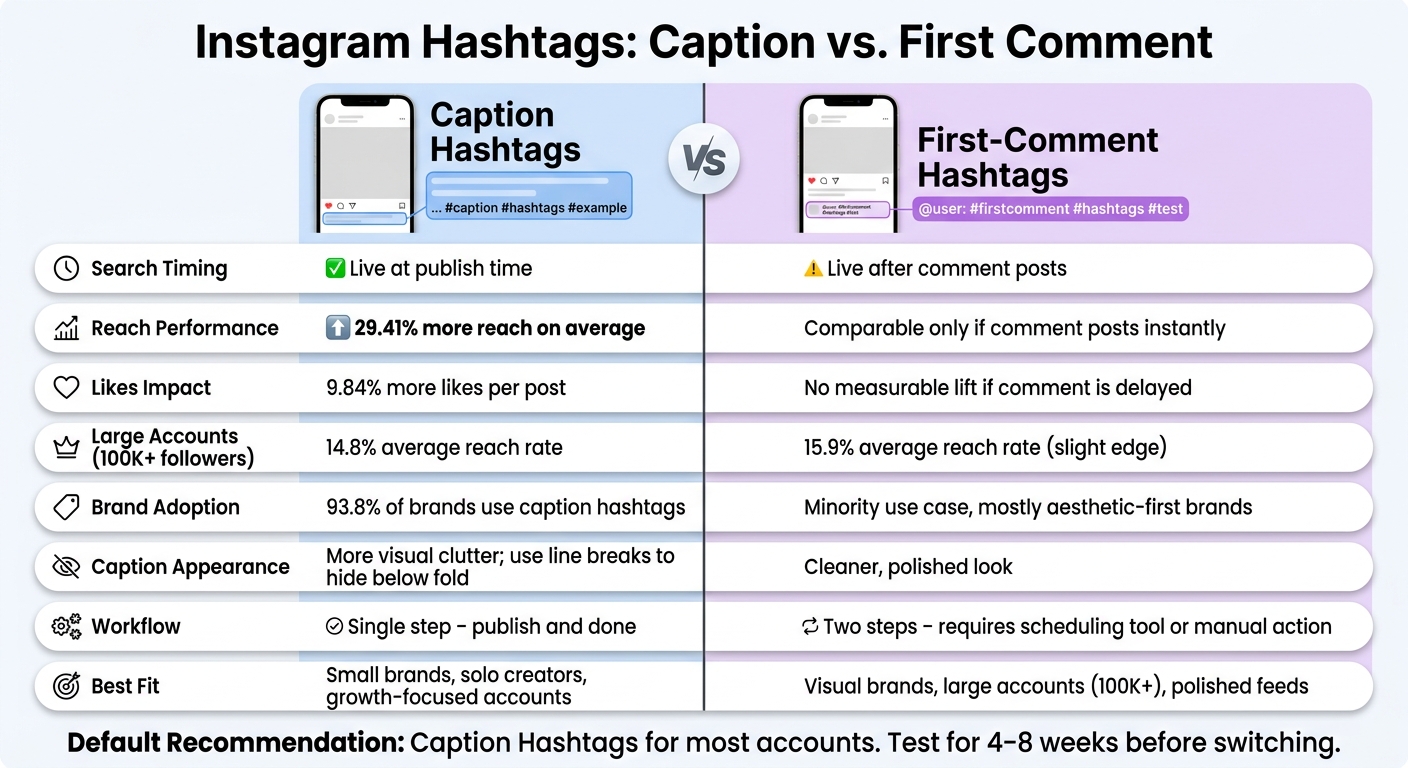
Instagram Hashtags: Caption vs. First Comment – Full Comparison
Here’s the direct side-by-side comparison.
Use this table to pick a default based on readability, workflow, and timing.
| Factor | Caption Hashtags | First-Comment Hashtags |
|---|---|---|
| Readability | Stays readable when hashtags sit below the caption | Keeps the main caption focused on the message |
| Visual cleanliness | Adds more visual noise, especially with longer hashtag sets | Cleaner, more polished look for aesthetic-first feeds |
| Discovery timing | Immediate at publish time | Depends on how fast the comment is posted |
| Workflow complexity | Single-step workflow | Requires a second step or reliable scheduling support |
| Best use case | Growth-focused accounts | Aesthetic-first or established accounts |
The right pick depends on account size and brand goals.
Small businesses and growth-focused accounts should usually stick with caption hashtags. When early traction matters - like product launches, holiday sales, or trending topics - putting hashtags in the caption is often the safer move.
Individual creators with a strong visual style or long storytelling captions have a good case for first-comment placement to maintain a consistent Instagram aesthetic. If the caption is part of the brand experience, keeping hashtags out of the main text can make the post easier to read. The catch? Your posting process needs to be tight, and the comment should go live almost right away.
Agencies often split the choice based on client goals. For performance-driven clients, caption hashtags tend to be the default. For premium brands that care more about visual polish, first-comment placement can make more sense. UpGrow can help teams track hashtag performance with real-time analytics across accounts.
That means account type and workflow are the main deciding factors. The next section turns that tradeoff into a practical default.
Based on the comparison above, caption hashtags are the best default for most accounts. They publish right away, keep your process simple, and give Instagram an instant topic signal. One SocialInsider study found that 93.8% of brands used caption hashtags, and another dataset showed posts with hashtags in the caption had about 29.4% higher reach than posts with hashtags in the first comment. Put plainly: caption placement is the safer bet for most teams.
First-comment placement makes more sense when a clean look matters more than instant signal delivery. This setup works best in a few cases. If your caption is doing the heavy lifting with storytelling, a clear call to action, or editorial-style copy, moving hashtags out of the main text can make the post easier to read without a big drop in reach. The catch? That first comment needs to go live immediately.
If your team wants hard proof, run a simple split test. Test one method at a time for four to eight weeks. Keep the hashtag set, posting schedule, and content format the same in each phase. Then compare reach, impressions from non-followers, and saves in Instagram Insights. Do not switch methods in the middle of the test.
Once you choose a default, write it down and use it consistently. Set clear exceptions, such as campaign posts or aesthetic-first series, in your content guidelines so placement stays consistent across posts and across team members.
Recommendations vary, but current guidance points to a more focused approach.
Some research has suggested using 20 to 30 hashtags to get more reach. But newer advice tends to favor 3 to 5 highly relevant hashtags or keywords instead.
In most cases, relevance matters more than volume. A smaller set of well-matched hashtags often works better than stuffing in as many as possible.
The smart move is simple: test different hashtag counts and see what gets the best response from your audience.
The sources don’t directly say that a late first comment changes hashtag performance.
What they do say, again and again, is simple: hashtags help Instagram categorize your content and show it to the right audience, whether those hashtags appear in the caption or in the first comment.
So in this case, adding the first comment later is usually more about workflow and keeping the post looking polished than about changing how hashtags work.
Yes. Test hashtag placement to see if they work better in your caption or in the first comment.
Putting hashtags in the first comment can make your post look cleaner. But the only way to know what works best is to test it with your own audience.
For a fair test, keep these parts the same:
Then compare reach, impressions, and engagement.