
Instagram Branded Content Enforcement Rules
Treat every sponsored post as a compliance check: disclose paid ties, gate restricted content, and avoid unsupported claims to protect reach and income.
Treat every sponsored post as a compliance check: disclose paid ties, gate restricted content, and avoid unsupported claims to protect reach and income.
4.98 /5 - from 58k reviews
Trusted by 50,000+ creators — get real engagement delivered to your profile in minutes, not days.
One mistake can get a sponsored Instagram post removed. Repeat the same mistake, and I can lose partner tags, branded content tools, or monetization access.
Here’s the short version: if I get paid, gifted, discounted, or earn a commission, Instagram expects me to use the Paid Partnership label. A caption with #ad alone is not enough. Enforcement usually starts at the post level, but repeated issues can move to the account level.
Before I publish, I need to check 3 things:
A few facts stand out:
If I want to protect reach and monetize your account, I need to treat every sponsored post like a compliance check, not just a piece of content.
| Risk area | What usually causes trouble | What can happen |
|---|---|---|
| Disclosure | No Paid Partnership label, wrong brand tag, caption-only disclosure | Post removal, limited reach |
| Product category | Banned products or missing age/location gates | Removal or blocked campaign |
| Claims | Weight-loss promises, risk-free finance claims, weak proof | Post flagged or removed |
| Repeat issues | Same mistakes across many posts | Tool limits or monetization loss |
That’s the core rule set: disclose it, gate it when needed, and don’t make claims you can’t support.
Once a post is marked as branded content, a few mistakes tend to set off enforcement fast. The big one is simple: missing or wrong disclosure. Instagram doesn't treat caption-only disclosures as enough. That means phrases like "thanks Brand X" or #ad in the caption don't meet the rule. You need to use the branded content tool with the right brand tag, and the disclosure needs to stay visible in Stories and Reels.
Two errors come up again and again. One is tagging the campaign agency instead of the actual brand paying for the post. The other is disclosing in a feed post, then leaving out disclosure on a linked Story or Reel tied to the same campaign. Both can trigger enforcement.
The key point: the disclosure has to appear on-screen. It can't be tucked into the caption or hidden deep in the video.
Instagram sorts branded content into allowed, restricted, and prohibited buckets. If a post lands in the wrong one, it can be blocked or removed right away.
| Category | Examples | What's Required |
|---|---|---|
| Restricted | Alcohol, subscription services, financial and insurance products and services, cosmetic procedures and weight loss, over-the-counter drugs, and family planning and contraception | Use age and/or location restrictions in the branded content tool; alcohol in the U.S. may require 21+ gating |
| Prohibited | Tobacco, vaporizers and e-cigarettes, drugs and drug-related products, unsafe supplements, weapons, adult products or services, payday loans, multi-level marketing schemes, and binary options | Cannot be promoted as branded content |
Some categories need more than a tag and age gate. Real-money gambling, cryptocurrency products, and drug or alcohol treatment centers need written pre-authorization from Meta before a branded content campaign can go live. Without that approval, these campaigns carry a high risk of removal.
Even if the product category is allowed, the post itself can still trigger enforcement. Instagram looks closely at misleading claims, especially ones like guaranteed weight loss, risk-free trading, or health claims that aren't proven. Visuals can cause problems too, including before-and-after images or dashboards that suggest results the advertiser can't back up.
Community Standards still apply across the board. So a sponsored fashion post that uses hate symbols, a prank campaign that pushes dangerous behavior, or content that glamorizes self-harm can all become ineligible, even when the product itself is allowed.
And if these problems keep happening, enforcement can get tougher over time.
Once Instagram flags a branded content violation, the process usually moves to a removal notice and a review option.
Instagram usually takes action on the post first. It may remove the content or limit its reach or shadowban the account, then send an in-app notice that explains which branded content rule was broken. That notice points to the exact rule, so you can tell if the issue involved disclosure, product eligibility, or claims. In most cases, this first penalty applies to the post itself, not your whole account, and that shapes what happens next.
For the reason behind the action, check Account Status. For the full decision text, look in Support Requests.
If you think Instagram got it wrong, it’s best to ask for a review right away.
If the removal looks like a mistake, Instagram gives you one chance to request a review for that post.
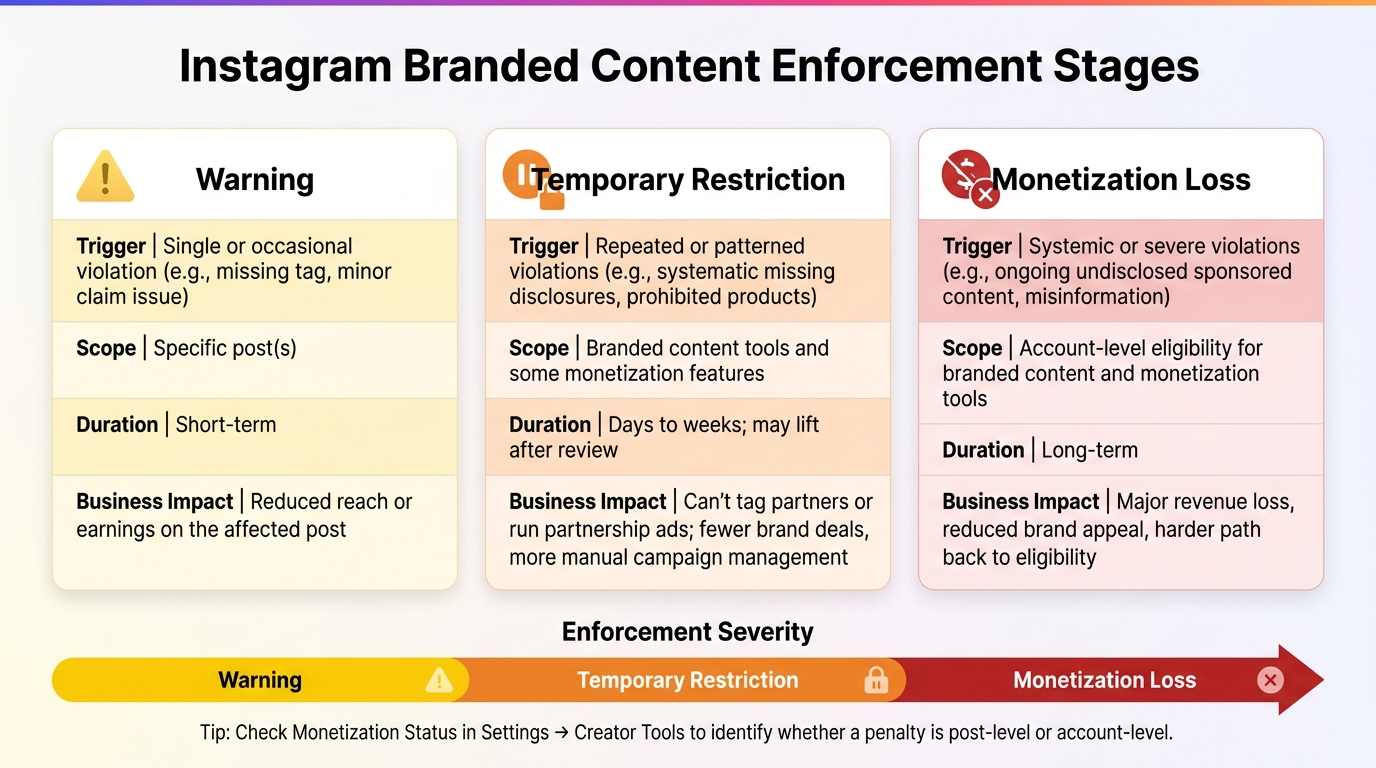
Instagram Branded Content Enforcement Stages: Warning vs. Restriction vs. Monetization Loss
After Instagram takes action on a single post, repeated problems can lead to feature limits and account-level monetization loss. A flagged post and a flagged account do not carry the same outcome. When Instagram removes or limits one piece of branded content, the effect usually stays tied to that post. But when violations keep piling up, the impact can move from the post to the whole account.
If violations happen again and again - such as leaving out the Paid Partnership label, promoting banned products, or sharing misinformation in monetized posts (or struggling to find Instagram content ideas that comply with guidelines) or failing to get more followers on Instagram through organic means - Instagram may place a temporary restriction on branded content tools. In plain English, the tools you rely on for sponsor work can start disappearing.
That can include:
Your regular posts may still go live as usual. But the tools tied to brand deals can be turned off.
Instagram reviews policy compliance on two separate layers. At the content level, each post is judged on its own. A Reel or Story with missing disclosure, misinformation, graphic imagery, or banned products can be labeled not eligible or see lower monetization, without affecting the rest of the account.
At the account level, Instagram looks for patterns. If the same kinds of issues keep showing up, the platform can mark the entire account as Limited or Ineligible for monetization tools.
If you're trying to figure out what happened, check Monetization status. That screen helps you see whether the penalty is tied to one post or your full account. U.S. creators can find both layers in Settings → Creator tools and controls or Business tools and controls → Monetization status.
The three enforcement stages differ in both scope and how long they may last.
| Status | Typical Trigger | Scope | Likely Duration | Business Impact |
|---|---|---|---|---|
| Warning | Single or occasional violation, such as a missing tag or minor claim issue | Specific post(s) | Short-term | Reduced reach or earnings on the affected post |
| Temporary restriction | Repeated or patterned violations, such as systematic missing disclosures or prohibited products | Branded content tools and some monetization features | Days to weeks; may lift after review | Can't tag partners or run partnership ads; fewer brand deals and more manual campaign management |
| Monetization loss | Systemic or severe violations, such as ongoing undisclosed sponsored content or misinformation | Account-level eligibility for branded content and monetization tools | Long-term | Major revenue loss, reduced appeal to brands, and a harder path back to eligibility |
A change from Eligible to Limited or Ineligible in the Monetization status panel is a red flag. It doesn't just affect the post in question. It can also hit future income and make partner workflows a lot messier.
Run one last compliance check as part of your social media workflow before you hit publish. This is where a lot of preventable problems show up, especially the ones that lead to removals or monetization limits.
| Check | What to Confirm |
|---|---|
| Paid Partnership label | Turned on in the post composer before publishing |
| Business partner tag | Exact official handle of the sponsoring brand, not a fan page or lookalike account |
| Brand tag and approval settings | The brand has approved the tag; boost permission on if partnership ads are planned |
| Account eligibility | No active policy violations that affect branded content or monetization access |
| Format support | Post type (Feed, Reels, Stories, carousel) supports the Paid Partnership label for that campaign |
| Product category | Confirm the product is not prohibited; flag restricted categories for additional review |
| Caption text | Do not rely on caption-only disclosure |
| Video disclosure | On-screen text overlay and spoken disclosure appear within the first few seconds of any Reel or video Story |
Set the Paid Partnership label before publishing. If you add it later, it can disrupt Partnership Ads setup and create issues with boosting or monetization.
If the campaign involves regulated products, check age, location, and claim rules next.
For regulated products, apply the needed age and location gates before publishing. For alcohol content aimed at U.S. audiences, set the minimum age to 21+ and add location restrictions to block regions where that product category is prohibited.
For health, wellness, or performance offers, stick to approved claim language. Avoid statements that say a product can cure, treat, prevent, or guarantee results.
Clear disclosure, proper gating, and approved claims help protect reach and monetization. Use the same pre-publish check for every sponsored post. A short final review can help you avoid the warnings, removals, and feature limits covered above.
On Instagram, branded content means any post where you have a material connection to a brand that could shape how followers see your endorsement.
That connection can include paid sponsorships, free or gifted products, affiliate commissions, discount codes, event invites, trips, hotel stays, or similar perks.
Here’s the simple rule: if a follower would be surprised to learn about the connection, it counts. In that case, you should use Instagram’s branded content label and add a clear disclosure in the post itself.
Yes. You can often fix a missing Paid Partnership label by editing the post. Open the post, tap the three-dot menu, and choose Edit to check whether you can add the tag with the branded content tool.
That said, the native label on its own may not be enough. Add a clear disclosure in the first line of your caption too, like Ad, Gifted by, or Sponsored by.
If you use Instagram’s branded content tool and add a partner tag for the Paid Partnership label, the brand has to approve that partnership before the label shows up.
Meta’s rules and FTC guidelines can change, so check your account status for category restrictions too. To stay in line, put clear disclosures like Ad or Sponsored at the start of your caption.


