
How to View Instagram Highlights Anonymously in 2026 (Without Them Knowing)
Three ways to view public Highlights anonymously: Airplane Mode, a secondary account, or browser viewers. Private accounts can't be viewed.
Three ways to view public Highlights anonymously: Airplane Mode, a secondary account, or browser viewers. Private accounts can't be viewed.
4.98 /5 - from 58k reviews
Trusted by 50,000+ creators — get real engagement delivered to your profile in minutes, not days.

Yes - you can view Instagram Highlights without tying the view to your main account, but only on public profiles. In this article, I break down the 3 methods that people use in 2026: Airplane Mode, a second account, and browser-based viewers.
Here’s the short version:
One key fact: if you watch a Highlight in the Instagram app as normal, your view is visible. And if an account is private, none of the no-login browser tools can show its Highlights.
Quick Comparison
| Method | Public Accounts | Private Accounts | Can the owner link the view to you? | Main issue |
|---|---|---|---|---|
| Airplane Mode | Yes | No | Sometimes | Can fail if content is not cached |
| Second Account | Yes | Yes, if accepted | Yes, to that account | Not anonymous |
| Browser Viewer | Yes | No | No Instagram account linked | Ads, tracking, tool failures |
If you want the plain answer: for public Highlights, browser viewers are usually the top choice; for private profiles, there is no anonymous method.
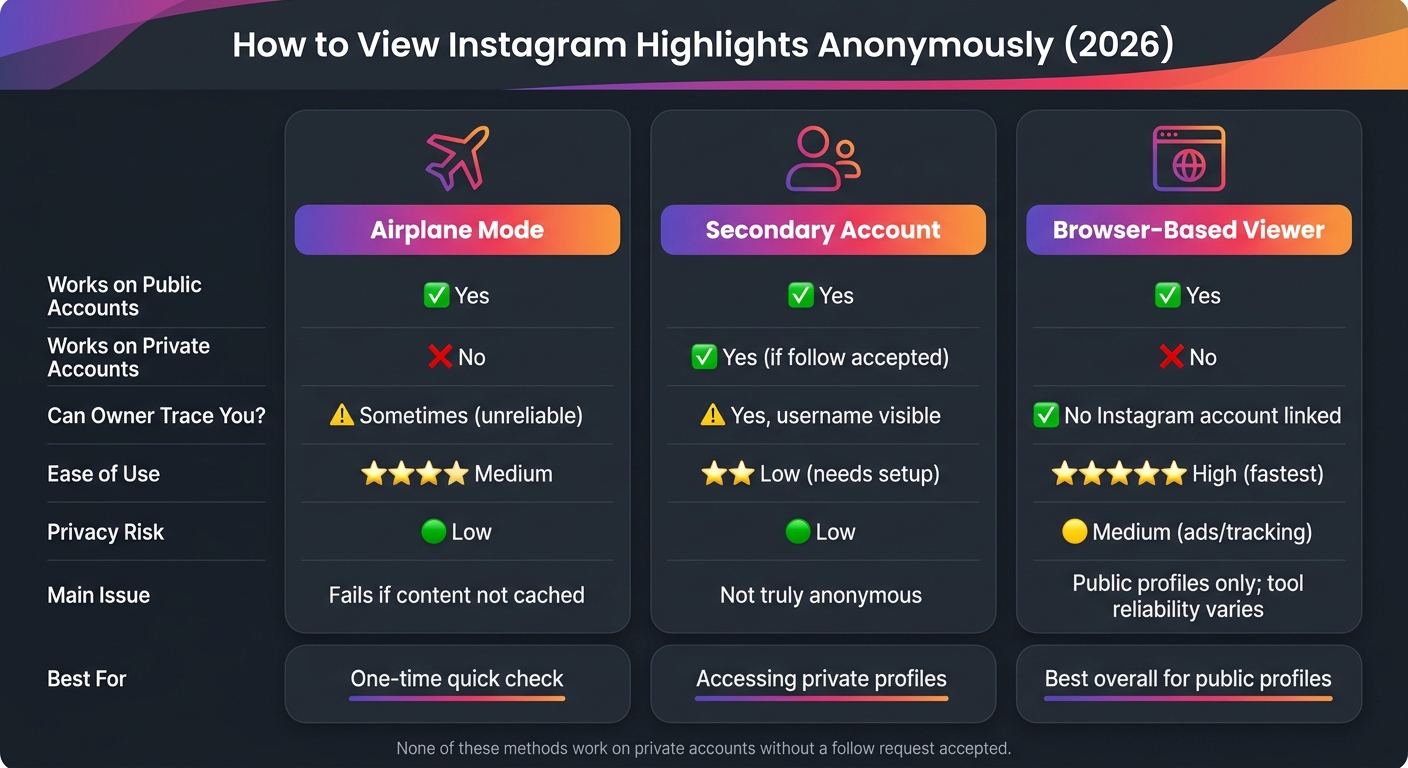
How to View Instagram Highlights Anonymously: 3 Methods Compared
For a faster solution, you can use an anonymous Instagram story viewer to check public profiles instantly.
Airplane Mode is a short-term workaround for a one-time check. It can work, but it’s hit or miss because Instagram needs to cache the Highlight first.
The sequence matters here:
If the Highlight wasn’t cached before you went offline, this won’t work.
This method only works when the Highlight fully loads before you disconnect. If Instagram doesn’t cache it, the offline view will fail.
There’s also another catch. Instagram may sync your view after you reconnect. That’s why force-closing the app before going back online matters.
Use this as a one-off trick, not something you count on again and again.
This method makes the most sense for a single public Highlight check.
If it doesn’t work, or if you want something more dependable, use a secondary account next.
A secondary account, sometimes called a burner account, is not anonymous. It simply keeps your main profile out of the viewer list. The person who owns the Highlight can still see that an account viewed it - they just won’t know it was your main one. So this method is for hiding your main identity, not for staying fully unknown.
Instagram logs Highlight views by account handle. That means the username you're signed into is the one the creator sees. So while a second account keeps your primary profile off that list, it does not hide the view itself.
An empty profile can look odd. If you want the account to blend in, give it a normal-looking setup:
One catch: private profiles still need approval. So this works best for public Highlights.
If you need the view to stay off Instagram entirely, use a browser-based viewer next.
For public Highlights, browser-based viewers are the most hands-off option. You can check public Highlights without using your Instagram account. If your goal is to avoid showing up in the viewer list, this is usually the cleanest route.
At a basic level, these tools pull public profile data through a third-party site, so your Instagram account isn't part of the process. That matters if you want no trace tied to your profile.
In plain English, you type in a public username, and the tool shows that account's active Highlights right in your browser.
The biggest catch is the account's privacy setting. These tools only work for public profiles. They can't get into private accounts. If the profile is private, you'll usually get an error or a "no content found" message.
There's another issue too: free viewers can be hit or miss. Some are packed with ads. Some only load part of the content, especially older items. And because Instagram changes its platform on a regular basis, these services can stop working with no warning or show old results when they run into rate limits or platform changes.
Never enter your Instagram password to prevent an Instagram hack. A legitimate viewer should only ask for a username or profile link.
A few things to watch for:
Use private browsing, skip any site that asks you to log in, and share as little as possible.
That makes browser viewers a good fit for quick checks on public profiles.
Use the chart below to pick the safest option for public Highlights. If you just need a fast call, the table gives you the short version.
| Method | Works on Public Accounts | Works on Private Accounts | Owner can trace you? | Ease of Use | Privacy Risk |
|---|---|---|---|---|---|
| Airplane Mode | Yes | No | Partial, unreliable | Medium | Low |
| Secondary Account | Yes | Yes (if accepted) | Low; username visible | Low; needs setup | Low |
| Browser-Based Viewer | Yes | No | Highest here | High | Medium (ads/tracking) |
The basic tradeoff is pretty simple:
For public Highlights, browser-based viewers are usually the most reliable way to stay anonymous. That said, private accounts are still off-limits, and free tools can be hit or miss.
No. If you use a third-party anonymous viewer, your view will not show up later for the account owner.
Here’s why: you’re watching the Highlight through an outside service, not through your own Instagram account. So as long as you don’t use your official Instagram account, the owner won’t know you viewed it.
Generally, yes - if they don’t ask for your Instagram login and only pull public content.
That said, safety and reliability can vary a lot. Some tools are privacy-focused and straightforward. Others can feel outdated, stuffed with ads, or just plain slow.
A little caution goes a long way:
If a tool asks for your login details, that’s a red flag.
Anonymous viewing tools rely on public data. That means they can only show content that Instagram already makes visible to everyone.
If an Instagram account is private, only approved followers can see its posts, stories, and highlights.
So while these tools may look convenient, they can’t get around Instagram’s privacy settings. They don’t have a back door into private stories or highlights. If the content isn’t public, they can’t fetch it.


&description=Three%20ways%20to%20view%20public%20Highlights%20anonymously%3A%20Airplane%20Mode%2C%20a%20secondary%20account%2C%20or%20browser%20viewers.%20Private%20accounts%20can't%20be%20viewed.&image=https://www.upgrow.com/blog-images/assets.seobotai.com/cdn-cgi/image/quality=75,w=1536,h=1024/upgrow.com/6a5199fb21d1dee3314ba3b5-1783734027887.jpg)