Table of contents
- How to Easily Remove FAKE FOLLOWERS on Instagram
- How to spot bot and fake followers on your account
- How to stop bots from following you using Instagram's built-in tools
- Simple habits that keep your follower list clean over time
- Conclusion: A simple action plan to stop bot followers on Instagram and keep your account clean
- FAQs

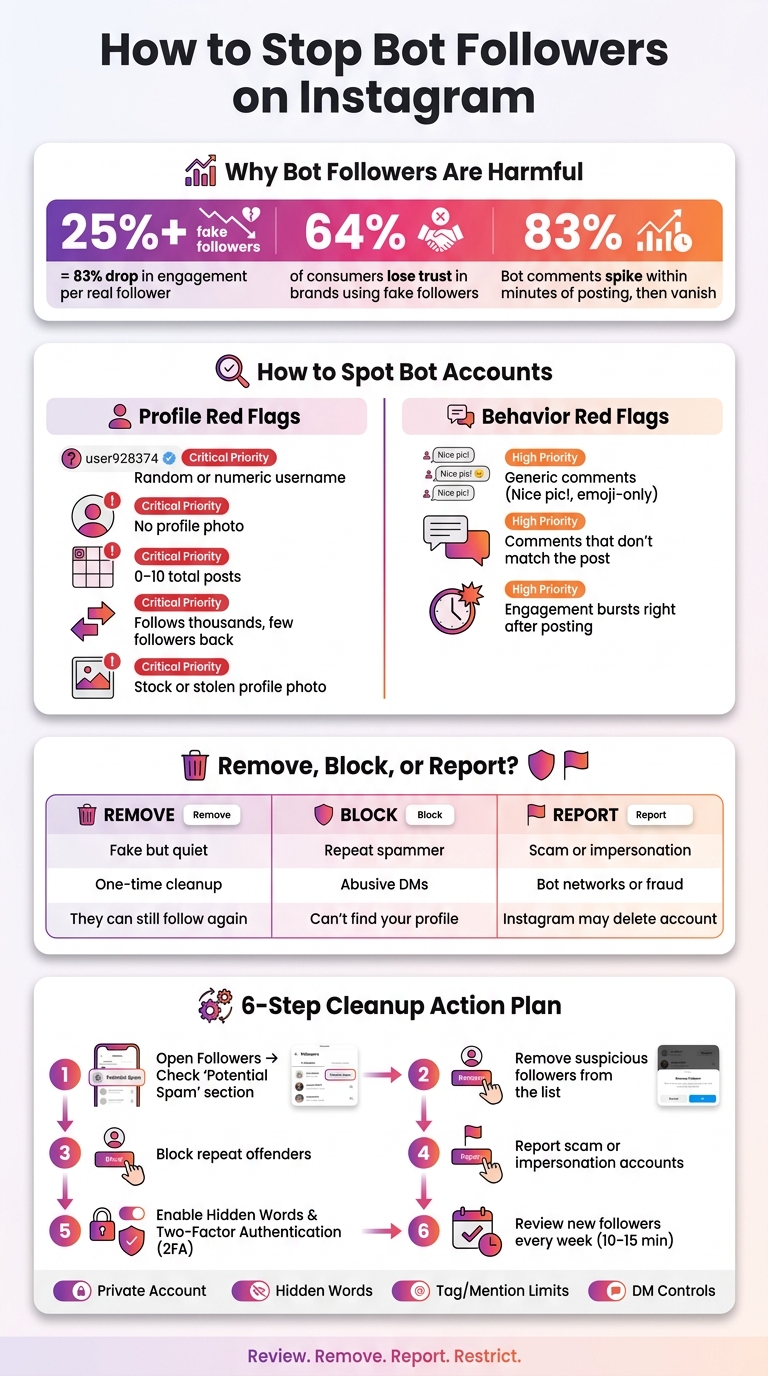
Bot followers hurt your Instagram account more than they help. They can skew your numbers, lower engagement, and make your account look suspicious. If more than 25% of your followers are fake, engagement per real follower can drop by 83%. And 64% of consumers say they’d lose trust in a brand that used fake followers.
If I want to stop bots from following me, I focus on four things right away:
- Check my followers for random usernames, empty profiles, stolen photos, and strange follow ratios
- Remove, block, or report bad accounts based on what they’re doing
- Tighten settings like private account, Hidden Words, DM controls, tag limits, and 2FA
- Review my follower list each week so spam doesn’t pile up
Here’s the short version:
- If an account looks fake but stays quiet, I remove it
- If it keeps messaging, tagging, or coming back, I block it
- If it looks like a scam or impersonation, I report it
- If I want the most control, I switch to a private account
- If I need a public account, I still turn on spam filters, Hidden Words, and two-factor authentication
The goal is simple: keep fake accounts out, keep your stats clean, and make it harder for bots to get in again.
If I’m cleaning up an account today, this is the plan I’d follow first:
- Open Followers and check Potential Spam
- Remove suspicious followers
- Block repeat offenders
- Report scam accounts
- Turn on Hidden Words and 2FA
- Review new followers every week
This gives me the fastest path to a cleaner follower list without making the process harder than it needs to be.
How to Stop Bots From Following You on Instagram: Step-by-Step Action Plan
How to Easily Remove FAKE FOLLOWERS on Instagram
sbb-itb-3c55afb
How to spot bot and fake followers on your account
Before you start removing accounts, look for a few common signs first. That makes it easier to figure out which followers should go first.
Profile signs that point to bot accounts
Start with the basics: the username, profile photo, and bio. Bots are often created in bulk, so usernames can look random or packed with numbers. A missing profile photo, an empty bio, or a bio crammed with generic phrases and unrelated emojis can also be a warning sign. Some fake accounts go a step further and use stock or stolen profile photos to look like a real person.
A lot of these profiles have 0 to 10 posts, recycled content, or long periods with no activity at all.
The follower-to-following ratio is another fast way to check. Most real accounts have a more natural balance. A bot, on the other hand, may follow thousands of people while having very few followers itself.
If the profile seems fine at first glance, the next step is to look at how it acts.
Engagement patterns that signal fake accounts
Low engagement on an account with lots of followers is one of the biggest red flags. And don’t just look at the number of comments. Look at the comments themselves. Bot accounts often leave generic replies that don’t match the post, such as "Nice pic!" or "Love this!", or they post emoji-only comments that feel off.
Timing can give them away too. Real engagement tends to build over time. Bot activity often shows up in bursts within minutes after a post goes live, then fades out just as fast.
How to do a quick manual follower audit
Start with a quick manual Instagram audit. Open your Instagram profile, tap Followers, and scroll through recent additions. When an account looks off, open it and spend a few seconds checking three things:
- the username
- the post count
- the follower-to-following ratio
If you want a fast read on follower quality, spot-check 30 to 50 followers from different parts of your list, not just the newest ones. That sample is usually enough to show whether you’re dealing with a bigger bot issue or only a handful of suspicious accounts.
Use the table below as a quick reference while you review your list:
| Bot Red Flag | Why It Matters | Removal Priority |
|---|---|---|
| Random or numeric username | Indicates automated account creation at scale. | High |
| No profile photo | Suggests an incomplete, inactive, or automated profile. | High |
| Follows thousands but has few followers | Typical of accounts used for mass-following scripts. | High |
| 0–10 total posts | Bots rarely maintain active, content-rich feeds. | High |
| Generic or emoji-only comments | Signals automated engagement scripts rather than real interest. | Medium |
| Stock or stolen profile photos | Used to create a human-looking profile without a real user behind it. | Critical |
| Comments that don't match the post | Shows the account isn't actually reading the post. | Medium |
If you notice several of these red flags on one account, that’s usually enough to flag it for removal, blocking, or reporting.
How to stop bots from following you using Instagram's built-in tools
Instagram already gives you a few solid ways to deal with bot followers. The best move is simple: clean up what’s there first, then change the settings that make future bot follows less likely.
Turn on spam filtering and review potential spam followers
Instagram automatically flags suspicious accounts and places them in the Potential Spam list inside Followers. Go to your Profile, tap Followers, and check the Potential Spam section. From there, you can remove accounts one by one or clear them in bulk.
That’s the easiest place to start because Instagram has already done some of the sorting for you.
How to remove, block, and report bot accounts
These three actions do different jobs, so it helps to use the right one for the right situation.
Removing is best for quiet cleanup of inactive followers. Blocking makes more sense for repeat spam, abusive DMs, or bots that keep coming back. Reporting is the right call for scams, impersonation, fraud, or bot networks.
To remove a follower, go to your Profile, tap Followers, find the account, tap the three dots next to the name, and choose Remove. If you want to block or report an account, open that profile, tap the three dots in the top-right corner, and select Block or Report.
| Action | What it does | When to use it | Effect on future interactions |
|---|---|---|---|
| Remove | Deletes the account from your follower list | Quiet cleanup of inactive followers | They can still see your public posts and request to follow again |
| Block | Blocks the account from finding or contacting you | Repeat spam, abusive DMs, or persistent bots | They can't find your profile, see your posts, or message you |
| Report | Flags the account to Instagram for review | Scams, impersonation, fraud, or bot networks | Instagram may suspend or delete the account entirely |
A quick rule of thumb: if the account is just sitting there and looks fake, remove it. If it keeps bothering you, block it. If it looks like a scam operation, report it.
How to tighten privacy, comment, and DM settings
Once you’ve cleaned up your followers, the next step is to make your account harder for spam accounts to target.
Switching to a private account is one of the strongest settings here. It forces every new follow request to be approved by hand, which stops automated follows. To turn it on, go to Profile > three-line menu > Settings and privacy > Account privacy and enable Private Account.
For comments and DMs, Hidden Words can do a lot of the heavy lifting. It automatically hides messages and comments that include common spam phrases. You can also limit tags and mentions by going to Settings and privacy > Tags and mentions and setting it to People You Follow. And if random message requests are piling up, go to Settings and privacy > Messages and story replies and limit requests to people you already follow.
| Setting | How to turn it on | Bot behavior it reduces | Trade-offs |
|---|---|---|---|
| Private Account | Settings and privacy > Account privacy | Prevents automated bot follows; requires manual approval | Lower public discoverability and reach |
| Hidden Words | Settings and privacy > Hidden Words | Filters spammy DMs and comments containing specific keywords | May occasionally hide legitimate comments |
| Tag/Mention Limits | Settings and privacy > Tags and mentions | Prevents bots from tagging you in spam posts or scam stories | Real users you don't follow can't tag you |
| DM Controls | Settings and privacy > Messages and story replies | Limits message requests to people you already follow | New business inquiries may land in a hidden folder |
| Two-Factor Auth | Accounts Center > Password and security > Two-factor authentication | Prevents bot-driven account hijacking | Requires an extra step during login |
If your account is public for work or growth, you may not want to lock everything down. In that case, Hidden Words, tag limits, DM controls, and Two-Factor Auth still give you a good layer of protection without fully closing the door.
Simple habits that keep your follower list clean over time
A one-time cleanup helps, but it won't hold for long on its own. Small habits during the week and month are what keep your follower list in good shape instead of letting it slowly fill up again.
Set a weekly and monthly follower review routine
A quick weekly scan takes 10–15 minutes. Open your Followers list, check new followers, and remove accounts that look automated. Doing this once a week stops spam from piling up.
Then, once a month, take a closer look. If your follower count goes up but engagement stays flat, that's a sign it's time for a cleanup. A deeper monthly audit, which usually takes 20–30 minutes, can catch accounts that slipped past your weekly review. It helps to block time on your calendar for cleanup or approval sessions so the habit sticks.
Behaviors that attract bots
After your review routine is in place, the next step is simple: avoid the stuff that pulls bots in.
Buying followers, mass-following, using third-party apps that promise fast growth, and joining spam-heavy giveaways can all increase spam followers. Overusing broad, high-volume hashtags can do the same thing because they tend to attract automated scripts. Niche, community-specific hashtags usually help cut down that exposure.
There's one more habit that's worth adding every few months. Go into Instagram's security settings and remove access for any third-party apps you no longer use or don't recognize.
If you're trying to get more human interaction, lean into Stories polls, quizzes, and Q&A stickers. Those features make it easier for real people to engage, and they're much harder for bots to fake.
How UpGrow helps you grow Instagram followers without bots
If you want cleaner growth from this point on, tie follower acquisition to actual targeting. That's where UpGrow comes in.
UpGrow is an AI-powered Instagram growth service built around real, targeted followers - no bots, no fake accounts. It uses AI targeting with filters for location, age, gender, language, and interests to bring in followers who fit your audience. Plans start at $39/month, and UpGrow includes a growth guarantee - grow your followers or get your money back.
The table below shows the main habits, how often to do them, how much time they take, and what each one helps with:
| Habit | Frequency | Time Required | Main Benefit | Tool Involved |
|---|---|---|---|---|
| New Follower Scan | Weekly | 10–15 mins | Catches bots before they skew engagement data | Instagram Followers List |
| Deep Follower Audit | Monthly | 20–30 mins | Removes suspicious followers that drag down engagement | Manual review |
| Analytics Review | Monthly | 15 mins | Flags suspicious follower growth spikes | UpGrow Live Analytics |
| App Permission Review | Quarterly | 5 mins | Clears unsafe automation links from connected apps | Instagram Security Settings |
Conclusion: A simple action plan to stop bot followers on Instagram and keep your account clean
Keeping your follower list clean over time comes down to a simple routine. Spot suspicious accounts, remove them fast, and tighten your settings so fewer slip in.
Start with a quick follower check. Look for accounts with random usernames, no profile photo, zero posts, or huge follower-to-following ratio gaps. Those are common red flags, and they’re often easy to spot once you know what to watch for.
When you run into clear scams, report them too. That gives Instagram a chance to act on the bigger bot network, not just one account. Think of it as cleaning your front porch and telling the neighborhood where the mess is coming from.
After that, lock down the settings that help cut future spam. Use Instagram’s privacy tools to lower the number of bot follows without hurting normal engagement too much. Turn on 2FA and tighten your privacy settings. If control matters more to you than reach, switch to a private account so you can approve each new follower by hand.
Regular cleanup helps protect engagement quality and keeps your analytics from getting skewed. Make follower checks part of your routine so fake accounts don’t slowly distort your growth. A recurring audit schedule works well here, especially when small spam waves start to pile up.
Review, remove, report, and restrict. That’s the fastest way to keep bot followers out.
FAQs
Can bot followers hurt my reach?
Yes. Bot followers can hurt your Instagram reach because the algorithm looks at engagement quality, not just follower count.
Bots don't engage in any meaningful way. That creates a mismatch between how many followers you have and how many likes, comments, and shares your posts get. To Instagram, that can look like low-value content, so your posts may be shown to fewer real people.
In some cases, reach can drop by 60% or more.
Should I make my Instagram account private?
Making your account private is a personal choice. It lets you review and approve every follow request, which can help if follower quality is your main concern.
You get more control over who sees your content, but there’s a trade-off: going private can limit organic growth. If you choose that route, set clear rules for which requests you accept and check your follower list from time to time to keep your audience genuine.
How often should I audit my followers?
How often you audit depends on your account type and how fast the account is growing.
- Personal accounts: audit every 2 to 3 months
- Growing creators with fewer than 10,000 followers: audit monthly
- Business accounts: audit monthly
- Established creators with 10,000 or more followers: audit every 2 weeks
You should also run an audit within 1 week of a viral post. Viral content often pulls in bots, and that can skew your follower mix fast.
If you're running an influencer program on a regular basis, audit at least monthly.