
How AI Powers Personalized Video Feeds
How AI ranks short videos by watch time, saves, shares and relationship signals—and what creators should change to improve reach.
How AI ranks short videos by watch time, saves, shares and relationship signals—and what creators should change to improve reach.
4.98 /5 - from 58k reviews
Trusted by 50,000+ creators — get real engagement delivered to your profile in minutes, not days.
The Instagram algorithm does not show every video to every person the same way. It ranks videos by surface, reads how people watch, skip, save, share, and reply, and then uses those signals to decide what to show next.
If I want more reach from video, the main lesson is simple:
That means I should not think, “Did this video get views?” I should think, “Did the right people watch, finish, save, share, or follow?”
A few signals matter more than others:
Here’s the short version: Instagram first builds a pool of possible videos, removes posts that should not be pushed, scores what is left, and then ranks each option by surface. It also looks at topic, format, creator history, relationship signals, and negative feedback like “Not interested.”
| Surface | Main goal | Top signals |
|---|---|---|
| Feed | Catch up + some recommendations | Past interaction, post context, creator relevance |
| Stories | Stay close to followed accounts | Replies, reactions, recency, viewing habits |
| Explore | Find new interests | Interest match, likes, comments, saves, shares |
| Reels | Keep people watching short video | Completion rate, replays, shares, topic interest |
So if I want better results, I need to make the topic clear in the first few seconds, use easy-to-read on-screen text, stick to one main idea, post in 9:16, and track metrics by attention, resonance, and discovery instead of looking at views alone.
Below, I’ll break down how that ranking works and what those signals mean for video growth.
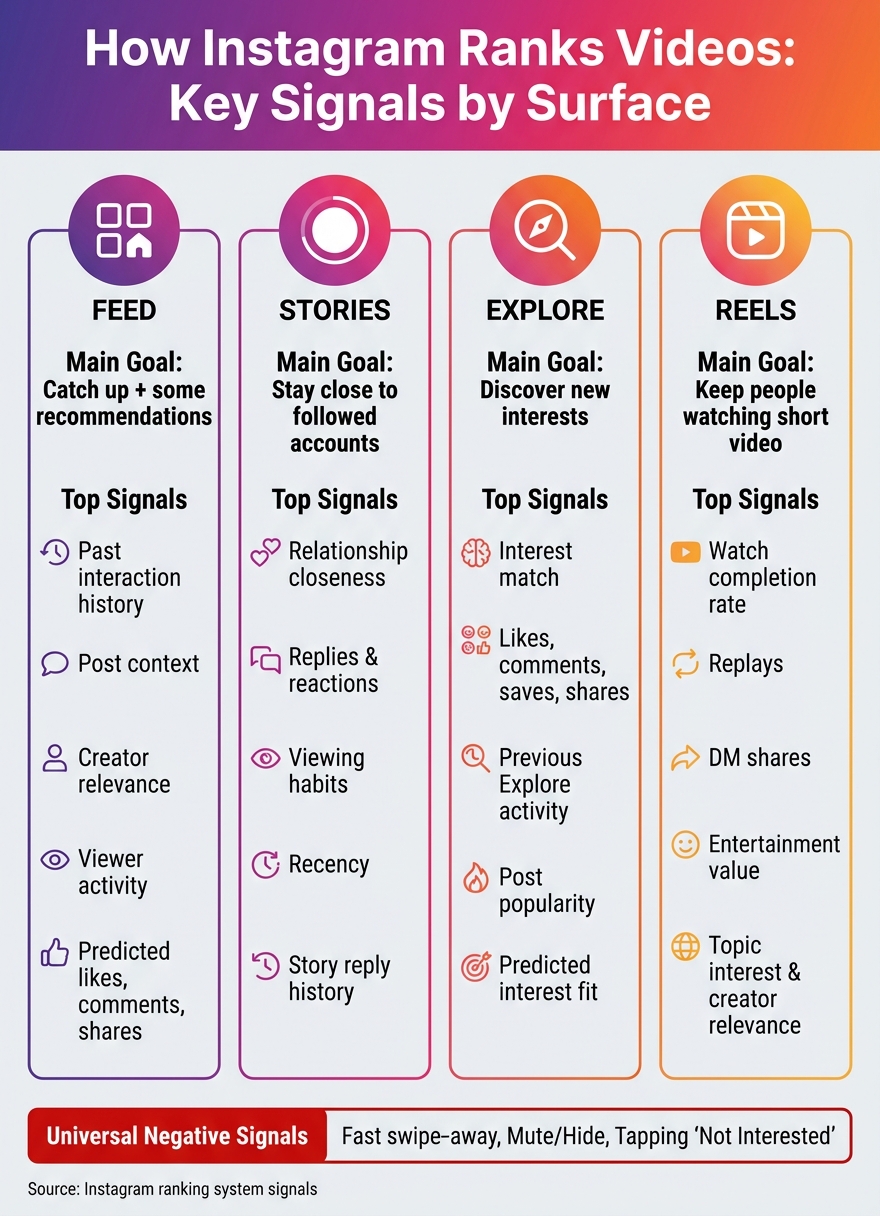
Instagram Video Ranking: Signals by Surface (Feed, Stories, Explore, Reels)
Instagram doesn't rank every surface the same way because each one has a different job. A video that does well in Feed might not do as well in Reels, and that's normal. Each surface is trying to predict a different kind of action from the viewer.
Here's the breakdown by surface:
| Instagram Surface | Key Signals |
|---|---|
| Feed | Post context, viewer activity, creator relevance, interaction history |
| Stories | Relationship closeness, replies, reactions, viewing habits, recency |
| Explore | Previous Explore activity, predicted interest, likes, comments, saves, shares |
| Reels | Predicted watch completion, entertainment value, likes, comments, shares, viewer interests, creator relevance |
Feed looks at post context, viewer behavior, creator relevance, and past interaction with that creator. From there, Instagram tries to predict whether someone will watch, like, comment on, or share the video.
Stories works a bit differently. It leans more on relationship closeness, replies, reactions, viewing habits, and recency. In plain English, a Story doesn't need mass appeal to show up for a close follower. It just needs a steady relationship. That's a big shift from discovery surfaces, which care more about predicted interest and how the content performs.
Explore puts more weight on post popularity, including likes, comments, saves, and shares, because it's recommending content to people who may not know the creator yet. It's less about who you already follow and more about what seems like a good match for your interests.
Reels pushes this further. It predicts whether a viewer will keep watching, with watch completion and sends acting as key behavior signals. If someone keeps watching the same topic over and over, Instagram may start showing them similar Reels from creators they've never seen before. That's how a viewing habit can snowball into a new recommendation pattern.
Each surface is solving a different problem. Feed helps people catch up. Stories helps them stay close to people they care about. Explore helps them browse interests. Reels is built for entertainment.
That means the same person can save a recipe post in Feed, reply to a chef's Story, and then watch travel Reels back-to-back. Each surface reads that behavior in its own way and builds a separate picture of what the viewer wants in that moment.
Those rankings don't come out of thin air. They start with the data AI collects about viewer behavior, content, and relationships.
Instagram looks at a mix of viewer behavior, content details, creator history, and negative feedback to guess what someone is most likely to watch, save, share, or skip next. And this doesn’t stay fixed for long. The system keeps updating those guesses in real time as new signals come in.
Watch time, likes, and DM shares are some of Instagram’s strongest recommendation signals, although their weight can shift depending on the surface and the relationship between viewer and creator. A replay adds another clue: the viewer thought the video was worth watching again. On the flip side, a fast swipe-away usually points to weaker interest.
What people do with a video matters just as much as whether they watched it. A like is a fast positive reaction. A save often means, “I want this for later.” A direct-message share can matter a lot for discovery because it shows the video is worth passing along beyond the creator’s current audience.
Those actions don’t all mean the same thing. Someone might like a 15-second joke, save a budgeting explainer, and send a local restaurant tip to a friend. Same person, three actions, three different signals about intent.
Instagram also reads the video itself. captions, on-screen text, audio, visual subject, topic, and format help the system sort out what the video is about and who may want to see it. The creator’s posting history also plays a part. Earlier post performance, along with whether the account is eligible for recommendations, affects how Instagram estimates relevance.
Then there’s relationship history. Past comments, profile visits, and Story replies give Instagram more reason to think future posts from that creator may be a fit. If a viewer keeps engaging with a topic, they’re more likely to see related videos, even from accounts they’ve never followed.
Put simply, Instagram starts with a huge pool of possible videos and uses these signals to cut that pool down to a smaller group worth ranking.
Recent behavior can outweigh older habits for a while. If someone usually watches fitness videos but spends a week saving and sending vacation-planning clips, Instagram may start showing more travel content because that person’s short-term intent has shifted. Recent follows, searches, and engagement patterns help the system spot those swings.
Negative signals push things the other way. Swiping past fast, muting or hiding content, or tapping "Not interested" lowers the chance that similar recommendations will show up again across recommendation surfaces. A quick exit often means the video wasn’t a fit, or the opening didn’t do its job.
For creators, the main thing is to watch patterns across lots of viewers. A sharp drop in the first three seconds says far more than one single skip.
These signals feed the next step: matching viewers with specific topics, formats, and posting patterns.
After Instagram looks at viewer behavior and video signals, it connects that interest to a topic, format, and style.
Instagram studies the video itself to build signals it can rank. That includes subjects, speech, on-screen text, captions, hashtags, audio, language, creator data, and engagement history. Creators can use an Instagram post optimizer to refine these elements for better visibility. It also looks at format and structure, such as framing, length, editing pace, overlays, faces, products, and narrative style.
Topic interest and format preference aren't always the same thing. Someone might enjoy fitness content but still prefer short demos over long interviews. In that case, Instagram can keep serving fitness videos while leaning toward the format that holds attention longer. It uses signals like watch time, saves, and skips to make that shift.
Topic fit matters, but a viewer's past interaction with a creator can give a video an extra push.
When someone interacts with a creator again and again, that viewer-creator relationship signal gets stronger. A familiar creator may rank higher because past engagement helps Instagram predict that the video will matter more to that person.
Posting when your audience is active can help you get early engagement. But timing alone won't beat relevance or video quality.
Once Instagram finds likely matches, it narrows them down in stages.
It starts by pulling a large pool of possible videos. Then it filters out ineligible content, gives the rest a fast score, and sends the strongest options into a tighter ranking model. At the end, Instagram also weighs freshness, diversity, and viewer feedback before deciding what to show.
Make the topic obvious in the first few seconds. Lead with a clear payoff. For instance, say five storage fixes for a 500-square-foot apartment instead of opening with a broad intro. A clear start can help retention and make the topic easier to sort.
Use high-contrast on-screen text that's easy to read. Keep it off faces and away from key demos. Add captions that match what’s said. Focus each video on one main idea, and film in 9:16 vertical format. Post original content or content that has been changed in a major way. Instagram may rank the original version above exact reposts in recommendations.
Once the hook is doing its job, the next step is simple: check whether the right people stayed and reacted.
Read your metrics in three buckets: attention (watch time, average watch duration, completion rate, replays), resonance (likes, comments, saves, sends), and discovery (non-follower reach, profile visits, follows). Those line up with retention, interaction, and conversion, which are the same signals the ranking system looks at.
A few patterns can tell you a lot:
Compare metrics per reach, not just raw totals. And when you can, split results by follower vs. non-follower status.
| Metric group | What it tells you | What to do when it's weak |
|---|---|---|
| Watch time, completion, replays | Whether viewers are staying | Tighten the opening; match format to intent |
| Saves, sends | Whether content feels useful or shareable | Add clearer takeaways; test instructional formats |
| Profile visits, follows | Whether the right audience is converting | Improve bio, pinned posts, and series continuity |
When the numbers show who’s responding, you can use that signal to fine-tune targeting and clean up your profile so more of those people stick around.
UpGrow is an AI-powered Instagram growth service built to help connect audience targeting with content decisions - without bots or fake followers. It offers AI targeting, live analytics, profile optimization, and a viral content library to help improve audience fit.
Its AI targeting uses filters you choose, such as location, age, gender, and language, to focus growth on people who are more likely to engage with your content. That works hand in hand with the metrics framework above. If your follower base is a closer match for your content, signals like watch time, saves, and sends per reach become much easier to read.
After Instagram lines up viewers with topics, formats, and posting habits, one last job remains: ranking the best option for each surface. Instagram uses separate ranking systems for Feed, Stories, Explore, and Reels, which is why the exact same video can land differently depending on where it appears.
Here’s the simple version. Instagram pulls a set of likely matches, estimates how a viewer may react, and then sorts the strongest picks for that surface. In plain English, the system is trying to put each video in front of the right person.
For creators, that changes the goal. The platform tends to favor videos that make the topic obvious, keep people watching, and drive strong actions like watch time, saves, shares, comments, and follows. Audience fit matters more than raw reach.
So treat each post like feedback. Publish clear ideas, look at how the right audience responds, and then tighten your topics, formats, and timing. When your topic, format, and audience fit stay aligned, that effect builds over time. Clear signals help Instagram match your content better, and better matching helps your distribution.
Because each Instagram surface uses its own AI models and ranking signals. Feed and Stories lean more on relationship signals, like DMs, tags, and how often someone engages with a creator.
Explore is built for discovery and interest-driven engagement. Reels leans harder on entertainment signals, like watch time, retention, and skips.
That means the same video can get very different results depending on how well it fits what each surface is trying to do.
Instagram is more likely to recommend your videos when early, high-intent engagement is strong.
The biggest signals are watch time and retention, especially the first 3 seconds. It also looks at saves, DM shares, meaningful comments, and profile taps.
Timing matters too. Instagram pays attention to how fast those actions happen after you post. On the flip side, it may push videos down if people skip fast or hit “Not Interested.”
There’s also a content pattern at play: posting consistently around 2–3 focused themes can help.
Check your analytics dashboard for the engagement signals that matter most: watch time, completion rate, saves, and DM shares. Those tell you a lot more than passive likes ever will.
If your video is reaching the right people, you should see steady engagement from your target demographic over time. Tools like UpGrow can help you track this in real time and fine-tune targeting filters like location, age, and interests.


