Free Instagram Hashtag Tools: 2026 Guide
Use free hashtag tools to research, vet banned tags, save rotating lists, and optimize 3–5 relevant Instagram hashtags per post.
Use free hashtag tools to research, vet banned tags, save rotating lists, and optimize 3–5 relevant Instagram hashtags per post.
4.98 /5 - from 58k reviews
Trusted by 50,000+ creators — get real engagement delivered to your profile in minutes, not days.
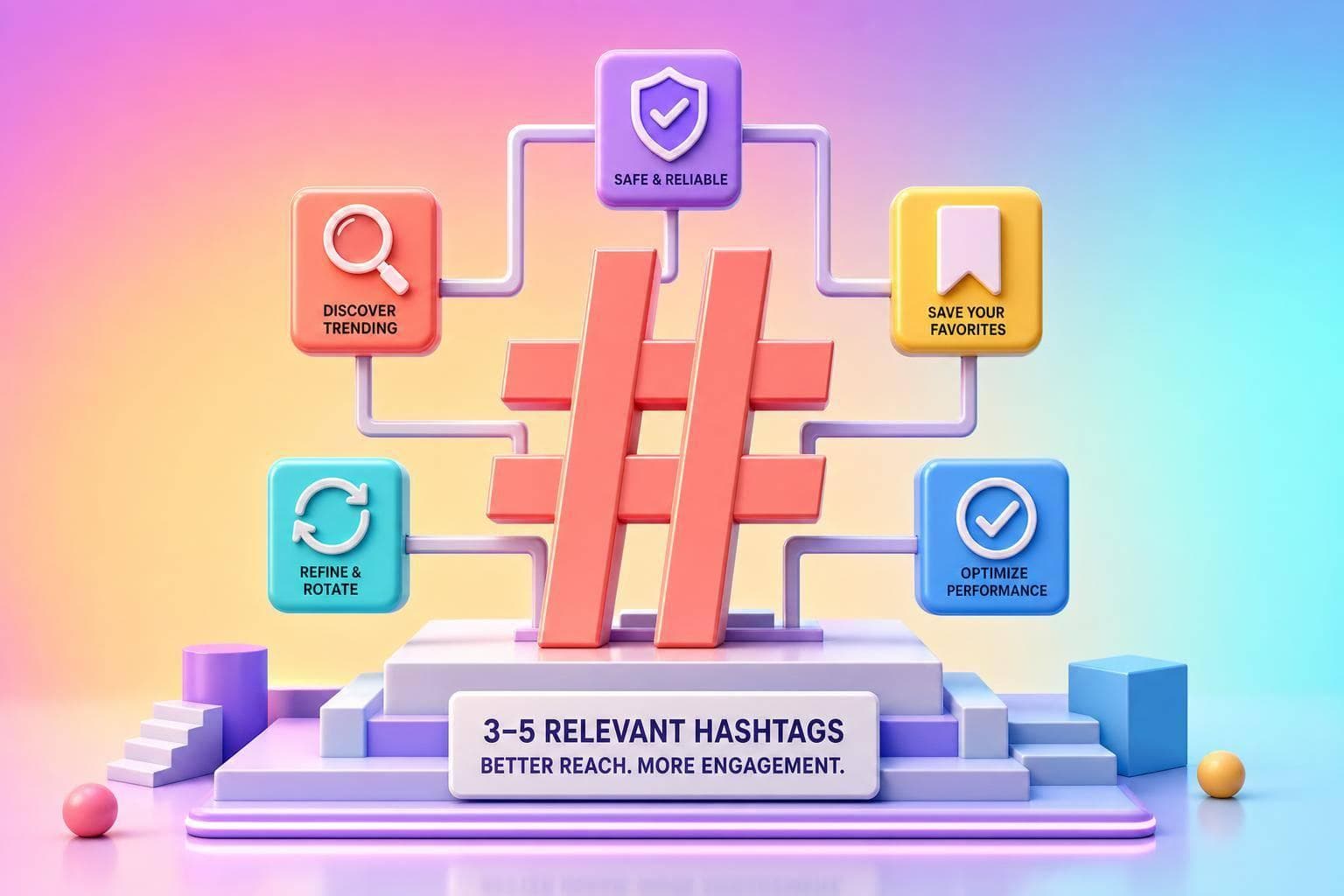
If I want more reach from Instagram hashtags in 2026, I’d keep it simple: use 3–5 highly relevant hashtags, group them by content pillar, check them for restrictions before posting, and rotate my sets instead of pasting the same list every time.
That’s the core idea. Free hashtag tools help me turn one seed keyword into related tags, sort those tags by size, save lists for repeat use, and spot risky hashtags before I post. Most free plans also come with limits, so I’d use them for my top content themes first.
Here’s the short version:
A few numbers stand out from the article:
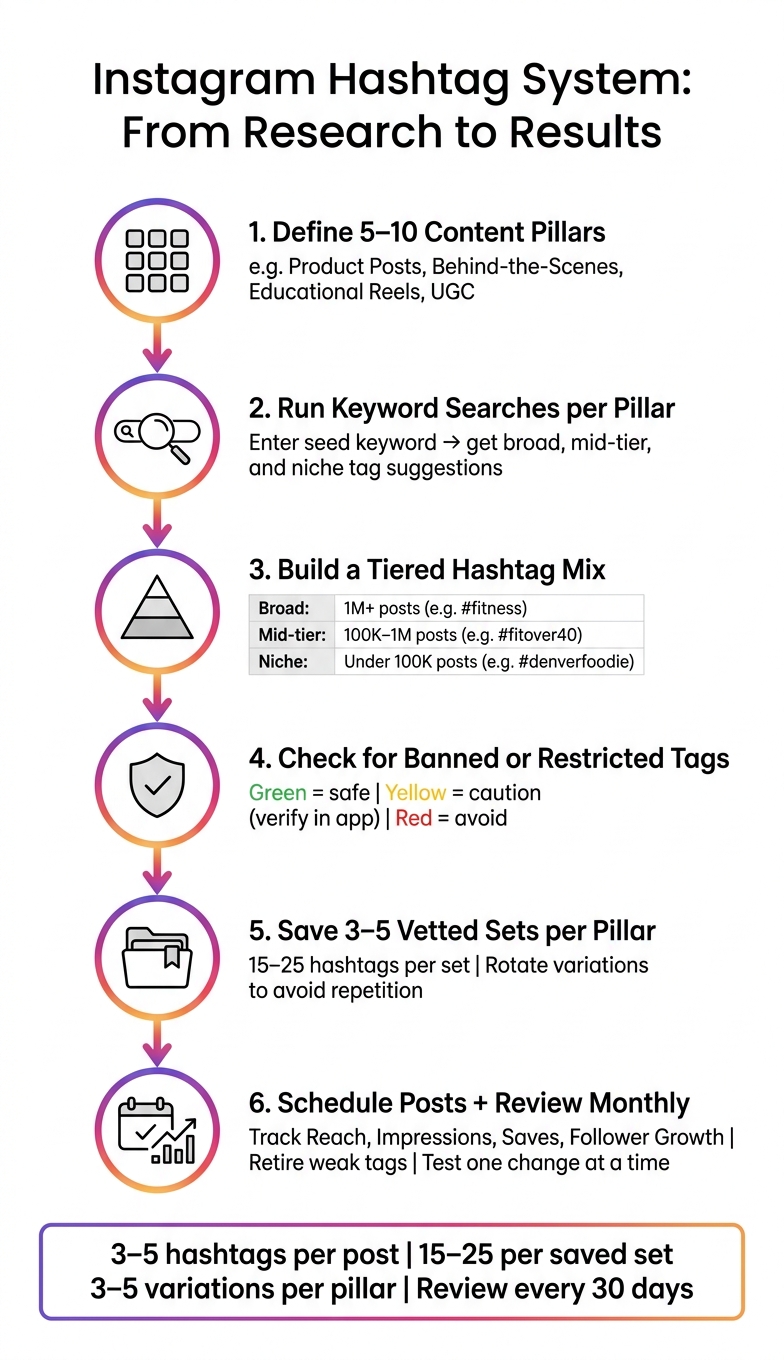
If I were building a simple system, I’d do this: pick my main content pillars, run keyword searches for each one, save a few hashtag sets, check every set before publishing, and review results once a month. That keeps the process tight, repeatable, and easier to use week after week.
Most free hashtag generators begin with a seed keyword and turn it into related hashtag ideas through autocomplete, tags that often show up together, and recent usage data. So if you enter "meal prep for weight loss," the tool may first pull up tags like #mealprep and #weightlossjourney, then branch into related options such as #healthymealprep, #mealprepsunday, and #lowcalorierecipes.
From there, the tool usually sorts those tags by relevance, popularity, or topic. Some newer tools also use AI to read the keyword in context, which can help the suggestions make more sense. That gives you the raw list. After that, the job is to sort those ideas into tag groups you can actually use.
Once you have a list of suggestions, the goal is to build a tiered mix, not just grab the biggest hashtags and call it a day. Free tools often sort hashtags by rough volume, which makes it easier to balance reach with relevance in each post.
| Tier | Post Count Range | Example |
|---|---|---|
| Broad | 1M+ posts | #fitness, #food, #fashion |
| Mid-tier | 100K–1M posts | #fitover40, #foodblogger |
| Niche | Under 100K posts | #denverfoodie, #skincareforacneprone |
A simple way to think about it: broad tags give you a shot at more exposure, mid-tier tags help you stay on-topic without getting buried, and niche tags put you in front of a smaller but more targeted group.
Still, every tag you save needs to match the post itself. The best filter is dead simple: Would my ideal viewer search this hashtag? If the answer is no, cut it, even if the tag looks big.
Language and location filters are the first two settings U.S. marketers should check. Setting the language to English (en-US) keeps suggestions lined up with how people in the United States search. That means terms like "color" instead of "colour," and fewer tags that may trend abroad but don't get much traction here.
Location filters can also pull up place-based tags like #chicagomarketing, #sandiegorealestate, or #nycstartup straight from your seed keyword. Those tags often bring in more intent-driven engagement from people who are in that market or paying close attention to it.
After you filter by language and location, check the list for banned tags before you save the set.
Before you publish, run a banned tag check. Instagram doesn't share an official banned-hashtag list, so these tools fill the gap with their own databases. Some checkers monitor hundreds of banned or risky hashtags.
Most tools work in a pretty simple way: paste your full batch of 15–30 hashtags into one field, and the checker marks them by status - green for safe, yellow for caution, and red for avoid. Still, no third-party tool is perfect. If a tag gets flagged yellow, double-check it inside Instagram. Search for the hashtag and look for a hidden recent-posts notice or an empty feed.
It's also smart to treat some hashtags as high-risk or temporarily restricted, not as permanently safe. Tags like #beautyblogger and #hardworkpaysoff have appeared on watchlists. Instagram can change enforcement over time, so a tag that looked fine a few months ago may not be fine now. That's why checking before every post is safer than leaning on an old list. When a set passes the check, save it by content pillar so you can use it again later.
A tidy hashtag library saves time every week. The easiest setup is to create 3–5 pre-vetted sets of 15–25 hashtags for each content pillar and keep them in a spreadsheet, notes app, or scheduling tool that supports saved hashtag sets.
For a U.S.-based small business, four pillars usually cover the bulk of recurring posts: product posts, behind-the-scenes, educational Reels, and user-generated content (UGC). Each pillar should have its own saved sets, mixing branded tags, niche tags, mid-tier tags, and a few broader discovery tags.
| Content Pillar | Example Tags | Primary Goal |
|---|---|---|
| Product posts | #StudioName, #NYCFitness, #HIITClass, #GroupTraining, #WorkoutInNYC | Drive discovery and sales |
| Behind-the-scenes | #StudioNameTeam, #TrainerLife, #SmallBusinessNYC, #WomenInFitness, #BoutiqueStudio, #GymOwners, #BehindTheScenes | Build trust and culture |
| Educational Reels | #FitnessTips, #FormCheck, #WorkoutTutorial, #HealthyHabits, #BeginnerWorkout, #TrainerAdvice, #FitnessEducation | Establish authority |
| UGC | #StudioNameFamily, #ClientSpotlight, #TransformationTuesday, #RealResults, #MemberLove, #NYCFitCommunity | Social proof and community |
In your weekly planning, choose the pillar, paste in the saved set, and swap out 2–3 hashtags to fit the post in front of you. That turns hashtag research from a repeat chore into a reusable part of your workflow. It also helps you avoid posting the exact same tag set over and over.
Using the same 20–30 hashtags on every post can weaken relevance. After a while, it may start to look like automated behavior, which can cut how often your content shows up in hashtag search or Explore.
A better move is to keep 3–5 variations for each content pillar and rotate them. Each variation can hold onto a core group of branded and niche hashtags, while the rest shift based on the topic, season, or format of the post. For example, a seasonal promo might use #SummerSale and #NYCSummer, while an instructional Reel might lean on #TutorialTuesday. That way, the hashtags match this post, not the one you published last week.
Review each set every quarter and replace 3–5 weak or newly restricted hashtags. Remove tags that no longer fit how U.S. users search, then load the refreshed set into your scheduling tool.
Instagram Hashtag System: Research to Schedule Workflow
Once your hashtag set is vetted, the next step is simple: put it to work.
Set aside time once a week to review your planned posts, build a vetted tag set for each one, and add it to your scheduler. Start with general timing benchmarks, then use Instagram Insights to choose the final publish time. After that, the scheduler takes over.
Most schedulers can auto-publish hashtags in the caption or first comment as soon as the post goes live. A smart setup is to place a few branded tags in the caption and put the rest in the first comment.
This is where saved hashtag lists help. You do the research once, save the right sets, and let the scheduler pull them in at publish time with very little manual effort. Each week, check your essential Instagram metrics:
Then update the saved list based on what the numbers show.
After publishing, a growth layer can help you get more from the reach you already earned. UpGrow fits into the process after research and scheduling as an AI growth layer that uses targeting and real-time analytics to help turn reach into followers.
Before you pick a free hashtag tool, compare the features that shape your day-to-day workflow. The goal isn't just to get tag ideas once. It's to turn keyword research into a repeatable posting process you can use every week.
| Feature | What to Look For | Why It Matters |
|---|---|---|
| Keyword suggestion method | Accepts keywords, captions, or URLs | More input options usually improve relevance |
| Niche discovery support | Shows broad, mid-tier, and niche tags | Helps you avoid oversaturated tags |
| Banned tag detection | Flags restricted tags automatically | Reduces risk from restricted tags |
| Saved list capacity | Stores enough lists for your content pillars | Makes reusable hashtag sets easier to manage |
| Scheduling integration | Exports cleanly or connects to a scheduler | Reduces manual copy-paste errors |
| Analytics visibility | Shows basic reach, saves, or impressions | Creates a simple performance check |
| Free-plan limits | Supports enough searches for weekly use | Keeps weekly posting moving |
A good baseline is simple: choose a plan that gives you at least one new search for every post you plan to publish, plus separate saved lists for your main content pillars.
Once a tool fits the way you work, the next step is pretty straightforward. Do the research, save the lists, plug them into your Instagram content calendar, and review results.
After you choose a tool, turn it into a simple monthly system. Use fewer, tighter tags that match each post.
A strong hashtag system starts with keyword-based research tied to your content pillars. Then you clean those tags with banned tag checks and store them in organized saved lists you can pull from each time you schedule a post. The last step, reviewing results every month, is what turns a static list into a reusable system that gets better over time.
Use this workflow:
This kind of setup keeps things clean. Instead of starting from scratch for every post, you build a small system your team can repeat without a lot of guesswork.
Choose seed keywords that are specific to your niche, product, or content. Skip broad terms like #food. If your input is too general, the tool will spit out generic hashtag ideas too.
Be clear and detailed with the words or phrases you enter. For example, use #vietnameserestaurant instead of a broad keyword. That gives the AI a much better shot at finding hashtags that fit your audience.
You can put hashtags in either the caption or the first comment. Both can work well for reach, so the choice mostly comes down to the look you want.
A lot of people prefer the first comment because it keeps the caption clean while still helping the post get seen. If you use scheduling tools, first-comment automation can publish those hashtags right away and make posting a bit easier.
Treat your hashtag strategy like a live test, not a fixed list you set once and forget.
Make bigger changes once a month, then fine-tune things each week.
That rhythm gives you room to spot which hashtags bring in engagement, drop the ones that underperform, try new tags, and steer clear of stale or overused hashtags that can drag down your reach.