
How Brand Voice Caption Libraries Scale
Set voice rules, store reusable caption modules by format, add tags and approvals, and use AI only for drafting and checks.
Set voice rules, store reusable caption modules by format, add tags and approvals, and use AI only for drafting and checks.
4.98 /5 - from 58k reviews
Trusted by 50,000+ creators — get real engagement delivered to your profile in minutes, not days.

If you publish on Instagram often, a caption library cuts guesswork, keeps your voice steady, and helps your team move faster without sounding repetitive. In this article, I’d boil it down to four parts: set voice rules first, sort captions by format and goal, reuse approved parts instead of whole captions, and use AI only for drafts and checks.
Here’s the core idea in plain English:
The article also points to a strong reason to care: posts with captions saw 53.03% more likes, 127.5% more comments, and 28.78% more reach than posts without them.
A caption library is not just a folder of old Instagram text. It’s a system. And if I want that system to scale, I need rules for voice, structure, reuse, review, and cleanup from day one.
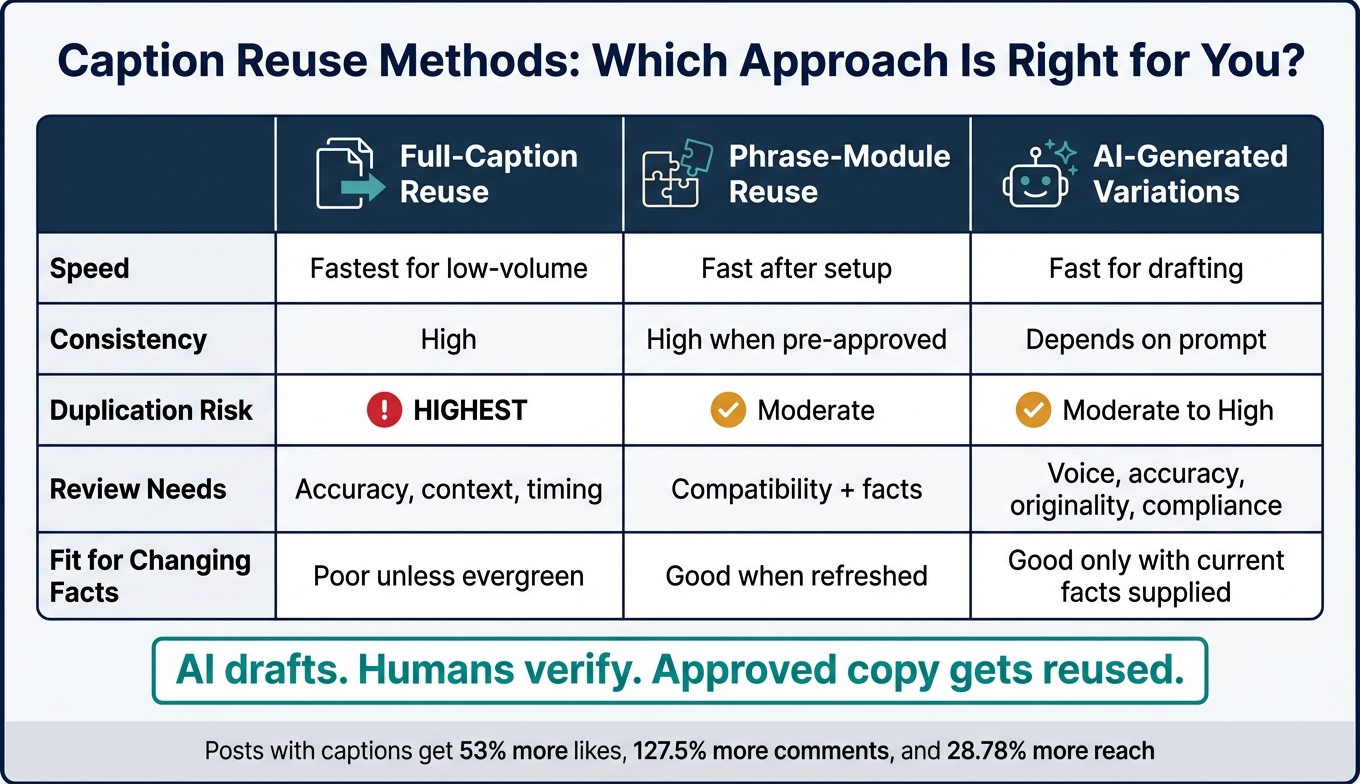
Caption Reuse Methods Compared: Speed, Consistency & Risk
Before you add captions, set the rules that keep the library consistent as it grows. That matters even more when more writers, more post types, and more formats start moving through the same workflow. A one-page voice card works well because it's short enough to use while drafting and specific enough to keep everyone on the same page.
Pick three to five voice traits and turn each one into a rule, not just a label. For each trait, add a plain-English definition along with clear do and don't examples. That side-by-side contrast is what makes the card useful. For instance, plainspoken can mean using clear, familiar wording and skipping jargon.
Add four short word lists: must-use, preferred, use-with-care, and never-use. Include Sound like and Never sound like fields too, along with the brand's preferred level of formality and notes about the audience. Keep these lists tight and specific - about 10 to 20 preferred terms and 5 to 10 restricted words with suggested replacements.
Then spell out the mechanics that often drift from writer to writer:
| Element | Rule example |
|---|---|
| Contractions | Use them: you're, we'll, it's |
| Exclamation points | One max, only for genuinely celebratory posts |
| Capitalization | Sentence case for captions; capitalize approved product names only |
| Emojis | Limit regular use to a small approved set of two or three recurring emojis; avoid them in customer-support or issue-response posts. |
| Hashtags | One branded hashtag and a few relevant tags |
| Calls to action | Use low-friction CTAs such as Save this for later, Explore the guide, or Try it |
Then add two or three reusable sentence patterns. These aren't finished captions. Think of them more like templates for rhythm. They help your writing stay familiar without making every caption sound copied from the last one. For example: If [audience problem] is getting in the way, try [practical solution].
Once the voice card is in place, map tone by use case. Show how the tone shifts across the five Instagram moments that come up most often, so writers aren't left guessing.
| Instagram moment | Tone emphasis | Avoid |
|---|---|---|
| Product launch | Confident, energetic, specific | Vague hype or unsupported claims |
| Customer education | Clear, patient, useful | Jargon, decorative language |
| Seasonal promotion | Warm, inviting, transparent | Fake urgency, such as Act now! |
| Customer support | Calm, empathetic, direct | Humor, dismissiveness |
| Issue response | Accountable, factual, measured | Speculation, cleverness over clarity |
Don't build separate brand voices for each case. That's where things start to drift. Instead, show writers which traits to turn up or down based on what the audience needs at that moment. A support reply and a product launch caption should still sound like the same brand. They just lean on different parts of the voice.
Once the voice card is set, organize the library by format and purpose.
Once the voice card is set, the next job is simple: make the library easy to search. Writers shouldn't have to dig through a maze just to find one caption. A shallow setup works best: platform, format, purpose.
Set up folders based on the content format and what that content needs to do.
| Format | Purpose folders |
|---|---|
| Feed | Education, How-to, Case studies, Testimonials, Product features, Announcements |
| Stories | Polls, Questions, Link clicks, Product stickers, Behind the scenes, Limited-time offers, Reshares and community |
| Reels | Education, Entertainment, Product or Offer |
Instagram captions can be long, but in the feed, people only see the first 125 characters before they have to tap for more. That means each feed record should save the opening hook in its own field, separate from the main body. It also helps to store the body, proof point, CTA, and Instagram hashtags group as their own fields.
For Stories, store content as short frame sequences. Each frame should include the frame text, the interaction type, and the next step. That way, a writer can tell what happens from one frame to the next without guessing.
Reels need a bit more structure. Keep separate fields for the hook, on-screen text, spoken script, subtitles, caption, and cover text. If you don't split those up, copy gets mixed between formats fast.
Tags only work when the list stays controlled and everyone uses it the same way. Tag every entry with content pillar, audience, funnel stage, tone, CTA, approval status, format, campaign, and review date.
Naming rules matter too. A file name should tell you what you're looking at right away. For example, IG_Education_Reel_CaptionLibraryHooks_v03_2026-09-29 shows the platform, purpose, format, subject, version, and date in one line.
Use ISO dates in the YYYY-MM-DD format so files sort in time order. And instead of replacing approved files, increase the version number. For multi-part Reels, add a suffix like _SCRIPT, _SUBTITLES, or _CAPTION so linked files stay grouped and easy to spot.
With the library in order, the next piece is setting rules for reuse and approval flow.
Once your library is easy to search, the next step is setting rules for reuse and deciding who signs off on what. As publishing volume climbs, those rules keep fast output from drifting into a messy, uneven feed. Maintaining quality while scaling is essential for Instagram growth.
Instead of rebuilding every caption from scratch, reuse approved modules. Split each caption into five parts and save each one with its use case and approval status. A simple setup might include:
That said, not every module should be dropped in as-is. Reuse only evergreen modules, and double-check proof, dates, prices, and audience-specific details before anything goes live.
If you want the feed to sound consistent without sounding copied, rotation matters. Don’t reuse the same hook or core phrase within the last 10 posts. Cycle through at least three CTA families, and don’t pair the same hook with the same signature line more than once per campaign. Label modules as evergreen, limited-use, or retired. Also, review the full feed, not just one caption at a time. Repetition often jumps out only when recent posts are viewed side by side.
| Method | Speed | Consistency | Duplication risk | Review needs | Fit for changing facts |
|---|---|---|---|---|---|
| Full-caption reuse | Fastest for low-volume publishing | High | Highest; repeated openings and CTAs can make the feed feel copied | Accuracy, context, and timing | Poor unless every fact is evergreen |
| Phrase-module reuse | Fast after setup | High when modules are pre-approved | Moderate; combinations and hooks should still be rotated | Module compatibility and facts | Good when variable fields are refreshed |
| AI-generated variations | Fast for drafting and alternate wording | Depends on prompt and source material | Moderate to high if outputs are not compared across the batch | Human review for voice, accuracy, originality, accessibility, and compliance | Potentially good, but only when current facts are supplied |
AI can help with drafts and alternate phrasing, but brand voice, facts, and compliance should stay under human control.
Once those reuse rules are in place, each caption needs one clear route to approval.
Every caption needs one owner at each stage. A five-step flow keeps standards high without slowing everything to a crawl.
Risk tiers help routine posts move faster. Evergreen language that’s already been approved usually needs only brand and publisher review. Regulated claims, new promotions, and new testimonials should go through the full path, including specialist review. And one detail matters more than it seems: assign a single final approver so posts don’t get stuck waiting on each other.
Once the library structure and approval flow are set, AI can help move drafting along without replacing editorial judgment. That only works when AI stays in a narrow lane: use it for search and drafting, not final publishing.
The most useful role for AI here is search by intent. A writer can search for “short Reel caption for a product tutorial, confident tone, U.S. audience, educational CTA” and pull up approved modules tagged by format, intent, tone, audience, campaign, and approval status. That way, the approved library stays the source of truth.
From there, AI can create controlled variations from approved modules. The word to focus on is control. It should change only set parts, like the opening hook, sentence length, or CTA phrasing, while keeping locked brand terms, verified claims, and required disclosures exactly the same. One prompt can handle that: vary only the hook and CTA, preserve all product names and verified claims, and add nothing new.
AI can also repurpose one approved idea across formats. A single message about “three steps for planning a week of content” can turn into a carousel caption, a four-frame Story script, and a short Reel caption with a “watch and save” prompt. Same core idea, different length, pacing, and CTA.
It’s also handy for metadata and duplicate checks. AI can flag a caption that mentions “this weekend” but gives no end date, spot a hook that was used in the last 30 days, or catch a promo line that’s missing required legal language.
| AI can support | AI should not control |
|---|---|
| Search approved captions by intent, format, tone, and audience | Invent facts, testimonials, statistics, pricing, or guarantees |
| Generate controlled variations from approved modules | Publish directly without human review |
| Adapt one idea for Posts, Stories, and Reels | Decide whether a claim is legally or factually acceptable |
| Detect repeated wording and missing metadata | Treat high engagement as proof that copy is accurate |
| Flag old dates, campaign IDs, or product terminology | Replace the brand owner's final editorial judgment |
AI should never invent testimonials, results, stats, pricing, guarantees, dates, endorsements, or product capabilities.
The rule is simple: AI drafts, humans verify, approved copy gets reused. Every AI-generated caption should carry the label “AI draft” until a writer checks accuracy, a brand editor reviews voice and clarity, and a designated owner gives final sign-off. Only then should it enter the approved library as a reusable module.
Instagram performance data shows what gets traction. It does not tell you whether a caption is accurate or on brand. A post can get strong engagement and still miss the mark. On the flip side, a solid caption can underperform for reasons that have nothing to do with copy quality.
Analytics can help the team decide which caption modules are worth more testing and which ones may need to be retired. But approval for caption quality stays with people, not software. AI can flag captions with expired dates, discontinued products, or old offers. For example, a caption that says “available through September 30, 2026” should be surfaced after that date for retirement or revision. The editor then decides whether to update, keep, or remove it. That keeps the library current and ready for the final health check.
A caption library stays useful only if someone keeps it up to date. If no one checks it, approved copy starts to drift, and old material finds its way back in. The good news? Maintenance doesn't have to be a huge job. It just has to happen on a steady rhythm.
That matters even more when the same library needs to support feed posts, Stories, and Reels without slowing the team down. Folders, tags, reuse rules, and approvals help - but only when the library gets cleaned up on a set schedule.
The main habit here is a weekly audit: look at recent posts for reach, comments, and saves, then revise prompts that miss brand voice or CTA goals. Let AI handle drafting. Let an editor make the final call.
Use the same tags, folders, and approval status you set up earlier to make this check fast. Run it during routine reviews and before anything goes live:
| Check | What to verify |
|---|---|
| Opening line | Strong hook with natural keywords near the start |
| Tone match | An existing customer would recognize the brand voice |
| CTA clarity | There is one obvious action |
| Format compatibility | Caption structure fits the post type |
| Claims verification | Every factual claim has been manually confirmed by a human editor |
| Prompt review | Prompts that repeatedly miss brand voice or CTA goals are rewritten or retired |
| Results review | Recent posts are checked for reach, comments, and saves |
Keep the workflow repeatable: organize prompts by objective, review performance often, and leave final judgment to people.
Start by auditing your existing content. Look for your top-performing posts and the themes that keep showing up. That gives you a clear picture of what's working instead of guessing.
Next, pick one central tool that fits how your team already works. If the tool fights your workflow, people won't use it consistently.
Then set up your library in a simple, usable way. Organize folders by objective and format. Use a small group of tags that stay the same across the library, so items are easy to find later.
Your workflow should also be crystal clear:
Inside the library, keep the pieces your team reaches for again and again. That can include brand voice notes, hook templates, and approved product claims. Think of it like keeping your best tools in the top drawer, not buried in the garage.
Tag each caption entry with a small, consistent set of searchable fields: audience segment, campaign, performance tier, status, last reviewed date, and post format or content type. Add language and platform when they matter.
Also include a short metadata block with:
This keeps your caption library easy to scan and easy to search. You can filter by campaign, spot top-performing posts fast, and see at a glance whether a caption still fits what you're working on.
Review your caption and phrase library monthly for quick cleanup. Fix broken or outdated tags, and clear anything that’s been stuck in pending review for more than 30 days.
Update the library structure quarterly. Prune unused tags and adjust folders as priorities shift.
Yearly, archive outdated items so searches stay clean, while keeping proven variations on hand for reference.


