
5 Best Instagram DM CRM Tools Tested 2026
Hands-on tests of five Instagram DM CRM tools — pipeline support, automation, inbox routing, and revenue tracking compared.
Hands-on tests of five Instagram DM CRM tools — pipeline support, automation, inbox routing, and revenue tracking compared.
4.98 /5 - from 58k reviews
Trusted by 50,000+ creators — get real engagement delivered to your profile in minutes, not days.

If you want Instagram DMs tied to deals and sales, I’d pick Kommo first. On September 30, 2026, I tested 5 tools on the same jobs: connect Instagram, log an inbound DM, add a tag, move a lead, send an auto-reply, export data, and track a conversion.
Here’s the short version:
A key point: what works depends on your Instagram account type, Meta access, and connected apps. So a feature on a pricing page may not work right away in your setup.
What mattered most in this test:
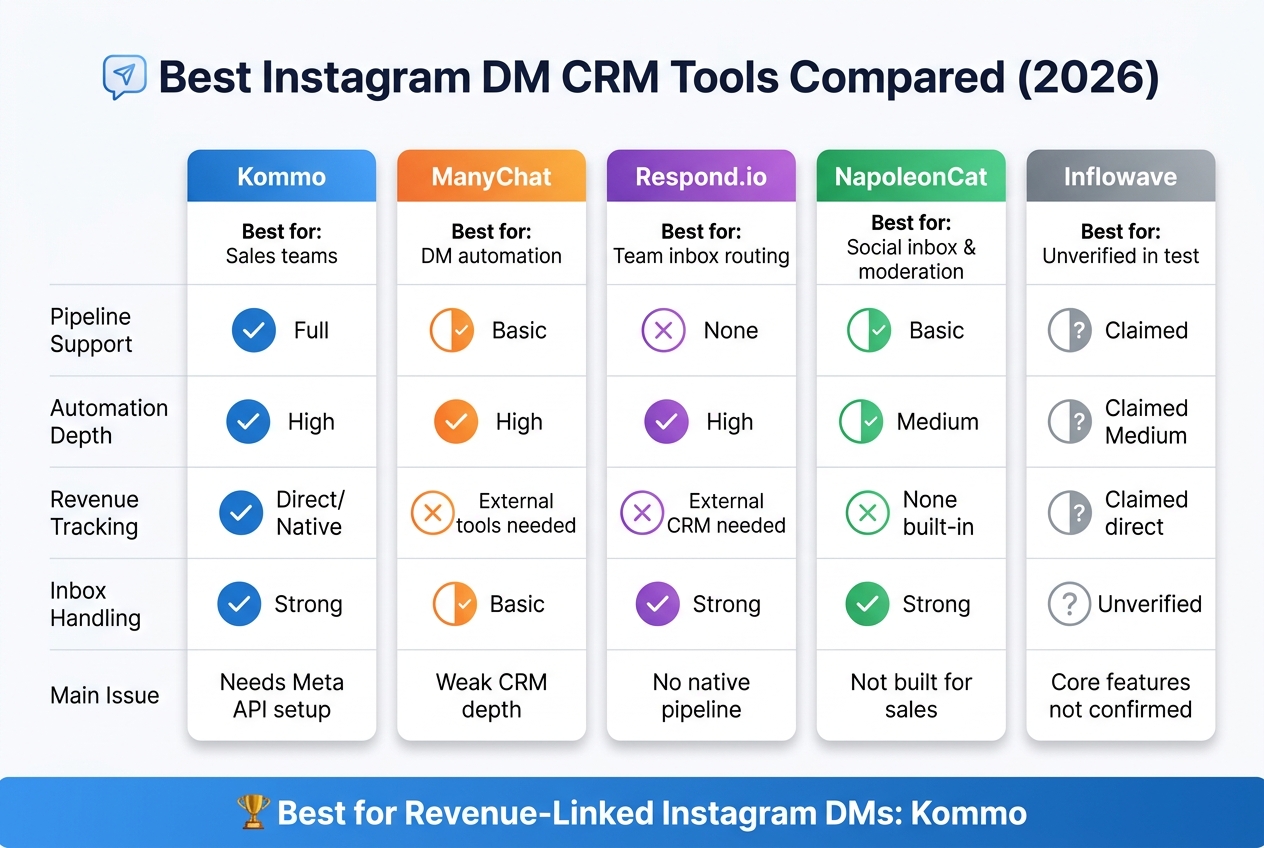
Best Instagram DM CRM Tools Compared (2026)
| Tool | Best for | Pipeline | Automation | Revenue tracking | Main issue |
|---|---|---|---|---|---|
| Kommo | Sales teams | Full | High | Direct | Needs Meta API setup |
| ManyChat | DM automation | Basic | High | External tools needed | Weak CRM depth |
| Respond.io | Team inbox routing | No native deal pipeline | High | External CRM needed | More setup work |
| NapoleonCat | Social inbox and moderation | Basic | Medium | None built in | Not built for sales tracking |
| Inflowave | Lead management claims | Claimed full | Claimed medium | Claimed direct | Test did not confirm core features |
In short, I found a simple split: Kommo leans sales, ManyChat leans automation, Respond.io leans inbox control, and NapoleonCat leans moderation. If your goal is to connect Instagram DMs to closed deals and $ revenue, Kommo was the clearest pick.
Kommo brings Instagram DMs into a CRM made for sales teams. It connects through the official Instagram Graph API.
When a new DM comes in, Kommo turns it into a lead card. It pulls in the sender’s Instagram handle and profile data at the same time. The full chat history syncs too, so if one rep hands the conversation to another, nothing gets lost.
Kommo also puts Instagram alongside WhatsApp, Facebook Messenger, and Telegram in one inbox. For teams juggling several messaging apps, that setup makes life a lot easier.
Kommo’s Digital Pipeline moves leads through sales stages inside the CRM. Each Instagram chat stays tied to its lead record, so reps can see the conversation and the deal status in one place.
Salesbot handles the routine work. It can:
The Digital Pipeline can also move leads from stage to stage on its own, including sending follow-up DMs as they progress.
Automation only helps if it connects back to revenue. Kommo ties Instagram chats to lead records across the pipeline, which makes it easier to spot which DMs turn into pipeline opportunities. Next, the comparison moves to tools that give up some CRM depth in exchange for simpler DM automation.
Where Kommo tracks deals, ManyChat stays focused on DM automation. It’s automation-first, not CRM-first.
ManyChat captures Instagram DMs and can kick off follow-up right away. In testing, captured DMs triggered tagged contacts and follow-up automation immediately - but no full contact record was created.
ManyChat relies on tags, custom fields, and human handoff to handle leads. There’s no true pipeline view, so teams that need structured deal tracking have to connect an external CRM.
Automation sends DMs down different paths based on trigger, tag, and handoff rule. That works well for most lead capture and follow-up use cases, but it doesn’t move contacts through a defined sales pipeline.
ManyChat has no native revenue attribution. Sales reporting depends on an external CRM. So while ManyChat works well for lead capture, it’s much weaker when you need sales attribution.
Respond.io is built for multi-agent Instagram inbox management, so it works well for teams handling a lot of DMs. It does a good job of pulling messages in and sending them to the right person. But when you need a clear line from chats to revenue, it falls short.
Respond.io connects to Instagram through the official Instagram Graph API. It pulls direct messages, story mentions, and message reactions into one unified thread. Every interaction stays logged in that same thread.
That setup helps teams stay organized. Multiple agents can work from the same inbox without sharing logins, which is a big plus for busy support or sales teams. Where it starts to feel limited is deal tracking. The inbox is shared, but the sales process isn't built into the tool.
Respond.io supports routing and assignment, but it doesn't include a built-in sales pipeline or deal stage view. If your team needs a structured way to track deals, you'll have to connect another CRM, such as HubSpot, Salesforce, or Pipedrive.
So the core strength here is conversation control. It helps manage who handles what and where each message goes. It doesn't give sales teams a built-in way to move opportunities through a funnel.
Its workflows focus on routing, assignment, and inbox operations. They're made to keep conversations moving to the right agent, not to run pipeline automation.
Respond.io does not natively track revenue, closed-won status, or transaction value. If you want sales attribution, you need a connected CRM.
For teams that need sales tracking tied directly to pipeline stages, the next tool is a better fit.
NapoleonCat is a social inbox tool, not a sales pipeline tool. That distinction matters if you need to track deals from first message to closed sale.
NapoleonCat pulls Instagram DMs, comments, and story replies into one inbox. It also builds contact profiles with message history, notes, and account details for each person who interacts with you.
That setup makes conversations much easier to manage. You can see context fast, avoid messy handoffs, and keep replies from slipping through the cracks.
It also supports multi-account management, which helps teams working across more than one Instagram profile.
NapoleonCat adds a Social CRM layer on top of the inbox. You can tag contacts and assign threads to teammates for follow-up.
But this is where the line becomes clear: it doesn't include a native visual sales pipeline. There’s no Kanban board, no deal stages, and no drag-and-drop funnel view.
It also doesn’t include automated lead scoring or probability-to-close metrics. You can export inbox and contact data, but not revenue-linked records. So while the tool helps organize conversations, it doesn’t give you a clean sales view.
Its automation is centered on inbox management. That includes:
What it doesn’t do is handle sales sequences or lead-routing workflows. So if your team wants message automation tied to deal movement, NapoleonCat won’t cover that on its own.
NapoleonCat does not offer native revenue attribution. It organizes conversations, but it does not connect them to revenue.
There’s no payment gateway integration, no closed-won tracking, and no way to assign a dollar value to a lead inside the platform. That makes NapoleonCat a solid fit for engagement and moderation, not for closed-won reporting.
NapoleonCat works best for moderation and tagging. If revenue tracking matters, you’ll need another tool for that. The next tool goes further on sales tracking.
Inflowave could not be fully verified in this test for DM capture, CRM views, automation, or revenue tracking. So if your team needs confirmed sales tracking, that's a problem.
The comparison below focuses on tools with proven pipeline and attribution features. Because of that, Inflowave sits outside the main comparison for verified sales workflows.
With the hands-on tests done, the last step is simple: match each tool to the job it handles best.
The main divide is pretty clear. Some tools are built more for inbox work, while others lean more toward sales tracking. Kommo and Inflowave sit closer to the sales side. ManyChat is geared more toward automation. Respond.io and NapoleonCat lean toward inbox management.
Here’s the cleanest fit for each one tested.
Use the tool that lines up with your main goal: pipeline tracking, automation, inbox routing, or social moderation.
No single tool works for every workflow. When you look at DM capture, tagging, automation, pipeline views, exports, and revenue tracking, the best pick depends on what you need most. In this comparison, Kommo stands out for sales tracking, while ManyChat is the better pick for automation-heavy lead capture.
Here’s the simplest way to choose:
If your main goal is revenue-linked Instagram DMs, Kommo is the clearest all-around choice.
You’ll need to switch your Instagram account to a Professional account, either a Business or Creator profile.
Then go to Settings > Messages and Story Replies > Message Controls and turn on Allow Access to Messages.
For security and compliance, use tools that connect through Meta’s official Graph API and OAuth. Never share your Instagram password with a third-party service.
Yes - if you connect Instagram DM activity to your CRM or analytics platform.
A simple way to do this is to add unique UTM parameters to links you send in DMs and use DM-only promo codes. That lets you track link clicks and purchases that happen later, not just instant sales.
From there, standardize your CRM fields - such as source channel, campaign name, and lead status - so you can connect DM conversations to closed deals. Once that setup is in place, you can measure revenue, average order value, and ROI in U.S. dollars ($).
Meta API setup takes some effort, but it’s pretty direct if you use Meta’s official API tools. You’ll need an Instagram Professional account, which means either Business or Creator, plus OAuth/Meta Graph API authorization and message access turned on.
In plain English, that usually means granting permissions like instagram_manage_messages, setting up webhooks or automation endpoints, and following Meta’s rules around the 24-hour messaging window and DM rate limits.


