
Best Practices for Story-to-Highlight Conversion
Select evergreen Stories, design clear covers, organize themes, and refresh Highlights to keep your Instagram profile polished.
Select evergreen Stories, design clear covers, organize themes, and refresh Highlights to keep your Instagram profile polished.
4.98 /5 - from 58k reviews
Trusted by 50,000+ creators — get real engagement delivered to your profile in minutes, not days.

Instagram Highlights are a powerful way to extend the life of your Stories and make your profile stand out. Here’s what you need to know:
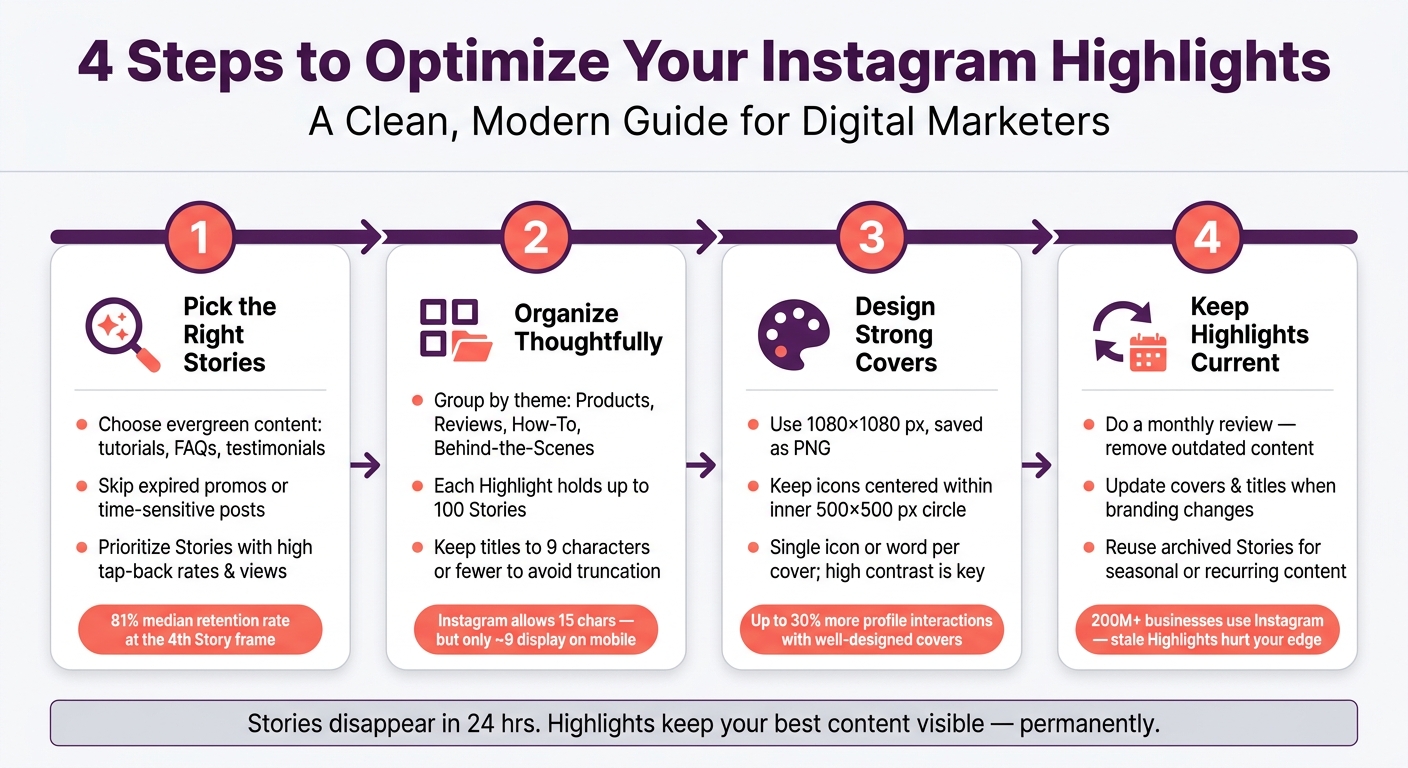
4-Step Instagram Highlights Strategy: From Stories to Profile Gold
Think of Highlights as the display window of your Instagram profile - they’re the first thing people notice. Choosing the right Stories is crucial for making a lasting impression on your profile. Here’s how to ensure your Highlights consistently reflect your brand in the best light.
Stick with Stories that stay relevant over time. Tutorials, FAQs, and testimonials are great options because they provide value long after they’re posted. As Therese Nguyen, Content Writer at Rival IQ, explains:
"Highlights are curated collections of your Stories - both old and new - that are easily and indefinitely accessible for users to scroll through."
Adding behind-the-scenes clips or content about your creative process can also make your brand feel more relatable, giving new followers a reason to engage.
Avoid including Stories tied to expired promotions or past events. For example, a Story about a sale from three months ago can make your profile look neglected. Instead, archive these Stories - you might find a way to repurpose them later.
Let your Instagram analytics guide you. Stories with high tap-back rates, shares, replies, or views are worth highlighting. These metrics show what content resonates with your audience. For instance, the median retention rate for the fourth frame of a Story is 81%. Stories that keep viewers engaged are perfect candidates for your Highlights.
Once you've chosen the right Stories, the next step is making them easy to navigate. Thoughtful organization is what transforms your Highlights into a polished and strategic display. After all, even the best content can fall flat if it’s hard to find.
Sort your Instagram Highlights into categories that make sense for your audience. Think about what they’re likely to look for - categories like "Products", "Reviews", "How-To," or "Behind-the-Scenes" work well. As Nikola Bojkov, CEO of EmbedSocial, explains:
"Instagram Highlights are groups of stories that you can create as folder sections on your Instagram profiles."
With each Highlight capable of holding up to 100 Stories, you won’t need to create unnecessary folders.
Too many Highlights can overwhelm visitors and make your profile feel cluttered. Stick to the essentials - only include categories that add real value. This ensures your Instagram content remains focused and engaging. A streamlined row of Highlights not only looks intentional but also encourages interaction. On the other hand, a long, sprawling lineup risks confusing your audience.
Instagram allows up to 15 characters for Highlight titles, but most mobile screens only display about 9 characters before cutting off text. Keep your titles short and impactful. For example, instead of "Customer Reviews", opt for "Reviews" to avoid truncation like "Customer R…". Avoid wasting space with filler words like "Story" or "Highlight." Instead, use concise labels like "Shop", "FAQ," or even relevant emojis for clarity.
It’s also worth noting that Highlights automatically rearrange themselves based on the most recently updated. Since you can’t manually reorder them, avoid designing covers that depend on a fixed sequence.
Your Highlight covers are like the front door to your Instagram profile - they’re the first thing visitors notice and help guide them through your content. Think of them as a navigation menu that sets the tone and gives a sneak peek of what’s inside. Profiles with well-designed Highlight covers can see up to 30% more profile interactions compared to those using default or inconsistent covers. Let’s break down how to create covers that grab attention and strengthen your brand.
Your Highlight covers should align with your brand’s overall look and feel. This means using the same colors, fonts, and visual style you use on your website and other platforms. Consistency like this helps people recognize your brand instantly.
When designing, use 1080 x 1080 pixels (or 1080 x 1920 for Story dimensions) and save your covers as PNG files for the best quality. Tools like Canva are perfect for this - even if you’re not a design pro. To keep things cohesive, batch-design your covers using a template that ensures uniform line thickness, icon sizes, and spacing.
Because Instagram crops Highlight covers into small circles, simplicity is crucial. A design that looks great full-size can turn into an unrecognizable blur when scaled down. Stick to a single clear icon or word per cover, and make sure your design is centered so nothing gets cut off.
High contrast between your icon and background is key - your covers should stand out, even during a quick scroll. Use icons that are easy to recognize at a glance, and avoid repeating the Highlight title on the cover itself. Instead, focus on making the design fit neatly within the inner 500 x 500 px circle so it looks great across all devices.
Each cover should visually hint at what’s inside that Highlight. For example, use a shopping bag icon for a "Shop" Highlight or a speech bubble for "Reviews." When the icon and title work together, navigating your profile feels effortless. Don’t forget to test your covers in both light and dark mode to ensure they’re clear and attractive no matter how users view them.
Your Instagram Highlights aren't something you can just set up and forget about. With over 200 million businesses actively using Instagram for marketing, stale Highlights can quietly detract from the polished profile you've worked hard to create. Regular updates and archiving are key to keeping your Highlights sharp and aligned with your brand. A quick monthly review can make a big difference.
Doing a monthly check of your Highlights helps ensure your profile stays relevant and aligned with your branding. Remove old promotions, past product launches, or outdated events. Here's how: long-press the Highlight, select "Edit Highlight," go to the "Selected" tab, uncheck the stories you want to remove, and tap "Done." If an entire Highlight category is no longer useful, press and hold the Highlight and choose "Delete Highlight" to get rid of it. Since each Highlight can store up to 100 stories, it's easy for outdated content to accumulate without notice. Setting a regular reminder to review them can help you stay on top of it.
When your branding changes - whether it's a new logo, updated colors, or refreshed messaging - your Highlight covers and titles should reflect those updates. To make changes, tap "Edit Highlight," choose "Edit Cover," and pick a new image from your camera roll or past stories. Keep in mind that updating a Highlight moves it to the front of your profile row, as explained in Step 2. Also, try to keep Highlight titles short - around 9 characters or fewer - since Instagram cuts off longer text on your profile.
"Getting strategic with your Highlight covers is another way to communicate what each Highlight is about... covers are a great way to capture visitors' interest, express the content of each Highlight, and strengthen your brand identity." - Therese Nguyen, Content Writer, Rival IQ
Refreshing your covers and titles is a simple but effective way to keep your Highlights visually appealing and on-brand.
Instagram's archive is a goldmine for keeping your Highlights fresh. As long as "Save story to archive" is enabled in your settings, every Story you post is automatically saved after the 24-hour window expires. If a past Story becomes relevant again - like a seasonal promotion, a recurring FAQ, or an evergreen tutorial - you can easily add it back to a Highlight. Just tap and hold the Highlight, select "Edit Highlight," and navigate to the "Stories" tab to find and include archived content. This feature is especially handy for brands running annual campaigns or reintroducing educational content for new followers who may have missed it the first time around.
Turning Stories into Highlights is straightforward but requires a bit of focus and planning. A well-organized profile often stands out because of a few consistent habits.
Start with selection: focus on evergreen content like FAQs, tutorials, and product showcases instead of posts tied to a specific moment. Group Stories into clear themes, such as "Reviews" or "How-To", to make it easier for the 70% of users visiting a brand's Instagram profile to quickly find what they need.
On the visual side, custom covers that align with your brand create an immediate sense of professionalism. Stick to single-word titles or emojis to avoid awkward truncation when viewed on your profile.
Make it a habit to review your Highlights monthly. This gives you a chance to remove old content, refresh the visuals, and pull in relevant Stories from your archive. Regular updates keep your profile looking fresh and prevent unnecessary clutter. This maintenance is a key part of optimizing your profile's reach.
To leave a lasting impression, pin Highlights that feature your most impactful or engaging content - whether that's key topics, standout products, or compelling brand stories. Prioritize eye-catching and meaningful Highlights that align with your brand's core identity and connect with your audience. These Highlights act as permanent markers of your profile's focus, building trust and clearly showcasing your brand's story.
Keeping your Instagram Highlights fresh is a smart way to keep your profile engaging and up-to-date. While there’s no strict rule, a good practice is to review and update them monthly or whenever you have new content worth sharing. This helps ensure your Highlights showcase your latest offerings and stay consistent with your brand’s message.
The best mobile cover design combines simplicity, visual appeal, and a clear representation of your brand or theme. It should fit seamlessly within the small circular format, stand out from the crowd, and be instantly recognizable. Prioritize clarity and keep the design minimal to ensure it grabs attention and remains effective.


