
How AI Tools Transform Instagram Visuals
Compare top AI image editors for Instagram—speed, cost, accuracy, and batch features to help creators and businesses streamline visuals.
Compare top AI image editors for Instagram—speed, cost, accuracy, and batch features to help creators and businesses streamline visuals.
4.98 /5 - from 58k reviews
Trusted by 50,000+ creators — get real engagement delivered to your profile in minutes, not days.

AI tools are revolutionizing Instagram content creation by making image editing faster, cheaper, and easier. Traditional social media workflows for photo editing required significant time and expertise, but AI-powered tools now enable users to edit images in seconds using simple text prompts. These tools cater to Instagram's 2026 algorithm, which rewards high-quality visuals that drive engagement, such as saves and shares.
Here’s what you need to know:
| Tool | Best For | Accuracy | Processing Speed | Batch Processing |
|---|---|---|---|---|
| Photoroom | Product photography | 93.3% | 2–5 seconds | Up to 50 images |
| Remove.bg | Portraits | 94% | 3–5 seconds | Unlimited bulk editing |
| Pixelcut | Quick edits | Moderate | 3 seconds | Up to 50 images locally |
| Removal.AI | Complex details | Moderate | 2–5 seconds | API-based workflows |
| Pixelbin.io | Custom workflows | High | Under 10 seconds | Folder uploads via API |
AI tools save time and lower costs while maintaining quality, making them essential for creators and businesses alike. With Instagram users increasingly influenced by visuals, these tools help you stay competitive in a fast-paced content landscape.
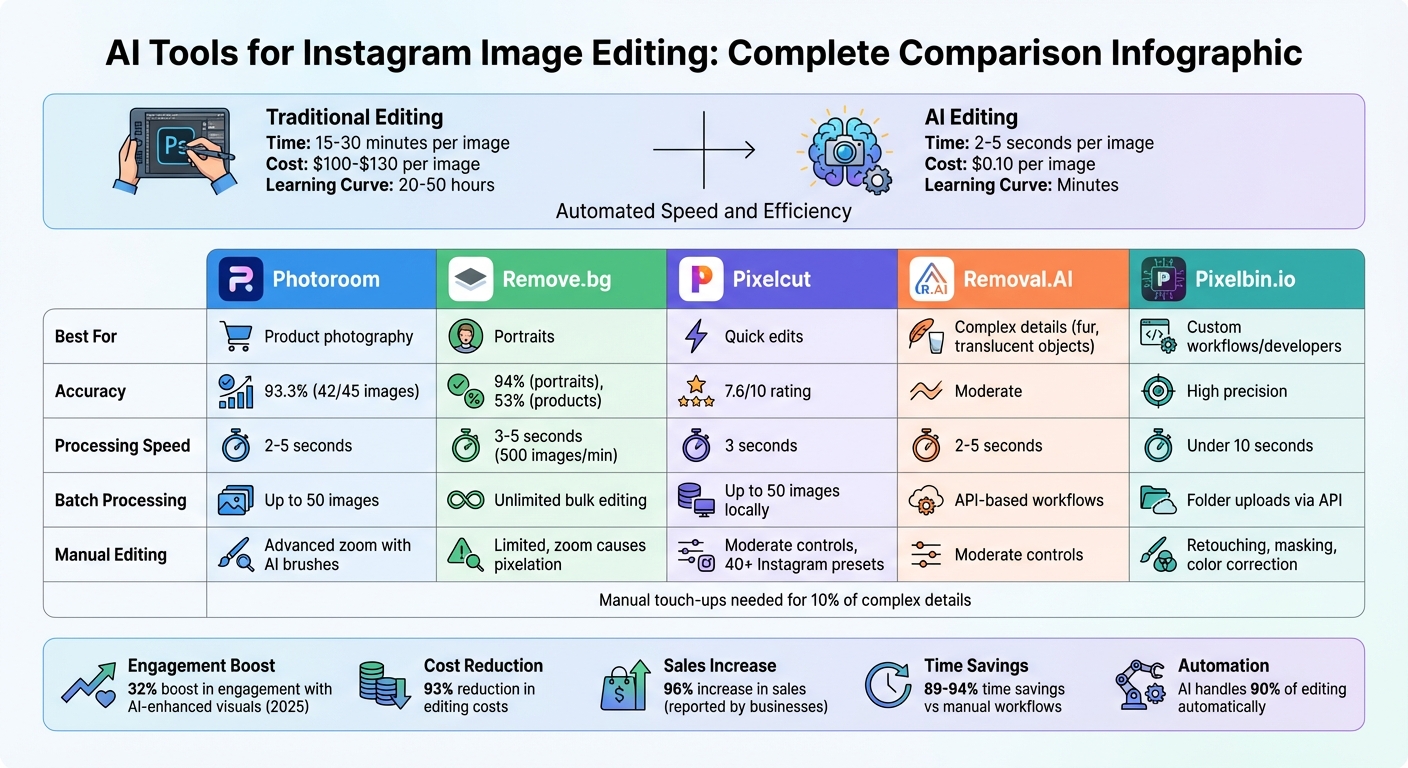
AI Instagram Editing Tools Comparison: Speed, Cost, and Accuracy

Photoroom boasts a 70.8% accuracy rating in independent tests, successfully handling 42 out of 45 complex images featuring intricate details like hair, fur, and transparency. Using advanced "color decontamination" technology, it eliminates color spill - such as green reflections from backgrounds - delivering clean and polished cutouts perfect for Instagram posts.
Photoroom's AI, trained on millions of images, excels at capturing fine details that other tools often struggle with. In 2024, Saad Basir, founder of Watches, Inc., praised its background removal capabilities as being unmatched in the industry.
"The background removal [in Photoroom] is fantastic. I think it's the best in the industry right now because I've used a lot and none can compare to what Photoroom can do." – Saad Basir, Founder, Watches, Inc.
This level of precision ensures high-quality results while speeding up the editing process.
Photoroom processes single images in just 3 to 10 seconds on its mobile and web apps. Its API is even faster, handling images in about 450 milliseconds each. For Instagram creators juggling multiple posts daily, this speed is a game-changer. Pam East, founder of Pam East Designs, highlighted how much time the tool saves compared to traditional software:
"The time Photoroom saves me is HUGE. What took forever in Photoshop now takes seconds in Photoroom." – Pam East, Founder, Pam East Designs
This efficiency makes it easier for creators to consistently produce eye-catching visuals.
For those who need more control, Photoroom offers a suite of manual editing tools.
Features like "Edit Cutout" and "Magic Brush" allow users to refine edges with precision, down to the pixel level. Other tools include "Magic Retouch" for removing unwanted objects, "AI Fill" for modifying specific areas, and "AI Expand" for recovering parts of an image beyond its original frame. Even at high zoom levels, the editor maintains clarity, and exporting as PNG ensures the image quality remains intact.
These tools are ideal for creators who want to perfect their images without sacrificing quality.
Photoroom also shines when it comes to handling large volumes of images.
With Pro and API plans, users can process hundreds of images at once using the batch mode. In 2024, GoodBuy Gear adopted Photoroom to streamline their background editing workflow. Audra Jones, Product Owner at GoodBuy Gear, shared how it sped up their process and ensured consistent photo quality, helping them get products online faster. Businesses report impressive results, including a 93% reduction in editing costs and a 96% increase in sales.
These features make Photoroom an indispensable tool for creators and businesses looking to scale their visual content efficiently.

Remove.bg boasts 94% accuracy for handling complex images and up to 96% for portraits, making it a go-to tool for Instagram headshots and fashion-focused content. It processes images in just 3 to 5 seconds, which is a major time-saver for creators. While it handles standard portraits and clothing textures well, it can occasionally falter with intricate details like jewelry reflections or lace patterns.
High-resolution images (at least 1080p) yield the best results with this tool. Using lower-resolution files can reduce accuracy by as much as 20–30%. In tests involving 45 diverse images, Remove.bg successfully processed 24, placing it second only to Photoroom while outperforming other tools. However, users might encounter blurry edges when zooming in for precise edits, which can make detailed refinements a bit tricky.
For Instagram creators juggling multiple posts, Remove.bg offers a major speed advantage. While manual masking in Photoshop can take 5 to 15 minutes per image, Remove.bg delivers similar results in just seconds. Its API processes images in around 600 milliseconds, making it ideal for automated workflows. This efficiency also translates to cost savings, with high-volume pricing as low as $0.07 per image, compared to the $0.65–$10.00 range for manual outsourcing.
For creators aiming for flawless visuals, the "Magic Brush" tool allows for precise manual edits, letting users erase or restore parts of the image as needed. This is especially helpful for fixing "halos" or smoothing blurry edges around tricky elements like fine hair. Files can also be exported in PSD format with layers intact, giving users greater flexibility. Additionally, plugins for Photoshop and integrations with platforms like Shopify and Zapier make it easy to streamline professional workflows.
The desktop app supports batch uploads of up to 1,000 images and works on Windows, Mac, and Linux. In May 2025, Kemmetmueller Photography used Remove.bg to process 114,000 students' photos (3 images each). This reduced their processing time from 30 seconds to just 8 seconds per image - a 73% time reduction that saved over 2,090 hours in one season.
Pixelcut keeps pace with Remove.bg in terms of speed, delivering background removal in just 3 seconds. What sets it apart is its user-friendly design, tailored especially for Instagram creators. Beyond speed, it excels at preserving intricate details like hair strands, beard textures, and even semi-transparent objects like coffee cups - tasks that could take up to 15 minutes of manual work in Photoshop [31, 32]. Software engineer Pranay Aduvala summed it up perfectly:
"Pixelcut removed my background in 3 seconds."
Pixelcut shines when the subject contrasts clearly with the background. However, it can falter when the subject’s colors closely match the backdrop [31, 32]. The tool supports resolutions as high as 6,000×6,000 pixels, but working with larger files might cause minor delays during input [31, 32]. To achieve the best results, use images where the subject stands out distinctly.
Pixelcut includes a "Refine" tool with "Erase" and "Restore" brushes, allowing for quick touch-ups in about 30 seconds [31, 32]. Its "Magic Eraser" makes removing unwanted objects as simple as a swipe, while the layer management system gives users control over positioning and opacity [33, 37]. For added polish, the tool can create AI-generated shadows and reflections, blending subjects seamlessly into new backgrounds [36, 39]. Plus, it offers over 40 presets designed specifically for Instagram posts, stories, and profile pictures for your business [33, 35].
For those managing multiple images, Pixelcut’s Pro plan ($9.99 per month) unlocks batch processing, making it easier to prep content for the week [31, 32]. The browser version supports up to 50 images at once, processing them locally without uploading to external servers. As Pranay Aduvala put it:
"Saves me hours every week, and my posts look cleaner because I can't get in my own way by sitting there editing and not posting."
With its speed, precision, and editing tools, Pixelcut proves to be a solid choice for creators looking to save time and elevate their content. Its batch processing and Instagram-focused features make it especially appealing for social media enthusiasts. Using these visuals alongside the best Instagram growth tools can further accelerate your account's reach.

Removal.AI stands out by tackling some of the toughest visual editing challenges on Instagram. It handles tricky elements like curly hair, thick fur, and translucent objects with ease. The tool is particularly adept at identifying subjects in complex situations, such as busy backgrounds, multiple people in a frame, or uneven lighting. It produces smooth, natural transitions without issues like color bleeding or halos. While extremely intricate patterns might require some manual touch-ups, its overall precision and efficiency make it a valuable Instagram app for editing photos.
Built for creators managing large volumes of content, Removal.AI balances speed and quality seamlessly. Unlike tools that focus on one at the expense of the other, it ensures professional-grade results while processing images quickly. This makes it a great fit for Instagram creators who need to churn out content at the speed demanded by the platform's algorithm.
Once the background is removed, creators can use the "Erase/Restore" tool to fix any small imperfections at the pixel level. The built-in editor also offers options to adjust aspect ratios, swap backgrounds, and add text. These features are particularly useful for polishing headshots or portraits, giving users the ability to fine-tune their visuals without spending hours on manual edits.
For those managing high-volume workflows, the free bulk desktop app can handle hundreds or even thousands of images. Pricing starts at $45.99 per month for 75 images and goes as low as $0.07 per image for 5,000 images ($359.90 per month). This makes it a practical option for creators looking to maintain a steady posting schedule. The free tier also includes unlimited standard-quality downloads and one HD credit to test the service, offering a flexible entry point for new users.
Pixelbin.io stands out as a developer-friendly platform designed to streamline Instagram image editing. By harnessing deep learning and advanced edge detection, it excels at isolating subjects with exceptional precision. It tackles challenging details like hair, fur, and lace - areas where many automated tools struggle. What might take 15–20 minutes to manually edit in Photoshop is reduced to under 10 seconds with Pixelbin's AI-driven processing.
Pixelbin.io's AI ensures high-quality extractions, delivering clean and sharp results. It effectively separates objects from backgrounds, even when working with intricate patterns or translucent materials. This makes it a dependable option for creating polished Instagram visuals across diverse content types.
The platform's AI-powered transformations - such as background removal, image upscaling, and color correction - are completed in mere seconds. It can upscale images up to 4× their original size and generate high-resolution, customizable backgrounds using simple text prompts, all within a matter of seconds.
In addition to its automated tools, Pixelbin.io offers manual features like retouching, masking, blurring, color correction, and intelligent cropping. These options let users refine images after the AI has done the bulk of the work. Being browser-based and mobile-friendly, the platform allows users to make quick adjustments anytime, anywhere.
For creators juggling large-scale workflows, Pixelbin includes batch processing and API support to handle multiple images at once. Users can upload entire folders, applying consistent backgrounds or styles to standardize their Instagram feeds. The platform offers a free basic plan, which includes three uses of the background generator without requiring sign-up. For those with higher demands, paid plans provide additional credits and API access, with pricing based on usage. This combination of speed, efficiency, and scalability makes Pixelbin.io a valuable tool for Instagram content creators managing high-volume production.
AI tools for Instagram image editing bring a mix of strengths and challenges, as highlighted in the individual reviews. Let’s break down how some of the most popular Instagram tools stack up:
Photoroom is a standout for product photography. Its "Edit Cutout" tool delivers sharp image quality, even at high zoom levels, allowing for pixel-level precision. However, its Pro plan caps batch processing at 50 images, which might not be ideal for creators handling large volumes.
Remove.bg shines in portrait editing, boasting an impressive 94% accuracy rate for complex human subjects. It also handles up to 500 images per minute, making it a powerhouse for bulk editing. On the downside, it struggles with product details, and zooming in on its interface can lead to pixelation, limiting fine-tuned edits.
Pixelcut and Removal.AI offer decent performance with basic manual editing features but fall short of the specialized capabilities seen in tools like Photoroom and Remove.bg.
Pixelbin.io takes a different approach, catering to developers with API integration and batch folder uploads. It also offers a free plan that allows three background generator uses without requiring sign-up, making it accessible for testing.
These comparisons highlight the trade-offs users must consider when selecting the right AI tool for their needs.
| Tool | Accuracy | Processing Speed | Manual Editing | Batch Processing |
|---|---|---|---|---|
| Photoroom | 93.3% (42/45 images) | 2–5 seconds per image | Advanced zoom with AI-assisted brushes | Up to 50 images (Pro plan) |
| Remove.bg | 94% (portraits); ~53% (products) | Up to 500 images per minute | Limited; zoom leads to pixelation | Unlimited bulk editing |
| Pixelcut | 7.6/10 rating | 2–5 seconds per image | Moderate controls | Essential batch processing |
| Removal.AI | Moderate | 2–5 seconds per image | Moderate controls | API-based batch processing |
| Pixelbin.io | High precision on complex details | Under 10 seconds | Retouching, masking, and color correction | Folder uploads with API support |
While AI tools automate the bulk of editing - handling around 90% of background removal - manual touch-ups are often necessary for tricky details like hair, transparent materials, and fine textures. Without human intervention, success rates for these elements can drop to as low as 31%. That said, leveraging AI for most of the work can save between 89% and 94% of editing time compared to fully manual workflows. Combining AI efficiency with manual precision offers the best results.
Choosing the right AI tool for Instagram comes down to matching your specific needs with each tool's capabilities. Photoroom stands out as a top choice for creators, thanks to its mobile-friendly design and e-commerce templates. It’s perfect for product-focused accounts that value speed while maintaining high-quality visuals.
For portrait-focused content, Remove.bg shines with its impressive 94–96% accuracy on human subjects, making it ideal for lifestyle and personal branding images. That said, creators working with products featuring intricate details might still need to make manual adjustments. If you manage large product catalogs, specialized AI tools can streamline your workflow by ensuring consistent lighting and shadows across hundreds of images - at just $0.10 per photo. This is a bargain compared to traditional studio photography, which typically costs between $100 and $130 per session.
These advancements in AI-driven content creation are making a noticeable impact. Posts with AI-enhanced visuals saw a 32% boost in engagement in early 2025. And with Instagram’s 2026 algorithm prioritizing saves and shares over likes, the quality of your visuals plays a direct role in expanding your reach.
Once your visuals are optimized, combine them with Instagram growth strategies to maximize impact. Tools like UpGrow (https://upgrow.com) use a mix of patented AI and human expertise to grow your audience, ensuring your enhanced content reaches the right people.
For product images, consider AI tools that excel in background removal and consistent editing. These tools help create clean, professional visuals that are perfect for showcasing products. For portraits, choose AI tools offering prompt-based background replacement and creative editing options. These features allow for more flexibility and a personal touch, ensuring your portraits look polished and unique. Each tool serves a specific purpose, tailored to meet the distinct requirements of product and portrait editing, helping your visuals leave a lasting impression.
When dealing with AI background removal tools, tackling tricky areas like hair or transparent objects can be challenging. To avoid poor cutouts, focus on edge refinement techniques. Choose tools equipped with advanced algorithms specifically designed for handling fine details, such as hair-level matting.
For optimal quality, always work with high-resolution exports and consider using batch processing for efficiency. However, for complex edges, it's worth taking the time to manually review and adjust them. This extra step ensures smoother and more precise cutouts that look polished and professional.
Yes, AI-edited images are likely to improve your Instagram reach by 2026. By refining visual quality, ensuring consistency, and driving engagement, these tools align well with Instagram's shifting algorithms. Better visuals grab attention, spark interactions, and promote organic growth - key factors for standing out in an increasingly competitive environment.


