
5 Steps to Recover After Buying Followers
Clean fake followers, cut risky apps, and rebuild real engagement to restore your Instagram's reach and trust.
Clean fake followers, cut risky apps, and rebuild real engagement to restore your Instagram's reach and trust.
4.98 /5 - from 58k reviews
Trusted by 50,000+ creators — get real engagement delivered to your profile in minutes, not days.

Buying followers might seem like a quick win, but it can tank your Instagram account. Fake followers lower engagement, confuse your metrics, and can even get your account flagged or banned. If you've made this mistake, here's how to fix it:
These steps will help restore your account's health and rebuild trust with Instagram's algorithm. Skipping shortcuts and focusing on genuine growth is the only way forward.
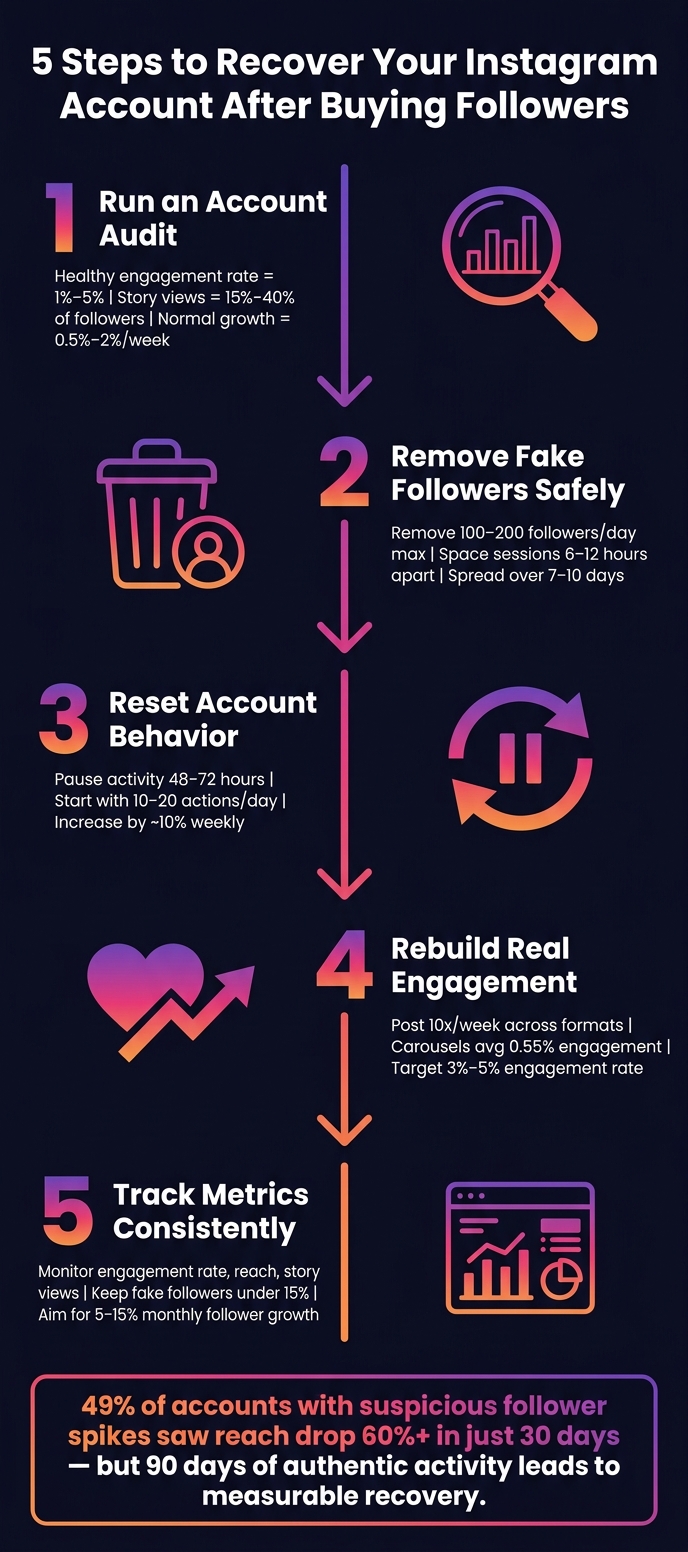
5 Steps to Recover Your Instagram Account After Buying Followers
Start by auditing your account to understand how fake followers might be affecting your engagement and how Instagram's algorithm perceives your profile. This process can reveal the percentage of fake followers, the impact on engagement rates, and other key insights about your account's health.
Fake followers often display some telltale signs:
Take a closer look at your follower growth history. Genuine growth typically happens slowly, with most healthy accounts growing between 0.5% and 2% per week. If you notice an unusual spike - like thousands of new followers in a day without any viral content or media attention - it’s a red flag that followers may have been purchased.
"Audit tools do not detect 'this follower was bought.' They detect 'this follower looks low quality,' which is correlated with bought followers, but not the same thing." - FMAX
Once you’ve identified suspicious followers, evaluate your account metrics to see how they’re affecting your performance.
Instagram Insights can help you monitor key metrics such as engagement rate, reach, and story views. A healthy engagement rate typically falls between 1% and 5%, while story views should range from 15% to 40% of your total followers. If your metrics are much lower, it’s likely that fake followers are dragging your numbers down.
Also, review your audience demographics. If a large portion of your followers are from regions unrelated to your target audience, it could indicate that those accounts were purchased.
| Metric | Authentic Account | Botted/Purchased Account |
|---|---|---|
| Engagement Rate | 1% – 5% | Below 0.5% |
| Story Views | 15% – 40% of followers | Below 10% of followers |
| Growth Pattern | Steady 0.5% – 2% weekly | Sudden, massive spikes |
| Comment Quality | Specific and niche-related | Generic or repetitive |
There are tools available to help you measure the quality of your followers. For instance, UpGrow offers a free AI audit tool that provides an Audience Quality Score (AQS) ranging from 0 to 100. This score considers factors like engagement, follower ratios, content consistency, and authenticity. If your AQS falls below 50, your account might need immediate attention.
Another option is Instagram’s built-in data export feature. Go to Settings → Your Activity → Download Your Information, choose the JSON format, and analyze the data locally to assess the quality of your followers.
Once you’ve completed the audit, you’ll have a clearer understanding of your account’s current state. This sets you up to take the next step: removing fake followers in Step 2.
Cleaning up fake and inactive followers is crucial, but it needs to be done carefully to avoid raising red flags with Instagram.
Instagram provides a built-in shortcut to simplify this process. Start by heading to your Followers tab and checking the "Potential spam" list. This feature automatically identifies suspicious accounts. You can use the "Remove all spam followers" option to clear them in one go.
For accounts that aren't flagged automatically, you'll need to dig a little deeper. Look through your followers and use the three-dot menu next to a follower's name to select "Remove Follower." This action is discreet - Instagram won’t notify the removed user. Focus on accounts with zero posts, odd usernames made up of random characters, or those following thousands of accounts while having very few followers themselves.
Once you've tackled the obvious fakes, adopt a gradual removal approach to ensure the Instagram algorithm doesn’t mistake your activity for spam.
"A dirty follower list makes every metric look worse than it is... removing followers who were never going to engage improves every ratio-based metric." - FANS App
Deleting a large number of followers all at once can trigger Instagram's detection systems, which might interpret this as bot-like behavior. This could result in temporary action blocks or even a ban for violating platform integrity.
To stay safe, limit removals to 100–200 followers per day and space these sessions out by 6–12 hours. If you’re managing a large cleanup, spread the process over 7–10 days. Many accounts notice improvements in engagement and reach within 7–30 days after completing a gradual cleanup.
For accounts with fewer than 500 fake followers, manual removal is the most reliable method. If your account has over 1,000 fake followers, using tools can save time - but only if they don’t require your Instagram login credentials. Sharing your password with third-party apps violates Instagram's Terms of Service and puts your account at serious risk.
| Feature | Manual Removal (Native) | Tool-Assisted (Safe/API) | Tool-Assisted (Login-based) |
|---|---|---|---|
| Time Investment | High | Low | Low |
| Accuracy | Very High | High | Variable |
| Risk Level | Very Low | Low | Very High |
| Cost | Free | $10–$80/month | Often free or cheap |
| Best For | <500 fakes | 1,000+ fakes | Not recommended |
If you opt for a tool, make sure to whitelist important connections - like friends, family, and clients - before running any automated scans. This precaution helps ensure you don’t accidentally remove genuine followers.
Once you've cleaned up your follower list, the next step is to reset your account behavior. This is crucial for regaining Instagram's trust. You'll also need to sever ties with any risky third-party apps or behaviors. These lingering connections could keep your account suppressed longer than necessary.
To remove unwanted app connections, navigate to Settings > Security > Apps and Websites. Here, you'll find a list of apps that have access to your Instagram account. Revoke access to any apps that seem unfamiliar or unnecessary, especially those that required you to share your login credentials. Legitimate tools connect through OAuth ("Login with Instagram"), so they never store your credentials directly.
"If you ever linked a 'free followers' tool or a bot follower app, disconnect it now - those linkages alone can keep an account suppressed indefinitely." - Postory
After removing these apps, pause all activity for 48–72 hours. This inactivity gives Instagram's algorithm a chance to reset any restrictions tied to your past behavior.
Once you've cleared out unsafe connections, focus on rebuilding trust through natural and consistent activity.
When you start using your account again, ease back into it. Begin with 10–20 actions per day, then increase your activity by about 10% weekly. Avoid behaviors that might appear automated, like liking dozens of posts in a few minutes or leaving repetitive, one-word comments. Take your time, vary your actions, and engage authentically.
Here’s a handy guide for safe activity limits as of 2026:
| Action | Daily Limit | Per Hour Max |
|---|---|---|
| Follows | 200–300/day | 20–30 |
| Likes | 700–1,000/day | 50–60 |
| Comments | 100–200/day | 5–10 |
| DMs | 50–80/day | 5–8 |
If you haven’t already, consider switching to a Professional Account. This can reset some action limits and provide access to better reach analytics. Additionally, linking your Instagram account to a verified Facebook page can signal authenticity to Meta's systems.
Once your activity levels are stable, check for any remaining algorithm penalties, such as a shadowban.
Shadowbans can be tricky to identify. A key indicator is a significant drop in reach from non-followers. For healthy accounts, 30–60% of reach typically comes from non-followers. If that figure drops below 10%, your account may be under suppression.
Start by going to Settings > Account > Account Status. If you see green checkmarks, your content is eligible for recommendations. If any content is flagged, review your last nine posts for banned hashtags. Tags like #followforfollow or #beautyblogger can make your posts invisible to non-followers. Remove these hashtags and steer clear of engagement bait, as Instagram's 2026 algorithm limits such content to 50% of its potential reach.
"The difference between creators who recover in days and those who struggle for months comes down to one thing: understanding how Instagram account health works and catching problems before they compound." - Avery Rivers, Content Strategist, CreatorFlow
After addressing flagged content, focus on posting 8–15 original pieces of content over 2–3 weeks. Avoid watermarked videos, recycled TikTok clips, or anything that looks like engagement bait. If your account remains restricted two weeks after removing problematic apps, use the "Request Review" option in Account Status to prompt a manual review.
Now that you've reset your account's behavior and started regaining algorithm trust, it's time to focus on generating real engagement. Bought followers can slash genuine interactions by as much as 50%–70%, so rebuilding an engaged audience is critical. With your account integrity restored, the next step is creating content that genuinely resonates with your audience.
Not all content formats perform equally when it comes to engagement. For instance, carousels average a 0.55% engagement rate, compared to the platform's overall average of 0.48%. Carousels are particularly effective for educational posts, like "how-to" guides or step-by-step storytelling. These types of posts tend to earn more saves and shares, which carry greater weight with the algorithm than simple likes.
Reels, on the other hand, are excellent for boosting discoverability. High views signal the algorithm to expand your reach beyond your current audience. To maximize growth, aim to post at least 10 times per week across different formats. Accounts that maintain this frequency achieve a 0.66% growth rate, which is over five times higher than accounts posting just once or twice a week.
To stay consistent without overwhelming yourself by using an Instagram content calendar, focus on 3–5 content pillars - these are your core topics that align with both your expertise and your audience's interests. For example, a personal finance creator might alternate between budgeting tips, money mindset advice, product reviews, reader Q&As, and savings milestones. This approach not only helps you stay organized but also trains your audience to know what to expect from your content, positioning you as a trusted voice in your niche.
These strategies help lay a strong foundation for meaningful audience interaction.
Creating great content is only half the battle. The other half? Actively engaging with your audience. Spend 30 minutes daily interacting in meaningful ways - respond to every comment on your posts, reply to DMs, and engage thoughtfully with content from others in your niche.
The key here is meaningful interaction. Avoid generic comments like "Great post!" Instead, leave thoughtful responses that add value, ask follow-up questions, or share quick insights. As Sup Growth, a growth expert, explains:
"The goal isn't just to get a follow. The goal is to start a relationship." - Sup Growth
Don't forget to include a clear call-to-action (CTA) in every post or Story. Simple prompts like "Save this for your next content planning session" or "Drop your biggest question below" can significantly boost engagement. A healthy engagement rate in 2026 falls between 3% and 5%, while anything below 1% suggests your content isn't connecting.
Once you’ve nailed down your engagement strategy, tools like UpGrow can help you take things to the next level. UpGrow is an AI-powered Instagram growth service that focuses exclusively on attracting real, targeted followers to support sustainable growth.
With UpGrow, you set filters for targeting - like location, age, gender, language, and niche interests - ensuring the followers you gain are genuinely interested in your content. These are people who are more likely to engage, save your posts, and stick around. The platform also offers access to a viral content library and real-time analytics through a live dashboard, allowing you to track what’s working and make quick adjustments. Plans start at $39/month, and UpGrow backs its service with a growth guarantee: if you don’t grow your followers, you get your money back.
The work doesn't stop once you've cleaned up your follower list and refined your content. To maintain and build on your progress, you need to keep a close eye on your metrics and ensure your account stays in good shape.
Certain metrics provide a snapshot of your account's overall health:
Engagement Rate: This is calculated using the formula:
(Total Likes + Comments) ÷ Follower Count × 100.
In 2026, a healthy Instagram engagement rate typically falls between 1% and 5%. If your rate consistently dips below 1%, it could mean your content isn't connecting with your audience - or fake followers are skewing your stats.
Reach and Story Views: These numbers are harder to manipulate than likes, making them a more reliable indicator of how many real users are seeing your posts.
Follower Growth Velocity: A steady, linear growth rate of 5–15% per month signals a healthy account. However, if you notice a sudden spike, it's worth investigating for irregular activity.
Also, aim to keep your fake-follower percentage under 15%. When it exceeds 30%, conversions can drop by as much as 58%.
With these metrics in hand, set up a regular audit schedule to track your progress and identify areas for improvement.
The frequency of audience audits should match your account's growth pace. Here's a quick guide:
| Account Type | Recommended Audit Frequency | Reason |
|---|---|---|
| Personal Account | Every 2–3 months | Slower growth means less frequent audits are sufficient. |
| Growing Creator (<10K followers) | Monthly | Regular checks ensure engagement stays strong as your audience grows. |
| Established Creator (10K+ followers) | Every 2 weeks | Larger accounts are more likely to attract bots, and brands demand clean metrics. |
| Business Account | Monthly | Accurate data is crucial for tracking return on investment (ROI). |
| After a Viral Post | Within 1 week | Viral content often attracts bots, so a quick audit is essential. |
For added security, use Instagram's "Download Your Information" tool to export your data in JSON format. This method avoids sharing your login credentials with third-party apps, which could violate Instagram's terms of service. Additionally, it's a good idea to save timestamped analytics and login history in an "evidence vault" in case your account is flagged by Meta's automated systems.
Once you're consistently monitoring your metrics, advanced tools can help you refine your strategy further. UpGrow simplifies this process with its live dashboard, which tracks your follower count in real time. It can alert you to sudden drops or suspicious spikes.
The platform also features an AI-powered audit tool that evaluates your profile for engagement patterns, follower-to-following ratios, and overall quality. This helps you identify and address low-quality accounts before they impact your metrics.
What makes UpGrow stand out for ongoing account maintenance is its smart AI-targeting. This feature filters new followers by location, age, gender, and interests, ensuring that your audience remains relevant and engaged. By maintaining a high-quality follower base, you can keep your engagement rate healthy over time.
Plans start at $39/month, and as of May 2026, UpGrow is offering a 60% discount on its growth plans.
You’ve audited your account, phased out fake followers, adjusted risky habits, revamped your content strategy, and set up a system to monitor your progress. Each step lays the groundwork for the next.
Here’s a reality check: 49% of Instagram accounts that experienced suspicious follower spikes saw their reach drop by 60% or more in just 30 days. However, accounts that stick to consistent and authentic practices for over 90 days often start seeing measurable recovery. These numbers highlight the heavy price of shortcuts - and the long-term benefits of genuine engagement.
"1,000 true fans who buy everything you create beats 100,000 passive followers who never convert." - Mehreen, Founder, Mehreen Adventure
This quote underscores why nurturing a real audience matters. Authentic engagement has a ripple effect. When engagement is high, Instagram’s algorithm rewards you with greater reach, drawing in more genuine followers. This creates a self-sustaining cycle of growth. Plus, 71% of consumers check a brand’s social media for authenticity before making a purchase, meaning your clean, engaged audience isn’t just about numbers - it directly impacts your sales.
Now that your account is back on track, focus on sustainable growth. Tools like UpGrow can give you a boost. With AI-powered targeting, it helps attract followers who genuinely care about your niche, while its live dashboard ensures transparency. Plans start at $39/month, and it comes with a growth guarantee.
Removing fake followers is actually a smart move for your account. Sure, your follower count might take a hit, but it’s worth it. Why? A smaller, more genuine audience means better engagement rates, which tells Instagram that your content is worth showing to more people. This can help restore your account’s performance in the algorithm.
The best way to do this? Remove fake accounts manually. It’s a bit time-consuming, but it’s the safest option. Using third-party tools can put your account at risk of being flagged or penalized, so it’s best to steer clear of those.
Recovering your reach takes time and patience. You might notice some visibility improvements within 2–4 weeks, but regaining full algorithmic trust often takes anywhere from 3 to 6 months. Rebuilding your brand's authority? That could stretch out to 12–18 months. How fast you see progress largely depends on how quickly you eliminate fake accounts and rebuild authentic engagement. The key to speeding things up? Regularly posting high-quality, relevant content that resonates with your audience.
To expand your Instagram following in a secure way, prioritize genuine interactions and high-quality content. UpGrow, an AI-driven growth service, offers a solution for gaining real followers by combining patented AI technology with human expertise. Unlike services that use bots or fake accounts, UpGrow employs features like smart targeting, location-based filters, and profile optimization. This approach aligns with Instagram's policies while fostering a loyal and engaged audience for sustained growth.


