Ultimate Guide to Instagram Chatbot Campaigns
Well-built Instagram chatbots scale personalized conversations while staying compliant with Meta rules.
Instagram chatbots transform how brands interact with followers, automating DMs, story replies, and post comments to create timely, personalized conversations. These bots can handle everything from FAQs to lead generation, helping businesses save time and increase Instagram engagement. Here's what you need to know:
- What they do: Automate interactions like sending DMs when users comment keywords or respond to stories.
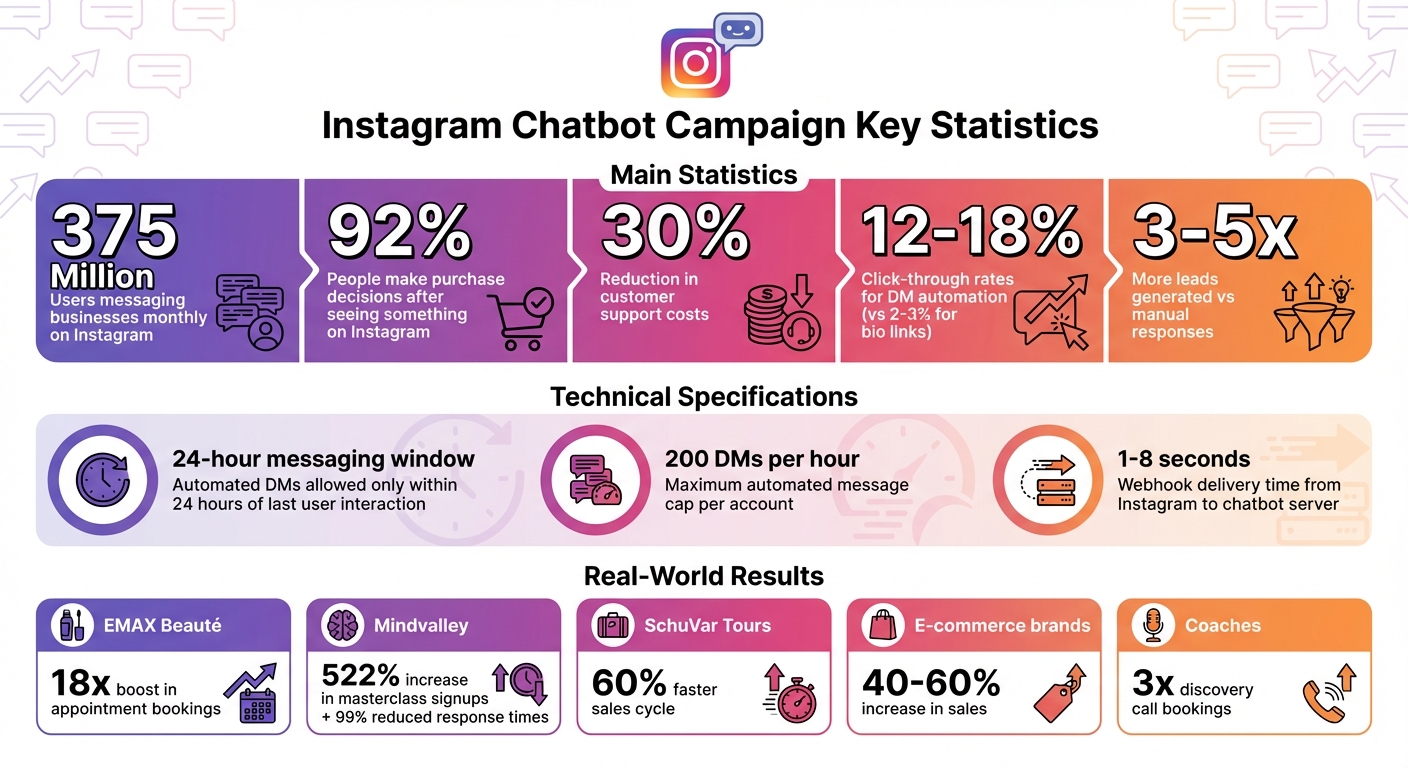
- Why they matter: With 375M users messaging businesses monthly, chatbots ensure instant replies, meeting customer expectations and boosting conversions.
- How they work: Operate through Meta's official API, ensuring compliance and security while leveraging advanced AI for natural, context-aware conversations.
- Key benefits: Generate higher-quality leads, increase sales, and reduce customer support costs by up to 30%.
Instagram Chatbot Campaign Statistics and Key Benefits
How to Create an Instagram Chatbot with Manychat in 2025
sbb-itb-3c55afb
How Instagram Chatbots Work
Getting a handle on the technical ins and outs of Instagram chatbots can save you from compliance headaches and ensure your campaigns are built to last. The key difference between a bot that plays by the rules and one that risks getting your account banned lies in how it connects to Instagram.
Integration With Instagram's API
The only legitimate way for chatbots to function on Instagram is through the Meta Graph API - Meta’s approved automation method. When you set up a chatbot tool, you grant it permissions like instagram_manage_messages through a secure OAuth process. This means you never have to share your Instagram password. If a tool asks for your login credentials, it’s likely using unauthorized browser bots, which can put your account at risk.
Here’s how the process works: when someone interacts with your account - whether by commenting on a post or sending a DM - Instagram sends a webhook, essentially a data packet, to the chatbot’s server within 1 to 8 seconds. The chatbot processes this trigger and responds using an API endpoint (e.g., POST /me/messages), ensuring timely replies.
Meta has strict rules to curb spam. For one, the 24-hour messaging window allows you to send automated DMs only within 24 hours of a user’s last interaction, whether that’s a comment, DM, or Story mention. Additionally, automated messages are capped at 200 DMs per hour per account.
This API-based integration is what makes advanced AI-driven personalization possible.
AI-Powered Personalization
Today’s chatbots go way beyond basic keyword recognition. Thanks to Natural Language Processing (NLP), bots can understand intent even when users don’t use exact phrases. For instance, if someone types “link pls” instead of “link please,” the bot can still recognize the request. That’s why it’s smart to use "contains" matching for triggers instead of exact matching - it accounts for typos, slang, and natural variations in how people communicate.
Some of the most advanced systems incorporate Retrieval-Augmented Generation (RAG), which pulls information from FAQs, product catalogs, and support documents to ensure responses are tailored to your business. On top of that, certain platforms now support multimodal interactions, meaning the bot can analyze images or transcribe voice messages sent by users, making responses even more personalized.
Chatbots also use sentiment analysis to pick up on negative emotions in messages. If a conversation starts heading south, the bot can automatically escalate it to a human agent to resolve the issue before it escalates further.
"The 24-hour messaging window is your primary boundary. After that, you need special tags (like Human Agent for manual support)." - Rohan Rajpal, Founder, Spur
Unlike older, rule-based systems, modern AI chatbots remember the context of a conversation. They can recall earlier details to provide relevant follow-ups, creating a seamless and natural dialogue. Plus, they’re capable of managing hundreds of conversations at once without skipping a beat.
Setting Up Your Instagram Chatbot Campaign
Getting your Instagram chatbot campaign off the ground involves three main steps: selecting the right tool, setting up triggers and responses, and thoroughly testing before going live. Following this process ensures your campaign runs smoothly and stays within Instagram’s rules.
Choosing the Right Chatbot Tool
Start by deciding whether you need a tool exclusively for Instagram or one that works across multiple platforms. If you're an individual creator, single-platform tools with flat-rate pricing might be ideal. On the other hand, agencies managing multiple channels should look for tools that integrate seamlessly with CRM systems and e-commerce platforms across Instagram, Facebook, WhatsApp, and SMS.
Make sure to use tools that rely on Meta’s official API to avoid security risks. Avoid any tool that asks for your Instagram login credentials. Beyond compliance, think about whether you need a basic chatbot that works with keywords or a more advanced AI-powered bot. For example, EMAX Beauté used Respond.io to manage high message volumes across its branches in Kuala Lumpur, achieving an 18x boost in appointment bookings by automating responses and scheduling.
Most platforms offer a free trial period (usually 14 days), so you can test things like message delivery rates, link tracking, and how messages display on mobile devices.
"The best Instagram chatbot depends on your business size, message volume and how advanced you want your automation to be." – Respond.io
Defining Triggers and Responses
Once you’ve picked your chatbot tool, the next step is setting up triggers and crafting responses. Triggers are actions users take that start a chatbot conversation. These could include direct messages, replies to Stories, mentions, clicking the “Send Message” button on your profile, or even specific keywords in post comments. For instance, you could create a trigger where anyone who replies “WIN” to your Story gets a personalized DM with instructions to enter a giveaway.
Most tools have visual builders that let you map out conversation flows using “if/then” logic. For example, if someone types “shipping,” the chatbot can provide delivery details. More advanced bots with natural language processing (NLP) can handle vague queries like “help me find a gift” without requiring exact keywords. Responses can include text, product carousels, clickable buttons, quick replies, discount codes, or links to landing pages.
Personalization is key to making automated messages feel more authentic. Use variables like {first_name}, location, or past purchases to tailor responses. In 2025, Mindvalley worked with School of Bots to set up keyword triggers like “energy,” which led to a 522% jump in masterclass signups and reduced response times by 99%.
Always offer users the option to connect with a live agent. A “Talk to a human” button ensures those with complex issues can reach real support quickly.
Testing and Monitoring Your Campaign
Before launching your campaign, test it thoroughly using a personal Instagram account. This helps you confirm that triggers for keywords, comments, and Story mentions are working properly. Testing ensures that every interaction feels personalized and seamless.
Try unexpected inputs like emojis, voice messages, or random text to see how the bot handles them. Make sure fallback responses like “I’m not sure; let me get a human to help” work as intended. Also, verify that personalization tokens like {first_name} display user data correctly. If you’re using an AI bot, test its responses against your uploaded knowledge base to ensure accuracy.
Once your campaign is live, monitor analytics to identify areas where users drop off. If users stop responding at a certain step, consider simplifying the language or reducing the number of steps. Pay attention to how often users press the “Talk to Human” button - frequent use might indicate gaps in your bot’s responses. Well-optimized campaigns often lead to noticeable boosts in engagement and conversions.
Finally, stay compliant with Meta’s 24-hour messaging window. Your bot should only send automated messages within this timeframe unless using approved tags for manual support. Regular testing and adjustments based on user feedback will help keep your campaign running smoothly.
Best Practices for Instagram Chatbot Campaigns
Once your chatbot is live, sticking to some key principles can help create interactions that feel natural, offer genuine value, and stay within Instagram's rules.
Maintain a Human Touch
After setting up your campaign, it’s important to make the experience feel personal and engaging.
Your chatbot should match your brand’s personality. Use conversational language, contractions, and even emojis to align with your tone. For example, a skincare brand might choose playful phrasing and heart emojis, while a financial advisor may prefer a professional yet approachable style.
Keep messages short - one or two sentences work best. Adding typing indicators like "..." can replicate the natural flow of a real conversation. Personalization matters too; addressing users by their name using tags like [first_name] can make interactions feel more tailored.
Always provide an option to connect with a human. For instance: "Not into chatting with bots? Reply 'CHAT' to speak with our team."
"Automation doesn't kill connection. Bad automation does."
This reassurance ensures users know they can reach real support if needed.
Focus on Value-Driven Interactions
Start every interaction by offering something useful instead of diving into a sales pitch. Whether it’s a helpful guide, a quick tip, or answers to common questions, adding value builds trust and keeps users engaged.
Keep in mind that 92% of people make purchase decisions after seeing something on Instagram. Hard-sell tactics can backfire and may even violate platform rules. Instead, think of your chatbot as a helpful guide. For example, a beauty brand might offer a short skin type quiz before recommending products, or a travel company could share destination guides before bringing up booking options.
A great example is SchuVar Tours, which used chatbot automation in 2025–2026 to gather customer details and identify high-intent leads. By focusing on understanding customer needs first, they sped up their sales cycle by 60%.
Segment Your Audience
Beyond providing value, tailoring your content to specific user needs can boost engagement even further.
Segmenting your audience allows for more personalized interactions. Not everyone wants the same thing, so customize responses based on behavior and demographics. Use quick-reply buttons or menus to let users self-segment. For example: "Press 1 for Order Help, 2 for Collaborations." This ensures users get relevant information faster.
You can also segment users based on their actions. Someone who reacts to your Story with a 😍 emoji might need a different follow-up than someone who uses a 😮 emoji. Similarly, users who click a link in your bio likely have different intentions than those who leave a comment. Preference-based questions, like "Is your skin Dry, Oily, or Combination?", can help qualify leads and refine product recommendations.
iMotorbike successfully implemented this strategy in 2025–2026 by using an AI-powered chatbot for Instagram DMs. The bot collected buyer and seller details, routing users to the right department quickly and efficiently. This early segmentation approach allowed them to deliver personalized support while saving time.
Optimizing Campaign Performance
Getting the most out of your Instagram chatbot means keeping a close eye on its performance and making adjustments as needed. By tracking the right metrics, you can ensure your chatbot delivers engaging, personalized interactions that drive meaningful results.
Key Metrics to Monitor
Here are some key areas to focus on when evaluating your chatbot's success:
- Engagement Rate: This is calculated by dividing total interactions (likes, comments, shares, and saves) by your reach, then multiplying by 100. If engagement drops, it’s a sign that your content or chatbot responses might need tweaking.
- Website Clicks: Use tools like Instagram Insights or Google Analytics to see if your chatbot is effectively guiding users toward your website or conversion goals.
- Cost Per Result (CPR): For paid campaigns, CPR tells you how much each lead, click, or conversion costs. Meta Ads Manager can help you ensure your budget is delivering a strong return on investment (ROI).
- Follower Growth Rate: A steady rise in followers indicates your chatbot is creating positive interactions. If growth stalls, it may be time to rethink your strategy.
- Saves and Profile Visits: When users save your content or visit your profile after interacting with your chatbot, it’s a clear sign they find your content engaging and worth exploring.
- Story Completion Rate: If your chatbot is integrated with Instagram Stories, track how many users watch from start to finish. This can reveal how compelling and effective your story content is.
These metrics provide a solid foundation for testing and refining your chatbot strategy.
A/B Testing and Refinement
To fine-tune your chatbot's performance, experiment with different approaches. For instance, compare simple text-based messages to more dynamic workflows that use visuals and conditional logic to guide users. Data shows that DM automation can achieve click-through rates (CTR) of 12–18%, far outperforming the 2–3% CTR typical of standard bio links. Additionally, automated chatbot responses can generate 3–5 times more leads than manual responses.
You can also test AI-powered natural language interactions against keyword-based triggers. Use real-time previews to ensure your chatbot’s direct messages (DMs) look appealing and that link-click tracking is precise. By analyzing these elements, you can better align your chatbot's behavior with your audience's preferences.
Refining your strategy can lead to impressive results. For example, coaches using automated workflows have tripled their discovery call bookings, while e-commerce brands have reported a 40% to 60% increase in sales. By monitoring conversion rates - whether it’s leads, booked calls, or sales - alongside CTR, you can measure your chatbot’s true ROI. Even small tweaks, like adjusting timing, tone, or the placement of calls-to-action, can deliver noticeable improvements.
Using UpGrow for Enhanced Chatbot Campaigns
Blend proven growth strategies with chatbot automation to boost engagement and drive better conversions.
A successful Instagram chatbot campaign isn't just about sending automated responses - it’s about engaging with real followers who care about your content. By combining organic growth techniques with chatbot tools, you can create a strategy that truly resonates with your audience.
Key Features of UpGrow
UpGrow is an AI-driven Instagram growth service that has helped over 100,000 accounts grow since 2016, earning an impressive average rating of 4.98/5. Unlike services that rely on fake followers, UpGrow uses a combination of advanced AI and Instagram experts to attract real followers who align with your target audience. Its proprietary growth engine, backed by five years of research, uses machine learning to analyze Instagram feeds and identify users with shared interests who are most likely to engage and follow.
Some standout features include:
- Smart AI targeting with filters for location, age, gender, and language to identify your ideal audience.
- Real-time analytics through a live dashboard that tracks follower growth, engagement rates, and interaction trends.
- Access to a viral content library, profile optimization tools, and the Boost™ feature for faster follower growth.
These tools ensure that your followers are pre-qualified, making them more likely to engage with your chatbot campaigns in meaningful ways.
How UpGrow Boosts Chatbot Campaigns
UpGrow’s features don’t just grow your audience - they also set the stage for highly effective chatbot interactions. For instance, a fashion brand targeting women aged 25–40 interested in sustainable clothing in major U.S. cities could use UpGrow to organically build a follower base tailored to that demographic. Once the audience is built, the brand could deploy chatbot-triggered Instagram Story quizzes offering personalized style tips. This approach can lead to 30–50% higher engagement because the audience is already segmented and primed to interact.
By aligning organic growth with personalized chatbot messaging, UpGrow ensures your campaigns connect with users at the exact moment their interest is highest.
To keep interactions feeling authentic, UpGrow incorporates ChatGPT for Instagram, avoiding the generic responses that can make automation feel robotic. As UpGrow puts it:
"Say adios to generic, cookie-cutter comments! ChatGPT for Instagram crafts genuine, human-like responses to your followers' comments, making your engagement feel more natural and heartfelt".
This means your automated DMs and comments stay personal and engaging, even at scale. Plus, UpGrow’s Instagram-compliant methods ensure your account stays safe while running chatbots - a crucial factor for long-term success.
Conclusion
Instagram chatbot campaigns offer a powerful way to connect with followers instantly and at scale. Whether you're answering FAQs, collecting leads, or sharing tailored content, the secret lies in balancing automation with a human touch. Keep interactions brief, friendly, and always provide an option to connect with a real person. Start small with one or two key functions, test thoroughly, and keep an eye on important metrics to fine-tune your strategy.
As your campaign grows, organic audience development becomes increasingly important. With UpGrow's AI-driven targeting, your chatbot campaigns can reach followers who genuinely care about your content. This means connecting with people filtered by specifics like location, age, gender, and interests - followers who are more likely to engage, convert, and stick around.
Pair UpGrow's real-time analytics with your chatbot data to test and improve your campaigns. For instance, if you're running a comment-to-DM campaign offering a free guide, UpGrow's live dashboard lets you track which audience segments perform best, so you can focus on what works. Features like the Boost™ tool help amplify growth during high-performing campaigns, all while adhering to Instagram's automation rules to protect your account.
FAQs
How do I keep my Instagram chatbot compliant with Meta rules?
To ensure your Instagram chatbot stays within Meta's guidelines, rely on API-based automation that enables genuine interactions and steers clear of banned practices like fake engagement or bulk actions. Prioritize human-paced automation and verify that your tools are Meta-approved. Safe and compliant activities include scheduling posts, monitoring analytics, moderating comments, and using authorized chatbots. These practices not only help maintain your account's security but also protect it from potential penalties.
What triggers should I start with for my first chatbot campaign?
Start with straightforward triggers, like keywords or phrases your followers often use - think "price" or "energy." You can also create triggers for when users tag your profile or mention you in Stories. These triggers enable automated, tailored responses that feel personal. Begin with these simple interactions and, as you get more comfortable running chatbot campaigns, move on to more advanced triggers tied to specific user actions.
Which metrics best prove my chatbot campaign ROI?
To gauge the success of your chatbot campaign, focus on key metrics like response rates, follower retention rates, and conversion rates - for example, how often interactions lead to actions like purchases or inquiries. Beyond these, look at response times, customer satisfaction scores, and engagement signals such as message volume and click-through rates. By consistently reviewing these numbers, you can ensure your chatbot is connecting with users effectively and delivering measurable outcomes.