How Brands Use UGC Videos for Instagram Growth
How brands find, clear rights for, edit, and reuse customer and creator UGC as Reels, Stories, feed posts, and ads to grow on Instagram.
How brands find, clear rights for, edit, and reuse customer and creator UGC as Reels, Stories, feed posts, and ads to grow on Instagram.
4.98 /5 - from 58k reviews
Trusted by 50,000+ creators — get real engagement delivered to your profile in minutes, not days.
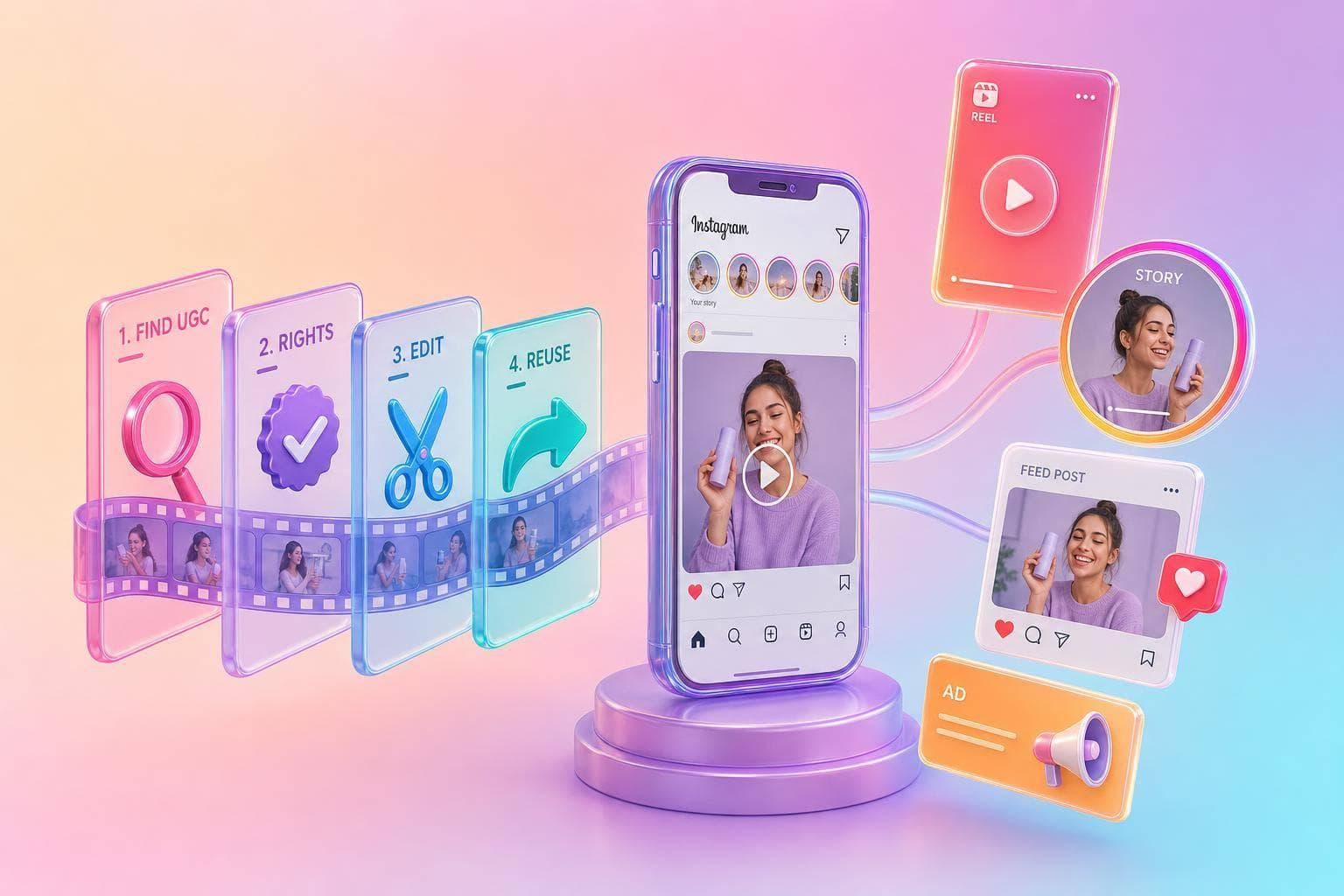
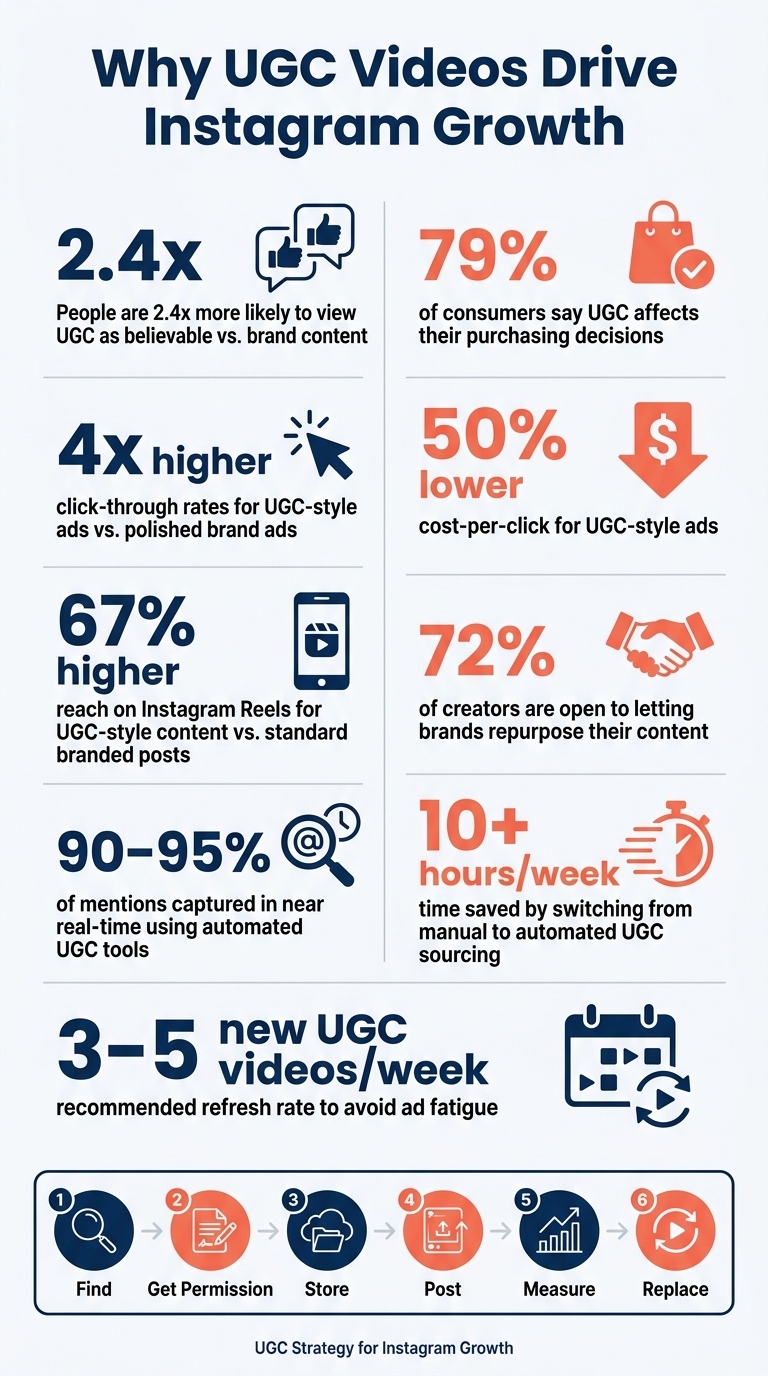
UGC videos can help brands grow on Instagram faster than polished brand posts. Why? People are 2.4x more likely to see UGC as more believable, and 79% say it affects what they buy.
If I had to sum up the article in a few lines, it would be this:
Here’s the core idea: UGC works because it looks like normal Instagram content, not a polished ad. That can lead to more shares, saves, comments, profile visits, and follows.
A few numbers stand out:
I’d also keep the process simple:
The article is less about making Instagram look polished and more about building a clean system that turns customer videos into steady growth.
UGC Video Stats: Why It Works for Instagram Growth
UGC videos on Instagram are clips made by real people - usually customers or followers - not a brand’s in-house team. In plain English, that could be a phone-shot unboxing, a daily routine clip, or someone talking about their experience with a product.
That’s part of the appeal. UGC tends to feel less polished and more at home on Instagram than studio-shot video.
Brands usually use three kinds of UGC videos on Instagram, and each one does a different job.
Customer-made videos are the purest form of UGC. These clips come from actual buyers who post on their own - no pay, no brief, no brand input. Since there’s no deal behind the post, people tend to trust them more. That makes them a strong fit for feed posts and Story Highlights, where social proof matters most.
Creator-made videos come from freelance UGC creators who are paid to make content that looks and feels like normal customer footage. They work from a brand brief, but the goal is still to make the video feel raw and native to the platform. This format helps brands make more content in less time, which is handy for Reels and paid ads.
Brand-edited UGC starts with raw footage, then the brand shapes it with on-screen text, product demos, or CTAs. It gives the team more control over the final cut and works well for conversion-focused Reels and fast testing.
Here’s a simple breakdown:
| Type | Source | Best Used For |
|---|---|---|
| Customer-Made | Real buyers (unpaid) | Feed posts, Story Highlights, trust-building |
| Creator-Made | Paid freelance creators | Reels, ads, campaign launches |
| Brand-Edited UGC | Internal team or raw UGC | Conversion-focused Reels, paid ads, rapid testing |
UGC helps brands gain followers because it feels more like peer proof than promotion. When people see someone using a product in a normal setting, it lowers resistance. The post feels less like an ad and more like a recommendation from someone like them.
That often leads to more saves, shares, and comments. And when engagement goes up, Instagram is more likely to show the post to people outside the brand’s current audience. That extra reach can turn into new followers.
The performance gap can be hard to ignore, too. UGC-style creative drives 4x higher click-through rates and roughly 50% lower cost-per-click than polished brand ads. If follower growth is the goal, applying proven Instagram growth tips alongside UGC can make a significant difference.
Once the types are clear, the next move is building a repeatable way to source them.
Once brands know which UGC formats work, the next step is setting up a repeatable way to collect them. The hard part usually isn’t finding UGC. It’s gathering it on a steady basis. That kind of system is what helps drive repeatable Instagram growth.
The four most reliable sourcing channels are tagged posts, branded hashtags, direct messages, and campaign prompts. Tagged posts and mentions are the easiest place to start. When customers tag a brand, they’re basically putting their hand up and saying, “look at this.”
A branded hashtag like #MyIKEAHome or #ShotOniPhone can pull customer posts into one searchable feed. That makes content easier to find instead of scattering it across Instagram.
DMs often get ignored, but they can be useful. They may include praise, screenshots, and clips that a brand can use later. And if a brand wants to be more active, a simple campaign prompt like "Tag us in your unboxing for a chance to be featured" can bring in more submissions.
Manual monitoring - scrolling through tags, searching hashtags, and checking mentions - can eat up 10+ hours per week and still miss a lot of content. Automated tools can cut that down to minutes while pulling in 90% to 95% of mentions in real time.
Whether the process is manual or automated, the weekly rhythm stays pretty much the same:
Once you shortlist a clip, clear the rights before you publish it. Collecting UGC is only half the job. Rights control is what makes content reusable, and that’s what helps keep Instagram posting steady.
The creator owns the copyright, even if the post tags the brand or uses a branded hashtag. So don’t assume access means approval. Send one DM or email that asks for permission for the exact channel and format you want to use, such as an organic repost, a Story, or a paid ad. Get a clear yes for each use case. In many cases, that step goes smoothly - 72% of creators are happy to let brands repurpose their content.
A good request is simple and direct. Start with a genuine compliment. Then say exactly where the video will appear, explain how the creator will be credited, and ask for permission in plain language. If the creator is being paid or receiving free product, include a clear disclosure like #ad or #sponsored at the start of the caption.
Also, tag the creator in the post and in the caption. It’s a small step, but it matters.
| Permission Method | Permission Scope | Allowed Use | Credit |
|---|---|---|---|
| DM/Email Request | Explicit permission for specific use cases (organic vs. paid) | Any content where the creator provides a "yes" | Manual; tag in post and caption |
| Automated Platform | Formal legal license with timestamped documentation | Vetted content from creators who opt in via the tool | Automated or manual depending on the platform used |
A clean rights log makes publishing easier. It also helps teams reuse top clips without last-minute back-and-forth. A basic spreadsheet or project management board is often enough. Use a standard file name like @handle_ProductName_Approved_OrganicOnly.mp4 so no one on the team uses a clip in a way that goes past the agreement. Add an expiration date field too. When that date passes, the asset should be flagged instead of quietly reused.
Your approved content library should track these fields:
| Rights Log Field | Purpose |
|---|---|
| Creator Handle | Ensures proper credit and contact for future use |
| Asset URL/Filename | Links the permission to the specific piece of content |
| Approved Channels | Prevents cross-posting beyond what was agreed |
| Usage Scope | Distinguishes between organic social use and paid advertising |
| Expiration Date | Prevents legal issues from using content past the agreed term |
Once rights are cleared and the file is logged, the clip is ready to turn into a Reel, Story, feed post, or ad.
Once a clip gets approved, the next step is simple: fit it to the Instagram format that does the job you want, whether that's reach, trust, or conversion.
Reels are your best bet for discovery. Keep them short, around 15–30 seconds, use trending audio, and lead with a strong hook in the first 1.5 seconds. A direct-to-camera line or a surprised reaction tends to work well. UGC-style content gets 67% higher reach on Instagram Reels than standard branded posts.
Stories work best when you pull out the strongest 15-second moment and pair it with a short text overlay, like a star rating or a link. You can also pin your best Stories into Highlights, which gives new profile visitors an always-on proof library.
For feed posts, a carousel made up of customer photos or visual testimonials can act as an evergreen proof library. For paid ads, before-and-after clips or problem-solution stories tend to fit well. Keep the edit light, use burned-in captions, and add a clear call to action. Export in 9:16 vertical, and keep key text, faces, and products centered so nothing gets cut off.
After publishing, look at the data. Keep the formats that bring in follows, and drop the ones that don't.
Publishing is the test. Analytics tell you what stays.
Track non-follower reach, profile visits, shares, and completion rate. A good target is a Hook Rate, or 3-second views, above 30% and a Hold Rate above 40%. If a post gets strong reach but weak profile visits, that's usually a sign to test a sharper CTA or a more specific hook.
The cycle is pretty straightforward:
It also helps to refresh top-performing UGC on a regular basis. When frequency on a paid ad goes above 2.5, cost per acquisition will often start to climb. That's your cue to swap in a new version.
Once a clip goes live, look at the metrics that match the format. That’s how you figure out what should get more reach and what should be left behind.
| UGC Video Type | Primary Goal | Key Metric to Track |
|---|---|---|
| Unboxing / Trends | Awareness | Reach & Non-Follower Reach |
| Testimonials / Reviews | Trust | Save Rate & Profile Visits |
| Tutorials / How-tos | Engagement | Completion Rate & Shares |
| Educational Reels | Follower Acquisition | Profile Visits & Follows from Reel |
Don’t stop at the table, though. Saves and shares often tell you more than a like ever will. They show that people found the content useful enough to come back to or pass along, and that often leads to follower growth.
It also helps to watch engagement velocity. In plain English, that means tracking early likes, comments, and shares in the first hour after posting. Those early signals can hint at whether a clip has a shot at wider reach.
For paid UGC ads, don’t let weak ads burn through budget. If an ad spends 2x your target CPA within 48 hours and still hasn’t converted, cut it. Waiting longer usually just means spending more on a clip that isn’t doing the job.
Then use what you learned to shape next week’s content queue.
Your best-performing clips should steer the next batch. The loop is simple: source, approve, publish, review, and replace.
A weekly review keeps the system tight. Rank clips by follows, saves, and shares, then give the top performers more promotion. At the same time, bring in 3–5 new UGC versions each week to avoid ad fatigue and help keep acquisition costs stable.
Use a repeatable system instead of only reposting content when it happens to show up.
Create a branded hashtag, ask customers to tag your brand, and run recurring campaigns like "Feature Fridays" or "Testimonial Tuesdays." That gives people a clear prompt and makes it easier for them to join in.
When people tag you, reply. Thank them by name. Keep track of mentions, tagged posts, and hashtag use so you can find customer content fast and feature it without digging around every time.
That steady recognition can turn casual followers into people who post about your brand again and again.
No. Don’t download and repost someone’s UGC without explicit permission, even if you credit them or they tagged or hashtagged your brand. Doing that can break intellectual property rights and Instagram’s terms.
Only repost after you get documented, explicit usage rights from the creator. Then keep that approval on file.
Focus on metrics that show real audience interest, not vanity numbers. A pile of likes can look nice, but it doesn’t always mean people care enough to stick around or act.
Watch your engagement rate first. A good target is above 3%. Then pay close attention to high-value actions like saves and shares. Those signals tend to matter more than likes because they show people found the post worth keeping or passing along.
For video growth, keep an eye on a few key numbers:
This gives you a much clearer read on what’s working. If people keep watching, click, save, and share, you’re not just getting views - you’re getting interest that can turn into growth.