
Ultimate Guide to UGC Tools for Instagram
Find, license, and scale Instagram UGC with tools for discovery, rights management, AI targeting, and automated workflows.
Find, license, and scale Instagram UGC with tools for discovery, rights management, AI targeting, and automated workflows.
4.98 /5 - from 58k reviews
Trusted by 50,000+ creators — get real engagement delivered to your profile in minutes, not days.

User-Generated Content (UGC) on Instagram is a game-changer for brands looking to connect with audiences. Why? It builds trust, drives engagement, and influences purchasing decisions - 79% of people say UGC impacts what they buy. But managing UGC effectively can be challenging without the right tools.
Here’s what you need to know:
This guide covers how to:
Whether you're a social media manager or part of a team, the right approach and tools can streamline UGC workflows and maximize results.
Running a successful UGC program on Instagram requires a structured approach. Whether you're handling it solo or leading a team, having a clear process helps you stay efficient and avoid mistakes.
Instagram is your starting point. Keep an eye on tagged posts, brand mentions, and branded hashtags to uncover content from real customers.
Branded hashtags are a smart way to encourage submissions. For example, Starbucks' #WhiteCupContest generated 4,000 entries in just three weeks by offering a clear prompt and an enticing incentive. This strategy is something any brand can adopt.
"UGC performs best when it is part of a content system, not a random repost." - Postoria
Don't stop there - reach out directly. Customer service interactions and post-purchase conversations often reveal your most enthusiastic fans. A simple, personalized message asking them to share their experience can result in valuable content that might not appear on its own.
Once you've gathered content, make sure to secure proper usage rights to protect your brand from potential issues.
Public posts don’t automatically grant you permission to use them.
"Public posting isn't the same as licensing. Visibility is not permission." - Automateed
In the U.S., using someone’s content or likeness for commercial purposes without their consent can lead to copyright claims or scrutiny from the FTC. If the content involves minors, you’ll need written parental consent. The safest route is to request written permission that clearly outlines how the content will be used, the platforms it will appear on, and the duration of its use. Avoid vague agreements that could lead to misunderstandings.
To stay organized, consider creating a rights matrix - a simple document that details the permissions required for different use cases, like organic posts versus paid ads or short-term versus long-term campaigns. Pair this with a rights log to track details like the creator’s name, content URL, approval status, and expiration date. This ensures your team is always prepared for audits.
Once permissions are secured, focus on selecting content that aligns with your brand’s identity. Choose UGC that fits your visual style and storytelling, ensuring consistency across your campaigns.
Timing matters, too. In the U.S., Instagram engagement often peaks mid-week, but your audience's habits may vary across Eastern, Central, Mountain, and Pacific time zones. Use scheduling tools to post during peak times for each region. When crafting captions, aim to retain the creator’s authentic voice while ensuring it aligns with your brand’s messaging. This balance helps maintain a genuine connection with your audience.
UGC tools come in various forms: some help you find content, others manage legal permissions, and some integrate directly with Instagram. Knowing which type aligns with your goals can save you time and make managing user-generated content much easier. Here’s a closer look at the main categories.
Instagram provides basic tools like tagged posts, @mentions, branded hashtags, and Story resharing. These options are free and easy to use, making them perfect for brands just starting with UGC. However, as your branded hashtag starts generating hundreds of posts each week, manually reviewing everything becomes overwhelming. Instagram’s native features lack advanced options like bulk filtering, rights management, or organized content libraries. This makes them better suited for small-scale campaigns or brands in the early stages of building their UGC strategy for brand growth.
When Instagram’s built-in tools fall short, discovery tools can take over. These specialized tools monitor hashtags, brand mentions, and keywords across Instagram, automatically gathering relevant content into a single dashboard. This automation eliminates the need for manual searches, saving both time and effort. For instance, a travel brand using AI-powered discovery cut down manual updates by 80%. Similarly, Beauty by Earth’s use of Instamentions in March 2023 resulted in 81 new posts within just two weeks, saving the company over $10,000.
For brands aiming to stay legally compliant, rights management tools are a must. These tools automate the process of securing permission to use UGC, which is critical to avoiding legal trouble. As EmbedSocial highlights:
"Using customer content builds trust, but using it without permission risks legal issues and brand damage." - EmbedSocial
These tools handle everything from sending branded requests via DMs or comments to tracking responses and securely storing consent records. For example, in April 2024, NH Hotel Group used Social Native’s rights management tool to handle legal requests across more than 400 hotels, significantly lowering legal risks. Social Native explains:
"Our robust rights management technology makes it easy to obtain explicit consent from users and turn earned content into owned assets." - Social Native
For brands scaling their UGC efforts, these tools are essential for ensuring compliance and safeguarding your reputation.
As your Instagram presence expands, managing user-generated content (UGC) manually can quickly become overwhelming. That’s where AI steps in, streamlining tasks like discovery, targeting, and tracking. By automating these repetitive processes, AI allows your team to focus on crafting strategies and creative content. This approach not only saves time but also enables campaigns that connect with niche audiences on a deeper level.
One of AI's greatest strengths in UGC campaigns is its ability to target with precision. Instead of casting a wide net and hoping for results, AI tools analyze factors like location, age, interests, and engagement patterns to identify the users most likely to resonate with your content.
Take the example of a U.S.-based outdoor gear company. Using AI filters, they can zero in on users in specific states who actively engage with hiking and camping content. This targeted strategy ensures the audience is more inclined to share authentic product photos compared to a generic group. According to Meta's case studies, brands leveraging advanced audience targeting on Instagram often see engagement rates rise by 20–30% compared to campaigns without targeting.
AI also uncovers micro-communities that traditional demographic data might overlook. These smaller, highly engaged groups tend to respond more positively to peer-driven content, making them ideal candidates for UGC campaigns where authenticity is key.
When UGC is central to your Instagram strategy, it’s not just about the volume of followers - it’s about attracting the right ones. Authentic engagement from real users who care about your brand far outweighs inflated numbers boosted by bots or inactive accounts.
UpGrow is an AI-powered Instagram growth tool designed to help brands attract genuine followers. Using advanced filters for location, age, gender, language, and interests, UpGrow ensures that your audience aligns with your brand goals. The platform combines patented AI technology with expert oversight to deliver meaningful growth.
For UGC-focused campaigns, UpGrow’s location targeting is particularly useful. For example, a retailer running a city-specific UGC initiative can focus on users in that metro area, ensuring the campaign reaches a relevant audience. UpGrow also offers profile optimization tips to help convert targeted traffic into engaged followers. With a real-time analytics dashboard, brands can track growth and engagement metrics effortlessly. Plans start at $39/month, and the service comes with a growth guarantee - grow your followers or get a refund.
"Our system tracks 50+ metrics to deliver 2-3x faster growth through automated hashtag optimization, optimal posting schedules, and competitor content insights." - UpGrow
AI doesn’t just improve targeting - it also simplifies campaign management. Instead of manually reviewing every branded hashtag mention, AI tools scan Instagram for new content, flagging posts that meet your quality and engagement criteria. This way, your team only reviews pre-filtered, high-quality content.
AI further evaluates UGC based on factors like engagement rates, visual appeal, and audience relevance. It prioritizes the best content for approval and discards lower-quality posts, streamlining the process. Once approved, AI-optimized posting schedules ensure that repurposed UGC goes live when your target audience is most active, factoring in time zones and weekday versus weekend behavior. By automating discovery, prioritization, and publishing, AI keeps your UGC campaigns running smoothly with minimal manual effort.
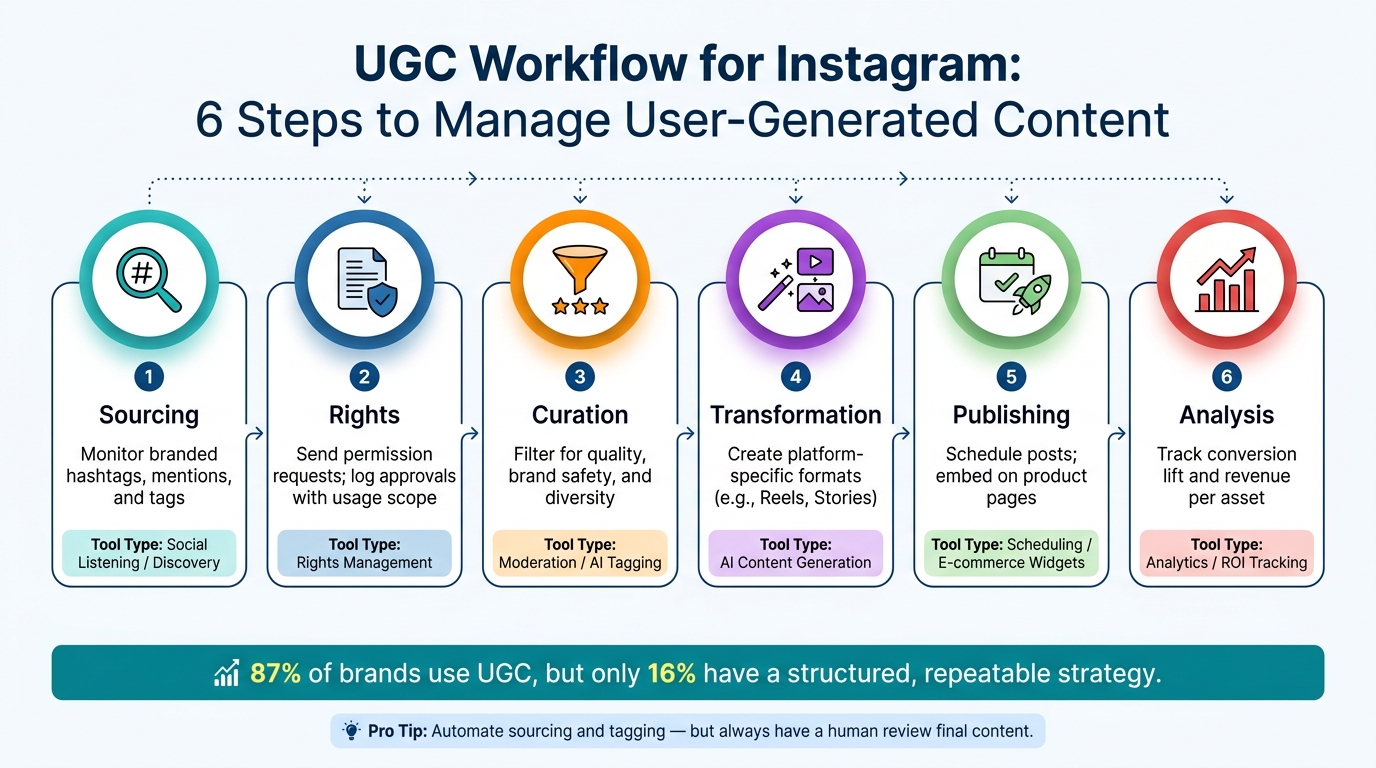
UGC Workflow for Instagram: 6 Steps to Manage User-Generated Content
When it comes to User-Generated Content (UGC), the challenge isn’t usually about finding content - it’s about having a reliable process. While 87% of brands incorporate UGC, only 16% have a structured, repeatable strategy for managing it effectively. A clear workflow can help bridge this gap.
| Workflow Step | What to Do | Type |
|---|---|---|
| 1. Sourcing | Monitor branded hashtags, mentions, and tags | Social Listening / Discovery |
| 2. Rights | Send permission requests; log approvals with usage scope | Rights Management |
| 3. Curation | Filter for quality, brand safety, and diversity | Moderation / AI Tagging |
| 4. Transformation | Create platform-specific formats (e.g., Reels, Stories) | AI Content Generation |
| 5. Publishing | Schedule posts; embed on shoppable product pages | Scheduling / E-commerce Widgets |
| 6. Analysis | Track conversion lift and revenue per asset | Analytics / ROI Tracking |
Here’s a practical tip: automate repetitive tasks like sourcing and tagging, but always have a human review the final content. This ensures brand safety and avoids legal missteps.
By following this workflow, it’s easier to stay compliant with legal and ethical standards while maintaining a steady stream of content.
Once you’ve established a repeatable workflow, make sure your legal practices are just as robust. In the U.S., copyright law automatically protects the creator of any content. That means you must secure clear, written consent - via a documented DM or a formal rights request form - before reposting or using someone’s content. Be specific about the scope of usage: social rights (like reposting on your feed) and commercial rights (using the content in ads) require separate agreements.
Additionally, the FTC’s 2023 updates to its Endorsement Guides require clear disclosures for any incentivized UGC. For example, if you’re running a contest or giving out free products in exchange for posts, labels like #ad or #sponsored must be prominently displayed. Simply burying these disclosures in captions isn’t enough; placing them directly on the image or video is a safer bet.
"The fact that a user tags a brand, uses a branded hashtag, or posts content publicly does not transfer ownership or grant the brand permission to use it." - Ethan Wall, Founding Attorney, The Social Media Law Firm
Once you’ve nailed down your workflow and compliance standards, the next step is finding tools that align with your needs. Start by assessing your weekly volume of rights-cleared UGC. A social media manager can manually process 30 to 60 pieces of content per week, but automated platforms can handle significantly more - sometimes thousands of assets daily. If your manual process is maxed out, it’s probably time to explore automation.
When selecting tools, focus on those that simplify rights management. Look for features like audit-grade rights records and automated alerts for expiring permissions. These can help prevent costly mistakes, such as using content after the rights have expired.
"A direct message asking for permission is not a defensible license. Brand counsel will block PDP usage until the rights workflow produces an audit-grade record." - Claire Wilson, VP of Marketing at Emplifi
| Tool | Best For | Key Differentiator |
|---|---|---|
| Archive | High-volume tracking | AI capture that finds 400% more content than manual monitoring |
| Bazaarvoice | Enterprise retail | Syndicates reviews to Amazon, Target, and Walmart |
| Yotpo | DTC brands | Combines reviews, loyalty, and SMS in one platform |
| PostGun | Legal automation | Generates platform-native variants with searchable rights logs |
| Emplifi | Shoppable UGC | Auto-creates shoppable galleries with closed-loop revenue analytics |
| MetaGhost | Reach optimization | Modifies content at the pixel level to avoid duplicate detection flags |
Yes, you need written permission to repost user-generated content (UGC) on Instagram. Even though a photo or video is publicly available, the creator still owns the rights to it. Public access doesn’t mean you have the right to use it. Always get explicit consent, especially for purposes like reposting, featuring it on a website, or using it in ads.
To stay on the safe side legally, document the permissions. Use a formal agreement or approval form that clearly outlines where the content will appear, how long it will be used, and how the creator will be credited.
Under copyright law, creators automatically own their work as soon as it’s created. When it comes to using user-generated content (UGC), social rights let brands share that content on social media platforms. However, commercial rights are necessary for uses like paid advertisements, websites, or other promotional materials. To steer clear of copyright problems, always obtain a formal license or written consent. This should clearly outline the scope, duration, and platforms where the content can be used.
When managing user-generated content (UGC) manually starts eating up too much of your time or becomes difficult to handle at scale, it might be time to switch to an automated UGC tool. If you’re dedicating hours every week to tasks like finding, moderating, and securing rights for content, automation can simplify the process. These tools are especially useful for scaling your efforts, maintaining consistency, and building repeatable workflows for tasks like content collection, rights management, and deployment. Plus, they can cut creative cycle times by as much as 60%.


