
Ultimate Guide to Real-Time Instagram Analytics
Track follower growth, engagement, reach, and audience data with Instagram Insights and third‑party tools to optimize posts, timing, and campaigns in real time.
Track follower growth, engagement, reach, and audience data with Instagram Insights and third‑party tools to optimize posts, timing, and campaigns in real time.
4.98 /5 - from 58k reviews
Trusted by 50,000+ creators — get real engagement delivered to your profile in minutes, not days.
Want to grow your Instagram fast? Real-time analytics can help. These tools update metrics like engagement, reach, and follower growth almost instantly, giving you the power to adjust your strategy as your content performs. Here’s why they matter and how to use them:
Pro Tip: Accounts using tools like UpGrow have seen follower growth increase by 275% through timely adjustments. Start tracking your stats in real time to stay ahead.
Keeping an eye on metrics like follower growth, engagement, reach, and audience demographics can help you understand how your content is performing in the moment. Together, these insights provide a complete snapshot of your real-time strategy's effectiveness.
Tracking your follower count in real-time helps pinpoint which posts are driving growth - or causing losses. For reference, Instagram's average monthly follower growth rate is about 0.98%. If your numbers are climbing faster than that, it’s a sign your content is striking a chord with your audience.
Engagement metrics like likes, comments, shares, and saves offer immediate feedback on how your audience feels about your content. Christina Newberry from Hootsuite highlights the power of these insights, noting that they replace guesswork with data-driven decisions. High engagement within the first hour of posting is a strong indicator that your content is resonating and worth replicating.
Reach shows how many unique accounts have seen your content, while impressions count the total number of views, including repeat views from the same account. These metrics are key indicators of brand visibility and awareness. If impressions significantly outnumber reach, it suggests your content has rewatch value - something worth analyzing further, especially the pacing and hooks.
For Instagram Reels, reach is counted even if the video wasn’t played, as long as it appeared on-screen. Monitoring drop-off rates is critical for understanding where viewers lose interest. Bella Foxwell, a copywriter at Iconosquare, explains:
Watch time demonstrates how engaging (or not) a video is and where viewers drop off. They may stop watching because a Reel is too long or the pacing isn't engaging enough.
Real-time demographic data, such as age, gender, and top locations, becomes available once your content reaches 100 unique accounts. These insights help fine-tune your content’s tone and targeting.
Metrics like most active hours and most active days are also essential for optimizing your posting schedule. Pair this information with average watch time and story completion rates for Instagram Stories. A retention rate of around 70% is a good benchmark. Falling below that could mean your stories are either too long or lack compelling hooks to keep viewers engaged.
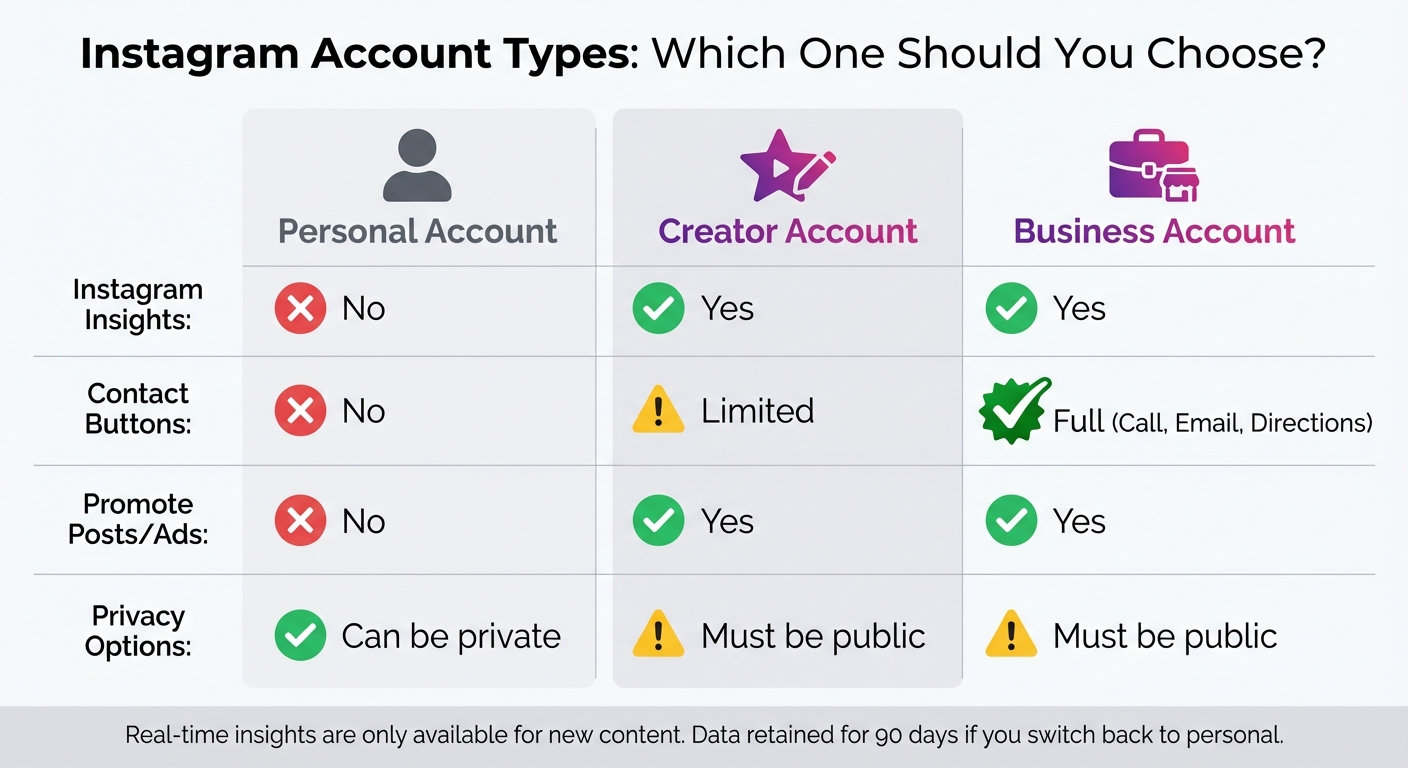
Instagram Account Types Comparison: Personal vs Creator vs Business
To access real-time Instagram analytics, you'll need to switch to a professional account. This process is straightforward and free. Open the Instagram app, head to your profile, and tap the menu (☰). Then, go to "Settings" or "Settings and privacy". From there, select "Account type and tools" and choose "Switch to Professional Account".
Once you're ready to make the switch, you'll need to decide between an Instagram Business or Creator account. If you're managing a brand or store and need features like full contact buttons (call, email, directions), go with Business. On the other hand, if you're focusing on personal branding or content creation, Creator is the better option. After selecting your category, you can add a business email, phone number, and address to enable contact options on your profile. Once the setup is complete, you'll gain access to real-time data through the "Professional dashboard" on your profile or by selecting "View Insights" under individual posts.
| Feature | Personal Account | Creator Account | Business Account |
|---|---|---|---|
| Instagram Insights | ❌ No | ✅ Yes | ✅ Yes |
| Contact Buttons | ❌ No | ✅ Limited | ✅ Full (Call, Email, Directions) |
| Promote Posts/Ads | ❌ No | ✅ Yes | ✅ Yes |
| Privacy Options | ✅ Can be private | ⚠️ Must be public | ⚠️ Must be public |
Note: Real-time insights are only available for new content. If you switch back to a personal account, Instagram will retain your insights data for up to 90 days.
Instagram Insights is Instagram's built-in analytics tool, available for free to professional accounts. You can access it through the "Professional Dashboard" on your profile or by tapping "View Insights" on specific posts or reels.
This tool provides key metrics, including:
You can view data for preset or custom timeframes, typically up to 90 days. For clarity, tap the (i) icon on any Insights screen to see detailed definitions of each metric.
Keep in mind that Instagram Insights has its limits. For example, data retention is capped at 90 days, and demographic breakdowns only appear after reaching 100 unique accounts. Additionally, it doesn't support competitor analysis or multi-platform integration. However, if your account has at least 100 followers, you can track trends in follower growth and active times to optimize your best time to post on Instagram. For more advanced features and continuous monitoring, consider third-party tools.
For a deeper dive into Instagram analytics, third-party tools like UpGrow offer advanced features that go beyond Instagram's native capabilities. These platforms provide 24/7 real-time monitoring, capturing data on follower growth and engagement even during off-hours. UpGrow, for instance, includes features like live follower counts, unfollow alerts, and hourly growth tracking - tools that aren't available in Instagram's built-in analytics.
Before using any third-party tool, ensure your account is set to a Business or Creator profile. Look for tools with API-based integration to stay compliant with Instagram's guidelines and keep your account secure. UpGrow also grants access to a database of over 300 million verified creators across 195+ countries and 50+ niches, leveraging AI to target audiences by location, age, gender, and language.
With these tools, you can set up custom alerts for events like sudden unfollows or peak growth periods, allowing you to adjust your strategy in real time. Features like "Export Data" or "PDF Reports" help you maintain a historical record of fluctuations for long-term analysis. If you're managing multiple accounts, UpGrow's bulk management feature lets you monitor several dashboards from one interface. Currently, the platform serves more than 55,000 users worldwide and holds a stellar 4.98/5 rating based on over 58,000 reviews.
Real-time data takes the guesswork out of growth strategies, offering actionable insights based on live performance metrics.
Real-time analytics can spotlight which posts, Stories, and Reels are driving the most engagement. Metrics like impressions, reach, engagement, and completion rates help you zero in on what’s working. For example, Instagram Insights highlights your top six posts from the past seven days, ranked by impressions, with filters to compare performance over different timeframes. By examining trends - whether it’s visual style, subject matter, or even location - you can refine your creative approach. Save your best-performing Stories as Highlights to keep them visible beyond the usual 24-hour window, and replicate successful elements in future posts to maintain momentum.
Knowing when your audience is most active can make a huge difference. Instagram Insights shows peak activity times and days, helping you schedule posts for maximum engagement. If your followers are particularly active on Sundays between 9 p.m. and 6 a.m., that’s your prime posting window. Beyond timing, these insights also reveal key audience demographics like top locations, age ranges, and even preferred languages. Use this data to fine-tune your targeting strategy. For instance, UpGrow’s AI-targeting tool uses such insights to achieve follower growth rates as high as 275%. These tools and data points allow you to tailor your content and campaigns to resonate with specific audience segments.
The ability to tweak campaigns on the fly is a game-changer. Real-time analytics let you calculate engagement rates (total engagements divided by impressions or reach) and quickly identify underperforming campaigns. If something isn’t clicking, adjust hashtags, captions, or posting times based on the latest trends. UTM parameters can also help track post-click behavior in Google Analytics 4, giving you deeper insights into what’s driving traffic. A sudden spike in engagement? Analyze what worked - whether it’s the content, hashtags, or timing - and apply those elements to future posts. If a post is performing well organically, consider boosting it with paid promotion to amplify its reach.
UpGrow’s hourly growth tracking takes things a step further by showing the immediate impact of specific posts or Reels on your follower count. By linking content releases directly to audience changes, you can fine-tune your strategy in real time. These tools and techniques empower you to stay agile and maximize your Instagram growth potential.
Real-time analytics have completely changed how Instagram accounts grow. By using live data, you can tweak your strategies instantly. Want to track your reach, engagement, or follower growth as it happens? Real-time analytics make it possible. This allows you to refine your content, choose the best posting times, and adjust campaigns on the spot. The ability to adapt quickly is what sets growing accounts apart from those that stall. This immediate feedback loop is the backbone of a data-driven approach to Instagram success.
Real-time metrics take the guesswork out of your strategy. Imagine knowing, within the first hour, which posts are resonating with your audience - that's the kind of insight that lets you double down on what works. Spotting peak activity times? That means you can schedule posts for when your audience is most active. And with up-to-the-minute demographic data, you can craft messages that feel personal and relevant. The result? Engagement rates that are 30-50% higher than those from generic, one-size-fits-all strategies.
Keep an eye on key metrics like your weekly net follower growth (aim for 1-3%), engagement rates (3-5% is ideal for organic accounts), and week-over-week reach improvements. If these numbers are trending upward over a month, your real-time optimization is paying off. Tools that provide these insights, like UpGrow, turn raw data into actionable strategies that fuel growth.
Instagram Insights is a good starting point, but tools like UpGrow take it to the next level with AI-powered real-time analytics. UpGrow’s live dashboard lets you track follower changes by the hour, identify unfollows immediately, and pinpoint which posts are driving your growth. Beta users of UpGrow's Boost™ feature have seen a 275% jump in monthly followers by leveraging AI to spot patterns.
With over 55,000 users and a stellar 4.98/5 rating from 58,000 reviews, UpGrow has become a trusted platform for Instagram growth. Plans start at $39/month and come with a growth guarantee - if you don’t see results, you get your money back. By combining real-time analytics with smart automation, UpGrow lets you focus on creating amazing content while the data takes care of your strategy.
"Real-time" Instagram analytics focus on tracking key metrics like follower growth, engagement rates, and content performance with minimal lag. For instance, tools like UpGrow’s follower tracker provide live updates and even hourly growth stats. Similarly, Instagram’s built-in insights deliver nearly instant data on audience engagement and content reach.
While refresh rates can differ depending on the platform, most analytics tools update frequently - often every few minutes or hours - making it easier to adjust strategies and monitor audience behavior as it happens.
When analyzing your social media efforts, begin with engagement metrics, follower growth, and content performance. These are the core indicators of how your posts are performing and how your audience is responding. By keeping a close eye on these numbers, you can quickly determine whether your content is striking the right chord with your audience and adjust your strategy accordingly.
A solid engagement rate is one that surpasses the typical benchmark for your industry. For most accounts, this benchmark usually falls between 1% and 3%, with higher rates indicating better audience interaction. Use these averages as a reference point to evaluate your performance and determine how effectively your content connects with your audience.
Share this post


