
Ultimate Guide to Instagram Caption A/B Testing
Make Instagram captions your conversion layer: actionable A/B testing steps, key metrics, and frameworks to increase engagement.
Make Instagram captions your conversion layer: actionable A/B testing steps, key metrics, and frameworks to increase engagement.
4.98 /5 - from 58k reviews
Trusted by 50,000+ creators — get real engagement delivered to your profile in minutes, not days.
Instagram captions are more important than ever in 2026. While visuals grab attention, captions drive engagement - comments, saves, shares, and clicks - all critical for Instagram’s algorithm. A/B testing captions is the easiest way to figure out what works best for your audience, turning guesswork into data-driven decisions.
Here’s what you need to know:
Key takeaway: Captions aren’t just decoration - they’re your post’s conversion driver. By testing and refining them, you can increase engagement and grow your account effectively.
When you're running caption A/B tests, it's important to focus on metrics that reveal how your caption impacts behavior - not just surface-level stats like post likes.
Engagement rate is the most reliable metric for comparing captions. It's calculated as (likes + comments + saves + shares) ÷ reach × 100. This formula levels the playing field by accounting for differences in reach, making it more meaningful than simply counting likes. Save rate has become especially important in 2026 because algorithms now prioritize saves and shares over likes, as they indicate content has long-term value. If your caption is designed to drive traffic, keep an eye on click-through rate (CTR), calculated as (clicks ÷ impressions × 100). Lastly, track profile visits - a spike here suggests your caption's hook or call-to-action (CTA) successfully piqued interest.
| Metric | What It Tells You | Why It Matters for A/B Testing |
|---|---|---|
| Engagement Rate | Overall audience interest | Best for comparing posts with varying reach |
| Save Rate | Content utility and longevity | Higher saves boost algorithm favor and show lasting value |
| CTR | Conversion effectiveness | Measures how well your CTA drives clicks |
| Profile Visits | Curiosity and intent | Indicates your caption motivated users to learn more |
| Comment Quality | Depth of audience connection | Helps separate genuine engagement from spam or bots |
These metrics provide a comprehensive view of how well your captions connect with your audience. The next step? Use tools to streamline your analysis.
Instagram Insights is a great starting point for analyzing post performance. It provides detailed data on likes, comments, saves, shares, reach, impressions, and profile visits for each post. However, this data becomes available only after the fact. For real-time insights, tools like UpGrow's live dashboard are invaluable. They allow you to monitor your caption's performance as it unfolds, spotting trends like sudden increases in profile visits or decreases in saves without waiting for the test to conclude.
For accounts with approximately 10,000 followers, aim for at least 50–100 engagements per variation before drawing conclusions. Larger accounts should target 200+ engagements to ensure the results are statistically meaningful.
"The difference between good and great social media performance isn't just content quality - it's systematic testing. Brands that test consistently outperform those with 'better' content but no testing framework." - Sophia Martinez, Social Media Director, Ogilvy Digital
To keep your tests organized and actionable, set up a tracking system. A simple spreadsheet works well - log each test with details like the post date (e.g., 06/08/2026), the variable you changed, the primary metric you're tracking, and the winning variant. Over time, this log will help you identify patterns, such as which types of CTAs or caption lengths resonate most with your audience.
Each test should run for 5–7 days to give the algorithm enough time to distribute your content across various audience segments. If your caption includes a link, use unique UTM parameters for each variant to track conversions in Google Analytics, as this provides more accurate data than Instagram's native click metrics. Before starting any tests, establish a baseline by tracking your typical performance for 2–3 weeks. For a variant to be considered successful, it should outperform your baseline by at least 10%.
While testing captions helps optimize your content, using the best Instagram growth tools can further accelerate your account's reach and performance.
To make the most out of Instagram captions, you need a solid A/B testing strategy. This ensures your efforts are guided by data, not assumptions, and helps refine your approach for better results.
Every effective A/B test starts with a clear, measurable hypothesis. It’s not enough to aim for “more engagement” - you need to be specific. A good hypothesis follows this format: "If I change [X], then [Y] will improve by [Z]."
For example: “If I switch a direct statement hook to a curiosity-driven one, my engagement rate will increase by 10%.” The key is to tweak one variable at a time so you can directly link the results to that change. Keep everything else - images, posting time, hashtags - consistent between variants.
"A/B testing is not just a tactic; it's a mindset that encourages continuous improvement and adaptation to audience preferences." - Magnet Blog
Once your hypothesis is set, focus on which caption elements are worth testing.
Certain parts of a caption have a bigger impact on performance. The hook - the first 125 characters before Instagram’s “See more” cutoff - is critical. If your hook doesn’t grab attention, readers won’t even reach your call-to-action (CTA).
Here are some key caption elements to test:
| Caption Element | Variation A (Control) | Variation B (Test) | Key Metric |
|---|---|---|---|
| Hook Style | Direct statement | Curiosity gap or question | Engagement rate / Comments |
| Length | Short (<50 words) | Long-form storytelling (200+ words) | Save rate / Reach |
| CTA | Soft ("Check it out") | Direct ("Tap the link in bio to save 20%") | Click-through rate |
| Emojis | No emojis | 1–3 strategic emojis | Engagement rate |
| Hashtags | 20–30 niche tags | 3–5 broad/trending tags | Reach / Impressions |
For example, posts with 1–3 emojis tend to see 25% higher engagement than those overloaded with 10 or more emojis. Caption length also matters: B2B audiences often prefer concise, value-packed captions, while lifestyle and fitness creators thrive with longer, storytelling-focused captions.
Once you’ve nailed down the variables to test, narrow your focus to specific audience segments. What resonates with a 24-year-old in Austin might not click with a 40-year-old in Chicago. Use demographic filters - like age, gender, and location - to ensure your tests reflect how different parts of your audience respond.
With tools like UpGrow’s AI-targeting, you can filter your audience by location, age, gender, and even language before running tests. This ensures your caption variations are tested on consistent, well-defined groups instead of a random mix. For instance, if you’re testing tone (professional vs. casual), you can target a specific age group or region to see which style resonates best with that segment.
A good rule of thumb? Dedicate 70% of your content to proven strategies and 30% to A/B testing. This balance lets you maintain steady growth while continuing to learn and improve. As James Wilson, Social Media Analytics Expert, explains:
"Most brands make the mistake of testing too many variables at once or not testing for long enough. Successful A/B testing requires discipline and patience - but the payoff is making decisions based on data rather than hunches."
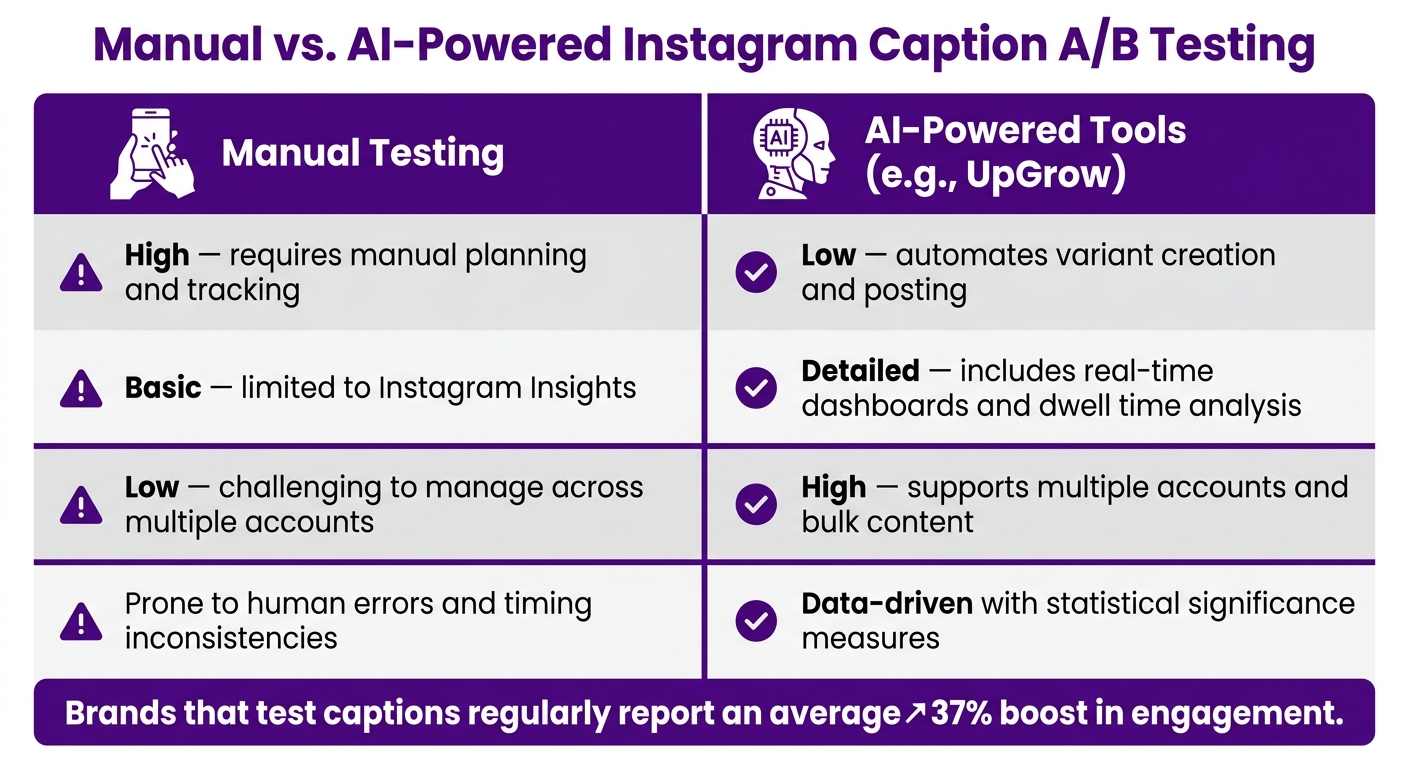
Manual vs. AI-Powered Instagram Caption A/B Testing: Key Differences
Once you’ve nailed down your hypothesis and variables, it’s time to run your caption tests systematically to ensure reliable results.
Start by noting your average engagement, reach, and click-through rate from the last 14–30 days. Then, create two caption versions: Version A (your control) and Version B (your variant). Make sure to change only one element between the two versions.
Post Version A on a Monday at 6:00 PM, and then post Version B the following Monday at the same time. Keeping the timing consistent is crucial. Avoid editing a live post during the test - this resets the algorithm's learning phase and can skew your results.
Each test should run for 4–7 days to account for daily variations in audience behavior. For smaller accounts, aim for at least 50–100 engagements per caption variant before drawing any conclusions. Hitting this threshold ensures your results are statistically sound.
If you’re looking for quicker insights, advanced tools can streamline the process.

While manual testing can deliver results, it’s not always the most efficient option. This is where UpGrow comes in, offering tools designed to speed up and refine your testing process.
UpGrow provides a real-time analytics dashboard that allows you to monitor your post performance as it unfolds. This live view helps you track metrics like dwell time (how long users spend on your post), which Instagram’s 2026 ranking model considers a key quality indicator.
Additionally, UpGrow’s Boost™ tool can expand your post’s reach to a targeted audience, helping you gather statistically meaningful data faster. By increasing impressions, you can reduce the time needed for testing without compromising accuracy. With AI-powered targeting filters - covering age, gender, location, and language - UpGrow ensures that both caption versions are shown to similar audiences, keeping the test conditions consistent.
Both manual testing and AI-driven solutions have their strengths, but they differ in speed, precision, and scalability. Here’s a quick comparison:
| Feature | Manual Testing | AI-Powered Tools (e.g., UpGrow) |
|---|---|---|
| Setup Time | High; requires manual planning and tracking | Low; automates variant creation and posting |
| Data Depth | Basic; limited to Instagram Insights | Detailed; includes real-time dashboards and dwell time analysis |
| Scalability | Low; challenging to manage across multiple accounts | High; supports multiple accounts and bulk content |
| Accuracy | Prone to human errors and timing inconsistencies | Data-driven with statistical significance measures |
Manual testing is a great way to start - it’s budget-friendly and helps you learn the basics of A/B testing. However, as your account grows or you increase the frequency of your tests, the limitations of manual methods become more apparent. Brands that test captions regularly report an average 37% boost in engagement, and AI-powered tools like UpGrow can help you maintain that momentum at scale.
When analyzing your results, focus on metrics that reveal actual performance rather than surface-level engagement. Metrics like Cost Per Acquisition (CPA), Return on Ad Spend (ROAS), and Conversion Rate provide a clearer picture of what drives meaningful results. Secondary metrics like saves, comments, and dwell time are also important since Instagram's ranking model prioritizes how long users engage with your post over simple likes.
For a test to be valid, ensure it reaches a 95% statistical confidence level and gathers about 50 optimization events (such as link clicks, purchases, or "Add to Cart" actions) within seven days. If confidence intervals overlap, the results are inconclusive. Smaller accounts that struggle to hit 50 purchases can track "Add to Cart" events instead. This method provides more actionable data without requiring weeks of waiting, keeping the focus on conversions rather than general engagement.
Two additional metrics to consider are Hook Rate (3-second views ÷ total impressions) and Hold Rate (how many viewers stayed engaged after the hook). Aim for a Hook Rate between 25–30%. These numbers help pinpoint where your content might be falling short. For example, if your Hook Rate is solid but your Hold Rate drops, the issue likely lies in the content that follows the hook.
Once you’ve analyzed your results, use the findings to create repeatable frameworks for future captions. It’s not just about identifying a winning caption - it’s about understanding why it worked. Was it the hook, the tone, the structure, or the call-to-action (CTA)? Turn these insights into reusable strategies.
Keep a record of every test, noting the hypothesis, the specific changes made, and the resulting metric shifts. Over time, patterns will emerge. For instance, you might discover that unexpected hooks outperform question-based openers or that a particular CTA generates 40% more comments compared to vague prompts. save these learnings in a "swipe file" or use an AI Instagram caption generator to apply them.
To guide your caption creation, consider the Hook → Context → Insight → CTA formula. Pair it with storytelling techniques like PAS (Problem-Agitate-Solve) for longer captions, and you’ll have a flexible structure that works across various content types. As the Inflowave Team explains:
"The visual gets them to stop. The caption is what makes them tap your profile."
Adjust your caption length based on the content format. For instance, Reels perform best with captions under 200 characters, while educational carousels can run between 1,200–2,000 characters. Longer captions for carousels signal depth and value, which the algorithm favors.
Caption testing isn’t a one-time effort - it’s an ongoing process. Once you identify a winning caption, use it as your new baseline and test another element, such as trying different CTAs. This iterative approach builds momentum over time, helping you align your content more closely with what resonates with your audience.
Keep an eye on your frequency metric as your audience grows. When frequency hits 2.5–3.0 for a specific segment, engagement often starts to drop. This signals it’s time to introduce a fresh, tested caption. Tools like UpGrow's analytics dashboard can help you monitor these metrics in real time. With AI-powered targeting filters, you can ensure each test reaches a consistent audience, keeping your data accurate and actionable.
Creators who treat captions as a second layer of content - complementing the visual - see significant results. Data shows this approach can deliver 2x to 4x more reach on the same image or video. Build caption testing into your monthly content planning, document what works, and use each round of results to refine your strategy further.
Instagram captions have evolved into a major factor for growth. As of 2026, the platform's algorithm prioritizes metrics like dwell time, saves, and shares, meaning your caption plays a critical role in driving engagement. Priya Patel, an Instagram & Reels Strategist, emphasizes this perfectly:
"The caption is not decoration - it is the conversion layer of your post."
This perspective ties directly to the strategies outlined in this guide. By testing and analyzing your captions, you can move beyond guesswork and make data-backed decisions. Start by isolating one variable - such as your hook, call-to-action, or caption length - and let the results guide your approach.
Once you gather insights, create a repeatable system to refine your captions. Frameworks like Hook → Context → Insight → CTA can help structure your content effectively. Adjust the length based on the format of your post, and document your findings. Research shows that creators achieve far greater reach by treating captions as a core part of their strategy, rather than an afterthought. Over time, these small wins can add up, forming a reliable playbook for future posts.
To streamline this process, tools like UpGrow can be a game-changer. With its live analytics dashboard and AI-driven targeting, you can test efficiently, maintain clean data, and draw accurate conclusions.
The key to long-term success on Instagram lies in consistent and intentional testing. Start with one hypothesis, test it over seven days, and use your results to refine your strategy further.
Want to test out different captions but don’t want to repost the same visuals? Here’s how you can do it effectively:
Aim for 1,000–5,000 impressions for each variation to gather enough data for meaningful insights. This approach can help you refine your strategy and fuel your growth.
The right metric hinges on your business goals. Start by identifying what you want to achieve: if your aim is to drive traffic, monitor click-through rate (CTR) or conversions; if you're building a community, pay attention to comments and shares; and if growth is your priority, focus on saves and profile visits. Choose one main KPI for the duration of your test to keep your results clear and actionable.
To ensure your caption A/B test results are reliable, follow these steps:
Patience is key - don’t rush to declare a winner before reaching the required sample size or completing the full test duration. This ensures your results are accurate and actionable.


