
How to Monitor Instagram Automation Tools
Track metrics, set real-time alerts, and run audits to keep Instagram automation compliant, prevent action blocks, and sustain organic engagement.
Track metrics, set real-time alerts, and run audits to keep Instagram automation compliant, prevent action blocks, and sustain organic engagement.
4.98 /5 - from 58k reviews
Trusted by 50,000+ creators — get real engagement delivered to your profile in minutes, not days.
Instagram automation tools can help grow your account, but improper monitoring can lead to serious issues like shadowbans, action blocks, or account suspension. Mismanaged automation also results in wasted ad spend, fake followers, and reduced engagement, costing brands billions annually. To avoid these pitfalls, focus on tracking key metrics, setting up real-time alerts, and conducting regular audits.
Key Takeaways:
Tools like UpGrow simplify monitoring with real-time dashboards, automated alerts, and compliance-focused features, helping you protect your account and optimize growth.
When it comes to Instagram automation, tracking the right metrics can mean the difference between success and running into compliance issues. The key areas to focus on are engagement metrics, follower growth patterns, and content performance data. Each of these provides valuable insights into whether your automation efforts are genuinely effective or potentially risky.
Metrics like likes, comments, shares, and saves are essential indicators of how your audience interacts with your content. These numbers show whether people are truly engaging or just scrolling past. A healthy engagement rate generally falls between 3% and 8%. For example, an account with 10,000 followers should see 300–800 interactions per post.
Interestingly, nano-influencers (1,000–10,000 followers) have an average engagement rate of 8.7%, while mega-influencers only reach 1.6%. This highlights that smaller, more authentic audiences often interact more actively than larger ones. If your automation tool is increasing your follower count but your engagement rate drops below 3%, it’s a warning sign. Be on the lookout for repetitive or generic comments, as they often signal automated behavior. Similarly, spikes in likes without corresponding increases in comments or saves can indicate suspicious activity that Instagram might flag.
Set up your analytics dashboard to automatically pull engagement stats and review them weekly. Pay close attention to which types of content generate genuine interactions. Once you’ve assessed engagement, shift your focus to follower growth patterns.
Organic growth is usually steady and gradual, while sudden spikes can suggest fake followers. Instagram’s algorithms are quick to flag accounts with unnaturally fast response times or large, disproportionate follower increases. For instance, exceeding 20 actions per hour or engaging in mass following and unfollowing can trigger Instagram's "We Suspect Automated Behavior" warning.
Use your analytics tool to track daily follower trends. Organic growth should resemble a smooth, upward curve - not a dramatic leap. Consistent growth patterns indicate that your automation tool is working as intended. Keep in mind that campaigns targeting accounts with more than 30% fake followers experience 58% lower conversion rates. Additionally, accounts with over 25% fake followers see an 83% drop in engagement per real follower.
To ensure your followers are genuine, review your list for accounts with odd usernames, no profile pictures, or skewed following-to-follower ratios. If your account is new, start with minimal automation and gradually increase activity as your account becomes more established.
Beyond tracking engagement and growth, analyzing your content’s performance is key to refining your strategy. Metrics like reach, impressions, and audience demographics help identify what’s working. Reach measures how many unique accounts see your content, while impressions count total views, including repeat views. These numbers can reveal whether your strategy is effectively expanding your audience.
Schedule weekly or monthly performance reports that combine engagement metrics, reach data, and audience growth insights. Tools that generate custom Instagram analytics reports can even include location comparisons and summaries of your top-performing posts. Use this data to identify which content drives the most reach and impressions, then adjust your strategy accordingly.
Also, compare your content performance with audience behavior to determine the best times to post. If your automation tool is posting content when your audience isn’t active, you’re wasting valuable effort. Keep an eye on audience demographics to ensure your targeting filters are reaching the right age groups, locations, and interests. For example, an eco-friendly apparel brand that analyzed 150 influencers for authentic growth reduced vetting time by 65% and achieved a 220% increase in click-through rates, with a $9.78 return on ad spend compared to the $5.20 industry average.
Once you've defined your metrics, the next step is creating an automated system to track them. Real-time monitoring tools can handle data collection for you, helping to spot issues early on. The idea is to set up dashboards, alerts, and reports that run continuously, so you're always in the loop without needing to constantly check your phone.
A live analytics dashboard offers immediate insights into how your automation tools are performing. For example, UpGrow connects directly to Instagram's API to automatically track key metrics like reach, follower growth, likes, comments, and saves. This level of automation can save marketing teams countless hours compared to manual tracking.
To get started, link your Instagram Business or Creator account to your chosen dashboard platform. Many platforms provide pre-built templates - like "Instagram Performance" dashboards - that make it easy to visualize essential metrics. These dashboards allow you to monitor how your automation efforts align with spikes in growth or changes in engagement. For instance, beta users of UpGrow's AI-assisted growth features reported a 275% increase in monthly followers, and the live dashboard made it simple to identify when and why those gains occurred.
Some advanced platforms even integrate with tools like ChatGPT or OpenAI to detect trends and deliver written insights alongside raw data. To make the most of these features, configure automated alerts to notify you of anomalies as they happen.
Automated alerts act as your early warning system, flagging unusual activity like a sudden drop in engagement or an unexpected spike in followers. UpGrow’s AI monitors over 50 metrics to optimize growth and predict trends. Modern monitoring tools also ensure data security with military-grade encryption and official Instagram API integrations. Fine-tune your alert thresholds to catch meaningful changes without being overwhelmed by unnecessary notifications.
In addition to instant alerts, scheduling regular performance reports can give you a broader view of your strategy's success.
Automated performance reports offer a long-term perspective on how well your automation strategy is working. Instead of manually gathering data, you can schedule weekly or monthly reports that compile all your key metrics into a single, easy-to-read document. UpGrow’s reporting tools allow you to consolidate important metrics into scheduled reports.
If you need more flexibility, you can export data for custom analysis. This feature is particularly useful for applying custom formulas or creating tailored visualizations. Combining Pay-Per-Click (PPC) data with organic metrics can also provide a complete picture of your advertising spend and return on investment (ROI).
| Reporting Method | Best For | Key Features |
|---|---|---|
| Native Insights | Individual creators | Real-time basic metrics (reach, engagement) on mobile |
| Meta Business Suite | Cross-platform management | Side-by-side Instagram and Facebook metrics on desktop |
| Third-Party Tools | Agencies and scaling brands | Automated email reports, PDF downloads, and multi-channel integration |
| Data Exports | Data analysts | Sending cloud data to Google Sheets or BigQuery for custom formulas |
UpGrow, rated 4.98/5 by over 58,000 users, combines automated reporting with its AI-powered growth tools. As of early 2026, they’re offering a 60% discount on all plans for a limited time, making it an appealing choice for businesses aiming to streamline their monitoring processes.
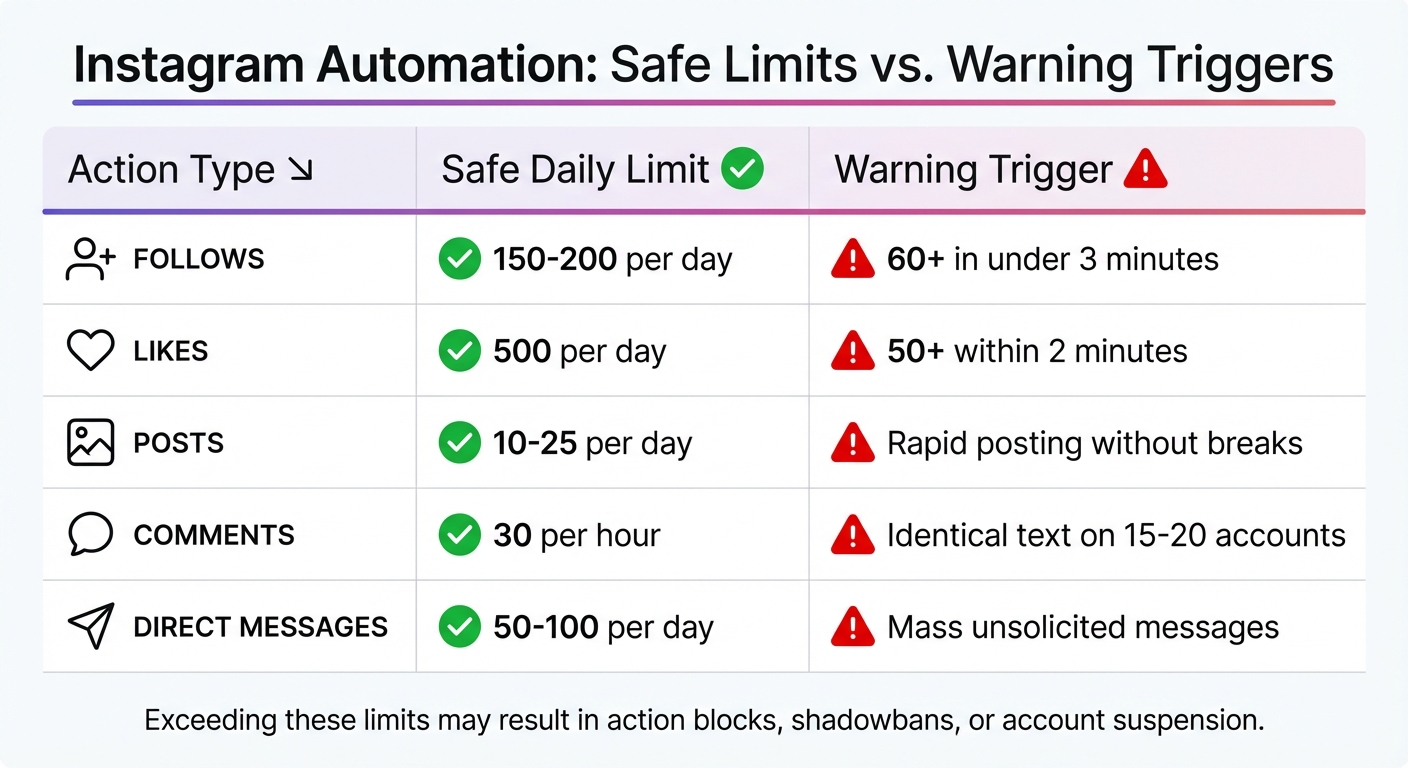
Instagram Automation Safe Daily Limits and Warning Triggers
Instagram relies on advanced AI systems to monitor user behavior, including action density, device details, and network activity. The platform strictly prohibits "inauthentic or automated behavior" aimed at gaming the system. This includes practices like mass following/unfollowing, bulk commenting, and automated liking. Breaking these rules can lead to action blocks, shadowbans, or even permanent account suspension.
As of December 4, 2024, Instagram discontinued support for third-party automation on personal accounts. Professional users are now required to transition to the official Instagram Graph API. This means any tool asking for your Instagram password instead of using OAuth or API tokens is a clear warning sign of non-compliance. Recognizing these red flags early is crucial to avoid penalties.
Instagram provides clear warnings like "We suspect automated behavior" or "Action Blocked". However, there are also more subtle indicators, such as a sudden dip in Story views, stalled Reels, or disappearing content from the Explore page.
The platform applies a Human Behavior Index (HBI) to assess account activity. This system evaluates randomness, creativity, and social relevance. Activities like following in rapid bursts, fixed action intervals, or IP changes from VPN or data center usage can trigger flags. For instance, following more than 60 accounts in under three minutes or liking over 50 posts in two minutes is considered high-risk behavior.
| Action Type | Safe Daily Limit | Warning Trigger |
|---|---|---|
| Follows | 150–200 | 60+ in under 3 minutes |
| Likes | 500 | 50+ within 2 minutes |
| Posts | 10–25 | Rapid posting without breaks |
| Comments | 30 per hour | Identical text on 15–20 accounts |
| Direct Messages | 50–100 | Mass unsolicited messages |
If you notice any of these warning signs, the best course of action is to pause all activity for 24–48 hours to reset your account's behavioral patterns. Log out of all sessions, update your password to disconnect unauthorized tools, and go to "Settings > Apps and Websites" to remove any unverified third-party apps.
To stay on Instagram’s good side, your activity needs to feel human. The platform's algorithms are designed to detect consistent, robotic patterns - like posting at exactly 9:00 AM every day or liking posts at fixed intervals. Instead, aim for flexibility. For example, schedule posts within a time range (e.g., 8:47–9:13 AM) to mimic natural behavior.
Follow the 80/20 rule: automate 80% of your content schedule while dedicating 20% of your time to genuine, manual interactions like replying to DMs or comments yourself. A great example is Sarah (@wanderlust_diaries), a travel blogger who maintained a 4.2% engagement rate and gained 2,100 followers monthly by automating 30 posts with 3-hour gaps, varying her posting times, and spending 30 minutes daily on manual interactions.
To further reduce risks:
Regular performance audits are a smart way to ensure your strategies are on track and compliant. These check-ins help you spot potential issues, like compliance risks or wasted resources on fake followers, and keep underperforming tactics from dragging down your results.
Frequent audits allow you to catch problems early. Start with a quick scan to address immediate concerns, followed by a more thorough review to assess long-term trends, verify follower authenticity, and ensure compliance with policies.
To get started, export your analytics data for the chosen review period. Look closely at your follower list for telltale signs of bots - profiles without pictures, usernames that seem random, incomplete bios, or a big gap between the number of accounts they follow and their own followers. These could indicate that automation is drawing in fake followers. Check your engagement metrics for unusual spikes or drops, which might suggest your account has been flagged. Also, verify that any third-party tools you're using comply with Instagram's official API policies. Tools that ask for your password instead of using OAuth can pose serious compliance risks.
Focus on metrics that show both how well your strategy is working and whether it's safe. For example, monitor the percentage of fake followers and the quality of engagement. Compare your engagement rate to industry standards - nano-influencers (1,000–10,000 followers) often see engagement rates around 8.7%, while larger accounts typically average closer to 1.6%. Watch for repetitive or generic comments, as these can be signs of bot activity.
Use your audit findings to make timely adjustments. For instance, in Q1 2024, a beauty brand reviewed a proposed $50,000 influencer campaign and discovered that 42% of the target account's followers were fake. Armed with this insight, they renegotiated the deal to $29,000, reflecting the account's actual reach. Similarly, an eco-friendly apparel brand used early-2024 audit results to vet 150 influencers more efficiently, cutting vetting time by 65%, boosting click-through rates by 220%, and achieving a $9.78 return on ad spend - almost double the industry average of $5.20.
If your audit uncovers a high number of fake followers, start by removing obvious bot accounts. When engagement rates fall below expectations, experiment with new content formats or posting schedules to improve performance. For compliance issues like action blocks, lower your daily activity limits and add more randomness to your actions. Keep track of every change you make and monitor the results over several weeks. These insights will help you fine-tune your monitoring strategy and improve your overall performance.
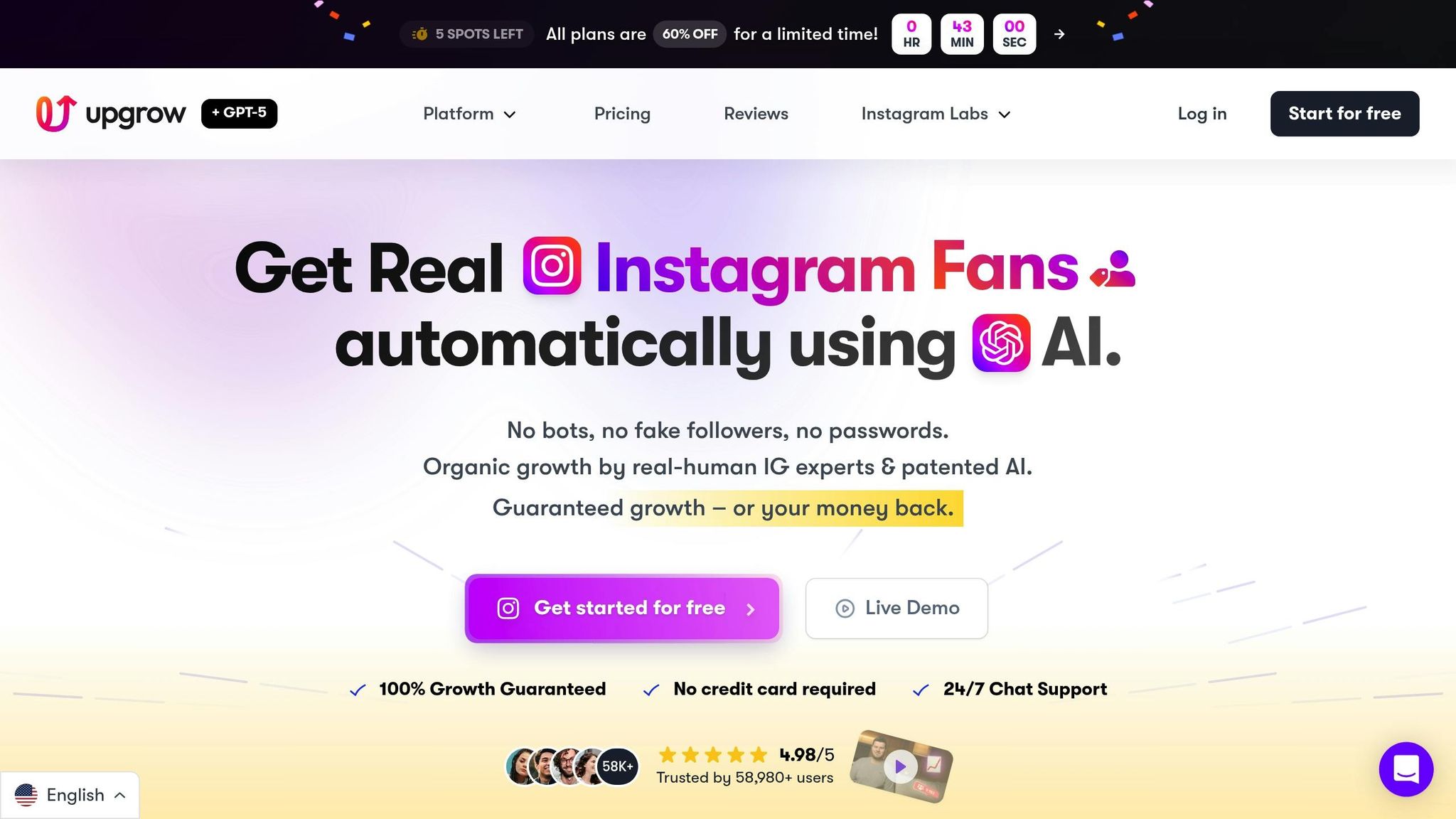
UpGrow is a platform tailored to help you monitor and grow your Instagram account while staying compliant with Instagram's rules. Since 2016, more than 100,000 accounts have benefited from its services, and it boasts a stellar 4.98/5 rating from over 58,000 users. By blending patented AI technology with human expertise, UpGrow ensures your account grows organically and transparently, giving you complete insight into your performance.
UpGrow offers a live dashboard that provides round-the-clock updates on follower growth, engagement, and content performance. With real-time metrics available 24/7, you can monitor your account’s progress - even during off-hours. The platform uses API-based integration to ensure all its activities align with Instagram's latest policies.
For those who choose the Turbo plan ($129/month), additional features like downloadable PDF growth reports and weekly performance summaries are included. These tools make it simple to conduct regular audits and document your account’s organic growth patterns. Beta testers of UpGrow's AI-assisted Boost™ feature saw an impressive 275% increase in monthly followers, showing how effective monitoring can lead to tangible results. With this combination of advanced analytics and Instagram compliance, UpGrow ensures you’re always equipped to track your performance in real time.
UpGrow prioritizes organic growth by combining AI-powered targeting with human oversight - steering clear of bots and fake accounts. All automated activities are carefully paced to align with Instagram's algorithmic limits. Since its launch in 2016, UpGrow has consistently delivered compliant and organic growth results.
One standout feature is that UpGrow doesn’t require your Instagram password, reducing the risk of unauthorized access. Instead, it uses AI-driven filters that let you customize targeting by location, age, gender, language, interests, and hashtags. This ensures that your engagement metrics reflect genuine interactions from your target audience rather than artificial activity. The platform also identifies fake accounts and low-quality followers, helping you maintain accurate performance data. These features not only enhance security but also allow you to fine-tune your automation settings to suit your specific needs.
UpGrow gives you the flexibility to tailor its monitoring tools and AI filters to meet your growth objectives and track niche metrics. Customizable alert thresholds notify you of critical changes - such as shifts in follower quality, engagement trends, or compliance risks - so you can address potential problems before they escalate.
For example, in early 2024, a beauty brand used UpGrow's real-time audit tool to evaluate a $50,000 influencer campaign. The analysis revealed that 42% of the followers were fake, enabling the brand to renegotiate the deal to $29,000, reflecting the actual authentic reach. Across the board, brands using UpGrow’s monitoring tools cut wasted marketing expenses by 67% in Q1 2024.
| Feature | Basic Plan ($69/mo) | Pro Plan ($99/mo) | Turbo Plan ($129/mo) |
|---|---|---|---|
| Real-Time Analytics | Included | Included | Included |
| Live Web Dashboard | Included | Included | Included |
| 24/7 Live Growth | Included | Included | Included |
| UpGrow Boost™ | Not Included | Included | Included |
| PDF Growth Reports | Not Included | Not Included | Included |
| Dedicated Manager | Not Included | Not Included | Included |
Keeping a close eye on your Instagram automation tools is key to safeguarding your account and driving growth. Instagram actively detects behaviors like sudden spikes in engagement or the use of tools that don’t comply with its API, which can lead to penalties or even account restrictions. By tracking important metrics, you can quickly identify potential issues and make necessary adjustments.
To turn these insights into results, you need effective monitoring systems. Real-time dashboards and automated alerts can provide constant oversight, while weekly audits help ensure your automation efforts stay within Instagram’s guidelines. This proactive, data-focused strategy not only protects your account but also prevents unnecessary ad spend while maintaining the organic engagement patterns Instagram values.
UpGrow takes this a step further with its patented AI and real-time monitoring features. Offering live dashboards and customizable alerts, UpGrow has supported over 100,000 accounts since 2016. Beta users have reported a 275% increase in monthly followers, while brands using these tools have cut marketing waste by up to 67%. These results provide clear insights that empower businesses to take impactful action.
To ensure steady and compliant Instagram growth, set up a monitoring dashboard, schedule regular audits, and rely on tools designed with compliance in mind.
If you're trying to spot fake followers on your Instagram account, start by examining certain red flags. Look out for profiles that seem incomplete, have very few posts, or show minimal to no engagement. These accounts often use usernames filled with random numbers or characters and display generic profile pictures.
For a more detailed check, you can turn to follower analysis tools. These tools help identify suspicious patterns and estimate how many of your followers might be fake. Regularly keeping an eye on your follower growth and engagement stats is another effective way to ensure your audience is both authentic and actively engaged.
Misusing Instagram automation tools can have serious repercussions, including breaking Instagram's terms of service. This might lead to penalties like reduced visibility, account restrictions, or even permanent bans. Activities such as mass following, auto-commenting, or sending automated direct messages are often flagged as spam, which can damage your account’s reputation and limit its reach.
On top of that, using unreliable automation tools can put your account’s security at risk. Sharing your login credentials with untrustworthy platforms could expose your account to hacking or data breaches. To grow your account safely and effectively, stick to tools that emphasize organic engagement, follow Instagram's rules, and offer real-time monitoring to ensure everything stays compliant.
To keep your Instagram automation within the platform's rules, stick to features Instagram explicitly permits. These include scheduling posts, managing Stories, tracking analytics, moderating comments, researching hashtags, and planning content. On the flip side, steer clear of actions like mass following or unfollowing, automated likes, comment spamming, or automating direct messages. These activities can break Instagram's guidelines and may result in account restrictions.
For a smarter, safer approach, try tools like UpGrow. They offer real-time monitoring, automation that aligns with Instagram's policies, and in-depth performance analytics. This way, you can grow your account organically while adhering to the platform's rules.


