
How Hashtag Analytics Boost Instagram Growth
Use hashtag analytics to track impressions, reach, engagement and sentiment, refine tag mixes, avoid banned tags, and accelerate organic Instagram growth.
Use hashtag analytics to track impressions, reach, engagement and sentiment, refine tag mixes, avoid banned tags, and accelerate organic Instagram growth.
4.98 /5 - from 58k reviews
Trusted by 50,000+ creators — get real engagement delivered to your profile in minutes, not days.

Hashtag analytics can significantly improve your Instagram growth by helping you understand which hashtags drive visibility, engagement, and organic follower growth. Here's a quick breakdown:
If you're looking to grow on Instagram, keeping an eye on specific metrics can help you understand how your hashtags are driving visibility and engagement. Here's what you need to know.
Reach measures how many unique accounts have seen your post, while impressions count the total number of views, including repeat views from the same person. For example, if 100 users each view your post three times, your reach is 100, but your impressions add up to 300.
One metric to prioritize is "Impressions from Hashtags", which shows how many views came directly from hashtag searches or feeds. To find this in Instagram Insights, go to your post, tap "View Insights", and scroll to the "Discovery" section. Here, you’ll see how many impressions were driven by hashtags versus other sources like your profile or home feed.
Once you’ve tracked visibility, it’s time to track and measure your success by seeing how users engage with your content.
Engagement rate reflects how much your audience interacts with your content. You can calculate it using this formula:
(Total Engagements per Post / Reach per Post) × 100.
This percentage indicates how well your content resonates with viewers. For reference, Instagram’s average engagement rate sits around 0.68%, which is significantly higher than Facebook’s 0.06%.
Different types of engagement carry different levels of significance:
Using tools like Sprout Social or Later, you can filter performance metrics by these interaction types to see which hashtags are driving the most meaningful engagement.
Additionally, sentiment analysis can help you understand how your hashtags are perceived. Are the conversations around them positive, negative, or neutral? If a hashtag is sparking mostly negative sentiment, it might be time to rethink its use.
Understanding which hashtags perform best and who they’re reaching is crucial for fine-tuning your strategy.
Top-performing hashtags are those that consistently deliver high reach and engagement. While Instagram Insights offers data on hashtag performance, it’s limited to 30–90 days. Third-party tools, on the other hand, provide more in-depth tracking, including historical data, individual hashtag performance charts, and competitor comparisons.
"The question isn't if hashtags are important, but how you use them to drive results." - Sprout Social
Audience data is equally valuable. It tells you about the demographics of the users your hashtags are attracting - their age, gender, location, and even when they’re most active. This information can help you refine your targeting. For instance, if a specific hashtag resonates with a particular demographic, you can focus on similar tags or tailor your content to that audience. Many brands are also leveraging this data for social listening, allowing them to spot trends and competitor strategies early.
For reporting and analysis, tools like Dataslayer let you export Instagram hashtag data into Google Sheets. Platforms like Later and Sprout Social offer built-in analytics dashboards, with Later available through various plans and Sprout Social offering a 30-day free trial.
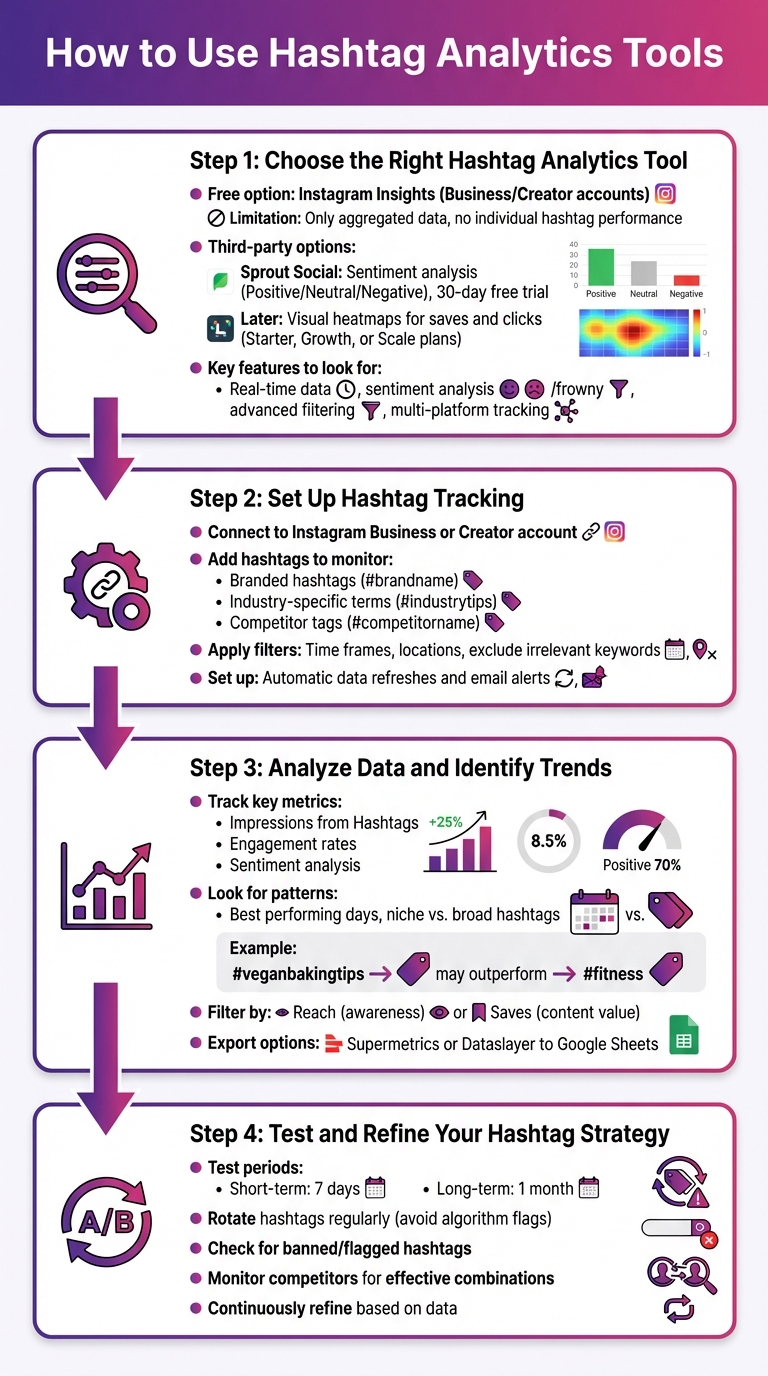
4-Step Guide to Using Hashtag Analytics for Instagram Growth
Using hashtag analytics tools can help fine-tune your Instagram strategy and boost your growth.
Start by deciding between Instagram Insights and third-party tools. Instagram Insights is free for Business or Creator accounts, but it only provides aggregated data, like total "Impressions from Hashtags", without detailing individual hashtag performance.
Third-party tools can bridge this gap. For example, Sprout Social offers sentiment analysis to classify conversations as Positive, Neutral, or Negative, and comes with a 30-day free trial. Meanwhile, Later provides visual heatmaps that highlight which hashtags drive the most saves and clicks, available on its paid plans (Starter, Growth, or Scale).
When picking a tool, focus on features like real-time data, sentiment analysis, and advanced filtering options. Some tools also allow you to track hashtags across multiple platforms, such as Instagram, Twitter, and TikTok, all from a single dashboard. Choosing the right tool sets you up for effective tracking in the next steps.
Once you've selected a tool, connect it to your Instagram Business or Creator account. Add the hashtags you want to monitor, including branded hashtags, industry-specific terms, and competitor tags.
Apply filters to narrow your data. For example, you can filter by specific time frames, locations, or exclude irrelevant keywords. Many tools also offer automatic data refreshes and email alerts, making it easier to stay updated on performance trends without manual effort.
With tracking in place, dive into the metrics. Look at "Impressions from Hashtags" to see how many views your posts are getting from hashtag searches. Measure engagement rates to understand how well your audience is interacting with your content. Sentiment analysis can also provide insights into how your hashtags are being received.
Pay attention to patterns. Are some hashtags consistently performing better on specific days? For instance, niche tags like #veganbakingtips might outperform broader ones like #fitness. Tools like Later allow you to filter data by metrics such as "Reach" for awareness or "Saves" for content value. For more detailed analysis, platforms like Supermetrics or Dataslayer enable you to export data to Google Sheets for custom reports.
Experiment with different hashtag combinations over short (7-day) and long (1-month) periods to find what works best. Rotate your hashtags regularly to avoid being flagged by Instagram's algorithm.
Check frequently to ensure none of your hashtags have been banned or flagged, as these can hurt your post's reach. Keep an eye on competitors to discover effective hashtag combinations. Use the data you gather to tweak and improve your strategy. By continuously refining your approach, you can drive more engagement and grow your Instagram presence faster.
UpGrow takes your refined hashtag strategies and turns them into actionable growth. By analyzing key Instagram metrics, the platform helps you use hashtag data to drive organic follower growth. With its AI-powered targeting and real-time analytics, UpGrow ensures you achieve authentic engagement - no bots or fake accounts involved.
UpGrow’s AI dives into audience data to pinpoint the right demographics and delivers niche-specific content templates tailored to trending hashtags. This means your content reaches people already engaging with hashtags that matter to your brand, boosting your visibility naturally.
For example, if your analytics highlight high-performing tags like #TravelGram, you can explore UpGrow’s library of pre-approved content. These templates are designed to connect with your audience and can be customized to fit your brand voice. With UpGrow, your Instagram strategy shifts from guesswork to a precise, data-driven approach.
The platform’s live dashboard gives you constant updates on follower growth, engagement rates, and reach metrics. This real-time data allows you to tweak your strategy as trends emerge. For instance, a surge in impressions from #SmallBusinessSaturday could signal an opportunity to adjust your content focus.
UpGrow’s Boost™ tool takes it a step further. Using pattern-recognition technology, it identifies what’s working and scales those strategies automatically. Beta users of Boost™ have reported a 275% increase in monthly followers. By combining these features with your hashtag insights, you can concentrate on high-impact hashtags and grow your audience - all while staying within Instagram’s guidelines. Plus, the platform offers a straightforward pricing model for added transparency.
Starting at $39/month, UpGrow includes a money-back guarantee. With thousands of satisfied users and top ratings, the platform has proven its ability to deliver real results. On the basic plan, you can expect to gain over 300 organic followers monthly, far surpassing what manual efforts could achieve. Pair your hashtag analytics with UpGrow’s AI-powered tools, and measurable growth becomes a reality.
Once you've set up your hashtag tracking, it's critical to steer clear of common missteps that can hinder your progress. Even with top-notch analytics tools, certain errors can stall your Instagram growth. Spotting these issues early helps fine-tune your strategy and saves you from wasting time on ineffective tactics.
One major blunder is hashtag stuffing, which happens when users cram all 30 allowable hashtags into every post. While it might seem like a good way to maximize reach, this can make your content look spammy and may cause Instagram's algorithm to deprioritize your posts. Instagram advises sticking to 3 to 5 hashtags per post to help their system categorize your content effectively. Focus on using a handful of highly relevant tags or, at most, around 20 well-chosen ones.
Another issue is relying solely on popular hashtags like #love or #fitness. While these tags boast massive reach (e.g., #love has over 2 billion posts), your content risks getting buried almost instantly among millions of other posts. A smarter approach is to combine widely-used tags with niche hashtags that have fewer than 50,000 posts. This strategy balances broad exposure with targeted engagement in smaller, active communities.
Repeating the same set of hashtags for every post is another common mistake. Instagram may flag your account for spammy behavior if you consistently reuse identical hashtags. To avoid this, create three or four unique hashtag sets based on your content themes and rotate them monthly, adjusting based on performance data. This keeps your strategy dynamic and signals to Instagram that you're sharing diverse, authentic content.
Another frequent error is ignoring analytics data altogether. Without analyzing hashtag performance, you're essentially guessing what works. Instagram's built-in insights only provide aggregated data under "From Hashtags", which doesn't pinpoint which tags are driving results. Third-party tools can help you track individual hashtag performance, so you can drop tags that aren't delivering views. If impressions from hashtags make up less than 10% of your total reach, it's a sign that your current strategy needs adjustment.
Lastly, using banned or spam-heavy hashtags can severely impact your visibility. Before adding a new hashtag to your list, search for it on Instagram to ensure the results page isn't hidden or cluttered with irrelevant posts. If your post gets zero impressions from hashtags despite using a full set, it's likely one or more of your tags has been flagged. Regularly checking your hashtags helps you avoid unnecessary drops in reach.
Here's a quick reference table summarizing the most common mistakes and their fixes:
| Common Mistake | Impact | Practical Solution |
|---|---|---|
| Hashtag Stuffing | Posts look spammy; content is deprioritized | Use 3–5 highly relevant tags or a curated list of ~20 quality tags |
| Using Only Popular Tags | Content gets buried in crowded feeds | Combine popular tags with niche ones (<50,000 posts) for better visibility |
| Ignoring Analytics | Effort wasted on ineffective hashtags | Use third-party tools to track and refine your hashtag performance |
| Static Strategy | Account flagged for repetitive behavior | Rotate hashtag sets monthly based on performance data |
| Using Banned Tags | Reduced reach or shadowbanning | Check the search page to ensure hashtags are active and relevant |
Hashtag analytics have become a must-have for anyone serious about growing on Instagram. With 71% of marketers viewing Instagram as essential and 75% of users taking action after seeing inspiring posts, using data to guide your decisions is what separates accounts that thrive from those that plateau.
Adam Mosseri, Head of Instagram, has emphasized the platform's shift toward AI-driven search and keywords. To keep up, you need to focus on real-time insights to identify the 3 to 5 hashtags that resonate most with your audience. Analytics provide instant feedback on your visibility and engagement, giving you the flexibility to tweak your strategy as needed.
But the benefits go beyond short-term wins. By consistently tracking hashtag performance, you can create detailed audience profiles, uncover evergreen niche hashtags that consistently perform well, and build a content calendar based on proven results. You’ll also stay ahead of the curve by identifying which hashtags succeed in your industry and spotting trends before they peak. With tools like UpGrow, you can take these insights even further, enhancing your Instagram strategy.
If you’re ready to ditch the guesswork, UpGrow combines AI-powered targeting with real-time analytics to help you implement these strategies effectively. As the platform explains:
"AI turns Instagram posting from guesswork into data-driven strategy, predicting which visuals, captions, hashtags, and timings will spark viral engagement".
With plans starting at $39/month and a money-back Growth-Guarantee, now’s the time to start using Instagram analytics to drive results.
Track your hashtag performance, apply the strategies outlined here, and watch your Instagram reach and engagement grow. The tools are available - make them work for you.
To make the most of your hashtags, use hashtag analytics tools to track key performance metrics such as reach, impressions, likes, and comments. By analyzing posts that generate higher engagement or broader reach, you can pinpoint which hashtags are working best. Many tools also let you filter data by custom date ranges, helping you refine your strategy. This ensures you're consistently using hashtags that grow your audience and encourage organic interactions.
Using 3 to 5 hashtags per post strikes the perfect balance for improving reach and engagement. This range ensures your content stays targeted and relevant while maintaining a polished, professional appearance.
To prevent spam flags and ensure your hashtags stay relevant, make it a habit to switch up your hashtag sets on a regular basis - every week or two works well. This aligns with Instagram's recommended hashtag strategies, helping you maintain engagement while minimizing the chances of your content being flagged as spam.


