
CTA Mistakes to Avoid on Instagram
Avoid vague CTAs, poor placement, mismatched messaging, clutter, and ignored data—learn clear, format-specific fixes to boost Instagram engagement and conversions.
Avoid vague CTAs, poor placement, mismatched messaging, clutter, and ignored data—learn clear, format-specific fixes to boost Instagram engagement and conversions.
4.98 /5 - from 58k reviews
Trusted by 50,000+ creators — get real engagement delivered to your profile in minutes, not days.

Your Instagram CTAs (calls-to-action) can make or break your engagement and conversions. Yet, many brands fall into avoidable traps like vague wording, poor placement, or mismatched messaging. Here's what you need to know:
Strong CTAs are clear, focused, and data-driven. Avoid these common mistakes, and you’ll turn more views into meaningful actions.
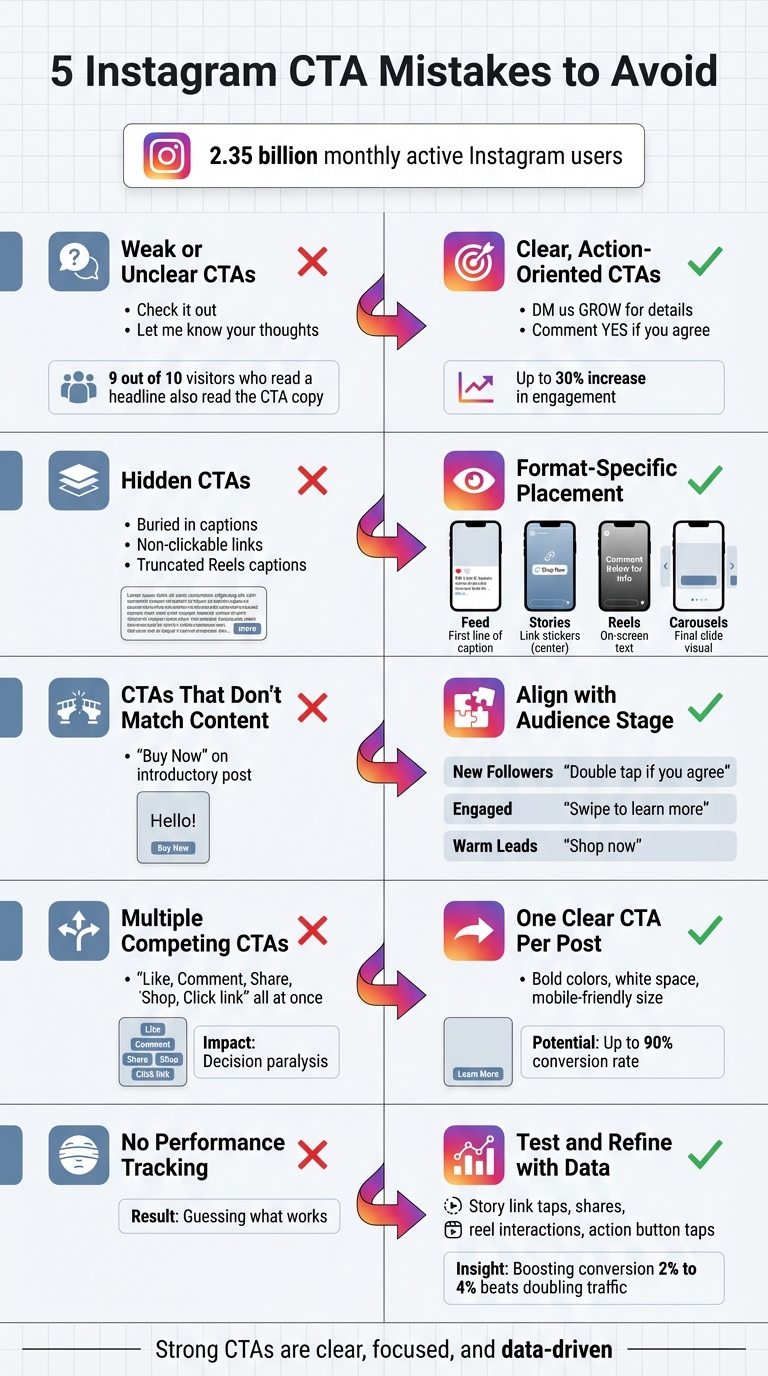
5 Common Instagram CTA Mistakes and How to Fix Them
Vague CTAs can be a real barrier to conversions. Phrases like "Check it out" or "Comment your fave" leave users guessing about the next step. This added mental effort often leads to inaction.
Passive or unclear language might get you a few likes, but it won’t inspire meaningful actions like clicks, sign-ups, or purchases. For example, saying “Get in touch for more info” leaves users wondering - should they send a DM, email, or click a link? This lack of clarity creates friction, and friction kills conversions. It’s like walking into a store with no visible checkout counter - people browse but rarely buy.
Here’s a telling statistic: 9 out of 10 visitors who read a headline also read the CTA copy. If your CTA lacks clarity or impact, you’re missing a golden opportunity to turn interested visitors into engaged followers or paying customers.
Use direct, commanding language to make the next step obvious. Instead of saying “Let me know your thoughts,” try something like “Comment YES if you agree.” Replace “DM for info” with “DM us the word GROW to get the blueprint.” This approach aligns with what social media consultant Fay Edwards calls the "Scarecrow" Rule:
"The more people have to think to take action, the less likely they are to act. So, take the thinking out of it!"
Focus on benefits. CTAs that clearly state a benefit can increase engagement by up to 30%. For instance, “Follow us” becomes much more compelling as “Follow for eco-living tips.” Keep CTAs short, stick to one per post to avoid overwhelming users, and use visual cues like emojis (👉 or ⬇️) to guide attention to your action button.
| Weak CTA | Strong, Action-Oriented CTA |
|---|---|
| Get in touch for more info | DM us BUTTERFLIES for your free factsheet |
| Let me know your thoughts | Comment YES if you agree |
| Check it out | Shop now and save 15% |
| Comment your fave | Tag a friend who needs this |
Every audience is different, so it’s essential to test what resonates best. Use Instagram analytics to experiment with different CTA variations. Adjust elements like the verb, the benefit, or the sense of urgency, and measure which options drive the most engagement. For instance, compare “Download now” with “Get your free e-book” or “Limited spots available” with “Reserve your spot today.”
Did you know a well-crafted CTA button can achieve conversion rates as high as 90%? Keep an eye on metrics like click-through rates, DM responses, and link taps to identify your top-performing CTAs. Once you find what works, double down on it.
Up next, we’ll look at how format and placement mistakes can further undermine your CTA’s effectiveness.
Even the most compelling call-to-action (CTA) won’t work if users don’t notice it. Instagram offers a variety of content formats - feed posts, Stories, Reels, and Live - each with its own visibility challenges. If your CTA gets lost in Instagram’s interface or doesn’t fit the format, it’s unlikely to drive results.
One frequent mistake is hiding the CTA at the end of a long caption. Most users scrolling through their feed rarely read beyond the first few lines, so a CTA buried at the bottom is easy to miss. Another misstep? Adding full URLs in feed post captions. Since links in captions aren’t clickable on Instagram, users would have to copy and paste them manually - a step most won’t take.
Reels present a unique challenge. As Payton Rodewald from Planoly notes:
"Reels viewers can only see the first line of your caption as they scroll".
This means any CTA placed further down in the caption will remain hidden unless the viewer expands the text. Similarly, relying solely on carousel captions for CTAs can backfire, as users often swipe through the images without reading the accompanying text. On Stories, poorly placed link stickers - either too high or too low - can get obscured by Instagram’s interface elements, like the account name or the "Send Message" bar.
To avoid these pitfalls, it’s essential to adapt your CTA placement to suit each Instagram format.
Different Instagram formats call for different approaches. Customizing how and where you place your CTA can make all the difference in turning views into actions.
"Put a version of your CTA in the text on screen in your reel. Or even speak it in the video. That's where the real conversions come from".
| Instagram Format | Primary CTA Placement | Visibility Challenge | Best Practice |
|---|---|---|---|
| Feed Posts | Caption (First Line) | Links aren’t clickable | Use @username to direct users to your bio |
| Stories | Link Stickers / On-screen text | Overlap with UI elements | Place stickers in the center "safe zone" |
| Reels | On-screen text / First Line of Caption | Captions get truncated | Use text overlays and audio cues |
| Carousels | Final Slide Image | Users focus more on images than captions | Add a visual CTA to the last slide |
| Live | Pinned Comments / Product Tags | Viewers join at different times | Repeat CTA throughout the session |
Data can help fine-tune your CTA strategy. Instagram Insights allows you to track metrics like link clicks from Stories, profile visits from feed posts, and engagement on Reels. These insights reveal where users drop off, helping you adjust CTA placement for better results. For example, if you notice high views but low engagement, your CTA might be poorly placed or not visible enough.
Ryder Meehan, Co-Founder of UpGrow, explains:
"Where your CTA is placed can be just as important as what it says. Ideally, your CTA should be positioned where it naturally fits within the user journey".
Experiment with moving CTAs to more prominent locations, such as the start of captions or on-screen text for Reels. Test these adjustments week by week to see which changes drive better engagement. Since users often scan content in a Z-pattern, placing CTAs along this visual path can significantly boost visibility.
Next, we’ll look at how poorly matched CTAs - those that don’t align with your content or audience - can derail your efforts.
A CTA, or call-to-action, serves as the bridge between sparking interest and prompting action. But when that bridge doesn't align with your content or your audience's mindset, it can derail the entire user experience - even if the CTA itself seems reasonable.
Asking for big commitments on low-effort content is a surefire way to alienate your audience. For instance, if you're sharing a quick tip or a lighthearted post and immediately follow it up with "Buy Now" or "Book a Call", it can feel pushy and out of sync. At that point, your audience likely hasn’t built enough trust to make such a leap.
When CTAs feel disconnected, they create a sense of unease and distraction, which works against the habit-forming process essential on platforms like Instagram. Manu Muraro, Founder of Your Social Team, highlights this challenge:
"With people's short attention span on Instagram, combined with the amount of content they are consuming, if they don't see a clear call to action asking them to take the next steps, they will most likely just keep scrolling".
The key to effective CTAs is matching them to both your content and where your audience is in their journey. Educational posts, for example, pair well with prompts like "Save for later" or "Swipe to learn more".
For new followers or casual viewers, focus on low-pressure actions like "Double tap if you agree", "Follow for more tips", or "Comment your thoughts below". These smaller asks help establish a habit of engagement. Once trust and familiarity are built, you can shift to higher-intent CTAs such as "Shop Now", "Register Now", or "Book your free consultation" for an audience that's warmed up.
Specificity also goes a long way. Instead of a generic "Follow us", try something like "Follow us for eco-living tips." Instagram Consultant Faye Edwards explains it best:
"Treat everyone like the scarecrow from the Wizard of Oz. That is: Like they have no brain. The more people have to think to take action, the less likely they are to act".
Here’s a quick breakdown of how to tailor CTAs based on audience stage and content type:
| Audience Stage | Content Type | Recommended CTA |
|---|---|---|
| New Followers | Relatable quotes, quick tips | "Double tap if you agree", "Save for later" |
| Engaged Audience | Tutorials, educational carousels | "Swipe to learn more", "Comment your experience" |
| Warm Leads | Product showcases, service demos | "Shop now", "Book a consultation", "Link in bio" |
By aligning CTAs with content and audience readiness, you create a smoother path for users to take meaningful next steps.

Fine-tuning CTAs starts with understanding your audience, and tools like UpGrow make this process easier. With AI-driven targeting and demographic filters, you can craft CTAs that align perfectly with user intent and their stage in the journey.
Features like age and gender filters, location targeting, and language preferences ensure your CTAs reach the right people at the right time. For instance, if your target audience skews younger (71% of Instagram users are under 35), casual, engagement-focused CTAs work well. On the other hand, location-based targeting ensures that "Shop Now" CTAs reach users who can actually visit your store or qualify for your offer.
UpGrow also provides a real-time analytics dashboard that tracks which audience segments respond best to different CTAs. This data helps you refine your approach, reducing friction and improving ROI by delivering CTAs to users ready to act.
Next, let’s dive into how hidden or competing CTAs can further dilute user attention.
Packing multiple CTAs into a single post or hiding them behind poor design choices can make it unnecessarily hard for users to take action. A well-designed CTA button has the potential to convert up to 90% of users. However, when faced with competing CTAs, users often feel overwhelmed, leading to decision paralysis. The LIFT Model highlights distraction as one of the six key factors that can hurt conversion rates. For example, if a post includes options like "Like", "Comment", "Share", "Shop Now", or "Click the link in bio", users might end up doing nothing at all.
This kind of clutter doesn’t just hurt conversions; it also creates design challenges that make user interaction less intuitive. For instance, CTAs can lose visibility if they lack contrast, are too small for mobile screens, or are buried under Instagram’s "more" button in lengthy captions . On Instagram Reels, text beyond the first caption line often requires an extra tap - something most users won’t bother with.
Too many CTAs can also irritate your audience. Claire, Marketing Executive at Design Wizard, explains:
"Too many CTA posts can irritate your followers and make them feel harassed".
To address these issues, stick to one primary action per post. As iubenda advises, "Remember not to add too many CTAs in a single post or story: just one is enough".
Boost visibility by using bold, contrasting colors and leaving plenty of white space. Make sure buttons are large enough for easy tapping on mobile devices, where nearly 6.92 billion users consume content. Use action-driven verbs like "Shop", "Discover", or "Join" to clearly communicate the next step. Place your CTA at the end of the caption or use interactive stickers in Stories for immediate engagement .
| Feature | Cluttered/Multiple CTAs | Streamlined/Single CTA |
|---|---|---|
| User Effort | High; users must choose an action | Low; the next step is obvious |
| Visual Impact | Low; elements compete for attention | High; white space and contrast help it stand out |
| Clarity | Confusing and ambiguous | Direct and easy to understand |
| Conversion Potential | Low; distractions reduce effectiveness | High; up to 90% conversion potential |
| Audience Perception | Feels like spam or harassment | Provides clear and helpful guidance |
The difference is striking. Posts cluttered with multiple CTAs force users to weigh their options, often leading to inaction. On the other hand, a focused, single CTA offers a seamless path from interest to action. Considering that 9 out of 10 visitors who read a headline also read the CTA copy, prioritizing clarity in your calls-to-action is essential. A streamlined approach not only minimizes distractions but also ensures your audience knows exactly what to do next, increasing the likelihood of conversions across Instagram’s formats.
Clear calls-to-action (CTAs) are essential, but tracking their performance is what really drives improvement. Skipping this step leaves you guessing and can severely limit your campaign's impact. Here's an eye-opener: boosting your conversion rate from 2% to 4% is often more cost-effective than doubling your traffic. Yet, many brands overlook this opportunity, missing out on potential conversions.
To understand how your audience interacts with your CTAs, you need to monitor the right metrics. For example:
Amanda Demeku, a Content Marketing Specialist at Later, highlights the importance of reach metrics:
"Reach shows how many unique accounts have seen your post, and therefore how much awareness and value you're gaining".
Given that Instagram Stories often generate high view counts, tracking link clicks is critical. With feed posts reaching about 12% of followers and Stories averaging just 2%, these metrics can reveal where your CTAs are most effective.
Start by setting clear goals for each CTA and tracking the metrics that align with those objectives. Use A/B testing to experiment with different elements like text, design, and placement to see what resonates best with your audience . For example, you can test:
Heatmaps are another useful tool to identify where users are engaging most on your page.
Define a North Star Metric (NSM) that directly ties to your business goals. For instance, if you're running an e-commerce store, focus on "Add to Cart" clicks rather than superficial metrics like likes. Here's a fact to keep in mind: 9 out of 10 visitors who read your headline will also read your CTA copy. Even small tweaks can lead to big wins.
With this data-driven mindset, you're ready to explore advanced tools for real-time insights.
UpGrow’s real-time dashboard simplifies the process of tracking CTA performance. It provides detailed analytics on traffic from website links, Link in Bio pages, and Story stickers. You can also analyze completion rates for Stories and Reels, helping you decide the best placement for CTAs so they’re seen before users swipe away.
The dashboard automates data collection, offering real-time updates on CTA performance and ROI. Plus, with AI-driven insights, you can quickly identify which CTA strategies are most effective for your audience. Considering that nearly 6.92 billion people globally use mobile devices, tools like UpGrow are invaluable. By combining its smart AI-targeting with live analytics, you’ll have everything you need to refine your CTAs and boost conversions.
As we’ve discussed, the most effective CTAs are clear, focused, and backed by data. The five pitfalls we highlighted - weak language, poor placement, mismatched messaging, cluttered design, and ignoring data - can seriously hinder your engagement efforts. The upside? Each of these mistakes has straightforward solutions. By testing and analyzing every element of your CTAs, you can continuously refine your strategy.
Strong, well-crafted CTAs can significantly boost engagement. With over 2.35 billion monthly active users on Instagram, standing out requires more than just good content - it demands clear, data-driven CTAs that resonate with your audience.
Ryder Meehan, Co-Founder and Co-CEO of UpGrow, sums it up perfectly:
"Creating an effective call to action requires both creativity and data-driven optimization".
This is where tools like UpGrow make all the difference. With AI-driven targeting and real-time analytics, UpGrow helps you craft CTAs that hit the mark. Their smart filters ensure you’re reaching the right audience at the right moment, while detailed performance insights reveal what’s working and where adjustments are needed. It’s a practical way to turn insights into measurable results.
To make your Instagram CTAs work harder for you, focus on being clear, relevant, and adding a touch of urgency. Keep your phrases short and to the point - think "Shop now" or "Sign up today." Using strong, action-driven words like "Join," "Download," or "Learn" can nudge your audience to take action right away.
Don’t stop there - pair your CTA with a specific benefit. For example, "Get 20% off your first purchase" gives your audience a clear incentive. Make your CTA pop visually by using bold text, emojis, or contrasting colors to grab attention. Experiment with different wording and placement to figure out what clicks with your followers. By keeping it simple, eye-catching, and compelling, you can drive more clicks, conversions, and engagement on Instagram.
To get the most out of your Instagram content, make sure your call-to-action (CTA) is easy to spot and naturally draws attention. Here are some effective ways to place your CTAs:
Make sure your CTAs are clear, action-driven, and fit the purpose of your content. Test different placements and monitor their performance using Instagram Insights or tools like UpGrow’s analytics to find what resonates best with your audience.
To make your Instagram CTAs more effective, start by diving into the numbers. Focus on metrics like click-through rates (CTR), link clicks, saves, and comments. Tools like Instagram Insights or UpGrow's real-time analytics dashboard can help you track these. Compare your performance to specific goals - like hitting a 2% CTR or 500 clicks a week - and identify trends based on factors like post type, audience demographics, or the timing of your posts.
Next, test and tweak your approach using A/B testing. Experiment with different CTA phrasing - like "Shop now" versus "Link in bio" - or play around with placement, such as adding CTAs in captions versus Story stickers. You can even test visuals, comparing the impact of emojis versus plain text. Keep everything else consistent so you can clearly see what resonates with your audience. Use insights like age, location, and interests to ensure you're reaching the right people at the right times.
Once you've gathered insights, put them into action. If short, punchy CTAs work best, stick with concise and engaging language moving forward. Adjust your posting schedule to match when your audience is most active, and phase out any CTAs that don’t perform well. By continuously testing and refining, you can transform your Instagram posts into tools that drive real engagement and conversions.


