
Complete Guide to Safe Instagram Automation
Only API-based, human-paced Instagram automation prevents bans, secures accounts, and supports genuine growth.
Only API-based, human-paced Instagram automation prevents bans, secures accounts, and supports genuine growth.
4.98 /5 - from 58k reviews
Trusted by 50,000+ creators — get real engagement delivered to your profile in minutes, not days.

Safe Instagram automation is about using Meta-approved tools to handle repetitive tasks like scheduling posts, managing messages, or analyzing data - without breaking Instagram’s rules. This approach protects your account from being flagged, shadowbanned, or permanently banned.
Here’s what you’ll learn:
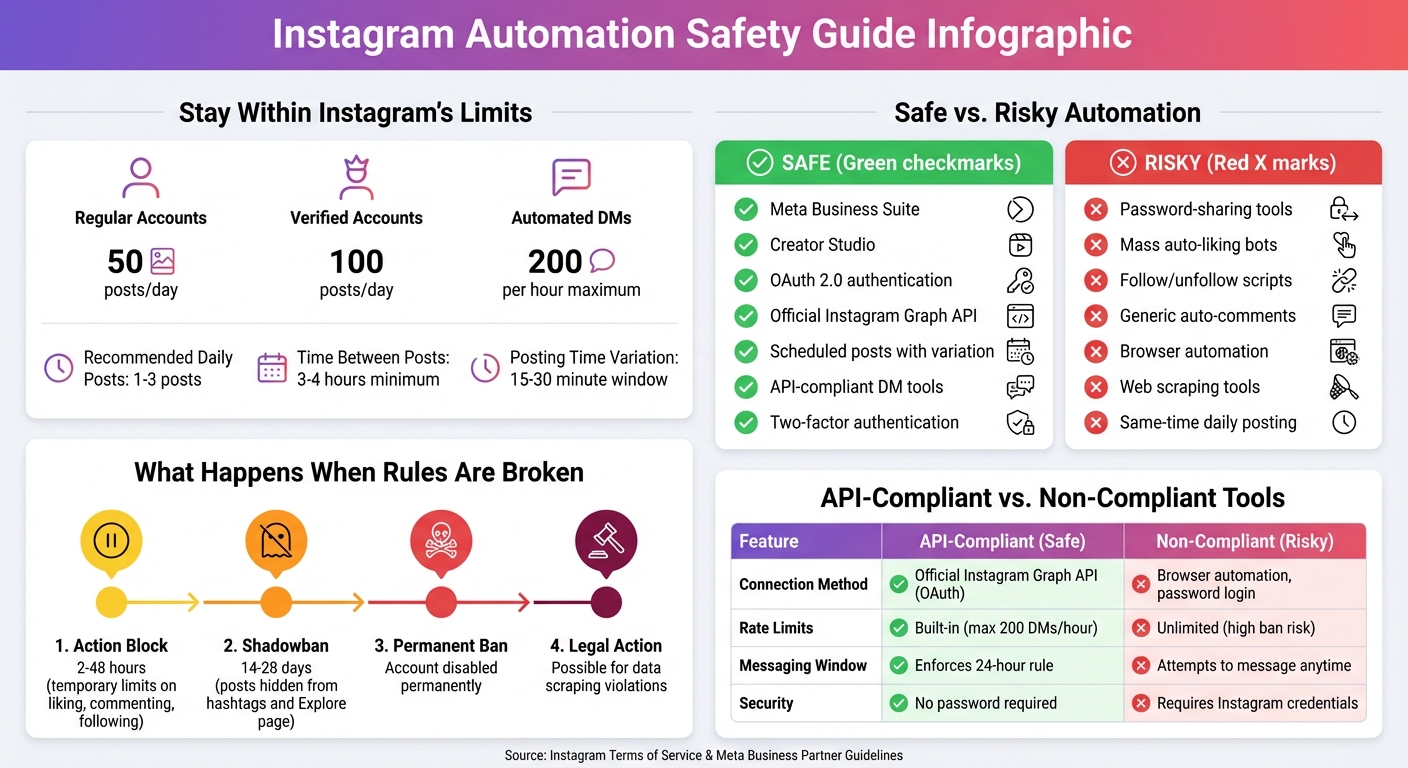
Instagram Automation Safety Guide: Rules, Limits, and Tool Comparison
Instagram has set clear boundaries when it comes to automation, aiming to separate legitimate activities from spammy, bot-driven behavior. Approved automation, such as scheduling posts or analyzing metrics, is done through Instagram's official APIs like the Instagram Graph API or Basic Display API. These tools allow for tasks like post scheduling, analytics tracking, and managing direct messages without compromising your account's security. They utilize OAuth 2.0, so you never need to share your password with third-party services that might rely on browser automation or web scraping.
On the other hand, Instagram strictly bans automated actions that mimic human engagement but lack authenticity. This includes activities like mass auto-liking, following/unfollowing scripts, or generic auto-comments. Instagram uses advanced detection systems to identify and flag such bot-like patterns, making it essential to stick to the platform’s guidelines if you want to avoid trouble.
Instagram’s detection systems are designed to spot behavior that doesn’t align with how real users typically interact. Over-the-top actions - like excessive posting, liking, or following - can quickly trigger these systems. The platform also keeps an eye on IP addresses and device signatures to identify cases where multiple accounts are being managed using the same automation tool.
Other red flags include posting at the exact same time every day, leaving repetitive copy-paste comments, or frequently switching between devices or locations. If your direct messages are reported as spam or your comments are marked irrelevant, Instagram’s system will take notice. Newer accounts, especially those under six months old, face stricter monitoring and lower activity thresholds, making them more vulnerable to being flagged.
If Instagram detects suspicious behavior, it enforces penalties to curb violations. The most common consequence is an action block, which temporarily limits your ability to like, comment, or follow others for 2 to 48 hours. Frequent offenders may also encounter repeated verification prompts or persistent "Action Blocked" messages.
More severe penalties include shadowbans, which typically last 14 to 28 days. During this period, your posts won’t show up on hashtags or the Explore page for non-followers, causing a significant drop in visibility and engagement. For repeated or serious violations, Instagram may permanently disable your account. Additionally, using automated tools for data scraping can lead to legal repercussions.
"Using automated engagement is supposed to increase followers or likes... however, be warned: it's against Instagram's user agreement, meaning it can get your account banned." - Spur
To safely schedule Instagram posts, stick to tools that work with the official Graph API, like Meta Business Suite and Creator Studio. These platforms align with Instagram’s rules, ensuring your account stays secure. If you’re using a third-party scheduler, confirm it uses OAuth 2.0 authentication - look for the "Login with Facebook/Instagram" button to verify.
Avoid creating predictable posting patterns. Instead of scheduling posts at the same time every day, mix it up within a 15–30 minute window. For instance, post at 9:12 AM one day, 9:23 AM the next, and 8:47 AM another day. Also, leave at least 3–4 hours between posts to steer clear of spam detection.
Keep Instagram’s API limits in mind: 50 posts per day for regular accounts and 100 posts per day for verified ones. If you’re just starting with automation, increase posting frequency slowly - no more than 20% per week. To further minimize risks, rotate through at least 30 hashtag combinations and ensure 80% of your scheduled content is original rather than recycled material.
"Instagram differentiates between legitimate scheduling (which they support through their API) and aggressive growth hacking (which they actively combat)." - Dima Botezatu, Chatwoot
This careful approach to scheduling posts lays the groundwork for safely automating other activities, like direct messaging.
Automating direct messages can be done safely, but only if you use tools that comply with Instagram’s official API. These tools enforce Instagram’s 24-hour messaging window, meaning you can only send automated responses to users who’ve interacted with your account - such as through a DM, comment, or story reply - within the past 24 hours.
Instagram caps automated DMs at 200 per hour. API-compliant tools will automatically queue messages once you hit this limit, so your account doesn’t get flagged. Stay away from browser extensions or tools that require your Instagram password - these are major security risks and could lead to account restrictions.
Set up keyword triggers to send tailored responses when users engage with your content. Personalization is key: include the recipient’s name and rotate between 2–3 message variations to avoid spam detection. While automation is great for FAQs and initial responses, more personalized interactions should still be handled manually.
| Feature | API-Compliant Tools (Safe) | Non-Compliant Tools (Risky) |
|---|---|---|
| Connection Method | Official Instagram Graph API (OAuth) | Browser automation, scraping, or password login |
| Rate Limits | Built-in (max 200 DMs/hour) | Unlimited (high ban risk) |
| Messaging Window | Enforces 24-hour rule | Attempts to message anytime |
| Security | No password required | Requires Instagram username and password |
"DM automation is safe when you use official API tools and follow Instagram's guidelines." - Avery Rivers, Automation Strategist, CreatorFlow
To round out your automation strategy, use tools that safely handle analytics and reporting. Stick with platforms that connect through the official Instagram Graph API or Basic Display API, and ensure they use OAuth for secure data access. These tools can pull insights directly from Instagram without raising security flags.
Set up automated weekly or monthly reports to track key metrics like follower growth, engagement rates, and your top-performing posts. For added convenience, configure alerts to notify you via email or Slack when specific events occur - such as a 30% drop in engagement or a comment from a high-profile influencer. If your engagement rate drops below 1%, it could signal over-automation or even shadowbanning.
Watch for warning signs like sudden decreases in reach or story views, which might indicate penalties from Instagram’s algorithm. If this happens, scale back your posting frequency by 50% for a week to rebuild trust with the platform. As a precaution, download your Instagram data monthly through Settings → Download Your Information to keep a backup in case of issues.
Before connecting any analytics tool, check for the Meta Business Partner badge to ensure it’s trustworthy. Modern tools can go beyond basic data collection, analyzing trends and suggesting strategy tweaks based on your best-performing content.
If you're looking for the safest way to automate Instagram tasks, Meta Business Suite is an excellent place to start. Since it's developed by Meta itself, this tool works seamlessly with Instagram, handling post scheduling, inbox management, and analytics through official APIs. Plus, because it connects directly via your Facebook/Meta login, you never have to share your Instagram password with a third party - a huge win for security.
Other trusted platforms like Sprout Social and Later also integrate through Instagram's official Graph API. These tools stick to Instagram's rate limits, which helps avoid triggering spam detection. They also provide handy features for teams, like approval workflows and audit logs, making them ideal for managing multiple accounts.
When choosing any automation tool, always verify it uses OAuth authentication. Look for options like "Login with Facebook" or "Login with Instagram." If a tool asks for your username and password directly, that's a big red flag - it likely violates Instagram's Terms of Use.
For those seeking a more advanced growth solution, UpGrow offers a standout option.
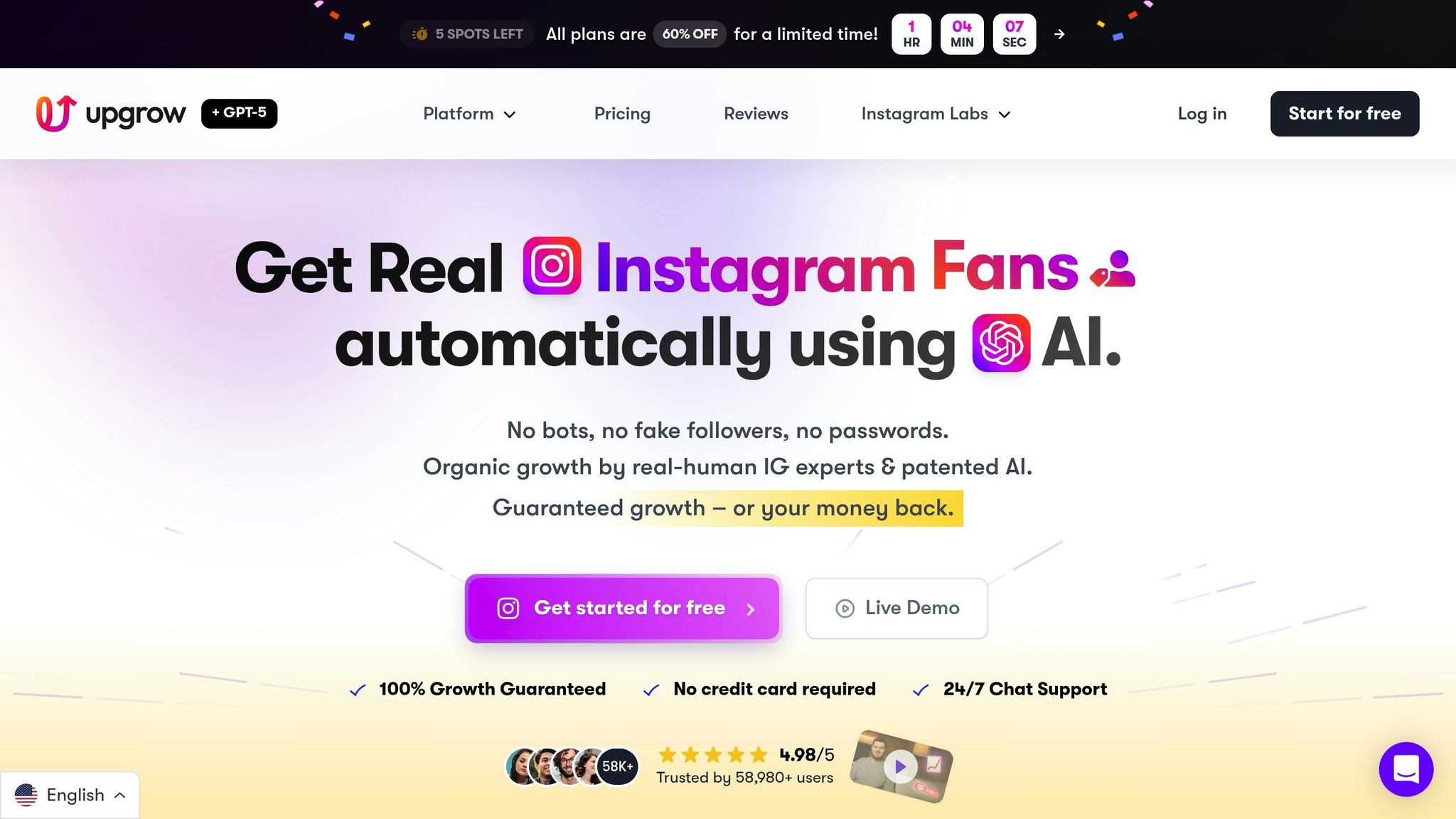
UpGrow takes Instagram growth to the next level by blending AI technology with human expertise to drive organic engagement. Staying fully compliant with Meta-approved practices, UpGrow uses secure API-based connections to protect your account while delivering measurable results.
Here’s how it works: You set targeting filters - such as location (like New York or Los Angeles), age range (24–40), gender, language, and interests (e.g., fitness, beauty, or tech). UpGrow’s AI then identifies relevant accounts and content, while their team ensures interactions feel natural. This approach minimizes the risk of Instagram flagging your account for spam-like behavior. Since launching in 2016, UpGrow has supported over 58,000 users with an impressive 4.98/5 rating, all without account bans.
Their live dashboard makes tracking progress easy, offering real-time metrics in U.S. formats. For example, you might see stats like gaining 1,250 new followers in 30 days, alongside engagement rates and campaign timelines (e.g., 04/01/2026 to 04/30/2026). The Boost™ feature, powered by advanced pattern-recognition technology, has shown beta users a 275% jump in monthly followers compared to traditional methods.
For agencies, UpGrow provides tools for managing multiple accounts and even assigns dedicated account managers on premium plans. Pricing starts at $39/month, and they back their service with a growth guarantee - if you don’t see net-positive results within seven days, you get your money back.
"UpGrow is the first & only growth service that fully comply with Instagram's Terms of Service and guidelines."
– Alex Castellano, UpGrow
Whether you go with UpGrow or another tool, prioritizing safety is non-negotiable.
To protect your account and stay within Instagram’s rules, make sure any automation tool includes these key safety features:
| Safety Feature | Why It Matters | Key Indicators |
|---|---|---|
| API-Based Connection | Protects your account and ensures compliance | OAuth login via Facebook/Meta; no password needed |
| Rate-Limit Controls | Prevents spam detection and account flags | Built-in throttling, daily caps, and random delays |
| Two-Factor Authentication | Adds an extra layer of security | Compatible with existing 2FA settings |
| Transparent Privacy Policy | Ensures clear data handling practices | Detailed info on storage, encryption, and retention |
| Live Support | Rapid help during policy changes | 24/7 live chat, especially during U.S. business hours |
The first step to ensuring long-term account safety is setting it up correctly. Start by switching to a Business or Creator account before connecting any automation tools. This step not only unlocks advanced analytics but also aligns with Instagram's compliance requirements. To further protect your account, enable two-factor authentication (2FA) - this adds an extra layer of security when granting third-party access.
A key safety tip: never share your Instagram password with automation services. Legitimate tools use secure OAuth authentication, which allows you to log in using options like "Login with Facebook" or "Login with Instagram" instead of entering your password directly. As highlighted in UpGrow's Terms of Service:
"You understand that UpGrow will never ask for your Instagram password or login credentials at any time".
When starting automation, introduce tasks gradually to mimic natural activity. For example, begin with just one automation feature, like scheduled posts, before layering on others. If you're managing a team account, set up role-based access so each member only has permissions relevant to their role. This limits potential risks if someone's credentials are compromised.
Finally, keep an eye on your account activity to ensure everything runs smoothly.
Routine checks are essential for catching issues early and maintaining account health. Make it a habit to review the Account Status section in Meta Business Suite weekly. Look for flagged messages, warnings, or notifications like "Action Blocked", which could indicate unusual activity. Other red flags include sudden drops in reach or a noticeable decline in story views, both of which may signal that Instagram's algorithms have detected suspicious behavior.
Pay attention to your engagement rates. If your monthly engagement consistently falls below 1%, it could be a sign of over-automation or even a shadowban. Regularly auditing your connected tools is another smart move. Remove any apps you no longer use and verify that active tools still rely on Meta-approved APIs. For those using automated DMs, rotate between 3–5 message variations to avoid triggering Instagram's anti-spam systems.
Lastly, review your automated message logs to ensure your content remains relevant and helpful. Irrelevant or spammy messages can lead to user complaints, which may prompt Instagram to review your account.
Even with precautions, account issues can arise. If you notice warnings or a sudden drop in reach, take immediate action. Pause all automation for 48–72 hours to give your account time to "cool off." Afterward, cut your posting frequency by 50% for one week. This approach shows Instagram that you're addressing the issue. Keep in mind that shadowbans typically last between 14–28 days, so patience is essential.
Reach out to your automation tool's support team for guidance. For instance, if you're using UpGrow, their live chat support can help you adjust your settings to stay compliant. If your account faces restrictions or a ban, you'll need to appeal directly to Instagram through their support channels. In the meantime, manually remove any spam or fake followers to avoid further issues.
Documentation is your best friend during this process. Keep detailed records of your automation settings, posting schedules, and any changes you make. This information will be invaluable if Instagram requests it during an appeal. As ReplyRush wisely points out:
"It's not automation that causes bans - it's how you use it".
Finally, stay within Instagram's technical limits, such as sending no more than 200 DMs per hour and limiting posts to 1–3 per day. These boundaries help ensure your account remains in good standing.
To grow your Instagram account while staying within Instagram's rules, it's all about working smarter and following safe practices. We've explored how long-term success hinges on sticking to Instagram's Terms of Service, using secure login methods, and opting for tools that focus on genuine, organic engagement rather than spammy shortcuts.
Take UpGrow as an example. Since 2016, they’ve helped over 58,000 clients grow their Instagram audiences - boasting a 4.98/5 rating and delivering a beta-tested 275% monthly follower increase - all without a single ban.
Alex Castellano from UpGrow puts it this way:
"UpGrow is the first & only growth service that fully comply with Instagram's Terms of Service and guidelines."
This demonstrates how sticking to compliance and prioritizing authenticity can lead to real, lasting growth.
Here are some key tips to keep in mind: never share your Instagram password, start automation slowly, and keep an eye on your account for any potential issues. Using AI-powered targeting filters - such as location, age, gender, and interests - can help you attract a genuinely engaged audience. And if you notice any problems, pause the automation to let your account recover. These steps are essential to ensuring your growth remains both safe and credible in the long run.
To keep your Instagram automation safe and within Meta's guidelines, it’s important to follow these key practices:
A service like UpGrow can make this process easier. They emphasize secure, organic growth through real-human interaction and methods approved by Instagram, ensuring your account stays safe and compliant.
Using automation tools that go against Instagram’s Terms of Service can have serious repercussions for your account. Instagram’s algorithms are designed to detect suspicious activities like excessive posting, aggressive follow-unfollow tactics, or repetitive use of hashtags. If your account shows signs of automated or unnatural behavior, it could get flagged. This might lead to reduced visibility (commonly known as shadowbanning), temporary restrictions, or even a permanent suspension of your account. On top of that, these tools often cause a sudden drop in followers and engagement, which can negatively impact your credibility and marketing efforts.
There’s also the risk of compromising your account’s security. Many of these unsafe tools require you to share your password, leaving you vulnerable to unauthorized access. With Instagram regularly updating its policies, accounts using non-compliant automation tools are constantly at risk of enforcement actions, which can lead to costly disruptions and time-consuming recovery efforts. To ensure steady and secure growth, always stick to automation solutions that align with Instagram’s guidelines.
To automate Instagram DMs safely, it's crucial to use a trustworthy platform that aligns with Instagram’s official policies. Opt for services that integrate using the Graph API, steering clear of risky techniques like browser bots or extensions. Ensure your account is linked through Facebook Business Manager for secure automation.
Stay mindful of Instagram’s limits: keep automated messages under 200 per hour and 2,000 per day. Focus on messaging users who have recently engaged with your account, such as followers or those who’ve commented on your posts. Personalize each message to reduce the risk of being marked as spam, and keep an eye on analytics to make sure everything is running as expected. By sticking to these guidelines, you can streamline DM automation without jeopardizing your account.


