
How to Combine Free Tools for Instagram Growth
Use free tools to design posts, track Insights, schedule content, and test hashtags in a weekly workflow for steady Instagram growth.
Use free tools to design posts, track Insights, schedule content, and test hashtags in a weekly workflow for steady Instagram growth.
4.98 /5 - from 58k reviews
Trusted by 50,000+ creators — get real engagement delivered to your profile in minutes, not days.

Want to grow your Instagram without spending money? Here's how you can use free tools to design content, track performance, schedule posts, and optimize hashtags - all while saving time.
The secret to success? Consistency. Create a weekly workflow to streamline your process, monitor results, and adjust as needed. Whether you're starting out or scaling up, these tools can help you grow your Instagram account efficiently and effectively.
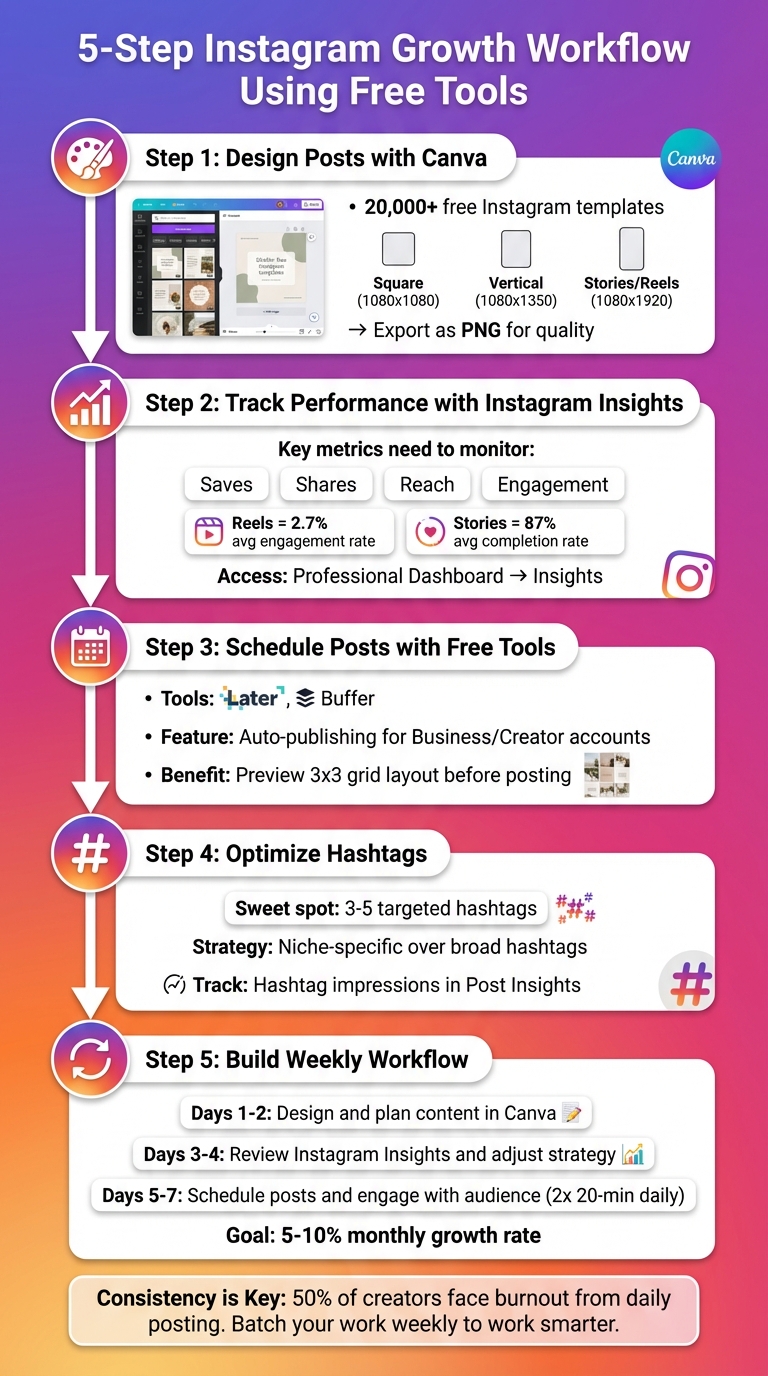
5-Step Instagram Growth Workflow Using Free Tools
Canva’s free version offers over 20,000 customizable Instagram templates, covering all the key formats like square posts, Stories, Reels, and Carousels. Even if you’ve never designed anything before, you can create professional-looking content with ease.
"Canva is the go-to visual design platform for creators, small businesses, and marketers - especially if you don't have a design background." - Tamilore Oladipo, Sr. Content Creator @ Buffer
Start by typing "Instagram post" into Canva’s search bar. Use the filters to refine your search by style, theme, or color to find templates that align with your brand. Once you’ve selected a few favorites, save them in a dedicated folder under the "Projects" tab for easy access later.
Canva’s drag-and-drop interface makes customization simple. Swap out template images for your own photos, and stick to a consistent color palette and one or two fonts. This consistency will give your posts a polished, cohesive look.
Proper sizing is key for Instagram. Square posts should be 1,080 x 1,080 pixels (1:1 ratio), while vertical posts need 1,080 x 1,350 pixels (4:5 ratio). For Stories and Reels, use 1,080 x 1,920 pixels (9:16 ratio). Canva takes care of these dimensions automatically when you search for Instagram-specific templates.
To avoid blurry images, export your designs as PNG files. If you’re using Canva’s free version, you can double the size of your design (e.g., 2,160 x 2,160 pixels for square posts) to keep them sharp after Instagram’s compression. Once your design is complete, download it to your device or post it directly to Instagram through Canva.
With your Instagram visuals ready and optimized, you’re all set to track their success using Instagram Insights.
Once you've crafted eye-catching posts using Canva, the next step is to monitor how they perform. Keeping an eye on your audience's engagement through Instagram Insights is crucial for maintaining growth. This handy tool is available to anyone with a Professional account, whether it's a Business or Creator profile.
To view your insights, head to your profile and tap the "Professional Dashboard" or the three-line menu, then select "Insights". This will give you a snapshot of your account’s performance, showing metrics like reach, engagement, and follower growth.
For individual posts, simply tap "View Insights" beneath any feed post or Reel. If you're reviewing Stories, swipe up while viewing them or tap "Seen by #" in the corner. Pay special attention to Saves and Shares, as these actions indicate a stronger level of interest compared to likes.
"Focus on saves and shares - stronger intent and advocacy signals than likes." - Erin Pennings, HubSpot
You can also examine where your views are coming from - whether it’s your followers (Home), hashtags, or the Explore tab (non-followers). This breakdown helps you gauge whether your reach strategy is effective. For Stories, keep an eye on the "Exited" metric; high exit rates may suggest your content didn’t hold the audience’s attention or was too lengthy. Use these insights to fine-tune your content strategy.
Once you've gathered data, analyze it to uncover trends that can guide your content strategy. Identify your top-performing posts and consider leaning into formats like Reels, which tend to drive more engagement. For instance, Instagram Reels boast an average 2.7% engagement rate, higher than regular video posts. Stories, on the other hand, achieve an impressive 87% average completion rate, making them perfect for time-sensitive updates.
"If people aren't engaging with your posts, your content isn't going to show up in feeds. Pay close attention to the posts with the highest engagement and see how they can be used as a model for future posts." - Lisa D. Jenkins, Social Media Examiner
Check when your audience is most active using the Insights dashboard, and time your posts accordingly. If you notice a spike in growth after specific posts, dig into what made them successful - was it the subject, the format, or the timing? Use this information to guide your future content. With Instagram now offering up to 90 days of data (instead of just 30), you have more time to identify patterns and refine your approach.
These insights will play a key role in optimizing your scheduling and hashtag strategies as you move forward.
Once you've figured out what content resonates with your audience, the next step is to plan ahead. Tools like Later and Buffer allow you to batch-create content and stick to a regular posting schedule. Relying on manual posting can disrupt your workflow, but these tools streamline the process by integrating seamlessly with your content creation and analytics efforts.
Free scheduling tools often come with user-friendly drag-and-drop calendars. You can upload your Canva-designed images and videos to the tool's media library and easily drag them onto specific dates and times for posting.
"The reason you're struggling with being consistent online is because you try to create content day by day. Take time to batch create your content for a week or two & schedule it." - Ashley France, @theashleyfrance
If you're using a Business or Creator profile, many tools also offer auto-publishing features. This means your posts can go live automatically at the scheduled time, no manual action required. For instance, scheduling posts for early morning hours could help you catch those first waves of engagement.
Once your content calendar is set, take advantage of feed preview features to ensure your posts align visually. These tools let you see how your 3x3 grid will look before anything goes live, helping you maintain a polished and cohesive aesthetic. This way, you can avoid placing similar colors or images too close together. If needed, you can simply drag and rearrange posts, and the tool will automatically adjust the posting schedule to match the new layout.
"You only have a few seconds to make a great first impression, so planning a visually appealing grid can help visitors understand who you are and what you do, right off the bat." - Monique Thomas, Content Marketing Manager, Later
This preview feature is also a great way to identify any gaps in your schedule or ensure your feed tells a visually balanced story while staying true to your brand’s overall look and feel.
Once your content and posting schedule are fine-tuned, the next step is using hashtags to expand your reach. Hashtags act as signposts for Instagram's algorithm, helping it identify your content and connect it with the right audience. While Instagram no longer supports hashtag follows, tags still play a crucial role in boosting visibility on the Explore page. The key is striking the right balance between widely-used hashtags and niche-specific ones that resonate with your target audience. Here's how to find the best hashtags and measure their effectiveness.
Free tools like Buffer and Hootsuite can help you find hashtags tailored to your content. These tools generate suggestions based on your post descriptions or keywords [20,22]. For better results, provide detailed descriptions to get more precise recommendations. Instead of using broad hashtags like #food, consider more specific ones such as #vietnamesefood or #vietnameserestaurant to connect with a focused audience [22,23].
A great example of this approach comes from 2024, when Drew McWhirter, Creative Marketing Lead at the Vietnamese restaurant Anh and Chi, used targeted hashtags like #vietnameserestaurant and #vietnamesefood. By also incorporating location-specific tags like #vancityeats and #vancouverfoodie, the restaurant successfully reached local food enthusiasts and media outlets, boosting exposure and even attracting potential media coverage.
"In a digital world full of content, hashtags are our way of narrowing it down and reaching the right people." - Drew McWhirter, Creative Marketing Lead, Anh and Chi
If your account has fewer than 5,000 followers, steer clear of hashtags with millions of posts where your content can easily get lost. Instead, focus on niche hashtags with lower competition to improve visibility. Using 3 to 5 carefully chosen hashtags can help you strike the right balance between reach and engagement [22,23].
After implementing hashtags, tracking their performance is essential. Instagram Business accounts offer a "Post Insights" feature where you can see how many impressions come directly from your hashtags. Free tools like Later and Metricool provide additional insights, allowing you to compare hashtag performance and identify the ones driving the most engagement. For a broader analysis, Talkwalker's free tool tracks engagement, sentiment, and reach across 186 languages over a 7-day period.
To ensure your hashtags are effective, search them directly on Instagram. This quick check lets you see if your content stands out among the top posts for that tag. If your content doesn't shine in comparison, it might be worth rethinking your hashtag strategy.
Now that you’ve mastered the individual tools, it’s time to bring them together into a reliable weekly system. Studies reveal that 50% of social media creators face burnout, often caused by the pressure of daily content creation. But this can be avoided with a workflow that batches tasks and plans ahead. Instead of scrambling every day to post, a structured schedule helps you work smarter by dedicating specific blocks of time to creating, analyzing, and scheduling content. Here’s how to make the most of tools like Canva, Instagram Insights, Metricool, and Later to streamline your week.
Kick off your week by focusing on content creation. Use Canva’s pre-sized templates to design Reels, Carousels, and Stories that align with your branding strategy. This ensures your feed stays visually consistent. Canva Docs can be a great starting point for brainstorming ideas and drafting captions before diving into the design phase. Once your graphics are ready, organize them into folders for easy access when it’s time to schedule.
Midweek is all about evaluating performance and fine-tuning your plan. Start by reviewing Instagram Insights to track metrics like reach, impressions, and activity. Then switch to Metricool for a deeper dive into follower trends and audience activity. Use heatmaps to pinpoint the best times to post. Focus on Saves and Shares, as these metrics often reflect the quality of your content better than likes. If you notice that certain formats, like Carousels, perform better than static posts, adjust your upcoming schedule to include more of what works. Armed with these insights, you’ll be ready to optimize your content strategy.
Wrap up your week by scheduling posts and monitoring engagement. Use Later to upload your content and preview your feed for a cohesive look. Schedule posts to auto-publish at the best times you identified earlier in the week. Features like "Saved Captions" and hashtag suggestions in Later can save you time during this process. Once everything is scheduled, set aside two 20-minute slots daily to check notifications, respond to comments, and engage with your audience. If you’re using Metricool’s free plan, you can schedule up to 50 posts per month across 11 channels, giving you plenty of flexibility to experiment.
"Consistency is key: Social media algorithms favor consistent activity." - Metricool
With the strategies outlined earlier, your path to growing on Instagram is clearly laid out. You've got a toolkit of free design, analytics, scheduling, and hashtag tools to help you grow your account. The key to success? Consistently track your results every week and tweak your approach as needed. If certain post formats drive more engagement or specific hashtags bring in new followers, double down on those tactics and let go of what’s not working.
Set measurable goals - aim for a monthly growth rate of 5–10%. Utilize real-time tracking tools to keep an eye on your progress and quickly spot any major drops in followers.
When managing everything manually starts to feel overwhelming, it might be time to explore automation. If free tools no longer cut it or your growth hits a plateau, consider upgrading to an AI-driven service like UpGrow. With advanced targeting options - such as location, age, gender, and language - paired with real human expertise, UpGrow helps attract genuine followers. For those looking to scale beyond 300–500 new followers per month, the UpGrow Boost™ feature has shown impressive results, with beta users seeing a 275% increase in monthly followers. Since 2016, this service has supported over 100,000 Instagram users.
Whether you stick with free tools or choose to automate, one principle remains constant: consistency. Keep producing quality content, engage with your audience, and let data guide your decisions. Instagram growth isn’t about quick wins - it’s a long-term game.
Creating a cohesive and polished Instagram feed doesn’t have to cost a dime. Start by picking a visual theme that reflects the vibe you want to convey. This could mean sticking to a specific color palette, using a signature filter, or keeping a consistent layout style. Free photo editing tools can help refine your images - tweak the brightness, contrast, and saturation to match your chosen aesthetic.
Craft captions and hashtags that align with your brand’s personality, and keep them consistent across your posts. Before publishing, preview how new images will fit into your overall grid to maintain a balanced look. To make things easier, save your go-to filters, color schemes, and style notes in a simple document for quick reference. With a little effort, you can create a stunning Instagram feed - no paid tools required.
Choosing the right hashtags can make a big difference in how visible your posts are on Instagram. The key is to focus on hashtags that are closely tied to your content and audience. Instagram prioritizes relevance, so using unrelated or overly broad hashtags can actually hurt your reach. To get the best results, aim for a mix of hashtag sizes:
Stick to around 10–15 hashtags per post for optimal performance. You can add them to your caption or drop them in the first comment to keep your post looking tidy. Before using any hashtag, do your research to ensure it’s active and steer clear of banned or spammy ones that could negatively impact your account.
For extra help, tools like UpGrow’s free AI Hashtag Generator can suggest trending and relevant hashtags tailored to your content. And don’t forget to track your results - keep an eye on metrics like likes, comments, and reach. Adjust your hashtag strategy as needed to keep your posts performing well.
Instagram Insights offers a treasure trove of data to fine-tune your content strategy. Start by diving into the Content You Shared section within your Business or Creator account. Here, you can evaluate your top-performing posts based on metrics like likes, comments, reach, or saves - depending on what aligns with your goals. Pay attention to trends in these posts, such as the type of media (photo, carousel, or Reel), hashtags used, or the time they were posted. These patterns can help shape your future content and posting schedule.
Next, explore the Audience Demographics section to better understand your followers. This area provides details about their location, age, gender, and the times they’re most active. Use this data to tailor your content to match the preferences of your core audience and schedule posts when they’re likely to engage. Don’t overlook your Stories’ performance either - analyzing which frames get the best response can provide valuable clues for improving upcoming posts.
To take things a step further, consider pairing these insights with tools like UpGrow’s AI-driven caption and content idea generators. Together, these resources enable you to craft engaging, data-backed posts while maintaining authenticity, helping you grow your Instagram presence naturally - without leaning on paid promotions.


