
How Many Hashtags Work Best on Instagram?
Learn the 2026 Instagram hashtag strategy: why relevance beats volume, when to use 3–5 vs 20–30 tags, placement tips, and tracking metrics.
Learn the 2026 Instagram hashtag strategy: why relevance beats volume, when to use 3–5 vs 20–30 tags, placement tips, and tracking metrics.
4.98 /5 - from 58k reviews
Trusted by 50,000+ creators — get real engagement delivered to your profile in minutes, not days.

If you're wondering how many hashtags to use on Instagram in 2026, here's the quick answer: it depends on your goals and content strategy. While Instagram recommends using 3-5 relevant hashtags, data shows that posts with 20-30 hashtags often achieve higher reach and engagement. However, quality and relevance matter more than sheer quantity.
The bottom line? Experiment with different hashtag strategies and track your performance to see what works best for your account.
Instagram Hashtag Strategy Guide: Optimal Numbers and Performance Data 2026
Instagram's algorithm has evolved significantly, moving beyond simple keyword matching to a more advanced semantic analysis. This means the platform now examines your bio keywords, captions, and even visuals to better understand and categorize your posts.
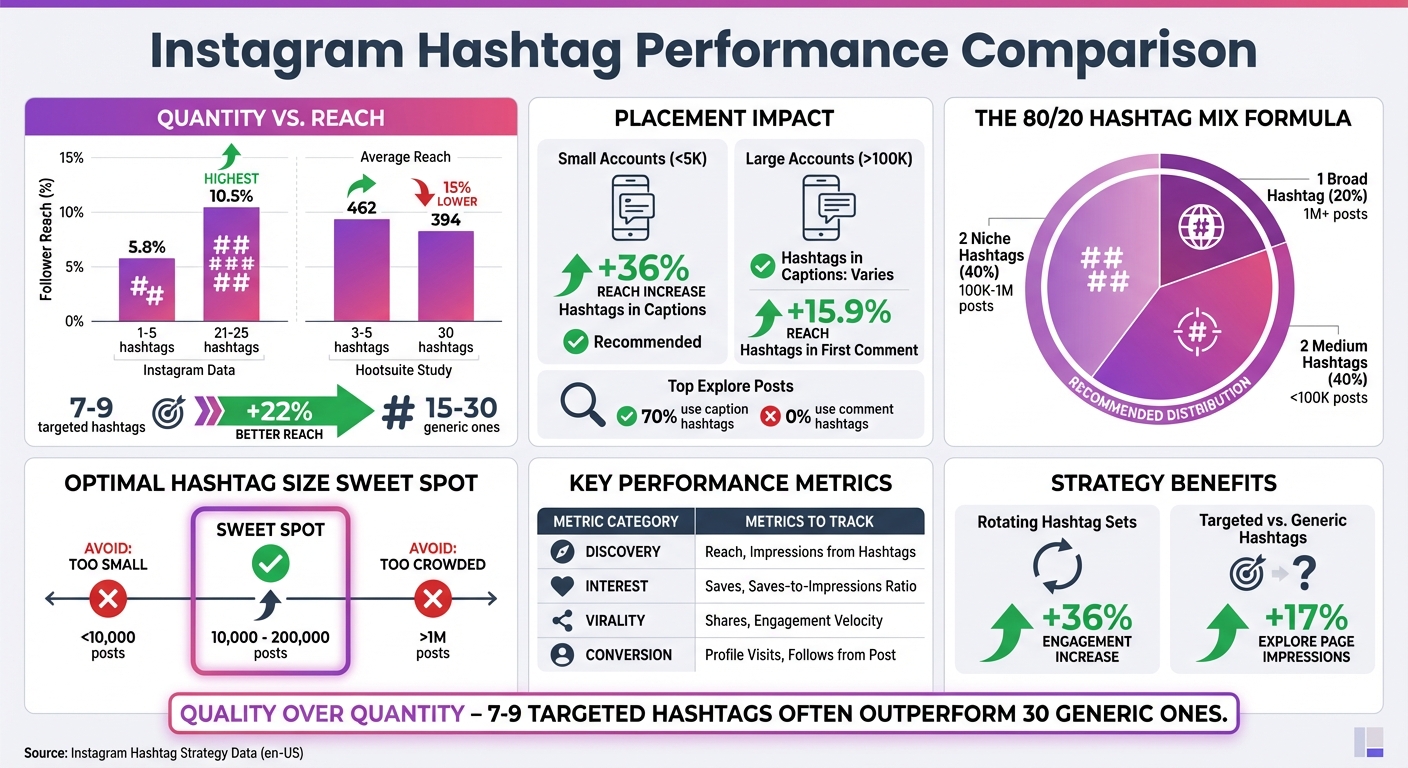
This shift has sparked mixed advice about hashtags. While Instagram officially recommends using 3–5 hashtags, recent data tells a different story. A 2026 study analyzing 2.4 million posts found that using 21–25 hashtags resulted in posts reaching 10.5% of followers - nearly double the 5.8% reach achieved with only 1–5 hashtags. However, research from INSSIST reveals that posts with 7–9 targeted hashtags outperform those with 15–30 generic ones by 22% in reach.
The takeaway? Quality matters more than quantity. Instagram's AI now penalizes "hashtag stuffing", flagging it as automated behavior. In fact, accounts that regularly vary their hashtags experience a 36% higher reach.
"Instagram's AI now penalizes 'hashtag stuffing' as automated behavior." – Hanna Laas, Author, INSSIST
The ideal number of hashtags depends on your content and the relevance of the tags you choose. Overloading your post with irrelevant hashtags can confuse the algorithm, ultimately limiting your reach. For instance, a 2025 Hootsuite experiment with a wedding account showed that posts using 3–5 hashtags reached an average of 462 people, compared to 394 for posts with 30 hashtags - a 15% improvement in reach. This highlights the importance of balancing the number of hashtags with their relevance.
Instagram's spam detection has become sharper than ever. Posts that max out the 30-hashtag limit - especially when using generic or trending tags - risk being flagged as low-quality content. This is often referred to as "hashtag fingerprinting." Furthermore, using tags associated with penalized accounts, known as "shadowban clusters", can lower your internal quality score and hurt your chances of appearing on the Explore page.
The algorithm now values precision over volume. Using 7–9 highly specific hashtags that align with your bio and caption keywords sends a clear signal about your content's focus, potentially increasing Explore page impressions by 17%. On the other hand, cramming in 30 random tags creates unnecessary noise, reducing your post's effectiveness. Striking the right balance between hashtag quantity and relevance is crucial to maximizing your reach in 2026.
Crafting a solid hashtag strategy goes beyond just picking a handful of tags - it’s about being intentional and strategic. Instead of flooding your posts with random hashtags, focus on relevance and purpose. A great way to organize this is by sorting your hashtags into five key categories: industry-specific (e.g., #WeddingPlanners), community-focused (e.g., #VanLifeLiving), descriptive (e.g., #SheaButterProducts), location-based, and branded tags. This approach ensures that each hashtag you use serves a clear role, rather than simply taking up space.
Hashtag size plays a huge role in visibility. Tags with over 1 million posts are so crowded that your content can easily get lost, while those with fewer than 10,000 posts may not generate enough traction. The sweet spot? Aim for hashtags that fall between 10,000 and 200,000 posts - they’re active but not overly competitive. Use Instagram’s in-app search tool to gauge the post volume of hashtags and uncover niche variations of popular terms. For example, instead of the oversaturated #SelfCare, try something like #SelfCareIsForEveryone. This way, you refine your strategy and target a more specific audience.
A balanced hashtag mix is crucial, and the 80/20 rule helps achieve just that. This method suggests using 80% niche-specific hashtags and 20% trending ones. A good example would be selecting one large hashtag (1M+ posts), two medium-sized hashtags (100K–1M posts), and two niche ones (under 100K posts).
"Fewer, more specific hashtags signal to Instagram exactly who should see your content, resulting in better targeting and engagement." – SocialRails
For smaller accounts with under 5,000 followers, focusing heavily on niche hashtags is even more important. Competing in high-volume categories can make it tough for your content to stand out. Always research hashtags before using them - if you don’t see any “Recent” posts under a tag, it might be banned, which could hurt your reach.
Repetition can hurt your hashtag strategy. Instagram’s algorithm favors variety, so avoid using the same hashtags repeatedly. Instead, rotate your hashtags to reach different niche communities and expand your audience organically. One way to stay organized is by creating “hashtag banks” tailored to your content pillars. For example, you might have one set for educational posts, another for promotional content, and a third for behind-the-scenes moments. Using pre-saved lists can save time and ensure your hashtags remain relevant to each post. Regularly update your lists to remove any restricted or outdated tags.
"We're constantly testing new niche hashtags, trying broad ones, and seeing what generates the most engagement." – Lindsay Ashcraft, Social Media Specialist
Once you've chosen the right hashtags, knowing where and how to place them can make a big difference in your post's performance.
In 2026, captions are the clear winner for hashtag placement. Why? Instagram's algorithm now treats your caption, alt text, and hashtags as a single data package, processing them together instantly. On the other hand, when hashtags are added to the first comment, they’re processed separately, which slows down categorization. This delay can affect how quickly your content appears in search results and suggested feeds.
The numbers speak for themselves. For accounts with fewer than 5,000 followers, hashtags in captions can boost reach by 36%. Larger accounts (over 100,000 followers) may see a 15.9% increase in reach when hashtags are used in the first comment. However, an analysis of Instagram's Explore page revealed that 70% of top-performing posts had hashtags in the caption, while none used hashtags in comments.
"For most accounts, placing hashtags in captions increases reach by up to 36%. For larger accounts, test placing hashtags in the first comment to see what works best for your audience." – David Olsen, Sked Social
For smaller accounts, the caption is the best place to maximize visibility and engagement. Once you've decided on placement, focus on formatting your hashtags for a clean and professional look.
Don't let hashtags clutter your caption. A simple trick: use line breaks to separate your hashtags from the main text. Write your caption, then add three to five line breaks (or dots) before listing your hashtags at the bottom. This keeps your caption visually appealing while still giving Instagram the information it needs to categorize your post.
Using scheduling tools can also help streamline hashtag placement in captions and avoid accidentally duplicating hashtags in both captions and comments. Instagram's 2026 algorithm may flag duplicated hashtags as spam, so keeping things tidy is more important than ever.
If you’re not tracking your hashtag performance, you’re essentially flying blind. Without data, it’s impossible to know which hashtags are driving results and which ones are just taking up space.
Instagram Post Insights can show you the number of impressions your hashtags generate. But impressions and reach only scratch the surface. To get the full picture, focus on metrics that reveal audience behavior, like engagement velocity - the speed at which likes, comments, and shares roll in. These signals are crucial for ranking. Another key metric? The saves-to-impressions ratio, which indicates how much value users find in your content.
"Saves signal huge interest and engagement. Focus on content that users save for later." – Jason Fung, Marketing Coordinator at Black & White Zebra
Here’s a quick breakdown of the metrics you should track and why they matter:
| Metric Category | Key Indicators | Strategic Purpose |
|---|---|---|
| Discovery | Reach, Impressions from Hashtags | Shows how many new eyes your content is reaching |
| Interest | Saves, Saves-to-Impressions Ratio | Highlights content that resonates deeply with users |
| Virality | Sends (Shares), Engagement Velocity | Indicates potential for algorithmic boosts |
| Conversion | Profile Visits, Follows from Post | Measures whether hashtags are building a loyal audience |
These metrics provide a roadmap for refining your hashtag strategy.
Once you’ve collected the data, the next step is to use it to fine-tune your hashtag sets. Look at your metrics to identify which hashtags are performing well and which ones are falling flat. Tools like UpGrow can help you track top-performing hashtags over a 30-day period. Start by reviewing your most successful posts from the past month. Which hashtags show up consistently? On the flip side, check your lowest-performing posts and replace ineffective hashtags with fresh options from related niches.
"Analyzing the performance of your hashtags is one of the best ways to judge the success of your experiments. Without analytics, you won't know what's working and what isn't." – Monique Thomas, Content Marketing Manager at Later
To maximize your reach, create 3–4 distinct hashtag sets based on your content themes - like educational posts, behind-the-scenes glimpses, or promotional content. Rotate these sets to target different audience segments. This approach not only keeps your content from feeling repetitive but also helps you discover which combinations resonate the most. By making data-driven adjustments, you’ll set yourself up for stronger organic growth on Instagram.
There’s no universal rule for the perfect number of hashtags. While data suggests that using 20 hashtags achieves the highest average reach, posts with just 3–5 hashtags can still see up to 15% higher reach compared to using the full 30. The secret lies in experimenting to see what resonates best with your audience and content.
Here’s the takeaway: numbers matter, but they’re only part of the equation. Relevance and quality are far more important than quantity. Instagram’s 2026 algorithm now factors in bio keywords, caption context, and hashtag clusters. Using irrelevant hashtags can actually hurt your visibility. Instead, aim for a balanced mix of hashtags, such as:
This combination helps you reach a variety of audience segments effectively.
To improve results, keep testing and refining. Rotate your hashtag sets and track key metrics like non-follower reach and engagement velocity. Research shows that varying your hashtag sets can increase engagement by 36%.
Whether you stick with 5 highly targeted hashtags or experiment with 20 diverse ones, let your performance data guide your decisions. With thoughtful hashtag selection, strategic placement, and regular adjustments, you can set your content up for stronger organic growth in 2026.
For even more precision, consider using UpGrow’s AI-powered tools to access real-time analytics and personalized recommendations to fine-tune your strategy.
Instagram suggests sticking to 3–5 highly relevant hashtags for your posts. This approach helps maintain focus and prevents your content from coming across as spammy. It also aligns with Instagram's algorithm, which favors quality content over sheer volume.
On the flip side, research analyzing millions of posts shows that using 20–30 hashtags can significantly boost reach and engagement. The trick? Finding the right balance. Choose hashtags that not only resonate with your content but also connect with trends and interests within your target audience.
When it comes to picking the right hashtags, it all starts with knowing your content and audience. Begin by identifying the main topics or themes of your post. Then, use Instagram’s search bar to dig into hashtags that match those themes. Pay attention to the number of posts tied to each hashtag - popular tags might give you more exposure but can make it tough to stand out, while smaller, niche tags (those with fewer than 100,000 posts) often attract a more engaged audience.
A good strategy is to use a mix of hashtags: include 1–2 widely used tags, 2–3 moderately popular ones, and 1–2 very specific tags. You can also check out what hashtags competitors or industry leaders are using to find ones that connect with active communities in your niche.
After choosing your hashtags, keep an eye on how they perform. Tools like UpGrow’s AI-powered targeting engine can help by recommending hashtags tailored to your audience and offering real-time analytics to track engagement. Regularly review your results, swap out hashtags that aren’t working, and steer clear of banned hashtags to keep your posts visible and effective.
Using an overload of hashtags or ones that don’t fit your content can hurt your Instagram performance. The algorithm might interpret this as spam, which could lower your post's visibility and engagement. In more extreme cases, it might even result in shadowbanning, making your content much harder for others to discover.
To steer clear of these issues, stick to hashtags that are relevant and targeted to your content and audience. When it comes to Instagram hashtags, less is often more - quality beats quantity every time.


