
5 Steps to Automate UGC Video Campaigns
Create, test, schedule, and optimize UGC video ads with AI in five steps—choose tools, automate scripts and avatars, batch produce, publish, and measure.
Create, test, schedule, and optimize UGC video ads with AI in five steps—choose tools, automate scripts and avatars, batch produce, publish, and measure.
4.98 /5 - from 58k reviews
Trusted by 50,000+ creators — get real engagement delivered to your profile in minutes, not days.

Want to run UGC video campaigns without spending weeks on production? Here's how automation and AI tools can help you create, test, and distribute user-generated video ads faster and at a fraction of the cost. UGC videos, featuring content from customers, influencers, or AI avatars, can deliver 4x higher click-through rates and 50% lower costs-per-click versus traditional ads.
By following these five steps - choosing tools, automating workflows, scaling production, scheduling posts, and tracking results - you can save time and reduce costs while improving results.
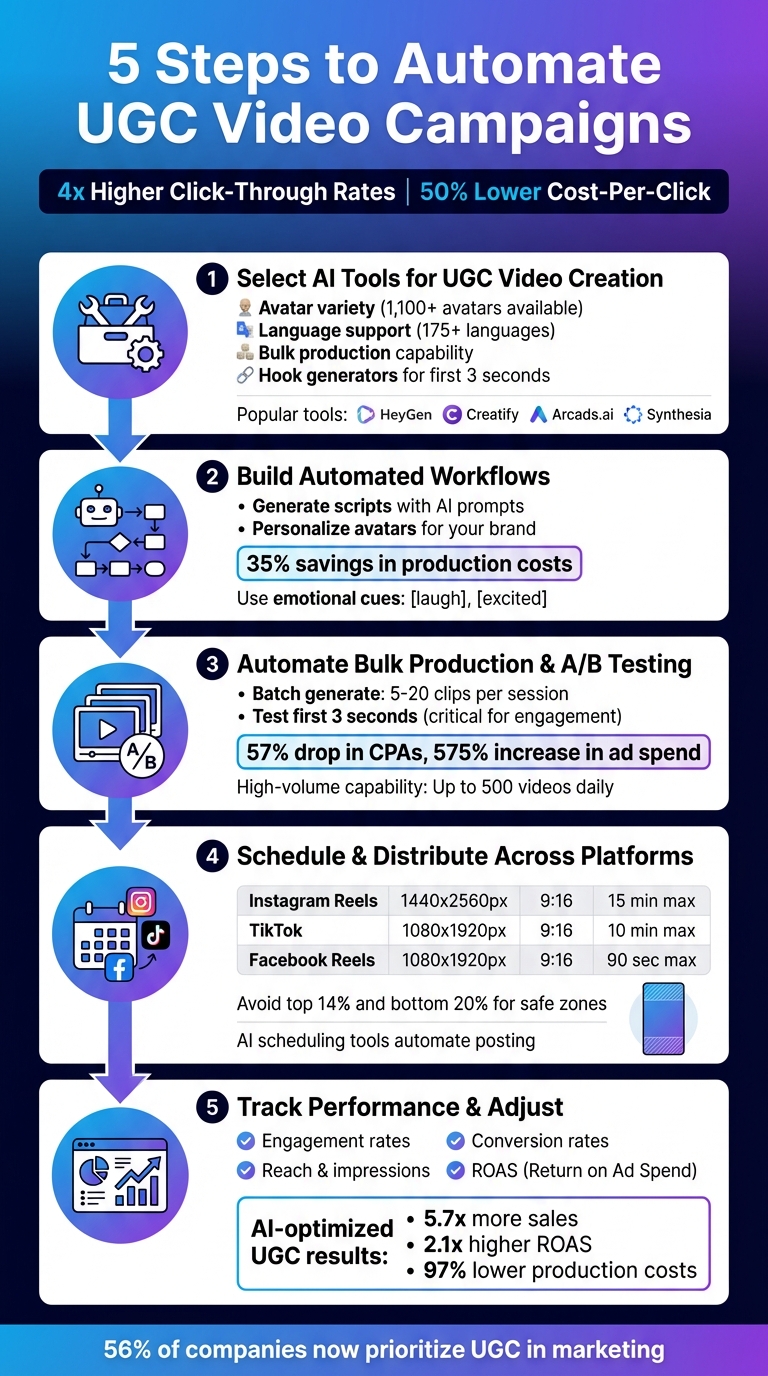
5 Steps to Automate UGC Video Campaigns with AI Tools
Choosing the right AI tool is key to running a successful UGC campaign. When comparing platforms, focus on features like avatar variety, language support, speed, and the ability to produce content in bulk.
HeyGen stands out with over 1,100 avatars and support for 175+ languages. Its "Generate Looks" feature lets users switch up an avatar's outfit or background with ease. Back in 2025, trivago used HeyGen to localize TV ads for 30 global markets at the same time. Similarly, the agency Favoured boosted their content production sixfold using HeyGen's AI-powered UGC tools.
Creatify excels in creating instant UGC-style ads directly from product URLs. It offers 900+ avatars that can "review" products and generate five or more variations per link. Arcads.ai is built for high-volume video production, capable of generating up to 500 videos daily via API, with a 94% natural lip-sync accuracy that's perfect for global brands. For educational content, Synthesia provides support in 120+ languages with realistic lip-syncing, while Captions (Mirage Studio) focuses on delivering natural speech and emotional expression to build trust in testimonial videos.
Keep an eye out for tools with "hook generators" - these help grab attention within the first three seconds of a video.
"AI boosts UGC video ads by removing traditional barriers. AI allows scalable content without losing quality, ideal for brands with limited resources."
- Nick Warner, Head of Creator Growth at HeyGen
You can also customize voice parameters like speed, pitch, and style to ensure the tone feels natural.
Once you've reviewed the tools, define your UGC video goals to ensure the platform aligns with your audience's needs.
Your campaign's success depends on matching the tool's capabilities with your objectives. For a Gen Z audience, focus on short, raw videos lasting 8–15 seconds. For Gen X, opt for more detailed reviews in the 30–60-second range. This approach ensures the content resonates with your target demographic.
E-commerce brands should prioritize tools that offer URL-to-video features and "Unboxing POV" options, which work well for showcasing physical products. For global campaigns, look for platforms with strong language support and multi-accent capabilities to maintain local authenticity. Even B2B companies are finding success - Pyne, for instance, doubled their trial conversion rates by incorporating HeyGen-generated "How-To" and explainer videos into their onboarding process.
Check for batch generation options that allow you to produce 5–20 clips at once and confirm that the platform provides full commercial usage rights. AI UGC platforms are often more affordable than hiring a single human creator, making them a cost-effective option for testing and scaling campaigns quickly.
AI tools can help you craft user-generated content (UGC) scripts in minutes by analyzing URLs, product descriptions, and reviews. The secret? Incorporating real customer language, like phrases pulled from reviews or support tickets - think expressions like "total game-changer." This makes the scripts feel genuine, not overly polished or corporate.
To grab attention right away, create multiple hook variations for the first three seconds, such as "I wish I knew this before..." or "Stop doing [X], try [Y] instead." These kinds of hooks have been shown to increase click-through rates by up to 200%. With this approach, you can generate 5–10 unique script variations from just one product page.
Take it a step further by adding emotional cues - like [laugh] or [excited] - to your scripts. These tags guide avatars to match their facial expressions and tone with the content, making the delivery feel more natural. Keep scripts short and to the point to ensure smooth AI voice performance. Businesses leveraging AI for content creation report saving an average of 35% in production costs compared to traditional methods.
"VEED has been game-changing. It's allowed us to create gorgeous content for social promotion and ad units with ease."
- Max Alter, Director of Audience Development, NBCUniversal
Batch production is another game-changer. You can render a single script with different hooks, angles, or avatars all at once, cutting production time from weeks to just hours. This makes it easy to create content packs tailored for various platforms in one go.
Once your scripts are ready, the next step is customizing your avatars to align with your brand.
With your scripts finalized, it’s time to ensure your avatars reflect your brand’s identity. Choose avatars from extensive libraries that offer diverse options in age, ethnicity, and style to match your target audience. Some platforms provide over 1,500 avatar choices, giving you the flexibility to align with your audience and build trust. To find the best fit, test the same script with 3–5 different avatars and see which resonates most with your viewers.
For a personal touch, use "Bring Your Own Avatar" features to create digital twins of your brand’s founders or team members. This ensures a consistent and recognizable brand presence without the need for repeated filming. If you want something entirely custom, you can generate synthetic avatars using text descriptions to specify details like age, gender, outfit, and background that match your brand’s style perfectly.
Pair these avatars with AI voices available in 75+ languages to maintain consistency across global markets. This is especially important, as 76% of online shoppers prefer product information in their native language. To keep your content visually dynamic, avoid static talking heads. Instead, use built-in editors to add B-roll, product close-ups, and jump cuts for a more engaging pace.
"AI isn't replacing creative thinking - it's compressing the production bottleneck between idea and execution."
- Creatify Team
For an authentic look, try using "phone-cam" or "natural" mode for lighting and angles. This helps your AI-generated content blend seamlessly with organic user content on platforms like TikTok and Instagram Reels.
Once you've tailored your scripts and avatars, the next move is automating bulk production. This step speeds up the process, allowing you to test and refine your campaigns in real time. By combining automation with A/B testing, you can boost efficiency while continuously improving results.
Today's AI tools make it possible to create 5–20 video clips from a single session. For instance, VeeSpark AI offers a feature called Storyboard 3.0, which lets you map out scene flow, lighting, and character consistency before rendering. This reduces the need for re-renders and saves time.
If you're looking for high-volume production, Arcads.ai has you covered, generating over 500 videos daily through its API. To keep track of performance, you can assign tags to each clip, making it easier to monitor metrics like ROAS and engagement.
Another advantage of these platforms is the ability to export multiple versions of the same script in different tones - whether you're aiming for an energetic, calm, or sales-focused vibe. Plus, AI tools can automatically adjust aspect ratios and pacing to suit platforms like TikTok, Instagram Reels, and YouTube Shorts. This approach is quickly becoming a go-to strategy for performance marketing as we head into 2025.
Once you've created a range of video options, the next step is testing to see what works best.
With a batch of videos ready, focus on testing the first three seconds of each clip. These opening moments are critical for grabbing and holding viewers' attention. Take Papier, a British stationery brand, as an example. By increasing its monthly video output from 8 to 14 and testing new product categories, the brand saw a 57% drop in TikTok CPAs, a 575% increase in ad spend, an 11% boost in thumbstop rates, and a CTR that more than doubled.
Small tweaks can make a big difference. Experiment with variations like background colors, voice styles, or hooks while keeping the main video content the same. For example, during a December 2024 holiday campaign on TikTok, Bloom Nutrition tested different hooks and promo codes. This effort reduced CPMs from $3.57 to $1.47, earned over 4 million views, and helped the product become the #1 Best Seller on Amazon Launchpad.
Keep an eye on individual clip metrics to identify which hooks or CTAs perform best. Once you know what works, remix those winning elements across your videos to scale up your campaign's success.
Once you've tested your UGC videos, the next step is to streamline their distribution. Automating this process not only saves time but also ensures your content reaches your audience at the right moments. To get the most out of your efforts, it's crucial to tailor your videos to each platform's specific requirements and use AI tools to handle scheduling.
Every social media platform has its own technical specifications, and meeting these requirements can make or break your video's performance. For instance:
When formatting your videos, keep important elements within the "safe zones" to avoid interference from platform icons. Specifically, avoid placing key visuals or text in the top 14% and bottom 20% of the frame. Additionally, use formats like MP4 or MOV and maintain a frame rate between 23 and 60 fps to ensure smooth playback on mobile devices.
| Platform | Format/Type | Recommended Resolution | Aspect Ratio | Max Length |
|---|---|---|---|---|
| Reels | 1440 x 2560 px | 9:16 | 15 minutes | |
| TikTok | In-Feed Video | 1080 x 1920 px | 9:16 | 10 minutes |
| Reels | 1080 x 1920 px | 9:16 | 90 seconds |
Once your videos are optimized for each platform, you're ready to automate their distribution.
After formatting your videos, AI tools can take over the heavy lifting of scheduling and posting. By batching your content creation and queuing it up for distribution, you can maintain a consistent posting schedule without the manual effort. Many advanced platforms allow you to post simultaneously across Instagram, TikTok, and Facebook.
Take UpGrow as an example. This tool automates scheduling and uses AI to target audiences based on factors like location, age, gender, language, and interests. It also provides real-time analytics dashboards to track metrics such as reach, impressions, and engagement rates, enabling you to tweak your strategy as needed. With a stellar 4.98/5 rating from over 58,000 reviews, UpGrow offers growth plans starting at $39/month.
But that's not all - UpGrow also includes features like an AI-powered hashtag generator to identify trending tags that can boost your video's visibility. Additionally, it automates direct messages and chat responses, ensuring timely engagement with users interacting with your UGC content. By automating these tasks, you can focus on refining your content strategy while ensuring your videos consistently reach the right audience.
AI-powered analytics tools offer real-time insights that help you understand what's working and what needs tweaking. Pay close attention to metrics like engagement, reach, conversion rates, view-through rates, and ROAS (Return on Ad Spend). For example, high engagement often means your content resonates with your audience, while low conversion rates might suggest your calls-to-action or targeting need improvement.
Platforms like UpGrow make this process easier. UpGrow's live dashboard provides 24/7 tracking for metrics like follower growth, engagement, and campaign performance, especially for Instagram. With real-time data on reach, interactions, and conversions, you can quickly adjust. Pause underperforming videos or double down on successful ones. UpGrow's Boost™ tool even uses AI to target audiences by age, gender, location, and language, helping you grow your visibility while keeping interactions authentic and organic.
AI-optimized user-generated content (UGC) videos are proving to be game-changers. According to AutoDS, these videos deliver 5.7x more sales, 2.1x higher ROAS, and 97% lower production costs compared to traditional methods. By analyzing hooks, music, and messaging, AI tools can pinpoint what drives results, enabling you to refine your campaigns quickly and effectively.
Once you’ve gathered performance data, use it to fine-tune your campaigns. Review key metrics weekly, compare how different video versions perform, and identify top-performing content with high ROAS. If you notice issues like low reach, it could be due to poor posting times. Adjust scripts to boost engagement or refine targeting filters to better connect with your audience.
The secret is constant iteration. Test new variations, monitor early results, and make quick adjustments. For Instagram UGC campaigns, combining insights from tools like UpGrow with your overall content strategy can help you achieve your goals - whether it's growing a loyal following or driving conversions. Start with small-scale tests, expand on what works, and tweak underperforming elements promptly to keep improving your results.
Simplify your UGC video campaigns by following five key steps: choosing the right AI tools, setting up automated workflows, scaling with A/B testing, scheduling posts across platforms, and monitoring performance. These steps align your creative vision with the efficiency of automation, saving time while boosting campaign results.
Take platforms like UpGrow, for example, which offer an all-in-one AI-powered solution tailored for Instagram growth. With features like 24/7 automatic growth, real-time analytics, and advanced AI filters for targeting by location, age, gender, and interests, UpGrow acts like a full-scale social media marketing team. Since 2016, it has helped users grow millions of organic followers, earning an impressive 4.98/5 rating from over 58,000 reviews. Tools like its Boost™ feature and live dashboard provide actionable insights, allowing you to fine-tune your UGC campaigns and ensure you're connecting with real, active followers.
The numbers back it up: brands using AI-driven UGC strategies report measurable gains in performance metrics. With 56% of companies now prioritizing UGC in their marketing efforts, automation has shifted from being a luxury to a necessity for staying ahead in the competitive landscape.
AI tools are transforming UGC video campaigns by taking over labor-intensive tasks like finding creators, writing scripts, and editing content. These tools can generate avatars, craft scripts, and produce videos with visuals that align perfectly with a brand’s identity - all in a fraction of the time it used to take. What once required weeks can now be done in minutes, saving both time and money while making polished UGC videos more attainable for brands of all sizes.
But AI’s impact doesn’t stop at content creation. It also streamlines campaign management by offering real-time performance insights, adjusting budgets, and fine-tuning distribution based on audience details like age, location, and language. With live analytics and automated tweaks, marketers can boost engagement and ROI without the heavy lifting or high costs.
To choose the best AI tools for automating UGC video campaigns, start by identifying your campaign goals and budget. Are you aiming to boost engagement, drive sales, or gather testimonials? Pinpointing your focus will help ensure the tool aligns with your objectives and fits within your budget.
Next, dive into the tool's AI features. Prioritize options that offer script generation, realistic avatars, and high-quality voiceovers. Make sure the tool integrates smoothly with popular platforms like Instagram, TikTok, or YouTube, and supports U.S.-specific video formats, such as 16:9 or 9:16, with a maximum duration of 60 seconds.
Lastly, consider scalability, automation, and compliance. Choose tools that let you create multiple video variations, schedule posts, and maintain consistent branding. At the same time, ensure they meet data security requirements and comply with U.S. privacy laws like CCPA. Testing the tool through a trial and reviewing built-in analytics can provide valuable insights to guide your decision.
To make your user-generated videos shine across social media platforms, it's essential to tailor them to each channel's specific needs.
Start by checking the technical requirements for each platform. For example, TikTok favors a 9:16 aspect ratio, while Instagram’s feed works well with 1:1. File formats also matter, so ensure your videos are compatible. AI tools can simplify this process by creating a high-quality video and automatically adjusting it to meet these specs. This saves you the hassle of manually editing for each platform. Don’t forget to add platform-specific touches like captions, subtitles, or branding elements that match the style of each channel.
Next, keep an eye on how your videos perform using real-time analytics. If a video isn’t hitting the mark, AI can step in to tweak key elements - like the opening hook or captions - and give it another shot. Automating these adjustments allows you to focus on your overall strategy while ensuring your videos are primed for success on every social network.


