
AI Chatbots for Instagram Retention
How AI chatbots cut response times, personalize DMs, and boost Instagram follower retention using targeted flows, segmentation, and clear metrics.
How AI chatbots cut response times, personalize DMs, and boost Instagram follower retention using targeted flows, segmentation, and clear metrics.
4.98 /5 - from 58k reviews
Trusted by 50,000+ creators — get real engagement delivered to your profile in minutes, not days.
Retention is the key to Instagram growth in 2026. While gaining followers matters, keeping them engaged is what drives visibility, loyalty, and revenue. AI chatbots are transforming how brands achieve this by providing instant, personalized responses to DMs and comments - day or night. Here’s why they’re game-changing:
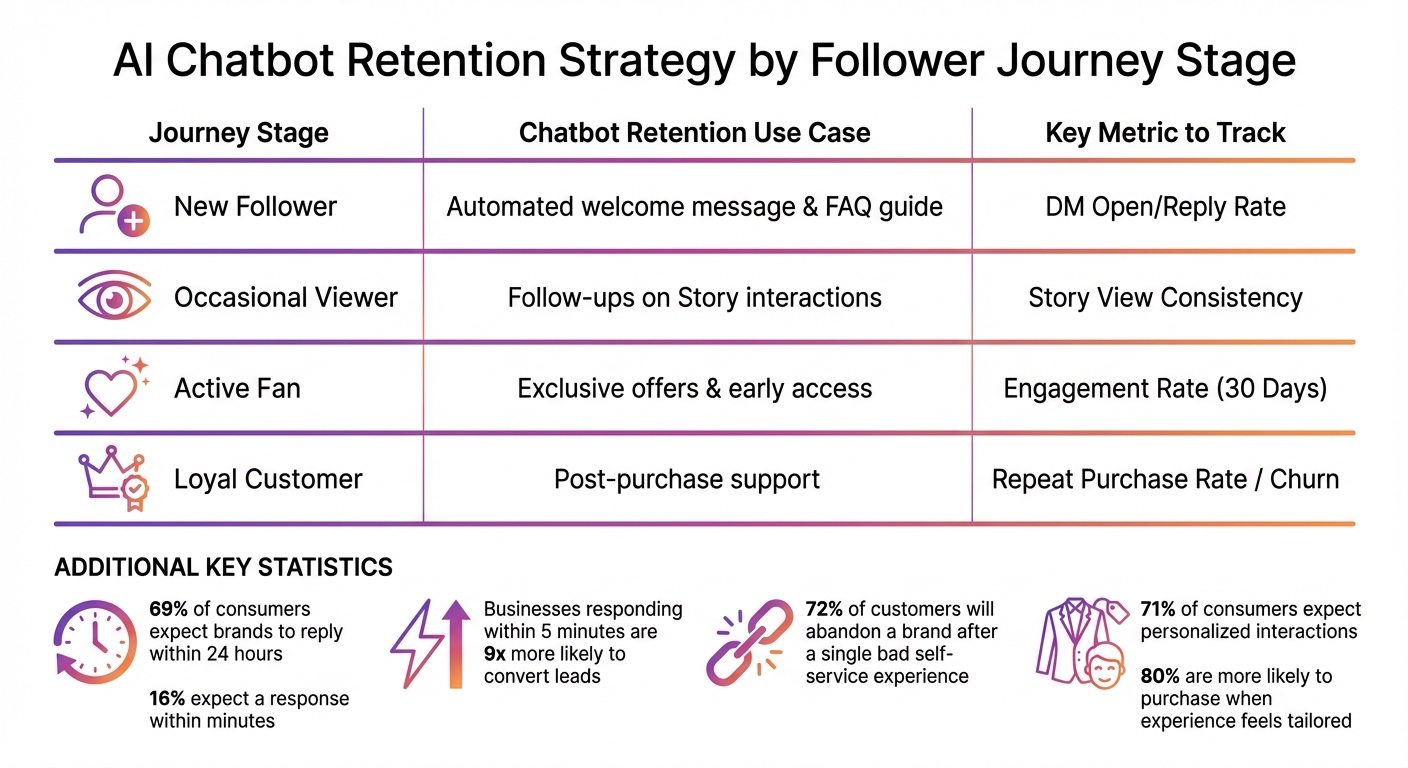
AI Chatbot Retention Strategy by Follower Journey Stage
When it comes to Instagram, having a solid retention strategy is just as important as creating engaging content. Before launching a chatbot or any automation tools, you need a clear roadmap to guide followers through their journey with your brand. This plan ensures you’re ready to meet their needs at every stage.
Every follower interacts with your brand differently, so segmenting their journey is essential. Think about these stages:
Traditional methods often overlook subtle but crucial touchpoints, like private DMs, "dark social" shares, or micro-interactions (e.g., hovering over Stories or scrolling through posts). AI changes the game by tracking these in real time - analyzing likes, comments, and DMs as they happen.
One powerful tool is sentiment analysis, which uses Natural Language Processing (NLP) to detect emotions in follower messages and comments. For example, if someone replies to a Story saying, "Still waiting for a response", that’s a signal your chatbot should address immediately. Machine learning can even predict when someone is about to disengage, sending proactive "win-back" messages to re-engage them.
Here’s a quick look at how chatbots can enhance retention at different stages:
| Journey Stage | Chatbot Retention Use Case | Key Metric to Track |
|---|---|---|
| New Follower | Automated welcome message & FAQ guide | DM Open/Reply Rate |
| Occasional Viewer | Follow-ups on Story interactions | Story View Consistency |
| Active Fan | Exclusive offers & early access | Engagement Rate (30 Days) |
| Loyal Customer | Post-purchase support | Repeat Purchase Rate / Churn |
By defining these stages and pairing them with specific goals, you’ll have a clear way to measure success.
To see how well your retention strategy is working, track measurable KPIs. For instance, if your DM open rates are above 60% but replies are under 10%, your messaging needs improvement.
Pay attention to Story view consistency over a month to spot patterns of churn. Another key metric is the re-engagement rate, which tells you how many inactive followers respond to automated "check-in" messages.
Don’t forget conversion metrics like click-through rates (CTR) on links shared in DMs, usage of discount codes distributed by your chatbot, or sign-ups for loyalty programs. Speed matters too - businesses that respond to inquiries within five minutes are 9x more likely to convert leads. A great example is Venture Smarter, which slashed its average response time from three hours to under five minutes during a flash sale in late 2024. CEO Jon Morgan shared:
"Currently, most questions require less than five minutes. Knowing they won't be left waiting for responses has raised client confidence".
And here’s a sobering stat: 72% of customers will abandon a brand after a single bad self-service experience. So, your chatbot needs to deliver quick, meaningful value - or risk becoming part of the problem.
A well-designed chatbot can make a huge difference in keeping followers engaged. Here are some practical ways to use one:
For your most engaged followers, offer VIP perks like early access to new products, private Q&A sessions, or exclusive content drops. You can even try gamification - quizzes, flash challenges, or leaderboards within DMs can encourage followers to stay active and connected to your brand.
The secret is matching each chatbot use case to the follower’s stage in their journey, ensuring every interaction feels timely and relevant.
Getting your Instagram chatbot up and running involves connecting your account, crafting thoughtful conversation flows, and automating follow-ups to keep users engaged.
To use a chatbot on Instagram, you'll need to switch to an Instagram Professional account - either Business or Creator.
Most chatbot platforms require you to link your Instagram account to a Facebook Page where you have admin or "Moderate" access. However, as of July 23, 2024, Meta introduced a new Instagram API that allows professional accounts to manage conversations through Instagram Login without linking to a Facebook Page. Despite this update, many third-party platforms still rely on the traditional method.
Make sure to enable the "Allow Access to Messages" setting. You can find this under Settings > Messages & Story Replies > Message Controls > Connected Tools. Without this, your chatbot won’t be able to access or respond to direct messages.
To integrate the chatbot, use a third-party platform and authorize permissions via Facebook Login. Permissions like instagram_manage_messages and instagram_basic are typically required, and you may need to renew access tokens every 60 days.
Pro tip: When testing your setup, use a separate Instagram account to send messages. Chatbots are often programmed to ignore messages sent from the account they’re managing.
Creating effective conversation flows is key to keeping users engaged. Start by defining entry points and triggers - the actions that initiate a chatbot interaction. Common triggers include sending a keyword via DM, commenting on a post, mentioning your brand in a Story, or clicking on a "Click-to-Instagram DM" ad.
Your welcome message should be warm and personalized. Use the follower’s name and offer Quick Reply buttons to guide them. For instance, instead of saying, "Hi, how can I help?", try something more engaging like, "Hey Sarah! 👋 Are you looking for our new collection or tracking an order?" with buttons for each option.
Incorporate branching logic and visual features like carousels or product cards to make interactions more dynamic. Use keyword-based branches or filters to direct users to specific dialogs based on their intent. Many modern chatbots also use AI intent recognition to understand the context of a message, going beyond simple keyword matching.
Here’s a quick overview of common trigger types:
| Trigger Type | Description |
|---|---|
| Welcome Message | Starts when a user first sends a message to the business profile. |
| Story Mention | Triggers a flow when a user mentions your account in their Story. |
| Post Comment | Launches a response when a user comments on a specific Instagram post. |
| Keyword Trigger | Activates a flow when a user sends a predefined keyword in a DM. |
| Live Stream Comment | Responds to comments during an Instagram Live session. |
One important stat: 69% of consumers expect brands to reply within 24 hours, and 16% expect a response within minutes.
Always include a "Talk to Human" option to allow easy escalation to a real person when needed.
Once your flows are set, focus on timing follow-ups to keep the conversation going.
After designing your flows, schedule follow-ups to maintain momentum and engagement.
Meta enforces a 24-hour messaging window, meaning your chatbot can only send messages within 24 hours of the user’s last interaction. Use this window to deliver key information or address user needs.
Set up AI-driven follow-ups to trigger after specific conditions are met in a conversation. For example, you might schedule a follow-up 24 hours later if a user hasn’t completed an action. To make interactions feel natural, add a 2–5 second delay between messages.
Take Avida Studios as an example. They used a multi-agent chatbot setup to qualify leads and schedule consultations, saving over 20 hours per week in customer communication time.
Another success story comes from Venture Smarter, led by CEO Jon Morgan. During a flash sale, they implemented a chatbot with keyword triggers and automated workflows, reducing their average DM response time from three hours to under five minutes. Morgan shared:
"The secret has been combining automation with personal touches. We leap in personally if someone has a specific or detailed problem. It seems to be the ideal fusion of sincerity and speed."
Additionally, configure your chatbot to save user responses as "User Fields" or variables. This data enriches your database, making future marketing efforts more personalized. And don’t forget to provide an easy way for users to exit the chatbot flow - like typing "agent" to connect with a real person.
Generic messages won’t keep users coming back. To build loyalty and engagement, your chatbot needs to feel personal and relevant to each individual.
AI chatbots collect and store user information - like preferences, previous purchases, or favorite colors - as "User Fields". This data allows you to create dynamic templates that can personalize messages by including details like the user’s name, location, or past interactions.
AI also goes beyond simple keyword matching by recognizing intent. For instance, if someone asks, “Where’s my order?”, the bot can identify the need for tracking details and guide them to the appropriate response flow.
Interactive features like gamification are another excellent way to gather audience insights while keeping users engaged. Personality quizzes, flash challenges, and polls not only entertain but also help collect valuable data without seeming intrusive. Additionally, enabling multilingual support ensures that users worldwide can interact in their preferred language, creating a more tailored experience.
Here’s a striking stat: 71% of consumers expect personalized interactions, and 80% are more likely to make a purchase when the experience feels tailored. A real-world example? Between February and August 2021, the cosmetics brand Make Up For Ever implemented the Heyday AI chatbot on their social media channels. In just six months, they saw a 20% boost in online sales and achieved a 30% conversion rate on personalized product recommendations alone.
Of course, always ensure compliance with GDPR and CCPA by obtaining explicit consent before collecting or storing user data.
This personalized approach works hand-in-hand with effective follower segmentation.
Not all followers are in the same stage of their journey. That’s where segmentation comes in - grouping users based on behavior, like new followers, active commenters, or those who need re-engagement.
You can also use trigger-based tagging to automatically segment users. For example, when someone interacts with a specific keyword like “GUIDE” or responds to a Story, they’re instantly categorized in your CRM. For more advanced segmentation, a multi-agent architecture can direct followers to specialized “agents” based on their interests. For instance:
Take the example of Kusmi Tea, which used an AI chatbot over three months to manage more than 8,500 conversations with an impressive 94% automation rate. This reduced their response time from 10 hours to just 3.5 hours. Similarly, the clothing brand Dynamite saw a 29% increase in customer engagement after integrating a chatbot into their customer service strategy.
Another effective tactic is setting up "Comment to DM" flows. Here, specific keywords in post comments can trigger instant follow-ups, like sending a discount code or lead magnet directly to the user’s inbox. When asking for personal details like emails or phone numbers, wait until the chatbot has established interest and aligned with the user’s budget - this approach often leads to higher conversion rates.
Once you’ve segmented your followers, it’s time to decide when to rely on AI and when to bring in human support.
A hybrid approach works best: let AI handle the initial interactions and pass complex issues to human agents. For example, AI can qualify leads and address basic inquiries, while humans step in for nuanced questions or to close high-value sales.
Set up your chatbot to escalate cases when needed. If a user asks multiple follow-up questions or shows signs of frustration, the bot should automatically connect them to a human agent. Always make it easy for users to switch to a human - whether by typing “agent” or clicking a “Talk to Human” button.
Edwin Chen, Co-Founder of Legacy AI, highlights the importance of emotional connection:
"People don't message wedding photographers because they need a vendor - they message because they're planning the most important day of their lives. Tap into that emotion first."
Regularly reviewing chatbot interactions is crucial. This helps identify areas where automation falls short and human intervention is necessary. Remember, automation isn’t about replacing the human touch - it’s about enhancing it.
Once your chatbot is live, keeping an eye on key metrics is crucial. These numbers help you understand what’s working and where adjustments are needed. On Instagram, where 92% of people make purchasing decisions as soon as they see something, every interaction counts.
Start by focusing on response time. Most Instagram users expect replies within an hour, yet the average brand takes 10 hours to respond. Chatbots can bring this down to under five minutes, significantly improving user retention.
Pay attention to conversion actions - this includes how many users interact with your chatbot, click on links in DMs, or use discount codes provided by the bot. Another critical metric is the Default Fallback Rate, which measures how often the bot fails to understand user messages. A high fallback rate signals areas where users might lose interest or drop off.
Once you’ve established your baseline metrics, leverage data analysis to fine-tune your chatbot. Sentiment analysis, powered by natural language processing, can identify the tone of user messages. This helps you spot frustration early and address it before it leads to unfollows. Engagement analysis reveals which conversation flows generate the most likes, shares, and saves, while predictive analytics uses past interactions to forecast future user behavior. Advanced AI chatbots also utilize reinforcement learning, improving themselves over time by rewarding successful interactions and penalizing failures.
Take, for example, BeautyCo, which saw a 40% increase in engagement rates and a 25% jump in sales after optimizing campaigns with AI. Similarly, TravelNow reported a 50% boost in customer inquiries and a 30% rise in holiday package bookings.
Testing is the key to transforming a good chatbot into a highly effective one. Start small by running a proof of concept to ensure your chatbot’s logic works before rolling out complex, multi-step funnels. Use simulation tools to identify broken links or dead-end conversations before the chatbot goes live.
Experiment with A/B testing for message templates, follow-up timing, and call-to-action buttons. For instance, compare how a follow-up sent three days after initial contact performs versus one sent seven days later. Test keyword triggers in your Reels and Stories - words like "GUIDE" or "ENROLL" can automatically initiate DM flows, helping you discover which content drives the most engagement.
Adding questions to your automated conversations can boost conversion rates by up to 10x. Experiment with different question formats and placements to find what resonates most with your audience. You can also segment your experiments by factors like audience behavior, location, or interests, ensuring your messaging feels tailored rather than generic.
"The secret has been combining automation with personal touches. We leap in personally if someone has a specific or detailed problem. It seems to be the ideal fusion of sincerity and speed".
Track detailed metrics such as triggers, open rates, conversions, and drop-offs to pinpoint areas for improvement. These insights will guide ongoing adjustments, ensuring your chatbot continues to enhance your retention strategy effectively.
AI chatbots are reshaping how brands keep followers engaged on Instagram by delivering quick, personalized responses that resonate with users. With 92% of Instagram users taking immediate action after interactions, every response counts. To get the best results, blend the speed and efficiency of automation with the nuance of human support for more complex scenarios.
This approach isn't just theoretical - it’s backed by results. Recent case studies highlight noticeable boosts in online purchases and faster response times when AI chatbots are part of the strategy.
To sharpen your Instagram retention game, start by mapping out the follower journey and pinpointing key moments for engagement. Use keyword triggers to address common questions, leverage user data to personalize responses, and always offer the option to connect with a human when needed. Keep an eye on metrics like response times and conversion rates to refine your strategy over time. These steps can make a tangible difference in how well you retain your audience.
As Instagram continues to evolve, followers demand quick and meaningful interactions. This ties back to the importance of balancing AI’s efficiency with a personal touch. By using AI chatbots thoughtfully, you can build stronger, lasting relationships with your audience. Experiment with different conversation flows, tweak your timing using data insights, and make every interaction count. Tools like UpGrow (https://upgrow.com) can help brands integrate advanced AI solutions, ensuring followers feel valued and genuinely connected.
AI chatbots are transforming Instagram engagement by handling personalized, real-time interactions at scale. Whether it’s responding to direct messages, comments on posts, or story interactions, these chatbots provide instant replies, cutting down wait times and keeping followers actively engaged. What makes this even more effective is the way these responses feel tailored to each user, creating a conversational experience that feels personal.
Beyond immediate interactions, chatbots play a key role in building long-term connections. For example, they can send follow-up messages like thank-you notes, requests for feedback, or even suggest relevant content based on user preferences. By analyzing user behavior, AI can pinpoint the best times to re-engage followers, nudging them toward new posts, reels, or live sessions. Features like audience segmentation take this a step further, allowing chatbots to share content that aligns with specific interests or actions, encouraging followers to stick around and interact more often.
Platforms such as UpGrow’s AI-powered tools bring all these capabilities together. They combine advanced chatbot functions with real-time analytics, enabling marketers to monitor performance and refine their strategies for even better results.
To boost Instagram retention with AI chatbots, keep a close eye on engagement metrics and user interactions. Here are three key areas to monitor:
By regularly analyzing these metrics, you can fine-tune your chatbot's performance to deliver more personalized interactions and keep your audience engaged over time.
AI chatbots create a more personalized experience by examining follower behavior, preferences, and key demographic details like likes, comments, location, age, gender, and language. With this information, they can design customized messages, plan follow-ups, and interact at the best times to match each follower's unique interests.
This level of personalization doesn’t just boost engagement - it helps establish deeper connections with followers, encouraging loyalty and increasing retention rates on Instagram.


