
Ultimate Guide to AI UGC Ideation for Reels
Build a repeatable AI workflow to mine Reel trends, generate UGC hooks and scripts, test one variable, and scale what works.
Build a repeatable AI workflow to mine Reel trends, generate UGC hooks and scripts, test one variable, and scale what works.
4.98 /5 - from 58k reviews
Trusted by 50,000+ creators — get real engagement delivered to your profile in minutes, not days.

If I want more Reel ideas without guessing, I need a simple loop: find trends, turn them into hooks and scripts with AI, test one variable at a time, and use the numbers to plan the next batch.
Instagram Reels matter because they drive a huge share of attention on the platform. In the source article, Meta data says Reels account for more than 50% of time spent on Instagram, and nearly 2 billion people interact with Reels each month. So the goal is not just to make more videos. It is to build a system I can use every week.
Here’s the short version:
A few points stand out. Short-form Reel ideas work best when they are built around hook, pacing, and trend fit, not just topic choice. AI is useful for first drafts and idea sorting, but I still need human judgment for voice and delivery. And if I want a clean workflow, I should connect idea planning to performance review instead of treating them as separate tasks.
Below, I break down that process in plain English so I can go from trend research to scripts to test results without wasting time.
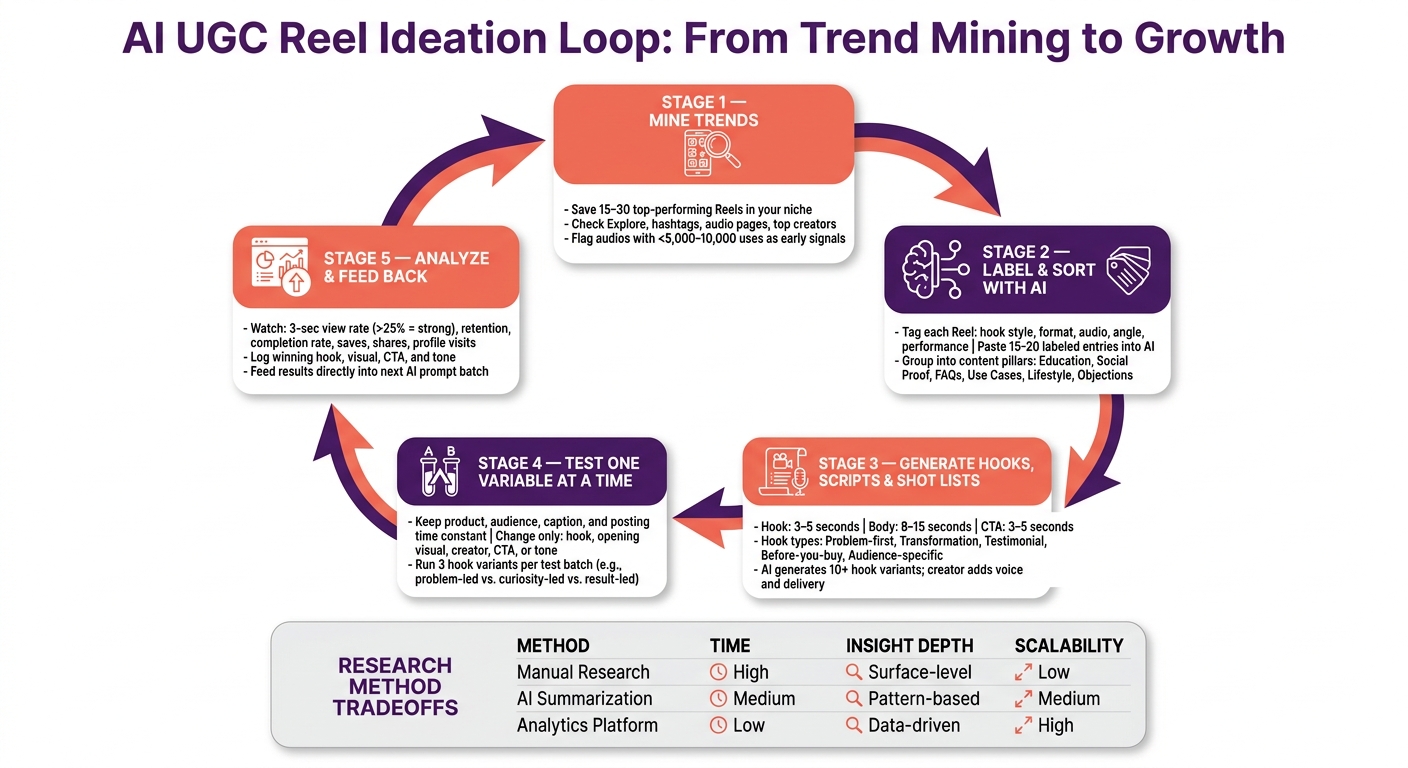
AI UGC Reel Ideation Loop: From Trend Mining to Growth
Start by collecting Reels that already work in your niche. Before you ask AI for even one idea, you need raw material: real Reels that are already doing well. The goal is simple. Gather enough examples to spot patterns, then use AI to sort those patterns into inputs you can use again.
A manual scan through Instagram’s own surfaces is still one of the best places to start. Check the Explore page, hashtag results, audio pages, and top creator accounts in your niche. When you tap an audio on Instagram, you can see how many Reels use that sound and browse the top-performing ones. Audios with fewer than 5,000–10,000 uses can still act as early signals before they peak. On hashtag pages, look at both top and recent posts to see which formats keep showing up. Save 15–30 Reels that overperform for the size of the account. For example, a creator with 10,000 followers getting 200,000+ views is a much stronger signal than a big account posting average numbers.
Once you’ve saved a batch, label each Reel before sending it to AI. For every example, note the format, the hook style, and estimated engagement. Formats might include testimonial, unboxing, tutorial, transformation, objection handler, or lifestyle. Hook styles might include a bold claim, a question, a pattern interrupt, or “watch me do X.” A simple Google Sheet or Notion table works well here, with columns for hook, format, audio, angle, and estimated performance.
With 15–20 labeled entries, paste them into an AI tool and ask it to group them by angle, format, creator style, and offer type. A prompt like "Group these Reels by angle, format, creator style, and offer type. Identify patterns a U.S.-based [niche] brand could reuse for future UGC" gives you structured output instead of vague ideas. From each group, you should get a few hook formulas and shot patterns that you can reuse in later prompts. That makes it much easier to build new hooks, angles, and shot ideas without starting from scratch every time.
Those raw groups are useful, but a monthly content calendar needs another layer of structure. Ask AI to sort your groups into content pillars like education, social proof, product use cases, FAQs, lifestyle, and objections. A prompt like "Assign each idea to one of these pillars, then summarize which angles show up most under each one" turns a messy list into a planning system you can use month after month.
Once your Reels are live, feed the results back into AI. Say educational Reels drove more saves while testimonial Reels drove more profile visits. You can give AI that data and ask it to shift the pillar mix for the next month. That way, your planning starts to follow what your audience is already telling you.
Each method has a different tradeoff between time spent and what you get back. Here’s how they compare for monthly Reel planning:
| Manual Research | AI Summarization | UpGrow Library + Analytics | |
|---|---|---|---|
| Time Required | High (hours of scrolling) | Medium (prompting + processing) | Low (instant library access) |
| Depth of Insight | Subjective, surface-level | Pattern-based, structural | Data-driven, live analytics |
| Scaling for Monthly Planning | Low | Medium | High |
AI helps you turn examples into patterns fast. UpGrow cuts down the collection phase with a viral content library and live analytics, so monthly planning can start with pre-vetted examples and end with performance feedback. Those groups then become the inputs for hooks, scripts, and shot lists.
Start with each content pillar, then use it as the input for the next layer. That means one pillar can turn into hooks, then scripts, then shot lists. The goal isn't to make the video feel polished like a commercial. It's to make it feel like something a real person filmed on a phone.
Not all hooks do the same job. Some are built to get more views. Others help you reach the right people. And some are better when you're trying to drive clicks or sales. That matters because the first 3 seconds usually decide if someone keeps watching.
Here’s how the most useful hook types line up with common Reel goals:
If you want to use ChatGPT for Instagram to give you a batch of options in one go, be very specific. A prompt like this works well: "Generate 10 Instagram Reels hooks under 8 words each for a UGC-style video about budget-friendly home workouts. Split into 3 groups: reach-focused, engagement-focused (questions, polarizing opinions), and conversion-focused (before-you-buy angles). Write each hook in a natural U.S. voice, no buzzwords or corporate tone."
You can use that same pattern for scripts and shot lists too.
A simple structure works best here: 3–5 seconds for the hook, 8–15 seconds for the body, and 3–5 seconds for the CTA. AI usually does better when you tell it exactly what to return instead of leaving the format loose.
A solid prompt could be: "Write a 25-second UGC-style Instagram Reel script in a casual, U.S. millennial tone for a budget workout app. Structure it as: Hook (3–4 seconds), Body (12–15 seconds with 2–3 benefits), CTA (3–4 seconds). Include spoken lines, suggested on-screen captions under 8 words, and approximate timestamps."
Example:
If you need test versions, build those into the prompt. Ask for six variations tied to objections and audience groups. For example, one version for the budget objection, one for the time objection, one for the "won't work for me" objection, plus separate versions for college students, busy parents, and business travelers. That way, each draft tests one angle at a time, which makes A/B testing much easier.
Shot lists work the same way. Drop in the script and ask: "Break this 25-second UGC Reel into a numbered shot list for vertical iPhone filming. For each shot, include: duration in seconds, camera angle (selfie, over-the-shoulder, screen recording, product close-up), what the creator does, and any on-screen text." In most cases, you'll get 5–8 shots. If you want to keep filming simple, add limits like "limit to 4 shots max, no tripod required, all indoors with natural light." That keeps the process easy to repeat for UGC.
Each option has tradeoffs. Most teams don't pick just one lane. They mix these approaches based on speed, budget, and how much human input the content needs.
| Human-Written | AI-Drafted | Synthetic UGC Concepts | |
|---|---|---|---|
| Script Speed | Hours to days | Minutes | Minutes (automated) |
| Authenticity | High | Moderate (with creator edits) | Lower; can feel synthetic |
| Control | Full | High, with prompting | Limited |
| Editing Needs | Light polish | Moderate personalization | Heavy review needed |
| Creator Involvement | Full shoot required | Full shoot required | Minimal to none |
| Best For | Flagship campaigns, sensitive topics | Always-on Reels, rapid A/B testing | Concept visualization, explainer content |
A good rule of thumb: let AI handle the first draft and structure, then let the creator layer in lived detail, personal phrasing, and natural delivery. That gives you test-ready versions without making the content sound flat.
Once your AI-generated hooks, scripts, and shot lists are ready, the job shifts from planning to proof. Now you need to see whether the idea that looked good in a prompt also works with real people scrolling Instagram. The process is pretty simple: test it, measure it, and feed the winner back into the next prompt.
The main rule is test one variable at a time.
Keep the product, audience, caption, and posting time the same. Then change just one thing, like the hook, opening visual, creator, CTA, or tone. That way, when one version does better, you know why.
Take a skincare brand testing the claim "reduces morning puffiness." It could run three hook versions - problem-led, curiosity-led, and result-led - while keeping the same 20-second script, the same creator, the same b-roll, and the same CTA. Post each version on separate days, then compare 3-second views, retention, completion rate, saves, shares, and profile visits. That makes it much easier to spot which hook style wins.
For agencies juggling multiple client calendars, a test batch setup keeps things sane. Give each client one controlled test set per week: one product benefit, three AI-generated hook options, and one CTA variant. When a structure works, you can reuse it across accounts by swapping only the topic and the creator voice.
One metric worth watching closely is the 3-second view rate, which is calculated as 3-second video plays divided by impressions. A 3-second view rate above 25% is a strong signal, not a hard rule. If that number is low, the problem usually sits in the hook or the opening visual. If early retention looks good but saves and profile visits stay weak, the CTA probably needs work.
Once the test posts are live, let the data shape the next round of prompts. Put plainly: use analytics to write the next prompt.
If a result-led hook gets the highest completion rate and the most saves, ask for more result-led openings next time. If educational explainers get more saves than product demos, shift future prompts toward tutorial-style framing. If a playful tone gets more shares than a confident tone, call that out directly in the prompt.
This turns your process into a repeatable loop:
Over time, your prompt library becomes a record of what works for your audience, not just what sounds good on paper. UpGrow's real-time dashboard and 24/7 monitoring can help speed up that loop by showing audience behavior and follower growth patterns while the data is still current.
Use native analytics to judge how the post performed. Use UpGrow to connect that post performance to growth signals.
| Feature | Native Instagram Analytics | Native Analytics + UpGrow |
|---|---|---|
| Data depth | Views, reach, likes, comments, saves, shares, profile visits | All native metrics plus follower growth patterns and audience behavior signals |
| Audience signals | Basic follower demographics | AI-targeted audience insights tied to real follower growth |
| Monitoring | Periodic manual check-ins | 24/7 real-time monitoring with a live dashboard |
| Workflow convenience | Requires manual review | Centralized dashboard for ongoing review |
| Usefulness for Reel ideation | Good for identifying top-performing content | Faster feedback loop; connects Reel performance to real follower growth |
| Follower quality signals | Not available | Helps identify ideas that attract real followers rather than just views |
Solo creators can get by with native analytics if they track results by hand. Teams and agencies can use UpGrow to cut down the feedback loop and connect creative choices to follower growth.
Take the output from each Reels batch and feed it into the next one. This process works best as a repeatable loop, not a one-time project.
For a solo creator, that loop can fit into a weekly routine: use AI to research trends, run a short sprint to build hooks and scripts, then end the week with an analytics review. Tag each Reel by pillar, hook type, and CTA so patterns show up fast.
For agency teams, the same loop can scale by dividing ownership. A strategist handles trend mining and pillar planning. A creative lead manages AI prompts and script edits. UGC creators handle filming. A performance marketer owns analytics and audience targeting. Weekly or every-other-week standups help push lessons from one batch into the next set of AI prompts.
UpGrow ties content choices to audience growth. Its AI targeting lets you set filters by location, age, gender, language, and interests so your Reels reach the people most likely to engage and follow. Profile optimization keeps your bio and highlights lined up with your top-performing pillars. And because UpGrow's live dashboard tracks follower growth as it happens, you can spot which Reels turn browsers into followers, then build those formats right into your next AI ideation sprint. That makes it easier to turn strong ideas into follower growth.
Once the workflow is in place, use these rules to keep it tight.
Review Reels Insights early, with extra attention on drop-off in the first 1–3 seconds.
If you change one variable, like the hook, give it 5–7 days before you judge the results. Then verify the winner over 7–14 days.
For template or variable tests, you can compare early performance in the first 24–72 hours. But make the final call only after the full testing window.
Avoid copy that reads like a product page. Give the AI clear direction instead: the role, the audience, their pain points, and the kind of tone you want. A conversational tone usually works best because it sounds like a person talking to another person, not a brand shouting from a billboard.
To make the writing feel more human, lean on natural storytelling. Use personal experiences, real frustrations, and plain lessons learned. That’s the stuff people connect with.
You can also take hooks that already performed well and feed them back into the AI. Then ask why they worked. That simple step can help you spot patterns in what grabs attention and keeps people reading.
Watch retention matters most right at the start, especially your 3-second hold rate. Then use watch time or completion rate to check whether the Reel kept people around.
The first few seconds are make-or-break. Up to 50% of viewers swipe away within the first 3 seconds. So if your hook doesn’t win that early pause, the Reel may never get the chance to do well on later signals like shares, saves, or conversions.


