
Instagram AI Tools That Track Growth in Real Time
Compare Instagram AI tools with live dashboards, alerts, audience filters, and forecasts for real-time growth decisions.
Compare Instagram AI tools with live dashboards, alerts, audience filters, and forecasts for real-time growth decisions.
4.98 /5 - from 58k reviews
Trusted by 50,000+ creators — get real engagement delivered to your profile in minutes, not days.

If I want better Instagram growth decisions, I need live data, not yesterday’s report. The article’s main point is simple: I should track refresh speed, live metrics, alerts, audience filters, and forecasting if I want to react while a post, Reel, or campaign is still moving.
Here’s the short version:
One data point in the article stands out: Instagram now uses views as a main metric across formats, and impressions no longer applies to media created after July 2, 2024. That means I should focus more on view-based tracking when I judge post performance.
The roundup is short. It centers on UpGrow, which combines a live dashboard, AI targeting, profile support, content help, and team features in one setup.
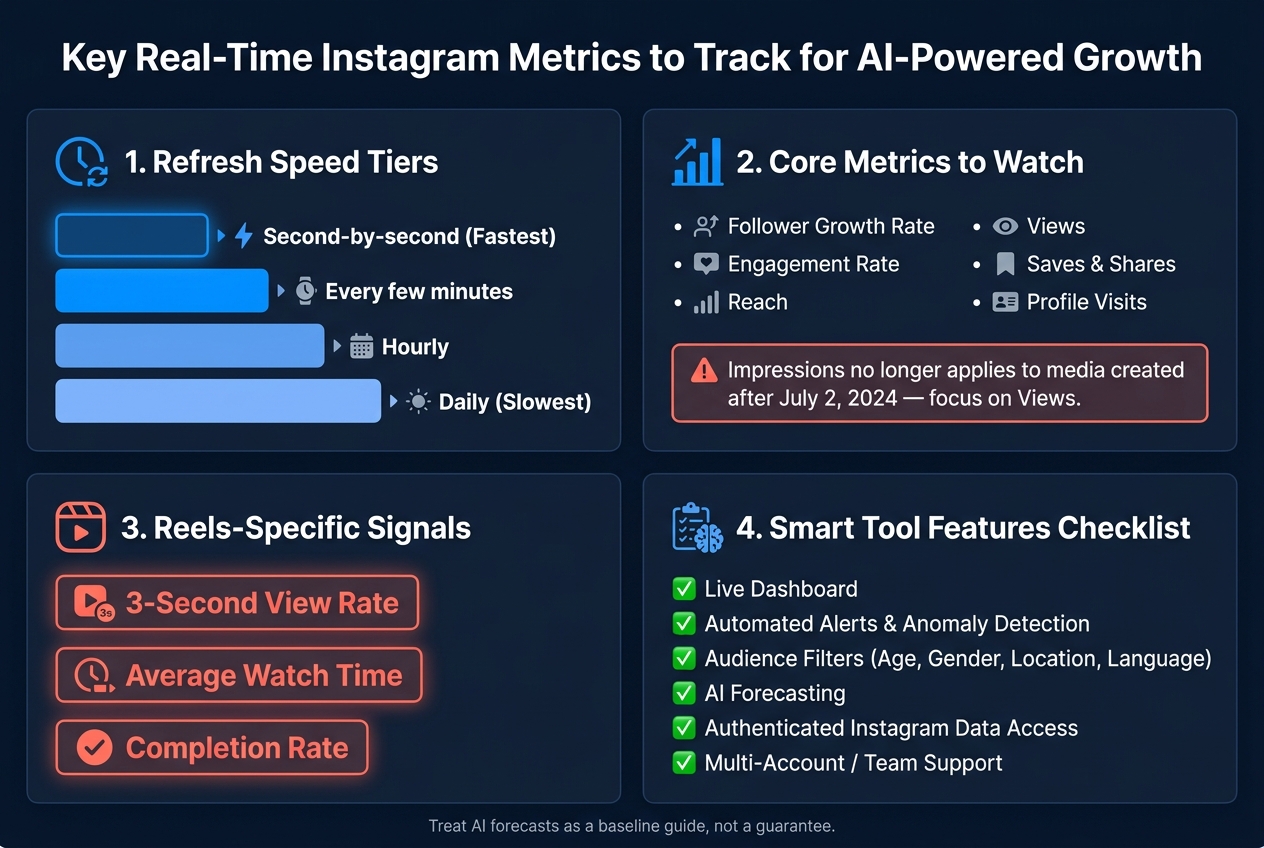
Key Real-Time Instagram Metrics to Track for AI-Powered Growth
| Tool | Live dashboard | Audience filters | Alerts | Forecasting | Team/client use |
|---|---|---|---|---|---|
| UpGrow | Yes | Yes | Yes | Yes | Yes |
If I’m a creator, I need fast post-by-post feedback to grow a new Instagram audience. If I run a local business, I need location-based audience tracking. If I’m in an agency, I need multi-account reporting and exports. That’s the frame for the rest of the piece.
Not every tool that shows numbers is worth your time. A good Instagram AI growth tool helps you make faster, smarter calls. A weak one just hands you more charts to stare at.
A live dashboard should put your main metrics in one place, with side-by-side comparisons and real-time updates. The best setups pull together essential Instagram metrics like follower velocity, reach, views, engagement, and profile actions so you can see what’s happening without bouncing between tabs.
It also helps if you can switch between date ranges and compare campaigns or similar posts. That’s how you spot what’s pushing growth and what’s just noise. Raw numbers alone don’t tell much. Context does.
A jump in follower growth today means a lot more when you can line it up against a similar post or another time window. That’s the difference between a dashboard you use and one you ignore after a week. UpGrow, for example, highlights live dashboards with follower growth curves, engagement metrics, and targeting filters in a single interface.
You’re not going to sit and watch a dashboard all day. That’s why automated alerts and anomaly detection matter.
A solid alert system spots unusual changes based on your own past performance. It can notify you when engagement drops, reach spikes, or unfollows start climbing. If one post flops or a Reel suddenly starts moving, you want that signal right away so you can tweak captions, posting time, or the next piece of content.
Audience filters matter for the same reason. Age, gender, location, and language filters help you look past raw follower counts and ask better questions. Are you gaining people in the right age group? Is your local campaign reaching users in the city or state you’re trying to reach?
Use those filters to check whether growth is coming from the audience you actually want. UpGrow uses AI-based targeting and user-set filters for age, gender, location, and language to focus growth on the audience you define. These alerts are most useful when growth shifts in the middle of a campaign.
Metrics like saves, shares, comments, watch time, and completion rate show why a post is moving and what that could mean for future reach and follower growth.
These signals matter because they point to real intent. A post with a high save-to-like ratio usually means people see lasting use in it. A Reel with a strong completion rate has a better shot at getting more distribution.
AI forecasting tools take those signals and turn them into expected growth ranges. They look at past patterns like your average daily follower gains, engagement per post, and posting frequency to estimate where your account may be headed if current behavior stays the same.
The smart way to use these forecasts is not to treat them like promises. Think of them as a baseline. If your actual growth falls below the forecast after a content change, that’s worth a closer look. If it’s beating the forecast, you may have found a format or angle worth repeating. Use those forecasts as the benchmark for the tools in the roundup below.
UpGrow covers the main parts of real-time Instagram growth tracking: live visibility into performance, audience targeting, and fast action when things shift.
UpGrow combines AI-powered growth with a live dashboard and smart targeting by location, age, gender, and language. It also includes profile optimization support, a Boost™ tool, a viral content library, and agency workflows.
The next step is picking the setup that fits your workflow and reporting needs.
Once you know what live tracking can show, the next step is choosing the setup that fits your workflow. The right tool should match how you work day to day, especially when it comes to refresh speed, analytics depth, and reporting format.
Solo creators usually get the most out of fast feedback. If a Reel, Story, or carousel starts picking up steam, you want to know right away. That gives you time to reply to comments, repost it to Stories, or pin the post while the buzz is still there. This is a key part of how to go viral on Instagram through timely engagement.
Local businesses need tools that connect Instagram activity to things like reservations, bookings, or foot traffic. That means looking for location targeting and time-of-day views that show when nearby people are most active. A tool that updates throughout the day works well here, with daily summaries for a closer look later. UpGrow supports location, age, gender, and language filters for local targeting.
Agencies usually care more about range than raw speed. They need multi-account dashboards, role-based access, and automated weekly or monthly reports in PDF or CSV format using U.S. date formats. Alerts for sudden follower drops or viral spikes also matter, since teams may need to act fast across several client accounts.
Before you trust any dashboard, check what updates live and what updates in batches. Also, make sure the platform uses authenticated Instagram access instead of scraped public data. If the data source isn't authenticated, live alerts and forecasts lose a lot of their use.
That’s the difference between a dashboard that looks current and one that can actually help you make growth decisions.
Put together, these features help you turn Instagram data into faster decisions. This is a core part of AI Instagram marketing strategies. Periodic reports tell you what already happened. Real-time dashboards let you respond now. And on Instagram, that timing matters because the window can close in a hurry.
The main thing isn’t just the metric itself. It’s how fast a tool helps you do something with it. That’s the line between a monitoring tool and a decision tool. The best setups bring live visibility, audience filters, and anomaly alerts into one workflow that keeps pace with you.
The right tool depends on your goals. If you only need to spot sudden spikes, shoutouts, or collabs, tracking follower growth may do the job. But if you’re planning campaigns, managing ad spend in USD, or reporting to clients, a full platform with segmentation and forecasting gives you the detail to support those calls.
UpGrow is worth a look if you want organic growth and live analytics in one workflow, with AI targeting and agency-friendly monitoring built in. If your goal is to handle live tracking and organic growth without making the process messy, UpGrow keeps it simple.
Real-time tracking on Instagram means 24/7 monitoring of account performance and audience activity with very little delay.
In plain English, it gives you near-live updates on things like follower growth, engagement, reach, and impressions. It can also send alerts when something changes fast.
In a live dashboard, this makes it easier for creators and businesses to spot trends, check audience demographics, and see how content is performing shortly after it goes live.
Prioritize saves and shares over likes. They signal stronger viewer intent and often line up more closely with algorithmic success.
Also keep an eye on reach, impressions, engagement rate, completion rate, and average watch time. These live metrics show how far a Reel spreads, how well it holds attention, and which hooks or formats are worth using again.
Use your UpGrow dashboard to track key audience filters like age, gender, location, and language. Then compare your new follower mix with your targeting settings to see if your growth matches the audience you want to reach.
UpGrow also gives you real-time updates and recommendations, which makes it easier to check whether your content is pulling in people who actually engage with your brand.


