
How to Track Instagram Follower Growth in 2026 (5 Tools & Methods)
Track net follower growth, follow vs unfollow trends, and growth velocity with Insights, trackers, unfollower tools, and a spreadsheet.
Track net follower growth, follow vs unfollow trends, and growth velocity with Insights, trackers, unfollower tools, and a spreadsheet.
4.98 /5 - from 58k reviews
Trusted by 50,000+ creators — get real engagement delivered to your profile in minutes, not days.
If you only watch your total follower count, you’re missing the part that matters. I’d track five things and tools together: Instagram Insights, a follower-count tracker, a growth analytics tool, an unfollower checker, and a simple spreadsheet.
Here’s the short answer: Instagram’s native data usually only shows recent history, often about 7 to 30 days, so I wouldn’t rely on it alone. To see if growth is sticking, I’d watch net follower growth rate, follows vs. unfollows, and growth velocity, then match spikes and drops to specific posts, Reels, or campaigns.
What I’d focus on right away:
| Method | Best use | Historical view | Unfollower data | Works for personal accounts |
|---|---|---|---|---|
| Instagram Insights | Recent post-by-post checks | Limited | No | Limited |
| Follower-count tracker | Fast count snapshots | No | No | Yes |
| Growth analytics tool | Longer trend review | Yes | Sometimes | Sometimes |
| Unfollower checker | Spotting losses after spikes | Partial | Yes | Sometimes |
| Manual spreadsheet | Keeping your own record | Yes | No | Yes |
My take: if you want a clean system in 2026, I’d use Insights for recent movement and a spreadsheet or analytics tool for long-term tracking. That gives you a simple way to tell whether follower changes came from content, a campaign, or just noise.
Your follower count is a scoreboard. But the trend matters more than the total.
What matters most is how that number moves: the gains, the losses, and what caused them. Tracking follower growth shows whether posts, launches, or collaborations actually change follower counts. That’s the difference between just watching numbers and tracking Instagram follower growth.
Growth data answers one question: Is this working?
When you track follows and unfollows next to your posting activity, patterns get easier to spot. One follower count on its own doesn’t tell you much. But if a Reel, launch, or collaboration lines up with a jump in followers, that tells you something clicked.
And if those new followers disappear soon after, that points to churn or a weaker audience fit. That’s how you tell the difference between real growth and a one-off spike.
Not all growth means the same thing. A spike only matters if it sticks. A stall usually means momentum has slowed.
Churn data can warn you early when the audience and message don’t line up. If people leave after a specific post or campaign, that’s a sign the message or audience fit missed.
That leads to the next piece: what Instagram’s native tracking shows you, and what it leaves out.
Instagram’s built-in analytics can show recent movement. But they don’t give you enough history to tell actual growth from short-term noise.
Instagram’s Professional Dashboard and Insights give professional and creator accounts a quick baseline for recent follower and content metrics. Personal accounts get very little.
These tools are handy for checking whether a recent Reel or campaign changed your follower count. That makes them useful for a quick pulse check. But for long-term tracking, they don’t go far enough.
Native analytics focus on recent activity, so they can’t map follower growth across months or years. Instagram also doesn’t provide a full historical follower chart, which makes older trends hard to piece together unless you tracked them on your own. You can see movement, but not the trend data you need to measure net growth rate or churn.
Here’s a simple side-by-side view of where native tracking falls short and what that means in practice:
| Limitation | Practical Impact |
|---|---|
| No long-range trend view | Can't review growth trends far back in time |
| No built-in follower timeline | Past trends are lost without manual logging |
| Limited access for personal accounts | Minimal follower analytics without a professional/creator account |
That missing history is why the next section turns to trackers, analytics tools, and a spreadsheet to build a longer view.
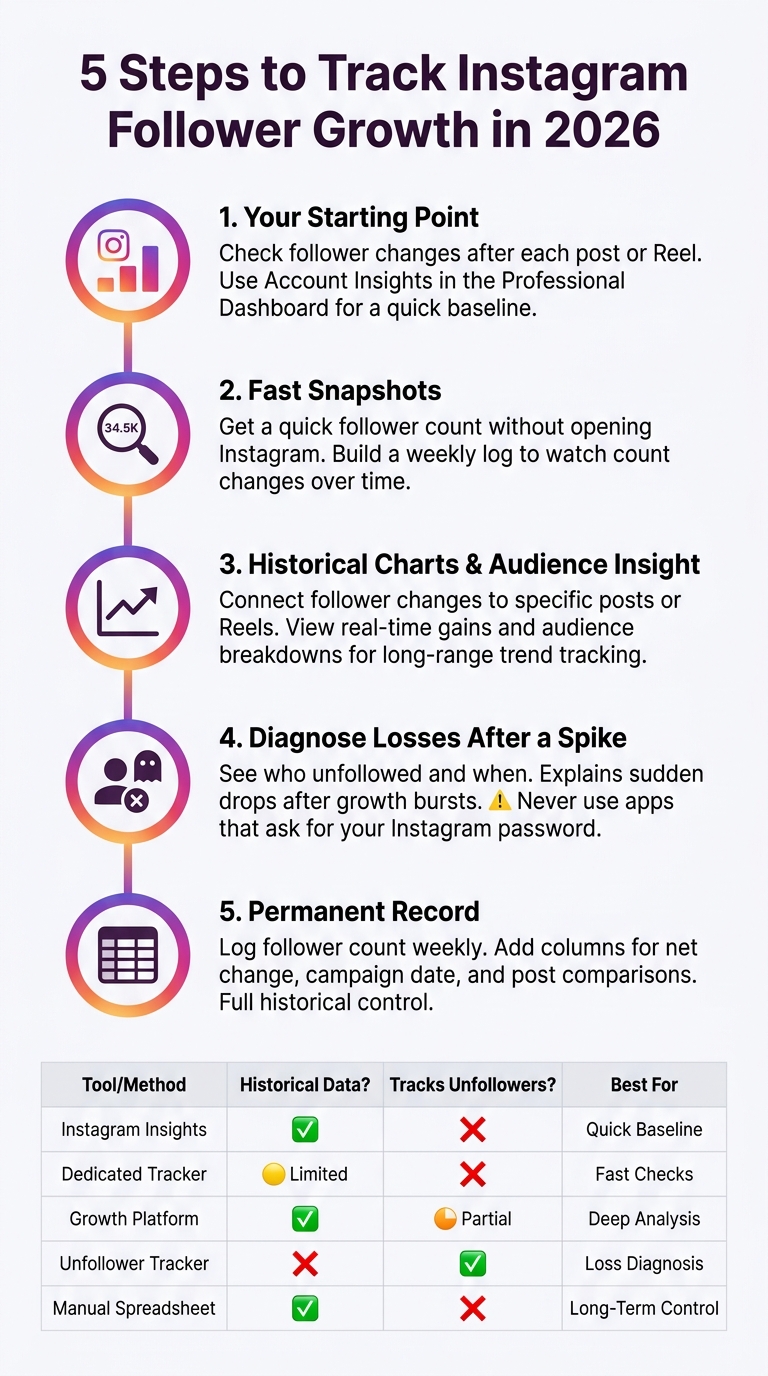
5 Steps to Track Instagram Follower Growth in 2026
Since Insights only shows recent activity, these five methods help you keep a longer record. The goal is simple: turn short-term follower swings into something you can track over time.
Step 1: Instagram Insights & Professional Dashboard (your starting point)
Start with Instagram Insights after a post or Reel. Open Account Insights in the Professional Dashboard, then note follower changes next to content performance. That gives you a baseline you can compare later.
Step 2: Dedicated follower count tracker (for fast snapshots)
If you want a fast count without opening Instagram, a dedicated Instagram follower count checker gives you a quick snapshot of your total followers. It's a simple way to build a weekly log and watch count changes over time.
Once you’ve got those snapshots, the next step is seeing the pattern behind them.
Step 3: Growth analytics platform (for historical charts and audience insight)
A growth analytics platform gives you more than a recent peek. It lets you connect follower changes to specific posts or Reels, so you can see what likely caused a spike. UpGrow's live analytics dashboard shows real-time follower gains and audience breakdowns. If you want more detail on what these tools show, check the full guide to Instagram analytics.
Step 4: Unfollower / ghost-follower tracker (diagnose losses after a spike)
An unfollower / ghost-follower tracker shows who unfollowed and when. That can help explain sudden drops after a burst of growth.
There’s one rule here: never use an app that asks for your Instagram password. Those apps are unsafe and break Instagram's terms. Stick with tools that use official login methods or need no account access at all.
If you'd rather keep your own record, you can track the same numbers in a spreadsheet.
Step 5: Manual spreadsheet (permanent record)
A spreadsheet gives you a record you control. Log your follower count at the same time each week, then add columns for net change, campaign date, and the posts or Reels you want to compare. This makes it easier to line up follower movement with posts, Reels, and campaigns.
To turn those raw numbers into percentages, see how to calculate your Instagram follower growth rate for the exact formula.
Here's how all five methods compare at a glance:
| Tool / Method | Historical data? | Tracks unfollowers? | Works for personal accounts? | Best for |
|---|---|---|---|---|
| Instagram Insights & Professional Dashboard | Limited | No | Minimal | Quick baseline checks after posts or campaigns |
| Follower count tracker | No | No | Yes | Fast snapshots and simple monitoring |
| Growth analytics platform | Yes | Varies by tool | Varies by tool | Long-range trend tracking, spike analysis |
| Unfollower / ghost-follower tracker | Partial | Yes | Varies by tool | Diagnosing losses and churn after spikes |
| Manual spreadsheet | Yes | No | Yes | Full historical control and custom logging |
Raw follower count is a starting point. But the trend tells you more. It shows whether growth is steady and whether people are responding to what you post.
The best way to read follower performance is to look at three metrics together. That gives you a clearer view of whether a post led to lasting growth or just a brief spike.
Net follower growth rate: This shows your net gain over a set period, which makes it easier to compare one week or month against another.
Follow-to-unfollow ratio: This shows whether new follows are outpacing unfollows during the same period.
Growth velocity: This shows how fast your follower count is moving up, leveling off, or slowing down.
To make sense of follower spikes, line up changes in follower count with the posts, Reels, or campaigns that went live around the same date. Then log what happened next. Did the lift stick, or did it fade a day or two later?
When follower count jumps or drops, go back and check what was published at that time. That simple step can help you spot which pieces of content drove the change.
UpGrow's live analytics dashboard shows real-time follower gains and audience breakdowns. That makes it easier to connect spikes to specific actions without comparing logs by hand.
Once you know which metrics matter, the next step is figuring out how often to review them and how to read sudden drops.
Once you know which metrics matter, the next step is simple: decide when to look at them.
A daily, weekly, and monthly rhythm helps you tell the difference between normal ups and downs and an actual follower problem. Use net follower growth rate, follow-to-unfollow ratio, and growth velocity on the schedule that fits how often you post.
Check daily during launches or periods of heavy posting. Check weekly for normal monitoring. Check monthly to review trends and make strategy calls.
For monthly reviews, pay close attention to month-over-month net growth. That gives you a cleaner view of whether your path is getting better or slipping.
Not every follower drop means something went wrong.
Instagram sometimes runs account-wide purges that remove bot accounts and inactive profiles. These often show up as a sharp, broad drop that doesn't tie back to one post.
Before you label it churn, look at timing. Did the drop happen right after a specific post, Reel, or campaign? If not, it may be a platform purge instead of a content issue.
Here’s the simple way to think about it:
UpGrow's live analytics dashboard tracks follower gains, losses, and audience breakdowns in real time.
A good follower growth rate on Instagram depends on your account size, niche, and how consistently you post. The main thing to watch is steady net growth over time, not random one-day jumps.
Look at patterns like follower gains, losses, and how growth shifts after certain posts or Reels. That gives you a much better read on whether your Instagram follower growth is healthy.
Yes, but only to a point. Personal accounts get very little built-in data on follower growth.
If you want more detailed tracking, you’ll usually need a Professional or Creator account. Those account types give you access to Instagram’s built-in insights, including recent follower growth trends.
Track growth long enough to spot real trends, not just short-term ups and downs. When you look at gains, losses, and patterns over time, you get a much clearer view of what’s working, what isn’t, and why.
A short snapshot can throw you off. That’s why steady tracking matters more than quick calls.


&description=Track%20net%20follower%20growth%2C%20follow%20vs%20unfollow%20trends%2C%20and%20growth%20velocity%20with%20Insights%2C%20trackers%2C%20unfollower%20tools%2C%20and%20a%20spreadsheet.&image=https://www.upgrow.com/blog-images/assets.seobotai.com/cdn-cgi/image/quality=75,w=1536,h=1024/upgrow.com/6a4eea8e21d1dee3314b82cc-1783561287553.jpg)