
How AI Personalizes Instagram Engagement in Real Time
How Instagram's AI uses behavior, location, and signals like saves, shares, and watch time to tailor feeds and boost creator reach.
How Instagram's AI uses behavior, location, and signals like saves, shares, and watch time to tailor feeds and boost creator reach.
4.98 /5 - from 58k reviews
Trusted by 50,000+ creators — get real engagement delivered to your profile in minutes, not days.

Instagram uses AI to predict and show content tailored to your preferences in real time. Every action - like scrolling, sharing, or saving - feeds into its algorithm to refine what shows up on your feed. This system analyzes billions of data points daily, balancing user behavior, demographics, and content signals. Here's what you need to know:
Instagram's AI continuously evolves, making it essential for creators and businesses to understand and leverage these tools effectively to grow their presence.
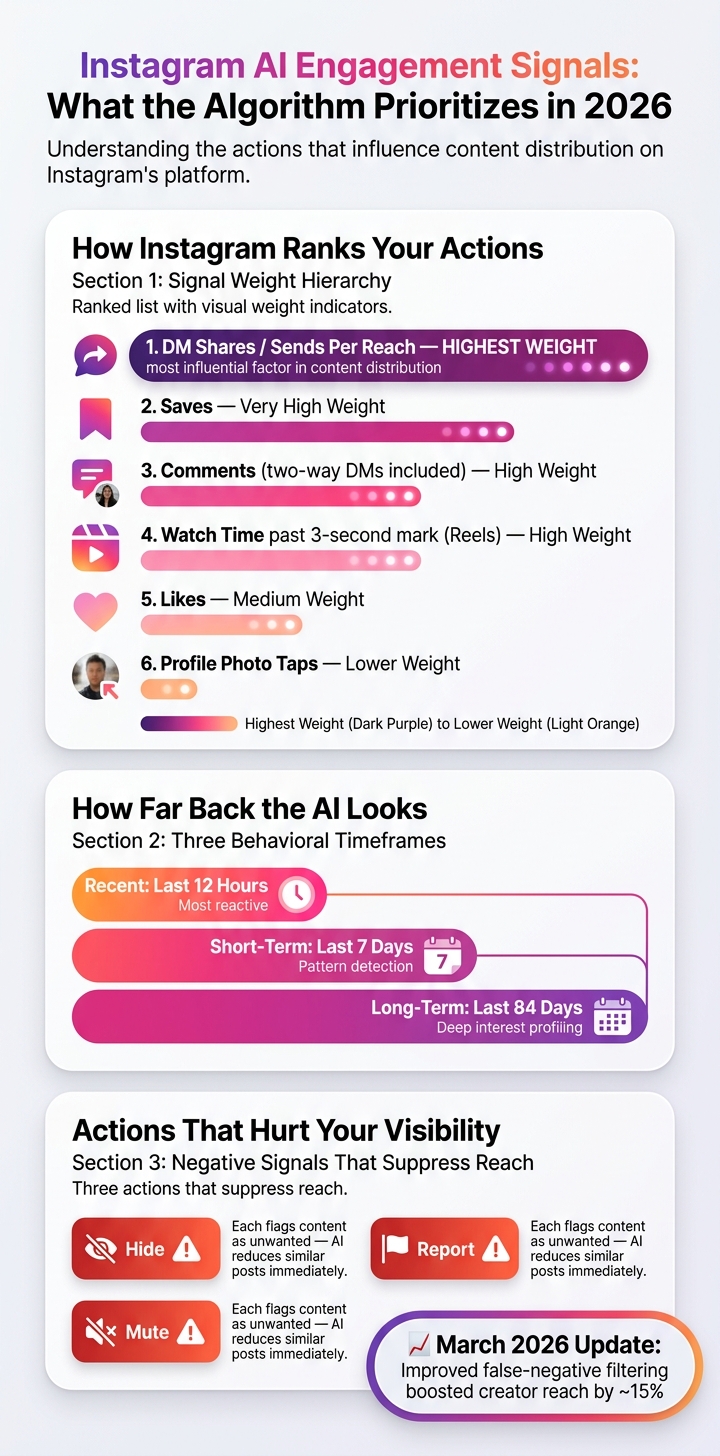
Instagram AI Engagement Metrics: What Matters Most in 2026
Instagram's personalization engine is constantly evolving, with its AI fine-tuning engagement by analyzing user data. Every action users take leaves a digital footprint, and these footprints are sorted into distinct signal categories. The algorithm then weighs these signals depending on the context to better understand user preferences.
As of 2026, Instagram places greater emphasis on "deep intent" signals - actions like saves and direct message (DM) shares - over simpler interactions like likes. These actions now carry more weight in the ranking model. For instance, "Sends Per Reach" (how often a post is shared via DM compared to its views) has become the most influential factor in determining content distribution.
"In feed, the five interactions we look at most closely are how likely you are to spend a few seconds on a post, comment on it, like it, share it, and tap on the profile photo." - Adam Mosseri, Head of Instagram
When it comes to Reels, the AI zeroes in on watch time, particularly whether viewers surpass the crucial three-second mark. It also monitors two-way DMs and comments to measure the strength of user connections, which impacts content visibility in both Feed and Stories.
While user behavior is a critical factor, the algorithm also incorporates demographic and location data to further refine its predictions.
Beyond behavioral signals, demographic and location information helps the AI fine-tune content relevance. Location, for example, remains a key ranking factor within the "information about the post" category, aiding the algorithm in identifying geographically relevant content. This is especially beneficial for local businesses or creators aiming to reach audiences in specific regions.
The AI also clusters users based on shared interests and demographics, enabling it to deliver content to non-followers with similar profiles. This targeted approach increases engagement by surfacing content that aligns with users' preferences. A notable update in March 2026 improved the system's ability to filter out false negative-interest signals, which had previously suppressed content. As a result, many creators saw their reach increase by approximately 15%.
Instagram's AI doesn't just track what users interact with - it also evaluates how they interact. Spending more than 10 seconds on a post, reading all comments, or revisiting a creator's content signals deeper interest. The system builds a layered user profile by analyzing behavior over three timeframes: recent (12 hours), short-term (7 days), and long-term (84 days).
Negative feedback is just as important. Actions like "Hide", "Report", or "Mute" flag specific content, prompting the AI to reduce the visibility of similar posts.
"The system will try to show you less content that is similar to the content you reported." - Meta
This sentiment analysis works as a dynamic filter, adjusting content recommendations in real time. By balancing positive and negative feedback, Instagram's AI continues to refine its goal of delivering personalized, relevant content to each user.
Instagram's AI doesn't just sit back and observe; it actively shapes your experience by personalizing content delivery. Understanding how it uses your data can make a big difference in how you engage with the platform.
Every time you open Instagram, the AI assigns a relevance score to around 500 posts in your feed. This score is based on several factors, including who created the post, the type of content, and how you've interacted with similar posts in the past - whether through likes, comments, or reshares.
For content creators, this means generic hashtags aren't cutting it anymore. Instead, tools powered by natural language processing (NLP), trained on Instagram's high-performing data, can create captions and hashtags tailored specifically to your content. These personalized tags are far more effective than relying on generic, high-traffic hashtags.
Instagram's AI doesn't lump all followers into the same category. It segments users based on their behavior, device type (like iOS vs. Android), app usage patterns, and engagement history, which can stretch back up to 84 days. But it doesn't stop there - it also targets non-followers who share similar profiles, making lookalike targeting an automated process. This segmentation feeds directly into strategies like optimizing post timing for better engagement.
Forget the one-size-fits-all advice like "post on Tuesdays at 11 a.m." Research shows that optimal posting times vary widely. For example, Buffer analyzed 9.6 million posts, Sprout Social looked at 2.7 billion engagements, and Hootsuite reviewed over 1 million posts - yet their recommendations for the best posting times differed by as much as six hours. Why? Because your audience is unique.
AI scheduling tools solve this puzzle by focusing on your account's historical performance and follower behavior rather than relying on industry averages. These tools aim to create engagement velocity - a burst of interactions within the first hour of posting. This early activity signals Instagram's algorithm that your content is worth showing to more people, boosting its reach.
However, consistency often trumps perfect timing.
"The best time to post on Instagram is whenever you'll post consistently." - Tim Eisenhauer, Author, Apaya
Posting daily, even if the timing isn't flawless, typically offers more opportunities for reach than sporadically posting at "ideal" times.
Understanding how AI can tailor content is just the beginning - using it effectively for your Instagram growth requires a hands-on approach. Here’s a practical guide to turn theory into action and see real results.
Before diving into AI tools, it’s crucial to define specific objectives. Vague goals like "get more followers" won’t cut it. Instead, focus on SMART goals - Specific, Measurable, Achievable, Relevant, and Time-bound.
For example, instead of saying, "I want more followers," set a goal like: "Increase U.S.-based followers by 20% (from 5,000 to 6,000) in 90 days while keeping a minimum 5% engagement rate." This kind of detailed target helps the AI understand what success looks like and allows it to analyze Instagram Insights data effectively.
It’s also helpful to tie each goal to specific Instagram actions:
| Goal | Instagram Actions | Key Metric |
|---|---|---|
| Follower growth | Profile visits, follows | Follower growth rate |
| Engagement | Likes, comments, saves, shares | Engagement rate |
| Website traffic | Link clicks, Story swipe-ups | Link clicks per month |
| Sales/leads | DMs, shop taps | Conversions, revenue (USD) |
Assign one main goal and one or two secondary goals so the AI knows where to focus its efforts. Once your objectives are set, the next step is connecting your data to the AI platform as part of your Instagram for business strategy.
Start by authenticating the AI platform with your Instagram or Meta Business/Creator account credentials. Make sure to confirm your time zone (e.g., America/New_York or America/Los_Angeles) so that the AI can optimize actions based on when your audience is most active.
For better tracking, link UTM-tagged URLs to Google Analytics. This allows you to connect Instagram activity - like Story swipe-ups or link clicks - to business outcomes, such as website visits or purchases (measured in USD). If you’re using a managed growth service like UpGrow, set up targeting filters in advance. These filters can include location (specific U.S. cities or states), age range, gender, language, and interests, ensuring the AI focuses on accounts that align with your ideal audience. Once everything is connected, you’re ready to activate AI-driven strategies.
To make the most of AI’s ability to respond to real-time data, follow these steps for a structured launch. Begin with a 2–4 week calibration period where the AI experiments with posting times and identifies audience segments that respond best.
Roll out AI actions in stages:
Set daily limits to avoid triggering Instagram’s rate limits or being flagged as spam.
Use a real-time dashboard to monitor follower growth, engagement rates, and any unusual patterns, like sudden unfollows. Every 1–2 weeks, review performance to see which Reels or carousels performed best and which hooks kept viewers engaged the longest. Adjust your targeting, posting schedule, and content strategy based on these findings. For example, accounts that posted during their peak engagement times (based on historical data) saw a 6–12% increase in reach compared to posting at random, proving the importance of fine-tuning your approach.
Once your AI strategies are live, the next step is figuring out how well they’re working. To do that, you need to track the right metrics. Without solid data, it’s impossible to tell if your AI is making a real impact or just running in the background without results.
When measuring engagement, saves and shares are far more insightful than likes. Beyond these, focus on metrics like engagement rate per post (calculated as: likes + comments + saves + shares ÷ reach × 100%), net new followers per week, and profile visit-to-follow conversion rate. Together, these metrics reveal whether your AI efforts are attracting the right audience - not just a larger one.
If your goal is driving traffic or sales, add link click-through rate (CTR) and Instagram-attributed website conversions to your tracking list. And don’t ignore comment quality - a rise in meaningful, thoughtful comments (instead of just emojis) indicates that your AI is successfully connecting with an engaged audience.
| Metric | What It Tells You |
|---|---|
| Engagement rate (per post) | How well your content resonates with your audience |
| Saves & shares per post | How relevant and valuable your content is |
| Follower growth rate | Whether your targeting is driving steady, organic growth |
| Profile visit-to-follow rate | The quality of traffic AI is bringing to your profile |
| Link CTR & conversions | The direct business impact of your Instagram engagement |
| Positive comment ratio | Audience sentiment and overall brand perception |
One major advantage of AI-powered analytics is speed. If a post underperforms in its first hour compared to your usual benchmarks, you can take immediate action. This might mean refining your audience targeting strategies, posting a follow-up Story to boost traffic, or experimenting with a new caption angle. These quick adjustments can make a big difference in your results.
Here’s a practical workflow: check your real-time dashboard daily for unusual spikes or dips, review top- and bottom-performing posts weekly to identify patterns, and conduct a full performance audit monthly to decide which strategies to expand. For instance, if carousels consistently outperform static images, update your AI preferences to prioritize carousels. A Socialinsider study of over 102 million Instagram posts found that carousels have the highest median engagement rate at 1.92%, compared to 1.74% for images and 1.45% for videos. Use this as a benchmark to measure your own results.
Looking for a tool to simplify this process? The UpGrow dashboard might be worth exploring.
UpGrow is designed for ongoing measurement and optimization. Its live growth dashboard provides real-time insights into follower growth, engagement, and targeting performance. You can break this data down by location, age, gender, and interest-based segments, giving you a clear and constantly updated view of your progress.
What makes UpGrow stand out is its blend of patented AI targeting and real human expertise. There are no bots or fake followers - just organic growth that aligns with Instagram’s guidelines. Its Boost™ feature has delivered a 275% increase in monthly followers for beta users, and the platform is trusted by over 58,980 creators, agencies, and businesses. Plans start at $39/month and include a 30-day money-back guarantee, so you can test its performance against your pre-AI baseline risk-free.
Instagram's algorithm is becoming smarter every day. With its near real-time updates, the platform adapts as users interact, making static strategies a thing of the past.
As Instagram stated in a March 2026 update: "Your content needs to earn genuine interest, not just trick the algorithm." AI now plays a central role in analyzing user behavior and ensuring the right content appears at the right time. This approach fosters consistent, long-term engagement rather than short-lived bursts of activity.
Top creators and brands are embracing these AI-driven changes by staying flexible and adapting to the platform’s shifts. They don’t just rely on AI for automation - they use it to gain insights and refine their strategies in real time. By focusing on the basics - setting clear goals, analyzing performance data, and using tools like UpGrow to fine-tune targeting - they ensure their approach remains data-driven and effective.
AI isn’t something you set up once and forget. It’s a dynamic system that improves the more you use it. The creators who experiment, stay curious, and let data guide their decisions will be the ones who succeed as Instagram continues to evolve.
To help Instagram’s AI better understand your preferences, interact with content you genuinely enjoy. Actions like liking, saving, and sharing posts signal the algorithm about what you want to see more of. If you come across suggestions that don't align with your interests, use the "Not Interested" feature to fine-tune your feed.
For those looking to boost their profile’s engagement, UpGrow’s patented AI technology offers a powerful solution. It uses advanced targeting filters and real-time insights to connect you with the right audience, ensuring your content reaches the people who matter most.
Not all engagement signals influence reach equally. Among them, shares via direct messages (DM) stand out as the most impactful, carrying 3–5 times more weight than likes. Saves are another key metric, as they indicate that your content holds lasting value. While likes still play a role, the real focus should be on crafting content that inspires shares and saves. This approach can significantly boost organic growth and reach, especially when leveraging tools like UpGrow’s AI-powered solutions.
When assessing whether AI-driven strategies are actually driving sales or generating leads, it's crucial to prioritize engagement and conversion metrics over vanity stats like follower counts. Metrics such as saves, shares, and other high-value actions give a clearer picture of meaningful audience interaction.
AI-powered tools, like dashboards from UpGrow, can help you track these actions and connect them to your overall goals. By analyzing how your content's performance ties into external conversion data, you can pinpoint audience segments that hold the most value for your business.
Additionally, real-time analytics provide another layer of insight. They allow you to link specific campaigns or posts directly to audience behavior. This data can help you fine-tune your approach, ensuring your growth efforts are aligned with measurable results.


