Free AI Hashtag Generators for Instagram
Compare six free AI tools that generate Instagram hashtags in seconds—use them as drafts, then verify tags on Instagram.

If you want Instagram hashtags fast, AI tools can give you a usable first draft in 15 to 30 seconds instead of the 20 to 40 minutes manual research often takes. But there’s one catch: most free tools do not check live Instagram data, so I’d treat them as idea generators first and do a manual review before posting.
Here’s the short version:
- I’m comparing 6 free tools: Canva, Buffer, Inflact, VEED, Ahrefs, and RiteTag
- I’m looking at input options, niche-tag quality, language support, and caption-based suggestions
- A solid target for 2026 is 7 to 15 hashtags per post
- AI can help find more specific tags than broad manual searches
- Manual checking still matters for restricted, overused, or dead hashtags
- Good hashtag use can improve reach by 12% to 30%
If you want the fastest picks:
- Canva: good for captions, keywords, and multilingual posts
- Buffer: good if you already publish through Buffer
- Inflact: best range of inputs, including photos and post URLs
- VEED: simplest option for plain text prompts
- Ahrefs: more control with persona and output settings
- RiteTag: best if you want visibility labels before posting
Bottom line: I’d use AI to build the list, then check each hashtag on Instagram before I publish.
Free AI Instagram Hashtag Generator (AI Writing Template)
sbb-itb-3c55afb
Quick Comparison
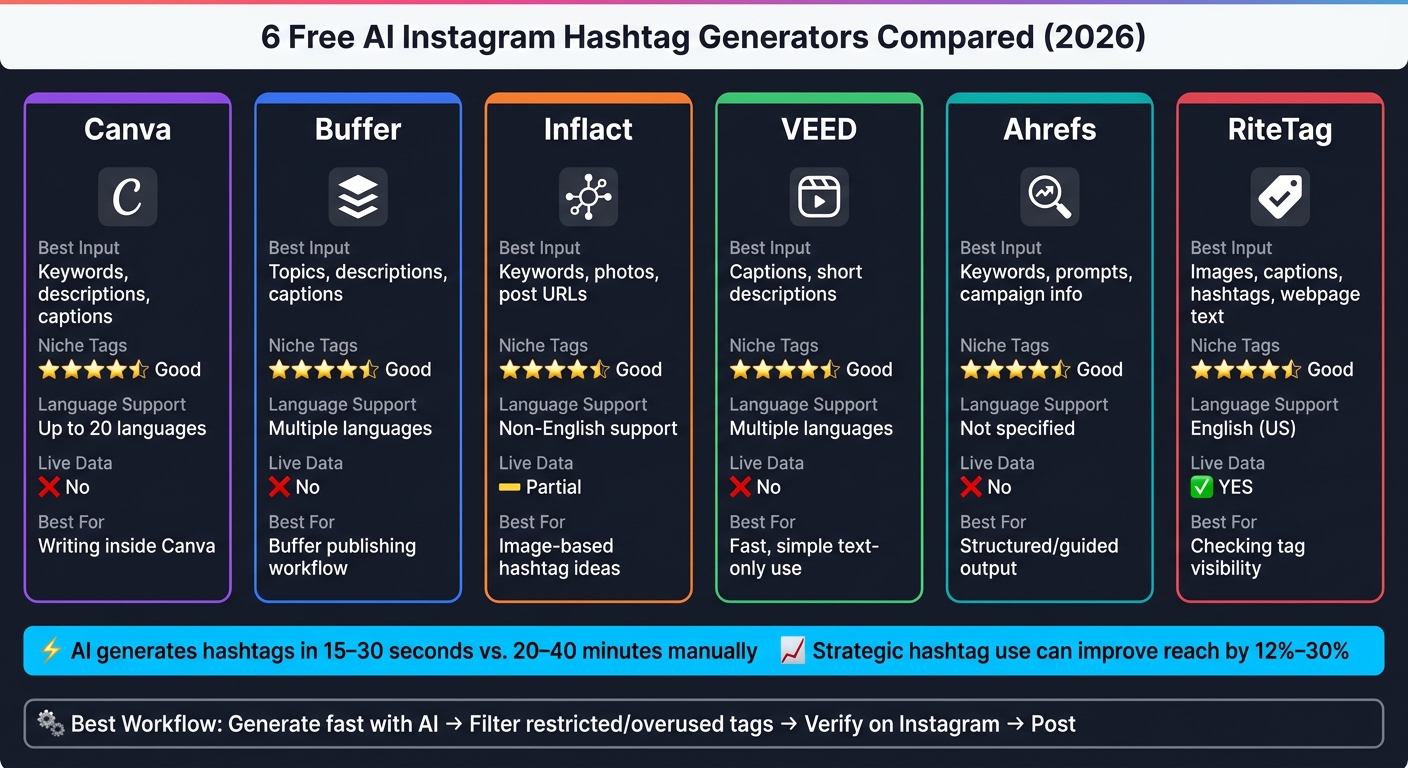
6 Free AI Instagram Hashtag Generators Compared (2026)
| Tool | Best Input Type | Niche Tags | Language Support | Live/Visibility Data | Best For |
|---|---|---|---|---|---|
| Canva | Keywords, descriptions, captions | Good when prompts are specific | Up to 20 languages | No | Writing inside Canva |
| Buffer | Topics, descriptions, captions | Good mix of broad and niche | Multiple languages | No | Buffer publishing workflow |
| Inflact | Keywords, photos, post URLs | Good due to volume sorting | Non-English support | Partial research signals | Image-based hashtag ideas |
| VEED | Captions, short descriptions | Good from text context | Multiple languages | No | Fast, simple text-only use |
| Ahrefs | Keywords, prompts, campaign info | Good with persona controls | Not highlighted in the article | No | More guided output |
| RiteTag | Images, captions, typed hashtags, webpage text | Good with color labels | English (U.S.) extension listing | Yes | Checking tag visibility |
So if you need one simple rule: generate fast, filter hard, and post only the hashtags that still look active and relevant.
1. Canva Free Instagram Hashtag Generator

Canva's hashtag generator runs on Magic Write™. You can use it right inside Canva through Assistant, the "/" shortcut, or the "+" icon in Docs. No extra tab. No hopping between tools.
Input Types
You can feed it a few different kinds of input:
- Keywords
- A short description of your post
- A draft caption
The more context you give Canva, the better the hashtag suggestions tend to be.
Niche Depth
Canva can pull up niche and cross-niche hashtags by reading the context, tone, and audience in your prompt. So if your prompt is broad, the tags will usually be broad too. If you get specific, Canva is more likely to return more targeted hashtags.
Language Support
The generator can create hashtags in up to 20 languages.
How It Differs from Manual Research
The main gap here is speed. Canva can generate hashtags in seconds, while manual Instagram research can eat up minutes or even hours.
But there’s a catch. Magic Write doesn't pull from live Instagram data, so it can't tell you if a hashtag is trending right now, losing steam, or restricted. Think of its output as a starting point, not the final word. If a tag looks unfamiliar, check it on Instagram before you post.
Free Canva accounts get 50 lifetime Magic Write uses. Canva Pro, Teams, and Education plans include up to 500 uses per user per month.
Buffer takes a similar caption-first route, but the workflow is a bit different.
2. Buffer Free Instagram Hashtag Generator
If Canva keeps hashtag ideas inside the editor, Buffer connects them to the publishing side of things. Its AI hashtag generator is built for fast, caption-based suggestions inside Buffer’s publishing toolkit, and it runs on OpenAI models.
Input Types
You can give Buffer a broad topic, a detailed post description, or your full caption text. In plain terms, the more context you give it, the better the hashtag match tends to be.
Niche Depth
Buffer tries to mix broad tags with more niche ones. It works best when your post topic is already clear, and specific prompts usually lead to more targeted suggestions.
Language Support
Buffer can suggest hashtags in multiple languages, which makes it handy if you’re posting for audiences outside English-speaking markets.
How It Differs from Manual Research
Buffer is much faster than doing hashtag research by hand. But there’s a catch: it doesn’t pull from live Instagram data, so the results are best treated as a starting draft, not a final list.
Use the output as a draft, then compare it with your own top-performing hashtags. AI can miss the mark, so it’s smart to review each suggestion before you publish. If you don’t have an account, Buffer gives you up to five hashtag generations per day. Free accounts get unlimited use.
3. Inflact Instagram Hashtag Generator
Inflact does more than take a caption and spit out tag ideas. You can start with keywords, a photo, or even an Instagram post URL. If you want a fast starting point, keywords work well. If you want suggestions that match the image itself, the photo option analyzes the visual and recommends related hashtags.
Niche Depth
Inflact sorts hashtags by post volume. That makes it easier to blend broad tags with more niche ones, which can matter a lot for smaller accounts. Instead of chasing only high-competition hashtags, you can build a mix that gives your post a fair shot at getting seen.
Language Support
Inflact can also generate hashtags for non-English content. That's helpful if you're posting for different markets or working with audiences in more than one language.
How It Differs from Manual Research
Manual research takes time, and it often starts from scratch. Inflact is faster and more targeted because you can feed it a photo or an Instagram post URL to shape the suggestions. That helps when you want hashtag ideas that match an actual post in your niche, not just a blank prompt.
4. VEED Hashtag Generator
VEED is the simplest text-prompt tool in this group. If you want a text-only workflow, it keeps things easy and direct.
Input Types
VEED works from a caption or short description of your content. In plain terms, the more detail you add, the better the hashtag ideas tend to be.
Language Support
VEED supports hashtag generation in multiple languages. That makes it a good fit if you're posting for audiences outside English-speaking markets.
Niche Depth
VEED reads the full description, so it can surface niche tags that basic keyword matching may miss.
How It Differs from Manual Research
Compared with manual hashtag hunting, VEED makes the first draft much faster. It turns one description into a curated list in seconds.
5. Ahrefs Free AI Instagram Hashtag Generator

Ahrefs gives you more control while keeping the same caption-first approach. Its free Instagram hashtag generator uses AI to make hashtags from keywords, prompts, or short descriptions. The big difference is the extra setup. You can choose a persona and a format, which helps shape the output with more precision.
Input Types
It accepts keywords, descriptions, campaign details, brand names, and collaboration themes. It also includes a persona option, such as "Social Media Manager," and a "Format as" setting to guide the output.
Niche Depth
Those persona and format controls make it easier to guide the tool past a basic one-line prompt. It can also bring up contextual tags that a simple search might miss. For example, a women-over-40 fitness prompt may surface tags like #over40fitness alongside broader ones. The sweet spot is usually a mix of broad and niche tags.
How It Differs from Manual Research
Ahrefs is faster than manual keyword research and does a better job reading context, tone, and audience. But it still does not pull from live Instagram data, so check unfamiliar tags on Instagram before you post.
Use it when you want faster ideation with more structured output. It sits in that middle lane between basic prompt tools and doing all your hashtag research by hand.
6. RiteTag Hashtag Suggestions for Instagram
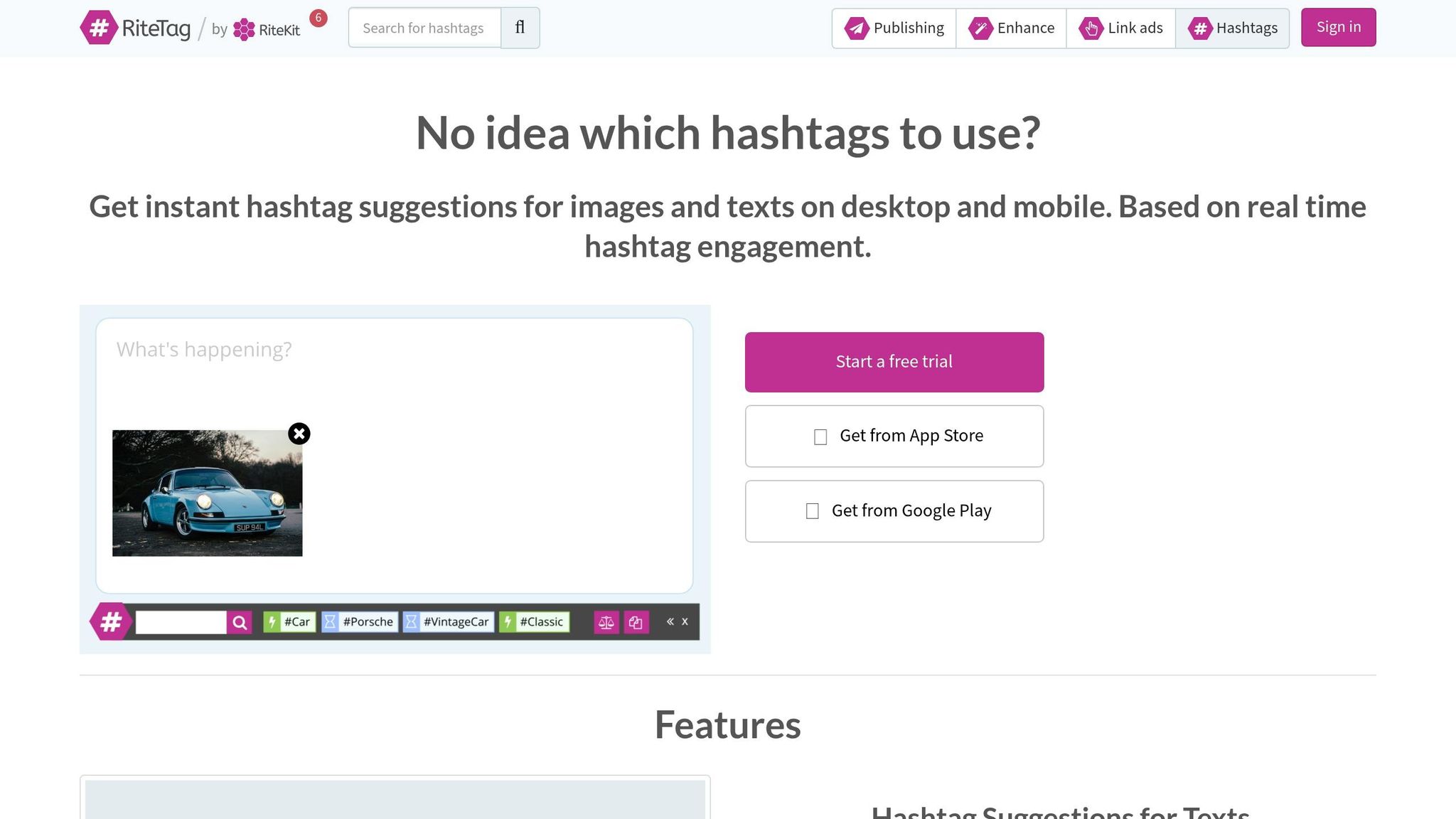
RiteTag adds live visibility labels to hashtag research. So instead of relying on prompt-only tools, you can see visibility signals before you publish.
Input Types
RiteTag accepts:
- Images
- Captions
- Selected webpage text
- Typed hashtags
Its Chrome extension also works from webpage images.
Niche Depth
Each hashtag suggestion comes with a color label, which makes the tool pretty easy to scan:
| Color | What It Means |
|---|---|
| Rainbow | Instagram Stories only |
| Green | High immediate visibility |
| Blue | Long-term visibility |
| Red | Overused or crowded |
| Grey | Low volume or banned |
For Instagram posts, put Rainbow and Green tags first. Then mix in Blue tags to help your content stay discoverable over time.
Skip Red hashtags. RiteTag marks them as overused and crowded.
Language Support
RiteTag's Chrome extension is listed as supporting English (United States).
How It Differs from Manual Research
Manual research usually leans on static counts. RiteTag adds real-time visibility labels and a Compare feature. That gives you a way to check a hashtag set before posting, not just spit one out.
You can also save hashtag sets for later use.
Free access is limited. Full access requires RiteTag Pro.
AI Hashtag Generators vs. Manual Instagram Hashtag Research: Pros and Cons
The tradeoff here is pretty simple: AI saves time, while manual research gives you live proof.
Manual hashtag research usually takes 20–40 minutes per post. AI hashtag generators can produce a full set in under 15–30 seconds. That gap is a big reason people lean on AI more often.
AI also does a better job with context than keyword-only tools. That makes it handy for finding mixed niche tags that are easy to miss when you search by hand.
The weak spot? Live accuracy. Most free tools rely on stored data, not live Instagram data. So they can't tell you if a hashtag is trending right now or if Instagram has restricted it.
| Feature | Manual Research | AI Hashtag Generators |
|---|---|---|
| Time Required | 20–40 minutes per post | Under 15–30 seconds |
| Specificity | High, but limited by your own knowledge | High; context-aware for niche topics |
| Data Depth | Real-time observation | Based on stored data, not live Instagram data |
| Consistency | Inconsistent across sessions | Repeatable quality |
| Human review needed | Total control | Requires human filtering for restricted tags |
| Niche Discovery | Slow; easy to miss community-specific tags | Fast; identifies mixed niche tags |
So the best workflow is simple: generate fast, then verify before posting.
That extra check matters. Strategic hashtag use can increase post reach by 12%–30%, but only when the tags are active and relevant.
Conclusion
The best free AI hashtag generator comes down to how you work. If you want a fast pick, use the table below to match the tool to your workflow.
| Tool | Best For | Why |
|---|---|---|
| Canva | Caption and keyword input | Broad-to-niche suggestions, 20-language support |
| Buffer | Caption-based drafting for publishing workflows | Integrates directly with Buffer's publishing toolkit |
| Inflact | Multiple input types | Accepts keywords, photos, and Instagram post URLs |
| VEED | Simplest text-prompt workflow | One description generates a curated tag list fast |
| Ahrefs | Structured prompts | Persona and format controls shape output with more precision |
| RiteTag | Live visibility checking | Color-coded labels show tag strength before you post |
Whichever tool you choose, the last step stays the same: use AI for the first draft, then check the final hashtag set in Instagram. Look up any tag you don't know, and remove anything with no recent activity or a warning.
AI cuts down the time spent on hashtag research. A manual check helps keep your final set relevant and safe.
FAQs
How do I verify AI-generated hashtags before posting?
Before you post, search 2 or 3 hashtags in the Instagram app if you don’t know them well. That quick check helps you see whether they’re active or restricted.
AI tools don’t have live Instagram data. So they can suggest hashtags that are shadowbanned or flagged. It’s also smart to scan your list for relevance and watch for any warnings your generator shows.
What makes a hashtag too broad or too niche on Instagram?
A hashtag is too broad when it has millions of posts, like #fitness or #love. In that case, your post gets buried fast, and your chances of showing up near the top are pretty slim.
A hashtag is too niche when hardly anyone uses it. That can limit reach, even if the people who do find it are more likely to care.
The sweet spot is balance: mix in a few broad tags, several mid-sized tags, and some niche tags.
Should I use the same hashtag set for every Instagram post?
No. Using the exact same hashtag set on every post can make your content look repetitive to Instagram, and that can cut into your reach.
A better move is to rotate 5 to 7 hashtag sets and match each one to the post you're publishing. Instagram tends to prefer targeted, high-quality hashtags over generic tag blocks that show up again and again.