
25 Fashion Lookbook Reel Templates for Instagram
25 short, repeatable Instagram Reel templates for fashion: outfit drops, seasonal edits, shoppable tags and brand formats.
25 short, repeatable Instagram Reel templates for fashion: outfit drops, seasonal edits, shoppable tags and brand formats.
4.98 /5 - from 58k reviews
Trusted by 50,000+ creators — get real engagement delivered to your profile in minutes, not days.
If you want better Instagram Reels, use a template. The article’s main point is simple: fashion lookbook Reels tend to work best when you keep them short, use a set clip flow, and repeat formats that match your goal. It also notes that Reels can get 22% more interaction than standard video posts, which is why a repeatable setup matters.
Here’s the short version:
The article groups all 25 templates into four buckets:
A few rules show up again and again:
| Group | Best For | Typical Length | Best Fit |
|---|---|---|---|
| Outfit Drops | New arrivals, try-ons, fast outfit reveals | 7–20 seconds | Creators, boutiques, online stores |
| Seasonal Edits | Weather, holidays, timed campaigns | 20–30 seconds | Brands, boutiques, lifestyle creators |
| Product Tags & Details | Taps and product page visits | 10–20 seconds | Stores with Instagram Shopping |
| Brand & Agency Formats | Repeat series and campaign systems | 20–35 seconds | Brands, agencies, studios |
What I like about this article is that it doesn’t treat every Reel the same. A countdown drop, a winter coat edit, and a BTS campaign Reel should not use the same structure. This guide helps sort that out fast, then shows how to compare the 25 formats by use case, clip count, duration, and production effort.
If you’re trying to post more often without rebuilding every edit from scratch, this article gives you a clear starting point.
A strong lookbook template gives every clip a clear job: hook, show, detail, CTA.
Most strong lookbook Reels land in the 15–30 second range, use 6–10 clips, and keep each clip on screen for about 1.5–3 seconds. Shorter Reels, around 7–15 seconds, often get the best completion rates. That said, 15–30 seconds is still a solid sweet spot for lookbook-style content. Those benchmarks make the 25 template types below much easier to compare.
Use a simple 3-part flow: hook, lookbook, CTA.
This setup keeps shoots fast for stores, easy to repeat for creators, and easier to scale for agencies.
For transitions, keep it simple. Pick one transition style per template. Use match cuts for outfit drops, hard beat cuts for seasonal edits, and jump cuts to mark an outfit change.
Text should move with the Reel, not get in the way. Keep it inside safe zones so Instagram’s UI doesn’t cover it. Put the drop name in the center during the first 3 seconds, use top-left outfit labels in the middle, and finish with a centered CTA in the last 2–3 seconds. Keep on-screen copy to 3–5 words. Add 1–4 product tags on the end frame, placing them near the edge of the garment.
Build templates for Instagram’s native Use Template workflow and Template Browser. Stick with a vertical 9:16 format, keep the clip timeline the same from one version to the next, and use the native editor so timing and audio stay reusable. Use these rules to judge which templates fit your shoot, then apply them to the 25 ideas below.
The 25 templates are grouped into four buckets: outfit drops, seasonal edits, product-tag-focused formats, and brand/agency formats. Pick the bucket based on what you want the Reel to do. Start with a simple question: What job should this Reel do? The answer usually points you to the right group. Use the table below to find the best fit fast.
| Bucket | Primary Goal | Best Fit |
|---|---|---|
| Outfit Drops | Product discovery, new look reveals | Creators, boutiques, e-commerce stores |
| Seasonal Edits | Themed storytelling, campaign content | DTC brands, lifestyle creators |
| Product Tags & Details | Shoppable clicks, conversions | Stores with Instagram Shopping enabled |
| Brand & Agency Formats | Scalable, consistent series content | Agencies, high-volume brand pages |
Each template includes four fields: use case, clip flow, text placement, and best-fit account type. Check those first. If the footage, goal, and account type line up, you’ve probably found the right template.
One small thing that matters more than people think: review the clip flow before you commit. If the footage doesn’t match the structure, you’ll lose time in editing and the Reel can feel off.
Posting pace should match the bucket too:
Start with the bucket that fits your goal, then move into the 25 templates below.
Outfit drop Reels are made for fast product discovery and strong buying intent. Lead with your best look first, keep the cuts tight, and end with a clear CTA. A good range is 7–15 seconds for quick drops. Go longer only if the set needs extra space. The goal here is simple: show the product fast. This format is not for seasonal storytelling, but it is essential for crafting engaging Instagram posts that drive sales.
If the content connects to weather, holidays, or a campaign theme, move to Seasonal Edits.
When the season is the hook, these edits do the heavy lifting. They work because they tie an outfit to a specific moment - a weather change, a holiday, or a point on the calendar. That timing matters. Seasonal outfit Reels can drive up to 38% higher engagement than single-season posts. The smart move is to plan them 6–8 weeks before the season starts so you’re live while shopping intent is climbing.
Keep each Reel tight. Use one seasonal cue, one reveal, one detail pass, and one CTA. The flow stays the same: seasonal cue → outfit reveal → texture or layer detail → accessory or footwear detail → final full look.
If your Reel needs taps, not just views, these shoppable formats do the job.
Use them when the goal is to sell the outfit, not just show it. Instagram lets you tag more than one product in a Reel, which makes this format a strong fit for outfit breakdowns and styling edits with lots of accessories. Those tags send viewers to a product detail page with the price, description, images, and a way to buy without leaving Instagram.
A simple four-step flow works well here: opening outfit shot, detail close-up, tag callout, then the final full look. Put each tag next to the item it points to. Also keep tags out of Instagram’s bottom caption area and away from the icons on the right.
Pick the template based on how many items you need to tag:
Keep each scene focused on one idea. Neutral backgrounds, slow-motion detail shots, and light motion graphics help the tags stay clean while keeping the outfit front and center.
Marketing your clothing brand on Instagram requires Reels that do more than look good once. They need to work across campaigns, collections, and client accounts. That’s why these templates are built to scale. Reels are a strong top-of-funnel format for fashion brands and agencies because they can reach people beyond your current followers.
These seven formats take the shoppable ideas above and turn them into repeatable brand systems.
Keep logos in one corner. Use brand colors only as accents, like title bars, dividers, and CTA frames. And keep key text inside the central 80% of the frame.
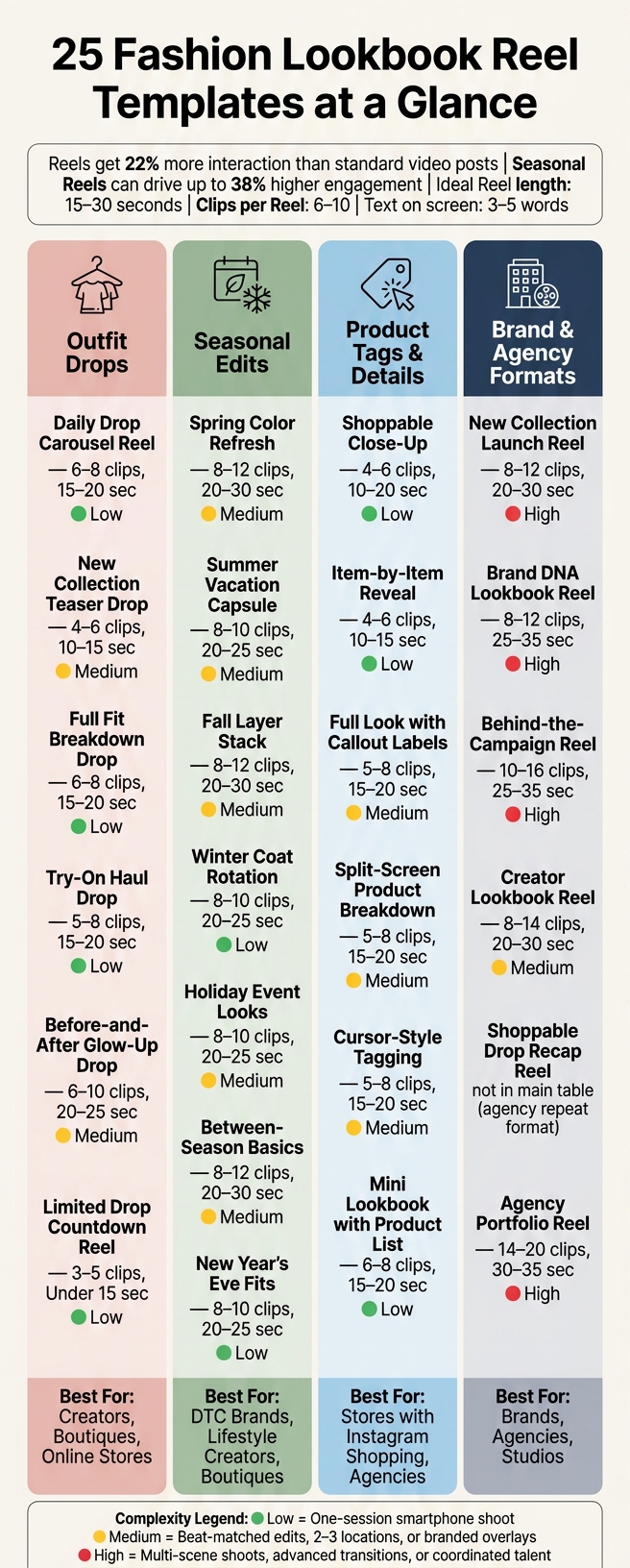
25 Fashion Lookbook Reel Templates: Quick Comparison Guide
After the detailed examples above, this table gives you a fast side-by-side view of all 25 templates. Find the row that lines up with your goal, account type, and how much you can shoot and edit.
Production complexity is simple on purpose:
| # | Template Name | Category | Primary Use Case | Ideal Account Type | Clip Count | Avg. Duration | Complexity |
|---|---|---|---|---|---|---|---|
| 1 | Daily Drop Carousel Reel | Outfit Drops | Multi-outfit weekly drop | Creator, Boutique | 6–8 | 15–20 seconds | Low |
| 2 | New Collection Teaser Drop | Outfit Drops | Pre-launch awareness | Brand, Agency | 4–6 | 10–15 seconds | Medium |
| 3 | Full Fit Breakdown Drop | Outfit Drops | Outfit detail and buying confidence | Boutique, Online Store | 6–8 | 15–20 seconds | Low |
| 4 | Try-On Haul Drop | Outfit Drops | Engagement-driven product discovery | Creator, Online Store | 5–8 | 15–20 seconds | Low |
| 5 | Before-and-After Glow-Up Drop | Outfit Drops | Styling transformation reveal | Stylist, Agency | 6–10 | 20–25 seconds | Medium |
| 6 | Limited Drop Countdown Reel | Outfit Drops | Urgency-driven limited release | Creator, Boutique | 3–5 | Under 15 seconds | Low |
| 7 | Capsule Wardrobe Drop | Outfit Drops | Capsule wardrobe demo | Stylist, Brand | 8–12 | 20–30 seconds | Medium |
| 8 | Spring Color Refresh | Seasonal Edits | Spring arrivals and new-season layering | Brand, Boutique | 8–12 | 20–30 seconds | Medium |
| 9 | Summer Vacation Capsule | Seasonal Edits | Travel and warm-weather outfit edit | Creator, Brand | 8–10 | 20–25 seconds | Medium |
| 10 | Fall Layer Stack | Seasonal Edits | Fall layering and back-to-season arrivals | Brand, Creator | 8–12 | 20–30 seconds | Medium |
| 11 | Winter Coat Rotation | Seasonal Edits | Winter outerwear showcase | Boutique, Brand | 8–10 | 20–25 seconds | Low |
| 12 | Holiday Event Looks | Seasonal Edits | Holiday party outfit edit | Boutique, Brand | 8–10 | 20–25 seconds | Medium |
| 13 | Between-Season Basics | Seasonal Edits | Transitional styling across weather changes | Creator, Agency | 8–12 | 20–30 seconds | Medium |
| 14 | New Year's Eve Fits | Seasonal Edits | New Year's Eve outfit reveal | Creator, Boutique | 8–10 | 20–25 seconds | Low |
| 15 | Shoppable Close-Up | Product Tags & Details | Single-item hero product spotlight | Boutique, Brand | 4–6 | 10–20 seconds | Low |
| 16 | Item-by-Item Reveal | Product Tags & Details | Styled set with 2–4 shoppable items | Creator, Online Store | 4–6 | 10–15 seconds | Low |
| 17 | Full Look with Callout Labels | Product Tags & Details | Full outfit with timed product callouts | Brand, Online Store | 5–8 | 15–20 seconds | Medium |
| 18 | Split-Screen Product Breakdown | Product Tags & Details | Multi-SKU catalog-style shoppable reel | Agency, Brand | 5–8 | 15–20 seconds | Medium |
| 19 | Cursor-Style Tagging | Product Tags & Details | Attention-directed item-by-item tagging | Boutique, Creator | 5–8 | 15–20 seconds | Medium |
| 20 | Mini Lookbook with Product List | Product Tags & Details | Full-look reel with end-card product list | Brand, Agency | 6–8 | 15–20 seconds | Low |
| 21 | New Collection Launch Reel | Brand & Agency Pages | Seasonal launch campaign | Brand, Agency | 8–12 | 20–30 seconds | High |
| 22 | Brand DNA Lookbook Reel | Brand & Agency Pages | Brand identity and editorial storytelling | Fashion Label, Agency | 8–12 | 25–35 seconds | High |
| 23 | Behind-the-Campaign Reel | Brand & Agency Pages | BTS and campaign process reveal | Brand, Agency | 10–16 | 25–35 seconds | High |
| 24 | Creator Lookbook Reel | Brand & Agency Pages | UGC compilation into one campaign reel | Brand, Agency | 8–14 | 20–30 seconds | Medium |
| 25 | Agency Portfolio Reel | Brand & Agency Pages | Multi-client range showcase for pitches | Agency, Studio | 14–20 | 30–35 seconds | High |
To choose the right row, start with Primary Use Case and look for the phrase that matches the post you want to make. Then check Complexity. That tells you, fast, whether the idea fits a simple shoot or needs more planning.
Clip Count and Avg. Duration set your target before you even open your editor. That matters more than most people think. If you know you need 6–8 clips for a 15–20 second reel, you can shoot with a clear plan instead of guessing your way through it.
A simple rule of thumb:
Once you've picked a row, the next section shows how to scale and refine it with UpGrow.
Use UpGrow to test which template works best for your audience. Start with the Viral Content Library to see how to go viral on Instagram by identifying which fashion Reel formats are already getting traction.
UpGrow's Viral Content Library helps you spot repeatable Reel patterns in fashion content. From there, pick the template that lines up with the hooks, clip lengths, and text styles driving reach and engagement in your niche right now. You can filter by interests like streetwear, luxury, or sustainable fashion to see which outfit drop formats, seasonal edit setups, and product-tag styles keep showing up in top-performing posts.
After you choose a template, test each version using the same targeting filters. Set filters by age, gender, location, language, and interest. Then publish different template types to the same audience and compare saves, shares, profile visits, and follower growth. The live dashboard tracks these metrics in real time, which makes it easier to spot a winning template fast and tweak the next post before the cycle resets. When Reels bring people to your profile, profile optimization can help turn those visits into follows.
For agencies, this same process works across client accounts. You can compare the same template from one dashboard - for example, how a Fall Layer Stack performs for a streetwear client versus a workwear client - then adjust clip pacing or text overlays for each account based on the data. Once targeting is set, use Boost™ on the strongest Reel.
The best template is the one that fits your goal, shoot setup, and posting rhythm. Pick the format that lines up with what you need most right now: sell new arrivals, build repeatable content, or grow a branded series. Think of the four groups as a toolbox, not a checklist to complete. Use outfit drops for inventory, seasonal edits for timely themes, product-tag templates for shopping, and brand formats when you want a series you can run again and again.
Once you choose a format, stick with it long enough to get a clean read. Start with two or three formats, run them for 30 days, and compare saves, shares, taps, and profile visits in Instagram Insights. Saves and shares now carry more weight than likes as signals for Reel distribution, so they deserve a central place in your reporting.
When one format starts working, give it a name, turn it into a weekly series, and post it on a set schedule. Change just one variable at a time - hook text, clip count, or CTA - so you can tell what’s moving the numbers. Start small, track the data, and keep the formats that steadily drive saves, taps, and follows.
Start by matching the template’s hook to your goal. If you’re making educational content, problem-solution and step-by-step formats usually work best. For product demos, fast-fix and diagnostic hooks are often a better fit.
If you want ideas based on current trends, UpGrow’s Viral Content Library can help. It includes customizable templates for your niche, with formats like unboxings, testimonials, and lifestyle shots.
A fashion lookbook Reel usually works best with 2–4 clips.
That keeps the sequence tight, so viewers can see the outfits fast and stay locked in. A simple setup like a before-and-after style contrast often does the job well.
This clip range fits transformation-style Reels in particular, where the goal is fast impact instead of a longer, more cinematic edit.
Track metrics based on your goal.
If attention is the goal, watch your 3-second view rate and retention. Those numbers tell you if your hook is doing its job or if people are scrolling past.
If you're aiming for engagement, focus on saves and shares. Those are strong signs that people didn’t just watch - they cared enough to keep it or pass it along.
For conversions, keep an eye on profile visits and clicks. UpGrow can help connect those performance signals to follower growth, so you can see which templates turn viewers into loyal followers.


