Top Instagram AI Scheduler Reviews 2026
Opinionated comparison of top Instagram AI schedulers, showing which tools excel at timing, automation, and reporting.

If you want the short answer: I’d put Later, Buffer, and Metricool at the top for most Instagram users in 2026, while PostEverywhere fits teams that post across many platforms. Hyper, PostQuickAI, and Apaya stay unranked here because the article doesn’t show enough source-backed detail to judge them.
Here’s the fast breakdown:
- Later: best if you want a visual calendar and account-based time suggestions from up to 6 months of follower data
- Buffer: best if you want a simple queue and light setup, with timing suggestions that refresh as posts come in
- Metricool: best if you want a heatmap view and deeper stats
- PostEverywhere: best if Instagram is only one part of your workflow and you publish to 11 platforms
- Hyper, PostQuickAI, Apaya: not enough verified product detail in this review to score them
This article compares all 7 tools on the same points:
- AI posting-time suggestions
- ease of use
- Instagram auto-posting support
- team workflows
- reporting
Quick Comparison
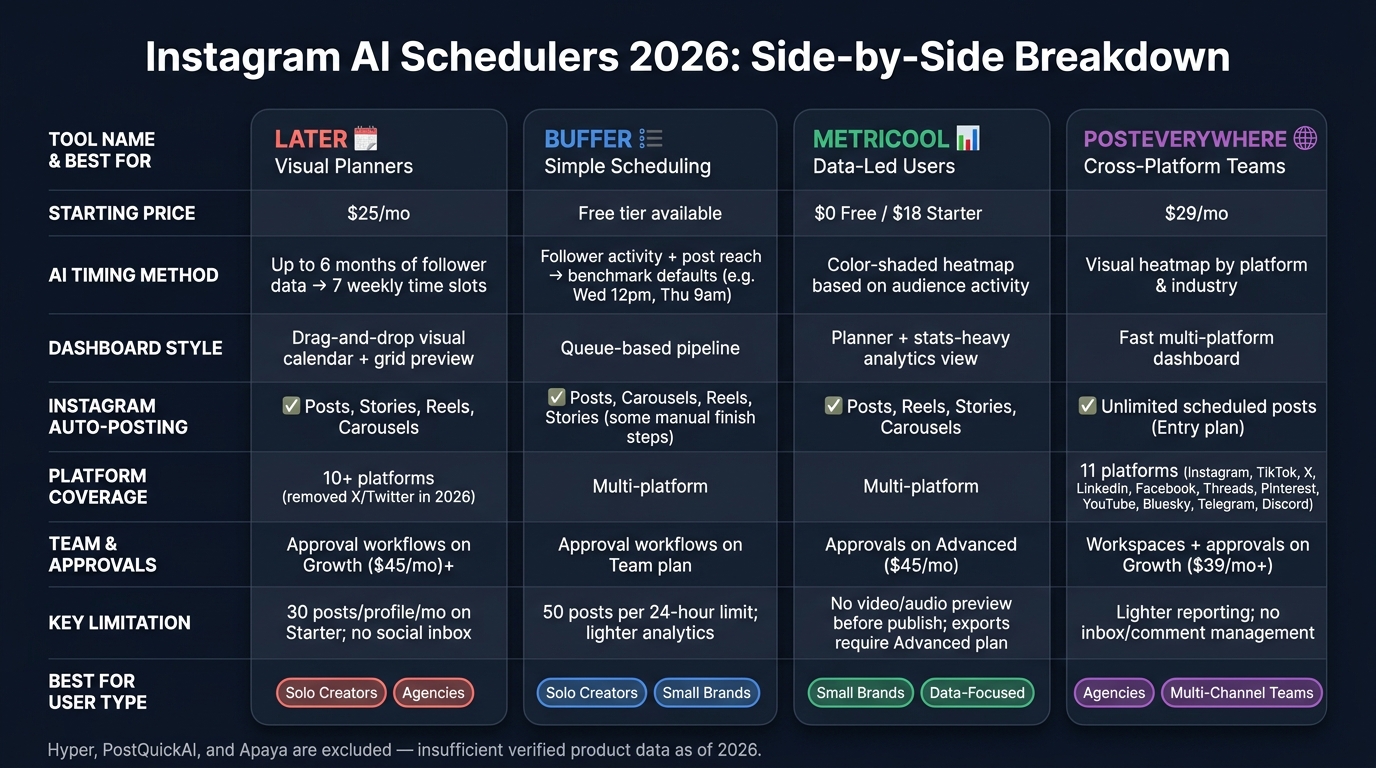
Instagram AI Scheduler Comparison 2026: Later vs Buffer vs Metricool vs PostEverywhere
| Tool | AI timing | Dashboard style | Instagram auto-posting | Team/reporting fit | Best for |
|---|---|---|---|---|---|
| Later | Uses up to 6 months of follower data | Visual calendar and grid preview | Posts, Stories, Reels, Carousels | Better on higher plans; weak on inbox/DMs | Visual planners |
| Buffer | Uses follower activity and post reach | Queue-based setup | Posts, Carousels, Reels, Stories, with some manual finish steps | Basic reporting; approvals on Team | Simple scheduling |
| Metricool | Heatmap based on audience activity | Planner plus stats-heavy view | Posts, Reels, Stories, Carousels | Good stats; approvals/exports on $45/mo plan | Data-led users |
| Hyper | No scored data | No scored data | No scored data | No scored data | Unscored |
| PostQuickAI | No scored data | No scored data | No scored data | No scored data | Unscored |
| Apaya | No scored data | No scored data | No scored data | No scored data | Unscored |
| PostEverywhere | Visual heatmap by platform and industry | Fast multi-platform dashboard | Yes, with unlimited scheduled posts on Entry | Lighter reporting and approvals | Cross-platform teams |
A few numbers stand out right away:
- Later Starter: $25/month, with 30 posts per profile per month
- Metricool Advanced: $45/month, where approvals and exports start
- PostEverywhere Entry: $29/month for 10 social accounts
- Buffer limits Instagram publishing to 50 posts per 24 hours
So if you’re choosing fast: Later for visual planning, Buffer for simple queues, Metricool for stats (including Instagram Stories analytics), and PostEverywhere for multi-channel posting. The rest of the article breaks down where each one fits, without mixing in tools that don’t have enough proof behind them.
sbb-itb-3c55afb
1. Later

Later builds Instagram planning around a drag-and-drop calendar and a grid preview. You can drop posts into suggested time slots, then move them around to keep your feed consistent before anything goes live.
AI Time Prediction
Later’s "Best Time to Post" feature uses up to 6 months of historical follower data to work out posting windows for your account. Those suggestions show up right inside the visual calendar, so it’s easy to use them right away. On the Growth and Scale plans, Later also adds future trend scheduling for a more forward-looking setup. One catch: the Starter plan limits you to 30 posts per profile per month, so scheduling capacity is fairly tight.
Dashboard Clarity
The visual feed preview gives you a simple way to drag, drop, and reorder posts before publishing, which helps you keep the grid looking clean and consistent.
Auto Posting Coverage
Later supports auto-publishing for Instagram Posts, Stories, Reels, and Carousels. It also works with TikTok, Facebook, LinkedIn, Pinterest, YouTube, Threads, and Snapchat. Later removed X (Twitter) support in 2026. For Instagram auto-posting, you need a Business or Creator account connected to a Facebook page.
Team Reporting
Team features depend a lot on the plan you choose. Starter is limited to one user. Growth adds two users plus internal and external approval workflows. The Agency plan ($200/mo) includes PDF reporting and supports up to 15 social sets, but it doesn’t come with a branded client portal.
There’s also no single social inbox or DM management. That’s a clear gap for agencies that manage replies and community work along with scheduling.
| Feature | Starter ($25/mo) | Growth ($45/mo) | Scale ($80/mo) |
|---|---|---|---|
| Best Time to Post | Included | Included with trends | Included with trends |
| Post Limit | 30/profile/mo | 150/profile/mo | Unlimited |
| Analytics History | 3 months | 1 year | 2 years |
| Approval Workflows | Not available | Internal & external | Internal & external |
| AI Credits | 5/mo | 50/mo | 100/mo |
Plan pricing and limits above reflect Later's 2026 pricing structure.
Later has a 4.5/5 rating on G2 and 1.3/5 on Trustpilot, with complaints tied to billing and refunds. So the picture is a bit mixed: strong for visual Instagram planning tools, less appealing if you need account support or agency-facing service tools. Buffer goes in a simpler direction.
2. Buffer
Buffer runs on a queue system. You set your posting times once, then add content to the next open slot. Simple. That makes it a practical alternative to tools built around visual calendars.
AI Time Prediction
Buffer's Best Time to Post, inside its rebuilt Insights tool, uses follower activity and past-post reach to suggest three weekly posting times. That lines up with Buffer's queue-first setup, where fast scheduling matters more than visual planning.
The model refreshes with each new post. Even so, Buffer says it's smart to check for new recommendations every few months, especially after trying new posting windows.
Dashboard Clarity
The queue takes a lot of the friction out of scheduling. Instead of staring at a calendar and second-guessing every slot, you can just keep the pipeline moving.
Buffer also includes its built-in AI Assistant on every plan, even the free tier. It helps with caption drafts, rewrites, and hashtag suggestions right inside the composer. Teams using the AI Assistant report cutting caption drafting time by 30% to 60% per post.
Auto Posting Coverage
Buffer auto-publishes Instagram images, carousels, Reels, and Stories for Business and Creator accounts. Personal accounts still use notification-based publishing.
A few post types still need a final step in Instagram:
- Stories with music, links, or text overlays
- Reels with music or collaboration tags
In those cases, Buffer sends a mobile push notification so you can finish the post manually. The platform also limits publishing to 50 posts per 24-hour period across all Instagram content types.
Team Reporting
Buffer's reporting is basic, not enterprise-level. Approval workflows start on the Team plan, which also adds draft collaboration and shared internal comments. The free plan is genuinely usable, but the trade-off is lighter analytics and fewer team controls for agencies.
| Feature | Free | Essentials | Team |
|---|---|---|---|
| Best Time to Post | No | Yes | Yes |
| Stories Scheduling | No | Push notification | Push notification |
| Approval Workflows | No | No | Yes |
| AI Assistant | Basic | Full | Full |
Buffer scores 8.24/10 on Lunoo and 92/100 on tools8020. Metricool takes a more analytics-heavy approach.
3. Metricool
Metricool sits closer to the analytics side of the scheduling spectrum. It puts a lot more weight on timing data and performance reporting. While simpler schedulers focus on speed, Metricool leans into audience activity and reporting.
AI Time Prediction
The Best Time to Post feature uses a heat map inside the planning calendar to show the highest-activity windows, with recommendations based on audience behavior and current engagement data. You can pick the highest-percentage time slots right from the planner. That makes scheduling feel less like guesswork and more like a data-led choice.
Dashboard Clarity
Metricool's calendar is useful, but the main draw is the analytics behind the schedule. It also includes Canva integration, so you can make content in Canva and send it straight into Metricool for scheduling.
That said, some users say the interface can feel cluttered when usage gets heavy. Even so, Instagram analytics depth is still the platform's biggest strength.
Auto Posting Coverage
Metricool supports automatic publishing for Instagram Posts, Reels, Stories, and Carousels through the official API. It also supports Reels audio scheduling from Meta's licensed music library, with audio added at publish time. To use that option, the account has to be connected through Facebook Login.
One drawback: Metricool does not offer a final video/audio preview before a post goes live.
Team Reporting
For teams, reporting can matter just as much as the schedule. Metricool brings growth metrics, audience demographics, and engagement data into one place, which makes it useful for solo creators and small brands. The free plan includes three months of analytics history, while deeper collaboration features depend on the plan level.
Approval workflows are available on the Advanced plan, priced at $45/mo. Lower tiers include review statuses, but they don't offer the same structured sign-off process. Agencies may still hit friction when they need multi-step approvals across several clients. Export options are also limited: free and Starter plans do not include exports, and both PDF and data exports require the Advanced plan.
| Plan | Price | Posts/Month | Analytics History | Approvals |
|---|---|---|---|---|
| Free | $0 | 50 | 3 months | No |
| Starter | $18/mo | 2,000 | Unlimited | No |
| Advanced | $45/mo | 5,000 | Unlimited | Yes |
Metricool holds a 4.4/5 average across 182 reviews on G2 and Capterra. It's a good fit for data-focused solo creators and small brands. Agencies that need multi-stage approval workflows and export options will need the Advanced plan to get the most out of it.
4. Hyper
There aren’t any source-backed details for Hyper in this comparison. So it can’t be scored for timing prediction, dashboard clarity, auto-posting, or reporting.
Because of that, Hyper stays out of the feature comparison until source-backed product details are available.
AI Time Prediction
No source-backed timing data is available.
Dashboard Clarity
No source-backed dashboard details are available.
Auto Posting Coverage
No source-backed auto-posting details are available.
Team Reporting
No source-backed reporting or export details are available.
5. PostQuickAI

There isn’t enough source-backed information to fairly score PostQuickAI in this comparison.
AI Time Prediction
While this tool lacks data, you can manually optimize your schedule by checking the best time to post on Instagram Saturday and other peak weekend hours.
No source-backed timing data is available.
Dashboard Clarity
No source-backed dashboard details are available.
Auto Posting Coverage
No source-backed auto-posting details are available.
Team Reporting
No source-backed reporting, collaboration, or export details are available.
6. Apaya
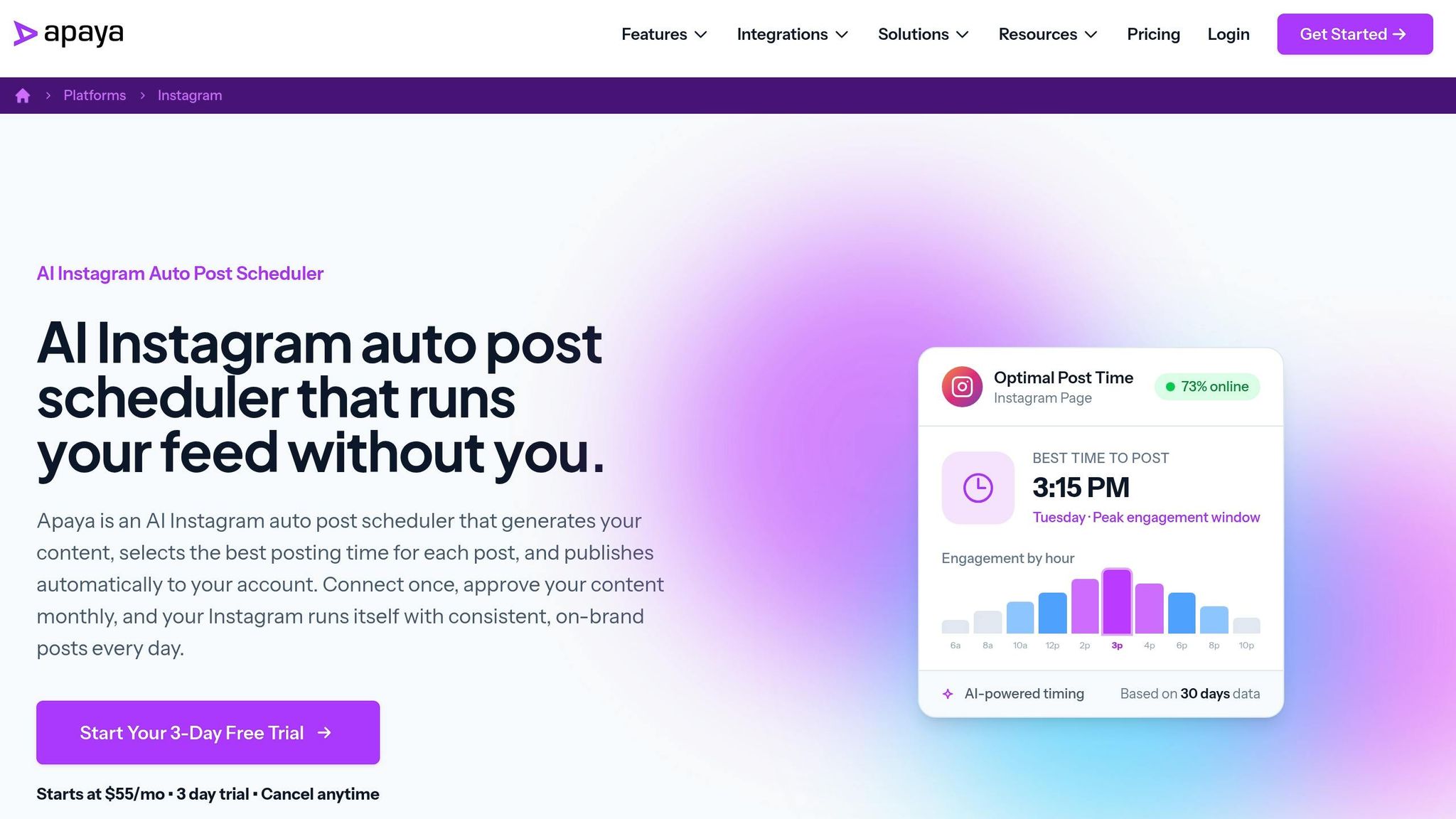
There isn't enough source material to score Apaya in a fair way. So, for now, it stays in this review as a placeholder instead of a scored pick.
This comparison looks at tools with verifiable Instagram AI scheduling features. Because that proof isn't available here, Apaya remains unscored for timing prediction, dashboard clarity, auto-posting, and team reporting.
AI Time Prediction
Understanding how often to post on Instagram is key to effective scheduling.
Unscored due to limited source data.
Dashboard Clarity
Unscored due to limited source data.
Auto Posting Coverage
Unscored due to limited source data.
Team Reporting
Unscored due to limited source data.
7. PostEverywhere
Unlike the Instagram-first tools above, PostEverywhere is built for teams that publish on Instagram and across other channels. It’s a cross-posting scheduler with Instagram support that covers 11 platforms: Instagram, TikTok, LinkedIn, X (Twitter), Facebook, Threads, Pinterest, YouTube, Bluesky, Telegram, and Discord.
AI Time Prediction
PostEverywhere includes a "Best Time to Post Calculator". It creates a visual heatmap that shows posting windows by platform and industry. That said, its Instagram metrics are more basic than the data-focused tools in this comparison.
Dashboard Clarity
The dashboard is geared toward fast publishing. It keeps things simple, but that comes with a limit: there’s no inbox or comment management.
Auto Posting Coverage
The $29/month Entry plan covers 10 social accounts across all 11 platforms. You also get unlimited scheduled posts and 100 AI credits per month. Higher-tier plans scale that up to 2,000 credits.
Team Reporting
This is where the trade-off shows up most. Collaboration and reporting are lighter than what you get from some other tools in this review. The Growth plan adds workspaces and approvals, but reporting tops out at standard exports.
| Feature | PostEverywhere Details |
|---|---|
| Platform Coverage | 11 platforms (Instagram, TikTok, X, and more) |
| AI Time Prediction | Visual heatmap by platform and industry |
| Auto Posting | Unlimited scheduled posts on the Entry plan |
| Team Features | Workspaces and basic draft approval (Growth plan, $39/month+) |
| Reporting | Standard exports only |
| AI Content | Captions, images, and video (100–2,000 credits/month) |
That makes PostEverywhere a narrower fit than the Instagram-first schedulers in this review. It falls behind the earlier tools on analytics depth, approvals, and exports, and makes the most sense for high-volume, multi-platform publishing instead of deeper Instagram-focused workflows.
Feature-by-Feature Breakdown and Best Use Cases
Here’s the side-by-side comparison that tends to matter most once you’re using these tools every day.
AI Time Prediction
When it comes to timing, the split is pretty simple: precision vs. ease.
Later leans into account-level timing. Its Best Time to Post feature connects to your Instagram business or creator profile and shows 7 repeating weekly time slots. Those suggestions get better as your account builds more posting data.
Metricool takes a more visual route. In the Planning view, it shows a color-shaded heatmap, where darker blocks point to stronger posting windows. If you like to scan a calendar and spot patterns fast, this setup feels natural.
Buffer relies on past benchmark data. Its 2026 study highlighted posting windows such as Wednesday at 12 p.m. and Thursday at 9 a.m. as strong starting points. That makes Buffer a good fit if you want usable defaults without digging too deep into account-level analysis.
So in plain terms: Later works best for account-specific timing, Metricool is easiest for visual scanning, and Buffer gives you steady benchmark-based defaults.
Dashboard Clarity
How these suggestions show up on screen matters more than people think. If the layout is clunky, even good timing data becomes a chore to use.
Later and Metricool are the easiest to scan. Later places recommended posting times right on the calendar, so you can act on them without bouncing between views. Metricool’s shaded heatmap does something similar in a different way. The stronger windows stand out right away, which cuts down on extra guesswork.
Buffer keeps the layout simpler. Its left-side account dashboard and clean multi-account flow make it easy to move between channels without much friction.
Auto Posting Coverage
Timing advice only goes so far if the tool can’t publish the formats you care about most.
| Tool | Feed Posts | Reels | Stories | Multi-Account |
|---|---|---|---|---|
| Later | ✓ Auto | ✓ Auto | Limited by plan/account type | Yes |
| Buffer | ✓ Auto | ✓ Auto | Notification flow | Yes |
| Metricool | ✓ Auto | ✓ Auto for professional accounts | Some Story elements still require manual publishing | Yes |
The pattern is pretty clear: Stories are still the most limited format across all three platforms.
Team Reporting
Once more people enter the process - teammates, clients, or both - reporting often becomes the deal-breaker.
Later and Buffer make more sense for agency-style work. Later’s higher-tier plans add more users per workspace and give you deeper analytics. Buffer’s Team plan adds approval workflows and branded reports, which works well for small internal teams that need a cleaner review process.
Metricool does offer collaboration on paid plans, but it fits smaller brand teams better than big agency setups.
Best Tools by User Type
- Solo creators: Later or Metricool
- Small brands: Buffer or Metricool
- Agencies: Later or Buffer Team
Pros, Cons, and Final Picks
Pros and Cons by Tool
The table below cuts each tool down to the main trade-off: timing depth, workflow speed, and reporting strength.
| Tool | Pros | Cons |
|---|---|---|
| Later | Calendar-based best-time slots; multi-profile timing starts on Growth. | Multi-profile best times require Growth-tier and above |
| Buffer | Auto-picks posting times; multi-account workflow. | Less reliable for newer accounts with little history |
| Metricool | Free heatmap-based timing planner with cross-platform coverage. | Less ideal for larger teams that need deeper collaboration and export options |
| Hyper | Unscored due to limited source-backed product detail. | Unscored due to limited source-backed product detail. |
| Apaya | Unscored due to limited source-backed product detail. | Unscored due to limited source-backed product detail. |
| PostEverywhere | Visual planning plus API-based automation across up to 11 platforms. | More technical than a visual-first scheduler; secondary fit for Instagram users who also need cross-platform publishing |
Top Picks by Use Case
Those trade-offs point to different users, not one all-purpose winner.
- Solo creators: Later for visual timing; Buffer for hands-off scheduling.
- Brand teams: Metricool for a shared heatmap view.
- Agencies: Later for reporting or PostEverywhere for API-driven scale.
- Hands-off users: Hyper or Apaya, but only if workflow priorities matter more than reporting.
Final Takeaway
The last call comes down to how much timing control, automation, and reporting you need.
Choose Later or Metricool for the clearest timing view, Buffer for benchmark-based defaults, and PostEverywhere for broad, API-driven publishing.
FAQs
How accurate are AI posting time suggestions?
AI posting time suggestions tend to be very accurate because they’re based on your account’s own data, not generic averages.
They look at past engagement, follower activity, login patterns, and time zone spread. Then they keep updating as new results come in.
Used the right way, these custom posting windows can increase predicted reach by 31% and engagement by 15%–50% compared with posting at random times.
Do I need a Business or Creator account to auto-post on Instagram?
Yes. To auto-post on Instagram, you need a Business or Creator account.
A personal account won’t work because it doesn’t support the API-based scheduling used for automatic publishing.
You’ll also need to link your Instagram profile to a Facebook Page. That connection gives scheduling tools the permissions they need to publish posts for you. The setup is free, and you can do it in your Instagram settings.
Which scheduler is best for creators, brands, or agencies?
The best scheduler comes down to your size and how your team works.
If you’re a solo creator and your setup is pretty simple, native Instagram scheduling can do the job. It works for up to 5 accounts per device, which is often enough if you’re managing your own content without a lot of moving parts.
If you’re a small brand that already spends most of its time in the Meta ecosystem, Meta Business Suite may feel like the easier fit.
For agencies and bigger teams, third-party schedulers usually make more sense. They’re better for things like:
- approval workflows
- deeper reporting
- cross-platform management
No matter which route you take, use a Business or Creator profile if you want official API access and secure automated publishing.