AI UGC Quality Control: Guide for Instagram Teams
Three-layer review for AI UGC on Instagram: automated screening, human/legal approval, clear disclosure, and live monitoring.
Three-layer review for AI UGC on Instagram: automated screening, human/legal approval, clear disclosure, and live monitoring.
4.98 /5 - from 58k reviews
Trusted by 50,000+ creators — get real engagement delivered to your profile in minutes, not days.

If your team uses AI for Instagram marketing and UGC, you need a review system before you post. The article’s main point is simple: sort content by how much AI shaped it, check it in three layers, lock down prompts and edits, require clear disclosure, and judge posts by trust and performance after they go live.
Here’s the short version:
A simple way to think about it: the more AI changed the post, the more review it needs. And if a post sounds like a person used the product, your team needs proof or it should not run.
Quick comparison
| Type | Main risk level | Review depth | Disclosure need | Best use |
|---|---|---|---|---|
| AI-assisted UGC | Lower | Standard editorial + claim check | State AI help when it shaped the message | Story-driven posts and top campaigns |
| Fully AI-generated UGC | Higher | Brand + legal + ethics + sentiment review | Clear AI disclosure | Testing, reach, and low-stakes format trials |
I’d sum up the article like this: if you want AI UGC to help Instagram growth instead of hurting it, build rules before output scales, not after problems show up.
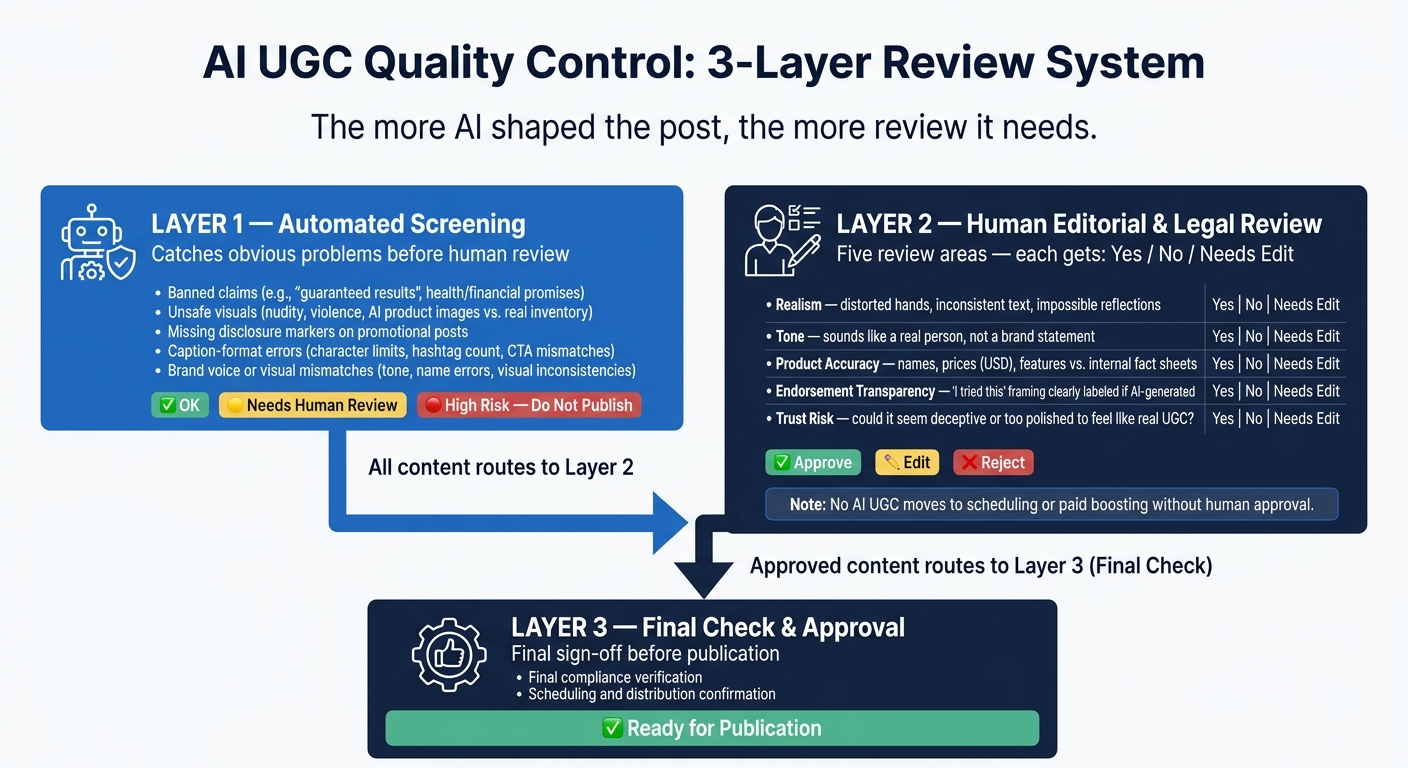
AI UGC Quality Control: 3-Layer Review System for Instagram Teams
One approval step won't cut it for AI UGC. This stuff moves fast, carries more than one kind of risk, and gets more expensive to fix once paid amplification kicks in. The smarter setup is simple: use automation to screen, people to approve, and post-publish data to tune what happens next. Once that review system is in place, the next move is prompt writing and edit rules that lead to content you'd actually want to approve.
Automation should catch the obvious problems before a person even looks at the content. At a minimum, Layer 1 needs to scan for five issues:
The big rule here is simple: automation flags, it doesn't decide. Every output gets a risk label: "OK", "Needs human review", or "High risk - do not publish." From there, it routes to the right place. Even content that looks clean still goes to Layer 2 before it's scheduled, boosted, or whitelisted.
After automation catches the obvious stuff, a human reviewer steps in with a short checklist they can use again and again. For Instagram AI UGC, five areas matter most: realism, tone, product accuracy, endorsement transparency, and risk to watch time, saves, shares, and trust.
Realism means looking for visible AI mistakes. Think distorted hands, text on packaging that changes from frame to frame, or reflections that don't make sense. In Reels, this matters even more because motion tends to expose fake-looking details.
Tone means checking the caption against brand-approved UGC examples to ensure authenticity. Does it sound like something a real person would post, or does it read like a company statement?
Product accuracy means checking names, prices in USD, features, and availability against current internal fact sheets. If a post says a product costs $29.99, that needs to match what's actually for sale.
Endorsement transparency means making sure any "I tried this" or "my results" framing is labeled clearly when the post is AI-generated, AI-assisted, or tied to a paid relationship.
Trust risk means asking a blunt question: could this come off as deceptive, too polished to feel like real UGC, or misleading about normal results?
Each item gets a plain answer: Yes, No, or Needs edit. Then the post gets one of three outcomes: Approve, Edit, or Reject. No AI UGC should move to scheduling, paid boosting, or client delivery without an "Approved – Layer 2" status logged in the content system. If you're working at an agency, client approval can come after internal review as another checkpoint. Paid posts should also move on a faster turnaround than organic posts.
Publishing is not the end of the job. Layer 3 tracks four things once a post is live.
First, caption changes. Periodic snapshots help catch edits that remove disclosure tags or add new claims no one reviewed.
Second, disclosure visibility. Branded content labels and affiliate disclosures sometimes get removed by accident when collaborators edit posts. If those labels disappear, the post should go back for manual review.
Third, repost attribution. When AI UGC gets remixed into Reels or reshared in Stories, the original disclosure context can vanish. Teams need to watch for that and either add a clarifying comment or ask for removal when transparency is gone.
Fourth, audience trust signals. Comments like "this looks fake" or "is this a real review?" aren't just background noise. They're signals. Tag them, track the ratio, and set a threshold so high distrust rates trigger a content check and prompt changes going forward.
Different formats need different checks. Reels need motion realism. Stories need clear disclosures. Feed posts need caption accuracy. Carousels need consistency from one frame to the next.
These controls only work if prompts and edits are standardized, which is why prompt rules come next.
If Layer 1 and Layer 2 catch issues after generation, prompt rules stop most of them before anything gets made. Quality control starts in the prompt, not in the review queue.
Every prompt needs six inputs: person, setting, action, emotion, camera style, and visible imperfections.
Example: casual apartment scene, handheld iPhone, imperfect light, minor clutter, awkward first-use moment.
If you want to avoid that over-polished, fake-looking feel, bake it into the prompt from the start. Add modifiers like casual setting, imperfect lighting, and minor clutter every time. And set up a banned-phrases list in your prompt QA process. By default, block terms like "cinematic studio shot", "corporate stock image", "professional", "studio", "perfect", and "premium."
Keep prompts grounded in everyday U.S. settings. Use imperial units, USD, and MM/DD/YYYY dates.
Once the prompt is locked, use the edit matrix to split safe fixes from risky rewrites.
A clear edit boundary helps keep compliant AI UGC from drifting into misleading territory. The goal isn't just to get approval. It's to keep the post feeling like something a real person might share on Instagram. Without that line, small edits can slowly turn safe content into a legal problem.
| Edit Type | Examples | Review Required |
|---|---|---|
| Always Allowed with Light Review | Caption grammar fixes, light color correction, cropping for aspect ratio, non-deceptive text overlays, minor retouching that doesn't materially change body shape or product performance | Light review |
| Needs Senior Review | Big caption rewrites that change the experience claim, moderate visual cleanups that affect realism, or any change that needs a second set of eyes before approval | Senior editor sign-off |
| High-Risk – Escalate or Prohibit | Synthetic faces, voice cloning to imitate specific individuals or imply creator involvement, fabricated reviews, before/after imagery implying medical or fitness results, inserting third-party logos or location markers in ways that suggest endorsements or affiliations that don't exist | Legal review required |
The FTC is explicit: fabricated reviews, including AI-generated reviews not based on actual product experience, are per se deceptive. So if a caption says, "I used this for 3 months and lost 20 lbs" and there is no real user behind it, that's not just risky. It's a violation. Any edit that pushes content into implied firsthand-experience territory needs to stop at legal before it gets anywhere near a scheduler.
When an output falls flat, send it back through prompt edits, not random rewrites.
Use this four-step loop:
You should also match review time to format type. Not every asset carries the same risk.
| Content Type | Authenticity Risk | Engagement Potential | Review Complexity |
|---|---|---|---|
| Lifestyle UGC | Low–Medium | High | Medium (brand fit, realism, visual standards) |
| Product Demo UGC | Medium | Medium–High | High (accuracy of steps, claims, and visuals) |
| Testimonial-Style AI UGC | High | High, but with high backlash risk if it feels fake | Very High (legal mandatory, detailed claims review) |
For testimonial-style AI UGC, prompts should use clearly hypothetical framing - "Here's what a typical morning might look like with…" - instead of implying a specific real person's experience or turning aggregated customer feedback into a literal story. Numeric outcome claims like weight loss, income, or skin changes should be blocked in prompts unless they are backed by verified data and clearly disclosed.
That kind of prompt discipline keeps review teams focused on performance, not damage control.
Legal review isn't the last box to check. It should run alongside creative and editorial work.
Once creative gets the green light, legal and ownership checks decide whether the post can go live. When compliance, brand, and growth each know what they own, approvals tend to move faster. You also cut down on the number of posts that need to be pulled after publishing.
Treat AI spokespeople the same way you'd treat paid endorsements: disclose the sponsorship and the use of AI. Put both disclosures before the caption gets cut off, or show them as on-screen text in Reels and Stories. If it fits, use the Paid Partnership tag too. Don't bury disclosures in hashtags.
Here are a few Instagram formats that work well:
Ad – AI-generated spokesperson | Paid partnership with [Brand]Created with AI assistance | Sponsored contentPaid partnership, AI-assisted review scriptAny performance or outcome claim in AI UGC needs a written substantiation file before it shows up in a prompt or caption. That file can include internal data, user studies, or documented customer feedback.
Also, log the exact disclosure wording used for each asset.
Every AI UGC asset needs a paper trail. That's what helps teams move through approvals with less back-and-forth and makes audits a lot less painful.
At a minimum, keep the following for each asset:
| Record Type | What to Capture |
|---|---|
| Prompt versions | Original prompt, iterations, AI tool used, date/time |
| Edit history | All human edits with timestamps and editor role |
| Approval records | Who approved (brand, compliance, growth), when, and on which version |
| Creator/compensation details | Fees, gifted products, affiliate terms, contract references |
| Claim substantiation | Studies, internal data, or customer feedback supporting any performance claim |
| Final published asset | Screenshot or archive link showing the live post and its disclosures |
If you're on a small team, a shared spreadsheet can do the job. If you're at an agency, it helps to use a standard client → campaign → asset folder setup. Keep records for at least 3–5 years.
Before publishing, give each approval step one clear owner.
Three roles cover the full AI UGC lifecycle.
The brand lead owns prompt design, visual standards, and tone-of-voice fit. The compliance lead has final sign-off authority. That means reviewing every disclosure, checking claims against substantiation files, and flagging synthetic identity risks before anything goes live. The growth lead looks at KPI impact and decides which posts should get more promotion.
After publishing, those roles still matter. The growth lead watches performance metrics. The brand lead tracks qualitative signals like comments and DMs. And the compliance lead spot-checks live posts to make sure disclosures are still accurate and easy to see.
After publishing, use performance data to figure out which AI UGC should get more reach.
Once posts are live, the same metrics can tell you what deserves more budget, boosts, and remixes. Instagram’s ranking systems put more weight on saves, shares, comments, watch time, and profile visits than likes.
A simple weekly review is usually enough. Track each post in a spreadsheet with:
A red-yellow-green system works well here: green for above baseline, yellow for near baseline, and red for below. It keeps decisions fast and cuts down back-and-forth.
For Reels, put more attention on AI UGC that reaches above 60–70% watch time completion and gets strong save/share rates in the first 24–72 hours. Those are the posts worth boosting, resharing, or remixing. If a post gets heavy negative feedback or comments that question whether it feels real, flag it and revise the prompt or edit before you push it any further.
Use those results to decide which format should lead the next batch. Research comparing human and AI Instagram posts found that human content got more comments on average (5.33 vs. 2.33), more shares (0.25 vs. 0), and a higher engagement rate (6.73% vs. 5.96%). In another dataset, AI-generated posts did a bit better on engagement rate and profile visits, but comments, shares, and other trust signals still leaned toward human-led content.
| Factor | AI-Assisted UGC | Fully AI-Generated UGC |
|---|---|---|
| Authenticity risk | Lower - real human voice anchors the content | Higher - synthetic personas or visuals can feel generic |
| Disclosure burden | Note AI support when it shapes the message | Explicit disclosure required |
| Review depth | Standard editorial review plus a focused claim check | Full multi-step review: brand, legal, ethics, and sentiment |
Use fully AI-generated UGC for reach and testing. Use AI-assisted UGC for storytelling, trust-building, and priority campaigns. Set the mix based on cohort performance data, then revise it every quarter. If the numbers shift, feed that back into your prompt rules and format choices for the next batch.
Use UpGrow’s live dashboard to track which format leads to actual follower growth and retention.
Every Instagram team working with AI UGC needs a basic quality control system before scaling output.
Start with the basics:
Use this system before increasing output or paid promotion.
Judge it by how much a human actually shaped the work.
A post is AI-assisted when a person leads the process and AI helps along the way. That might mean drafting scripts, editing visuals, or reviewing performance data for content made by real people.
It’s fully AI-generated when the content depends on synthetic media or automated output, without a human creator’s own experience or likeness behind it. In both cases, clear disclosure is required when AI makes major changes to the content or creates synthetic personas.
Any AI-generated UGC that could look deceptive, misstate human experience, or come across as an endorsement should go through legal review.
The reason is pretty simple: the FTC prohibits fake AI reviews or testimonials that misstate a person’s identity, experience, or even existence. If a piece of content makes it seem like a real person used a product, loved it, or shared a personal story when that didn’t happen, that’s a legal risk.
The same idea applies to virtual influencers and AI endorsers. They need proper disclosure so people know what they’re looking at. And if content heavily alters reality or touches public-interest topics, it should be labeled clearly. Skip that, and you could run into platform penalties, account suspensions, or legal fines of $51,744 per violation.
Pay close attention to signs that people feel misled, especially when AI-generated UGC isn’t clearly disclosed. You’ll often see it in the response: more negative comments, boycott behavior, and drops in overall trust metrics.
Poor disclosure can also hurt organic reach, since platforms tend to favor transparency. To protect your credibility and avoid penalties, clearly and conspicuously label AI-generated content.