
AI Tools for Viral UGC Instagram Posts
Use AI to create authentic, low-cost UGC-style Instagram posts that boost engagement, save time, and scale content production.
Use AI to create authentic, low-cost UGC-style Instagram posts that boost engagement, save time, and scale content production.
4.98 /5 - from 58k reviews
Trusted by 50,000+ creators — get real engagement delivered to your profile in minutes, not days.

Creating viral UGC (User-Generated Content) for Instagram is easier and cheaper than ever with AI tools. These tools generate content that mimics the casual, relatable style of real users, cutting production costs by up to 90% and saving hours of manual work. Brands like Verde Wellness have already seen results, boosting engagement rates from 1.8% to 4.2% by producing UGC-style videos in under two minutes.
Key takeaways:
For businesses looking to scale their Instagram presence, AI offers a fast, cost-effective way to create engaging, shareable content.
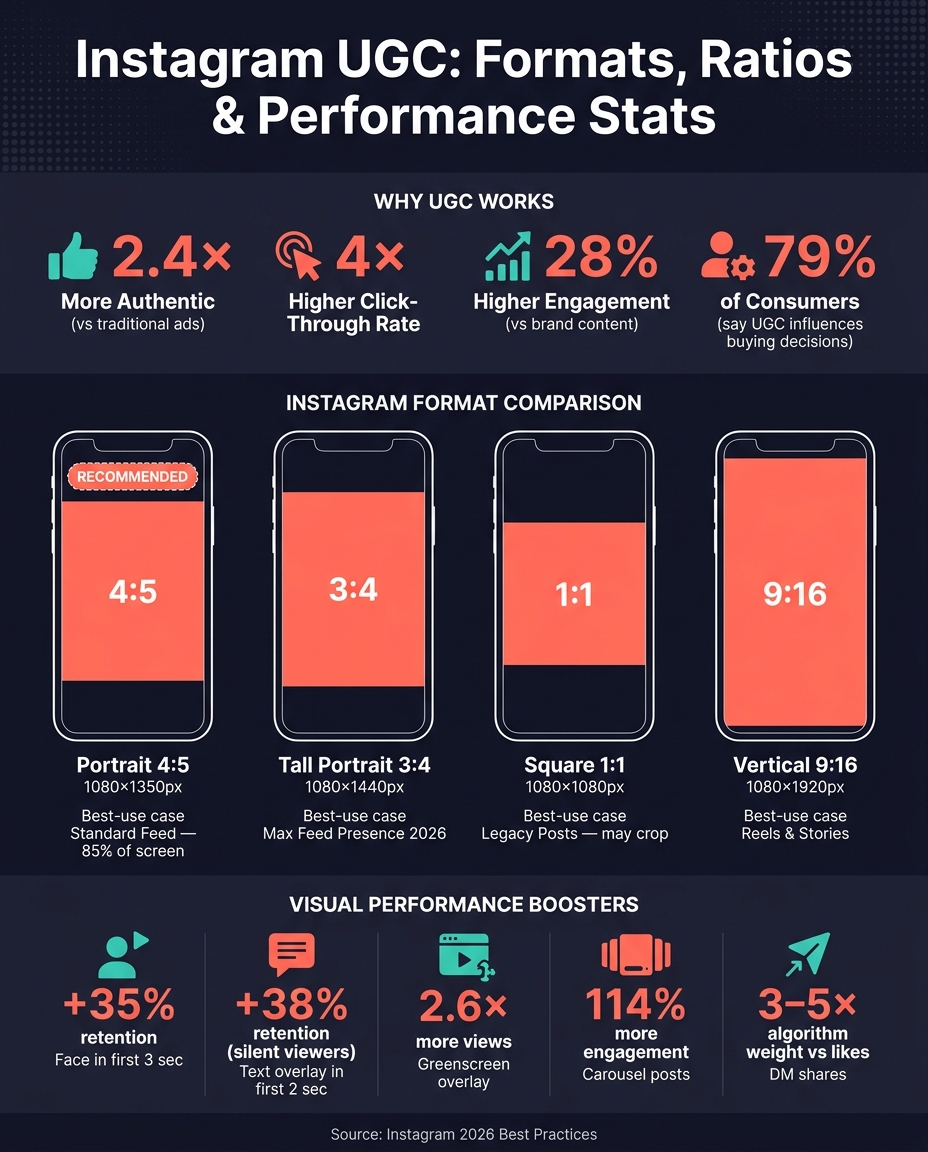
Instagram UGC Content Formats: Aspect Ratios & Performance Stats
When it comes to creating viral UGC (User-Generated Content) on Instagram, certain traits stand out. By understanding these characteristics and leveraging AI tools, you can increase the chances of your content catching fire.
Authenticity is the cornerstone of viral UGC. In fact, UGC is 2.4× more authentic and achieves 4× higher click-through rates than traditional ads. The unpolished, smartphone-shot look isn’t a drawback - it’s what makes it work.
"The secret sauce is its authenticity. When a potential customer is scrolling and sees a video that looks like it was shot on a smartphone by someone just like them, it instantly disarms their skepticism." - Project Aeon Team
But authenticity alone isn’t enough. Shareability is just as important. Instagram’s algorithm places a heavy emphasis on how often your content is shared. A post being sent via DM carries 3–5x more weight than a simple like. So, before hitting publish, ask yourself: Would someone send this to a friend? If the answer is no, it’s time to rethink the content.
First impressions matter, and on Instagram, they’re made in just 1.7 seconds. That’s how long you have to grab someone’s attention before they scroll past. The most effective strategies include:
The format and aspect ratio of your content can significantly impact its performance. Instagram’s 2026 profile grid update introduced a 4:5 portrait ratio as the new standard for feed posts. This format, at 1080 × 1350 px, occupies 85% of a 6-inch mobile screen, compared to just 63% for square posts.
| Format | Aspect Ratio | Dimensions | Best For |
|---|---|---|---|
| Portrait | 4:5 | 1080 × 1350 px | Standard feed posts; maximizes screen space |
| Tall Portrait | 3:4 | 1080 × 1440 px | Maximum feed presence in 2026 |
| Square | 1:1 | 1080 × 1080 px | Legacy posts; may crop in new grid |
| Vertical | 9:16 | 1080 × 1920 px | Reels and Stories |
For Reels and Stories, keep critical elements - like faces, text, and CTAs - within the central safe zone to avoid interference from Instagram’s UI. This means staying clear of the top 250 px and bottom 340 px. Always export at 1080 px wide in sRGB color mode to maintain vibrant colors after Instagram’s compression.
Carousels are another powerful tool. They generate 114% more engagement than single-image posts. Plus, Instagram’s algorithm can re-serve a carousel by showing a different slide if the first one doesn’t catch attention. For the best results, mix static photos with short 3–5 second video clips in a hybrid carousel format - this is shaping up to be the top-performing style for 2026.
Not every AI tool is built to meet the demands of Instagram-worthy UGC. Some tools excel in photorealism, while others focus on speed or generating diverse outputs. Picking the wrong one can waste time and result in content that fails to engage your audience. Let’s dive into the must-have features for creating authentic, engaging UGC.
When it comes to UGC, realism is king. Tools that can replicate real-life textures and lighting are non-negotiable. For instance, Luma Photon and FluxNote's Vivid Max (powered by FLUX.2 Max) are known for producing lifelike skin textures and natural lighting. If you’re working with video, options like Veo 3.1 and Kling 2.0 stand out for their ability to capture natural micro-expressions and realistic movements.
Another critical factor is brand consistency. This includes tools that offer face identity preservation, such as Persona (PuLID) or FaceSwap, which ensure a consistent look without needing to hire influencers repeatedly. Pair this with image-to-image editing features, found in tools like Kontext Pro/Max, to fine-tune backgrounds or lighting without starting from scratch.
Here’s a quick breakdown of what to look for:
| Feature | What to Look For | Why It Matters |
|---|---|---|
| Realism | 4K output, natural lighting, skin texture | Avoids the "AI-generated" look that erodes trust |
| Consistency | Face identity preservation | Builds a strong, recognizable brand presence |
| Editing | Image-to-image adjustments | Speeds up refining and customizing outputs |
| Variation | Batch generation / multiple hooks | Simplifies A/B testing for better performance |
| Format | 4:5 and 9:16 aspect ratio support | Ensures compatibility with feeds and Reels |
For better results, upload a real product photo as a reference to help the AI generate more accurate outputs. Many tools offer free trials, so take advantage of them. For example, FluxNote provides 100 free credits per month before requiring a $9.99/month subscription.
Once you’ve nailed down the essential features, it’s time to look at successful examples for inspiration.

The UpGrow Viral Content Library is a treasure trove of inspiration and a guide for aligning your tool selection with proven results. Use it to explore trending UGC styles - whether it’s unboxing videos, lifestyle shots, testimonials, or hook-plus-demo formats - specific to your niche. This helps you identify the exact type of output your chosen tool needs to produce.
The library also helps you benchmark realism. For example, some niches thrive on raw, phone-shot aesthetics, while others demand polished, high-quality visuals. Knowing your niche’s preference ensures you pick the right tool instead of relying on guesswork. As DesignRevision puts it:
"The best workflow: generate 50 hook variants with AI, let the algorithm find winners." - DesignRevision
Before diving into AI tools, it's crucial to gather the right raw materials. The quality of your input directly impacts the quality of the output. As Max Zeshut, Founder of ppl.studio, explains:
"The tool's capabilities set the ceiling, but your brief determines how close you get to that ceiling."
To get started, you'll need five essential assets: a high-resolution product photo, a persona brief, a style line, a script, and a negative prompt list.
Once these assets are ready, the next step is to format them properly for the best AI-generated results.
Even the best raw assets can fall short if they aren’t formatted correctly for AI tools. A common misstep is generating square images and cropping them later. According to ZSky AI:
"Generating in the correct ratio produces better compositions than generating square and cropping later, because the AI composes the image for the full frame."
To avoid this, prepare your images in the platform's native dimensions: 1080 x 1350 px (4:5) for Feed posts and 1080 x 1920 px (9:16) for Reels and Stories.
Another issue is the overly polished look that AI often defaults to - flawless skin, perfect lighting, and hyper-clean surfaces. While these might look professional, they can make UGC feel fake. To counter this, include modifiers in your prompts like "natural imperfections", "slight grain," and "casual background." Additionally, build a negative prompt list to exclude elements like "studio lighting, perfect skin, beauty filters, plastic surfaces".
This small but powerful adjustment helps bridge the gap between content that screams "AI-generated" and content that feels genuinely authentic.
When working on user-generated content (UGC), keeping it natural and relatable is key. Start by creating a consistent base persona. Tools like "Seed Fixing" in Midjourney or "Reference Images" in Nano Banana Pro can help lock in specific traits like hair color, skin tone, or facial expressions. Once you've established your base, place this character in everyday settings - think a cozy bedroom, a bustling kitchen, or the front seat of a car. Use natural lighting and casual framing to make the scene feel authentic.
Next, add realistic product interactions. For example, you can create images of someone holding a product or unboxing it. These small details can make the content feel more genuine. To take it a step further, introduce minor imperfections - like slightly off-center framing or a visible thumb in the shot. These subtle touches prevent the content from looking overly polished or artificial.
This streamlined process can cut production time dramatically, bringing it down to under 30 minutes per creative. Compared to the usual 1–3 week timeline, it’s a game-changer. Brands have also reported cutting production costs by 60–80%, all while maintaining or even boosting their return on ad spend.
Once your workflow is dialed in, the next step is writing prompts that can drive viral UGC.
AdLibrary offers a crucial piece of advice:
"The #1 mistake when prompting AI for UGC content is treating it like product photography. UGC works because it feels real, casual, and unpolished."
A great starting point? Use a "Shot on iPhone" style prompt. Here’s an example:
Candid smartphone photo of a [age/gender] [action with product] in [location], shot on iPhone, natural [time of day] lighting, casual, authentic, slight grain, non-professional.
This formula consistently delivers that native, Instagram-ready UGC look. To make it work, follow a five-part structure:
Focus on capturing actions with the product rather than just showcasing it. For instance, instead of just showing a coffee mug, show someone sipping from it during a sunrise. Use photography terms like "35mm lens" for lifestyle shots or "phone-camera POV" for that raw, ad-native style. Lighting details - like "soft window light" for indoor shots or "golden hour" for outdoor scenes - further enhance the organic feel.
To scale efficiently, keep your prompt structure consistent while tweaking just one variable at a time. For example, change the subject’s age, the setting, or the time of day. This method allows you to generate a variety of assets quickly, enabling you to produce a full week’s worth of content in one session.
Once you've crafted your AI-generated visuals, fine-tuning them can make all the difference in creating UGC that feels authentic and engaging.
Start with the right aspect ratio. For Instagram, a 4:5 crop (1080 x 1350 px) is ideal for maximizing feed visibility. A square 1:1 format works well for maintaining grid consistency, while landscape formats often appear smaller and may lead to lower engagement.
To maintain a cohesive look, stick to your brand's color palette and lighting style in every prompt. Small post-production tweaks, like adding a touch of grain or a subtle vignette, can enhance the image while preserving its natural charm.
If certain details - like an awkward hand placement or a distracting background - stand out, targeted editing (inpainting) can help. This technique allows you to fix specific areas without regenerating the entire image. Always review the final edits to ensure the visuals still align with your brand identity and look natural.
Lastly, addressing common visual flaws is essential to refining AI-generated UGC.
AI-generated visuals can sometimes feel overly polished, which can hurt their authenticity. As MakeInfluencers explains:
"The moment something feels 'off,' trust drops and people scroll." - MakeInfluencers
Here's a quick guide to common issues and how to address them:
| Issue | Indicators | Fix |
|---|---|---|
| Plastic skin | Over-smoothed, waxy appearance | Use negative prompts like "beauty filters" and add "visible pores" or "freckles" to your prompts. |
| Lifeless eyes | Unbroken, glassy stare | Prompt for "natural blinks every 2–4 seconds" or "brief sideways glances." |
| Studio lighting | Flat, even lighting with no depth | Specify a single light source, such as "soft window light" or "a bedside lamp." |
| Generic background | Blank or featureless spaces | Add specific elements like "a messy bedside table with a water glass" or "an open laptop on the desk." |
| Rigid poses | Stiff or unnatural stillness | Include micro-movements in prompts, like "shifting weight to the left foot" or "slightly leaning forward." |
For video UGC, the choice of AI model plays a big role in achieving natural results. Older models like Runway Gen-2 or Pika 1.0 often have a noticeable "AI-generated" look. However, newer models like Veo 3.1 and Kling 2.0 (as of 2026) produce more realistic motion and subtle, human-like expressions, making them a better choice for creating convincing video content.
Before posting user-generated content (UGC) on Instagram, it’s important to fine-tune your approach. As of April 30, 2026, Instagram's algorithm has tightened its stance on accounts that heavily rely on non-original content. Adam Mosseri, Instagram's Head, emphasized this shift:
"Accounts that primarily share content they did not create will no longer be recommended to users who do not already follow them."
To stay on Instagram's recommendation radar, ensure your UGC offers real value. This could be through fresh perspectives, thoughtful commentary, or creative edits. A good rule of thumb? Keep at least 50% of your posts original or meaningfully transformed. This balance helps maintain an authentic and engaging profile - something Instagram prioritizes. You can check where you stand using the "Account Status" tool in the Professional Dashboard.
Want to boost your originality score? Use Instagram’s built-in tools like the Reels editor or the in-app camera. These features signal that your content is native to Instagram.
Instagram Insights is your go-to tool for tracking how well your UGC performs. It breaks down key metrics like reach, impressions, saves, and shares for Reels, Stories, and Feed posts, giving you a clear picture of what’s hitting the mark.
"It starts with knowing your audience and what's resonating with them - and Instagram Insights can help you do just that." - Instagram for Creators
Pay close attention to metrics like reach and engagement (saves, shares, comments) to identify content that’s gaining traction. Compare the performance of different formats - for example, Reels versus Feed posts - to understand what your audience prefers. These insights help you refine your strategy and focus on content that drives the best results.
Creating great UGC is only part of the equation. To truly grow, you need to get your content in front of the right audience. That’s where UpGrow comes in. Their AI-powered tools help you target users who are likely to engage with your content. Features like Boost™ can drive follower growth by up to 275% per month.
For a limited time, UpGrow is offering 60% off all growth plans, with pricing starting at just $39/month. If you're serious about scaling your Instagram presence, this might be the edge you need.
This guide has walked you through everything from choosing the right tools to crafting a posting strategy, and now it’s time to lock in the essentials that will shape your approach. Creating viral UGC isn’t about luck - it’s a system. It starts with understanding what resonates with your audience, using AI to enhance visuals, posting with purpose, and analyzing performance to fine-tune your efforts.
Here’s what matters most: authenticity trumps perfection. UGC that feels natural - think real lighting, casual angles, and relatable moments - consistently outshines overly polished brand visuals. For instance, research shows UGC posts can drive up to 28% higher engagement than traditional brand content. Even more compelling, 79% of consumers say UGC directly impacts their buying decisions.
Before hitting "post", run every image through the 3A filter: is it Authentic, Attention-grabbing, and Aligned with your audience’s preferences? If not, tweak until it checks all three boxes.
AI tools are invaluable for speeding up the creative process, but they’re no substitute for your intuition. Use them to experiment and refine, but trust your instincts to decide what will connect with your audience.
Finally, great content is only as effective as the audience it reaches. That’s where UpGrow comes in. Their AI-driven targeting tools, combined with expert insights, ensure your UGC reaches the right people. With features like smart audience filters, a library of viral content ideas, and a real-time analytics dashboard, UpGrow bridges the gap between content creation and measurable growth. Starting at $39/month and backed by a growth guarantee, it’s a practical solution to help you achieve consistent Instagram growth.
To give AI-generated user-generated content (UGC) a more genuine feel, guide the AI to produce casual, unpolished material that reflects everyday life and emotions. Pay attention to details like natural lighting, relaxed poses, visible skin texture, and familiar settings like bedrooms or kitchens. Steer clear of overly perfect or studio-like visuals. Adding small imperfections - like slightly off-center framing or a bit of grain - can make the content feel more lifelike and relatable.
For Instagram UGC posts, stick to 1080 x 1350 pixels for portrait feed posts and 1080 x 1920 pixels for Stories and Reels. These sizes make sure your content looks great and fits perfectly on Instagram across all devices.
To see if your UGC (user-generated content) is gaining traction, keep an eye on important metrics like engagement rates, reach, conversions, and sentiment. Tools tailored to specific platforms, such as UTM parameters, can help you accurately track performance, while real-time dashboards make it easier to spot trends as they happen.
Also, pay attention to how users interact with your content. Look at comments, shares, and the number of submissions to gather qualitative insights. By combining these data points, you’ll get a clearer picture of how viral your content is becoming.


