AI Hashtag Generators for Instagram: Guide 2026
Build safe, high-performing Instagram hashtags with AI: generate from captions, remove risky tags, schedule at peak times, and review results.

Hashtags still matter on Instagram in 2026: posts with hashtags saw 36% more engagement in one 10,000-post study, but only when the tags fit the post. From what I see, the best setup is simple: write the full caption first, let AI build a mixed hashtag set, remove risky tags, and schedule the post for a strong time slot.
If I had to sum up the whole article in a few points, it would be this:
- AI works best before scheduling, not after posting
- Full captions beat short keyword lists for better tag suggestions
- A mixed set of niche, mid-size, and broad hashtags tends to work better than only big tags
- Caption hashtags are safer for scheduling than first-comment hashtags unless the tool supports auto-posting comments
- Risk checks matter because one banned hashtag can limit reach
- Rotation matters: swapping out 30%–40% of tags helps avoid repeating the same block
- Timing matters because early engagement can help hashtag-page visibility
- Performance review matters: if hashtags drive 20%+ of impressions, the set is working; under 5% usually means the tags need work
- Teams do better with shared hashtag banks, approval steps, and client-by-client tag lists
Here’s the short version: I’d use AI for speed, but I wouldn’t trust it blindly. I’d generate, check inside Instagram, schedule, then review the results every few weeks. That gives you a repeatable process without turning every post into guesswork.
How to Generate AI-Optimized Hashtags for Social Media Posts
sbb-itb-3c55afb
How AI hashtag generators work with scheduled Instagram posts
Once the draft is ready, the generator pulls from keywords, caption text, and media cues to build a hashtag set before the post is scheduled. A caption like "new summer menu in Austin" gives the system a lot to work with: season, location, and business type. From that, the AI can suggest food, local, and seasonal hashtags. Some more advanced tools also scan the image or video, picking up objects, scenes, or style cues to tighten tag relevance before the post goes live.
Post format matters too. It affects how wide or narrow the hashtag set should be. Single-image posts usually need closer alignment. Carousels can support a broader mix. Reels often do best with discovery-focused tags. Instagram allows up to 30 hashtags per post, but for Reels, 8–15 highly relevant hashtags is often the best range for performance.
Keyword input, caption context, and media analysis
A full caption tends to produce better hashtag suggestions than a short keyword list. When you paste in the full caption, the AI has more context. It can pick up on intent, like whether the post is promotional, educational, or community-driven, and shape the tag set around that.
Caption text can also reveal local signals that a plain keyword search may miss. If the post mentions a city, neighborhood, or event, the tool can surface local discovery tags that fit better. One simple habit helps here: write the full caption first, then generate hashtags. You can also use free AI-powered Instagram tools to streamline this process. That small step usually leads to better topic fit.
Niche, mid-size, and broad hashtag mix logic
One of the most common hashtag mistakes is loading a post with only massive hashtags. Tags with tens of millions of posts move fast, so a single post usually won't stay visible there for long.
A tiered mix tends to work better:
- A few niche or long-tail tags where ranking is more realistic
- A core set of mid-size tags that balance reach and competition
- A small number of broader tags for extra exposure
The goal isn't to chase the biggest post counts. It's to balance niche, mid-size, and broad tags in a way that gives the post a fair shot at discovery.
Caption hashtags versus first-comment hashtags
Placement affects both scheduling dependability and how polished the post looks. Putting hashtags in the caption is simpler. The tags publish with the post, which makes scheduling and reporting easier to track.
First-comment placement keeps the caption cleaner, which some brands like. But there's a catch: the scheduler has to publish that comment right after the post goes live. And not every scheduling tool can do that automatically.
| Factor | Caption placement | First-comment placement |
|---|---|---|
| Visibility | Immediately visible with the post | Appears after publish; may load slightly later |
| Workflow convenience | Simpler - tags schedule with the post | Adds a step; requires scheduler support |
| Reporting clarity | Tags tied directly to post record | Comment may be tracked separately |
| Scheduling compatibility | Supported by all schedulers | Requires tools with first-comment publishing |
The better option depends on your scheduler and brand voice. If your tool doesn't support first-comment auto-posting in a steady way, caption placement is the safer default.
Safety checks, timing, and optimization signals
Once the generator builds a hashtag set, the next move is simple: cut risk and post at the right time.
Banned hashtag checks and risky tag filtering
One bad hashtag can hurt more than most people think. Metadata Reactor puts it plainly:
"Using a single banned hashtag can suppress the reach of an entire post - not just that hashtag."
Instagram flags hashtags tied to spam, inappropriate content, or heavy misuse. And those restricted tags don't stay the same forever. They shift over time.
That means you can't just build a list once and call it done. Check risky tags directly in Instagram. If a tag hides Recent Posts or shows Posts Hidden, take it out.
AI hashtag generators help here by scanning updated restricted hashtag lists and removing risky options before the final set is saved.
It's also smart to rotate 30%–40% of tags between posts so you're not posting the exact same string every time.
After unsafe tags are removed, timing becomes the next lever.
Best posting time recommendations tied to hashtag sets
Schedulers should match hashtag sets with the time window when the audience is most active. Why? Because early engagement can help a post rank in Top Posts for a hashtag page.
So the goal isn't just to publish. It's to publish when followers are most likely to react fast.
For carousel posts, timing should also leave room for a second engagement bump that can happen 24–48 hours after the post goes live. Hashtag relevance still matters during that later push.
After the post is out, the numbers from that run should shape the next hashtag set.
Performance feedback loops for future hashtag suggestions
Use Instagram Insights to track impressions driven by hashtags for the next scheduled post. A good rule of thumb:
- 20%+ of post impressions from hashtags signals strong performance
- Under 5% points to weak relevance or tags that are too broad or off-topic
A simple monthly audit keeps things on track. Review hashtag performance, swap out weak tags, and feed those results back into your generator.
That loop gets much easier to handle when teams store everything in shared hashtag workflows.
How teams use AI hashtag generators in content calendars
Shared hashtag banks, rotation rules, and approval steps
Once a team sees which hashtags pull their weight, those tags usually move into shared banks and calendar templates. Most teams don't start from zero for every post. They keep a central hashtag bank sorted by content pillar, topic, and audience segment, then pull from that bank during scheduling.
A solid bank often includes 30 to 60 hashtags grouped into niche buckets, campaign tags, evergreen core tags, and an exclusion list for anything banned or risky.
Store approved backup options for each content pillar too. That way, teams can rotate tags and avoid using the same set over and over without drifting off-topic.
On the approval side, the setup is often simple: a creator or junior marketer generates the AI hashtag set, a strategist or brand manager checks it for brand fit and compliance, and the final set gets locked to the scheduled post.
| Approach | Speed | Control | Consistency | Risk Management |
|---|---|---|---|---|
| Fully automated AI selection | Very fast | Low | High, but can become repetitive | Moderate - relies on tool filters alone |
| AI + manual review | Moderate | High | High, guided by SOPs and approved banks | Low - humans catch sensitive or off-brand tags |
Calendar-based scheduling for brands and agencies
After the bank is in place, the calendar becomes the control point. It lets teams attach hashtag sets to repeat post types without extra work each time. A "Monday motivational quote" template, for example, can come with a pre-approved hashtag set already attached. If the publish date changes, the hashtags move with the post.
For agencies running several Instagram accounts, the main move is to build client-specific hashtag libraries inside one shared workspace. Each client gets its own niche tags, campaign tags, and exclusion list. Teams then plan posts in two-week sprints and use the calendar view to stop hashtag plans from colliding across clients in the same vertical.
GridPeek recommends building 3–4 category sets and updating them every quarter to keep performance in good shape.
Where UpGrow fits into a broader organic growth workflow

For teams that want hashtag planning connected to a larger growth system, UpGrow can support that workflow. Discovery on its own isn't the goal. It needs to lead to follower growth. UpGrow can sit next to the content calendar as the growth layer, helping turn scheduled reach into follower growth.
Conclusion: How to build a reliable AI hashtag workflow for Instagram
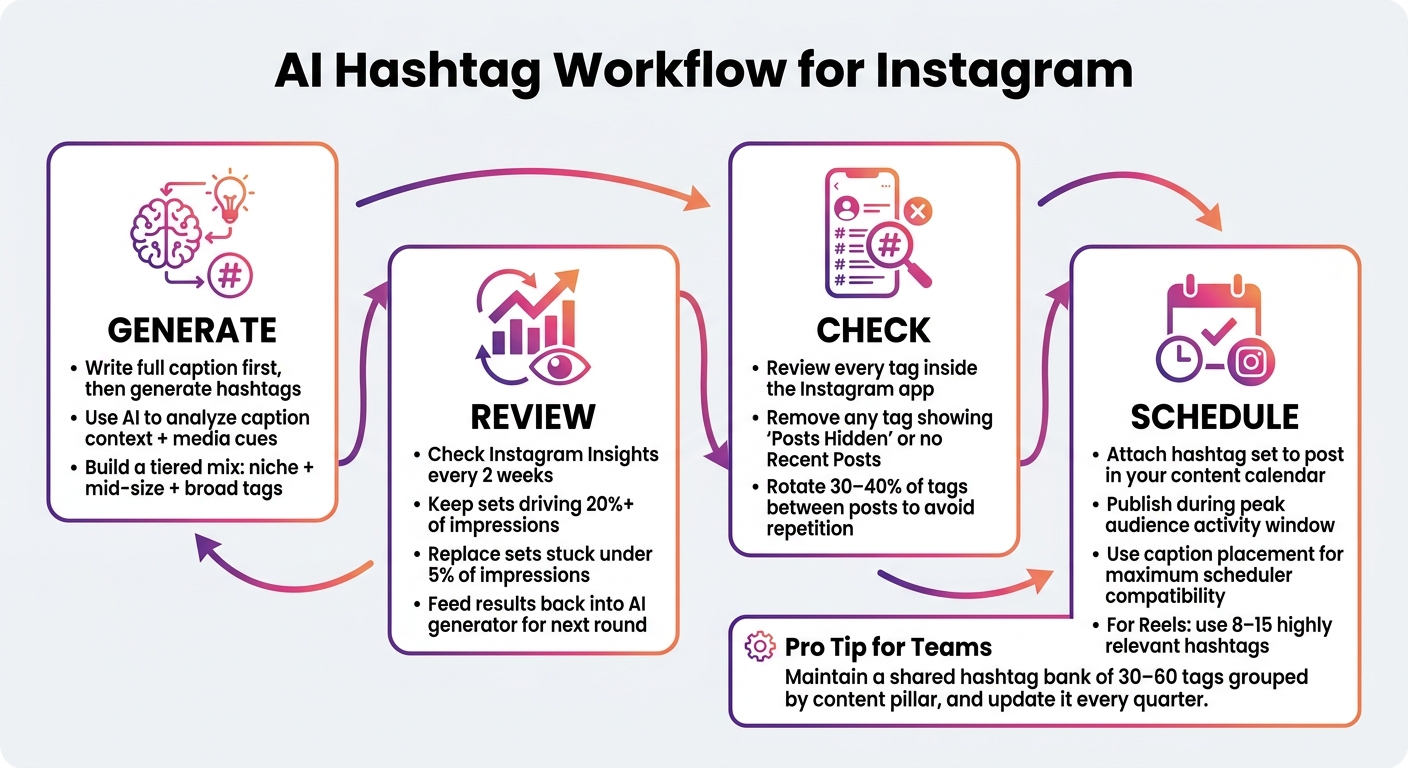
AI Hashtag Workflow for Instagram: Generate, Check, Schedule, Review
A reliable workflow brings a few moving parts together: AI input analysis, tag rotation, safety checks, timing, and post-performance review.
Key takeaways for creators, small businesses, and agencies
For scheduled posts, keep it simple. Use AI to look at the caption and the media context, then build a balanced mix of broad, mid-size, and niche tags.
Before the post is locked in, do one last check inside the Instagram app. Review every tag in Instagram before scheduling, and remove any restricted or hidden tags.
It also helps to rotate top hashtag sets, so you’re not posting the same block on every single post.
Then review hashtag impressions every two weeks. Keep the sets that drive 20%+ of impressions and replace the ones that stay under 5%.
Use AI for speed, but give seasonal and community tags a manual review before scheduling. That sequence - generate, check, schedule, review - is the most reliable way to use AI hashtags on Instagram.
FAQs
How many hashtags should I use per Instagram post?
As of 2026, Instagram limits each post to five hashtags total across the caption and comments. The sweet spot is three to five hashtags that closely match the post.
Using a small, focused set makes it easier for Instagram to understand what your content is about. It can also help you avoid looking spammy. And one more thing: don’t paste the exact same hashtag block into every post.
Should I put hashtags in the caption or first comment?
For most accounts, hashtags work best in the caption. That gives Instagram the tags right away, which can help your content get picked up sooner. For smaller accounts, that can make a noticeable difference in reach.
The first comment can still work if you care about keeping the caption cleaner. But timing matters. You need to post that comment immediately. If it’s delayed by more than 60 seconds, Instagram may start distributing the post without the help of those hashtags.
How often should I update my hashtag sets?
Treat your hashtag strategy like an ongoing test, not a set-it-and-forget-it job. Make small weekly tweaks based on engagement, then do a deeper monthly review to spot banned tags and see how your hashtags are performing over time.
It also helps to rotate between a few hashtag sets instead of using the same group every time. Drop tags that aren't pulling their weight, and try new relevant ones to keep your posts from feeling stale and to avoid spam signals.