
Ultimate Guide to AI Instagram Story Scheduling
Auto-publish Instagram Stories with AI: setup, best practices, post timing, analytics, and compliant tools for consistent engagement.
Auto-publish Instagram Stories with AI: setup, best practices, post timing, analytics, and compliant tools for consistent engagement.
4.98 /5 - from 58k reviews
Trusted by 50,000+ creators — get real engagement delivered to your profile in minutes, not days.

AI Instagram Story scheduling simplifies posting by automating the process, saving time, and boosting engagement. By analyzing your audience's behavior, these tools ensure Stories are published at the optimal times for maximum visibility. Brands like Verde Wellness have already seen improvements, such as doubling engagement rates and saving 15 hours weekly.
Key benefits include:
AI tools also help with content organization, approval workflows, and analytics to refine your strategy. Although interactive elements like polls may still need manual input, advanced platforms like Storrito offer full auto-publishing support. To ensure compliance, always use tools approved by Instagram's API and avoid risky automation practices.
For effective scheduling:
AI Instagram Story scheduling is a game-changer for brands aiming to streamline their workflow and maximize engagement.
AI Instagram Story scheduling lets you automate the process of posting Stories on Instagram. By connecting your account to a scheduling tool, you can upload content ahead of time and let the AI handle the timing and posting. This approach ensures your Stories go live without you needing to open the app. Let’s dive into how these tools make scheduling smoother and more reliable.
AI scheduling tools analyze 30 days of historical engagement data to determine when your followers are most active. Using this data, the AI identifies the best times to post and even queues your content early in the day - sometimes as early as 5:00 AM - to ensure it’s ready and indexed before peak activity hits, like the popular 9:00 AM window.
"The AI also distributes Stories evenly throughout the day so your brand stays visible across multiple check-ins." - Apaya
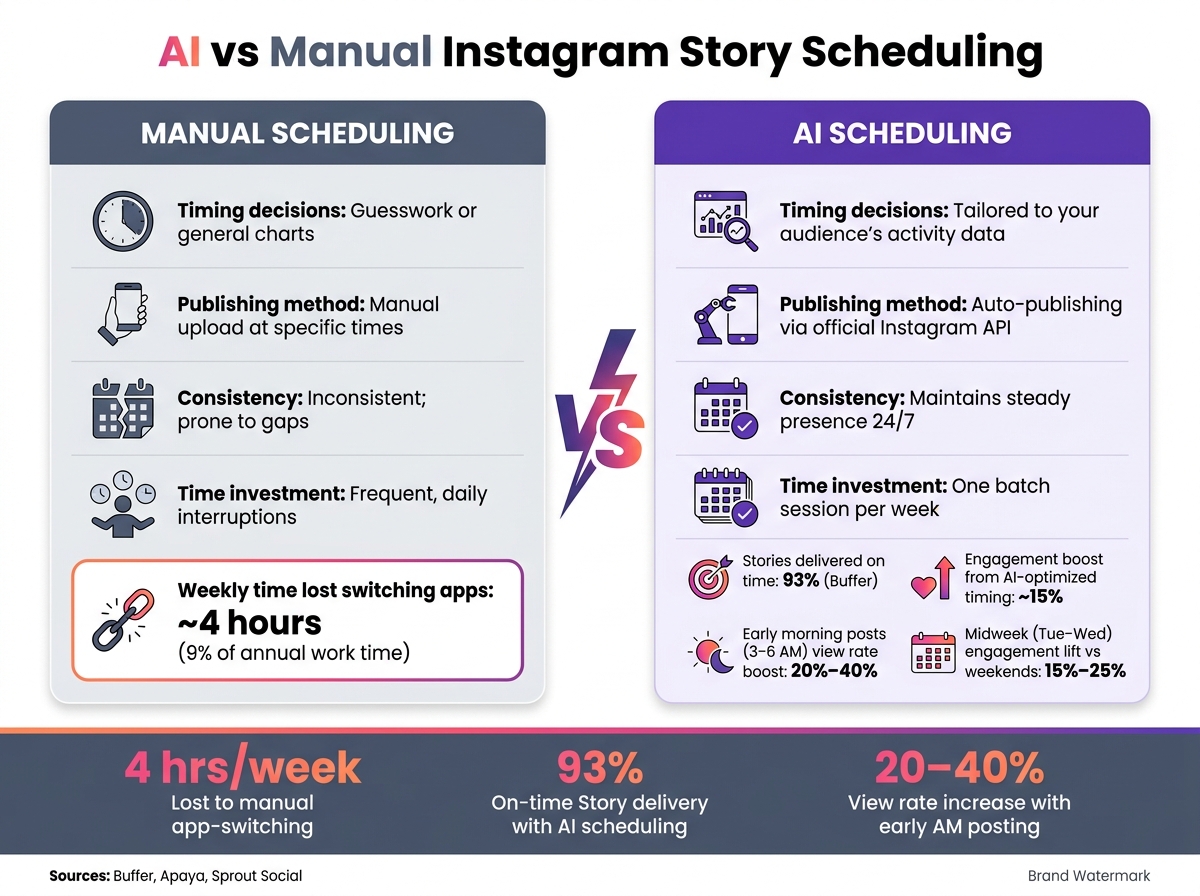
Manual scheduling can be disruptive and often leads to reactive posting habits. Research reveals that workers lose nearly 4 hours each week - or about 9% of their annual work time - just getting back on track after switching between apps for tasks like manual posting.
AI scheduling eliminates this inefficiency. You can batch-create Stories for an entire week - or even a month - and the AI will handle the rest. It publishes your content directly through Instagram’s official API, so there’s no need for manual uploads or push notifications. Here's a quick comparison:
| Factor | Manual Scheduling | AI Scheduling |
|---|---|---|
| Timing decisions | Guesswork or general charts | Tailored to your audience’s activity |
| Publishing method | Manual upload at specific times | Auto-publishing via API |
| Consistency | Inconsistent; prone to gaps | Maintains a steady presence 24/7 |
| Time investment | Frequent, daily interruptions | One batch session per week |
AI tools go beyond just timing. Advanced features can create Story sequences, write captions, and even design graphics, cutting down your daily posting workload to a single, focused session each week. As Sprout Social explains:
"Scheduling Stories allows marketers to focus on one task at a time instead of interrupting what they do throughout the day to post, saving them time, effort and focus." - Sprout Social
AI vs Manual Instagram Story Scheduling: Key Differences & Stats
This process involves three key steps: account integration, content upload, and auto-publishing.
AI schedulers connect to Instagram using the official Meta/Instagram Graph API, so you never have to share your password with a third-party tool. However, your account must be set up as an Instagram Business or Creator profile, as personal accounts don’t support API-based scheduling. Additionally, your Instagram account must be linked to a Facebook Page and verified within Meta Business settings. For managing permissions, it's best to use a desktop browser for full visibility.
"Scheduling is not mainly about saving time. It is about controlling when and how your company shows up." - Lev Bass, Founder & CEO, Crowbert
Once integration is complete, the next step is uploading and organizing your Story content.
After connecting your account, you can upload your Story assets directly into the platform. For best results, use vertical images sized at 1080 x 1920 px in .jpg or .png formats (up to 20 MB) and videos in .mp4 or .mov formats (up to 650 MB). Videos under 60 seconds are published as single slides, while longer clips are automatically divided into multiple consecutive slides.
To streamline scheduling, most platforms offer a drag-and-drop calendar view. This allows you to arrange your slides into sequences, batch-schedule content for weeks or even months, and preview each slide before it’s queued. Advanced tools often include approval workflows, enabling team members or clients to review and approve content before it goes live.
Interactive features like polls or music require manual intervention due to API restrictions, prompting a push notification for posting. However, standard images and videos without interactive elements can be fully auto-published.
Once your content is queued, the AI focuses on optimizing the timing for maximum audience engagement.
With your content organized, the AI analyzes audience behavior to refine the posting schedule. These tools adjust timing dynamically based on recent engagement patterns, tailoring recommendations to your account and the specific day of the week.
For instance, midweek posts - particularly on Tuesdays and Wednesdays - typically see 15%–25% higher engagement compared to weekends. Posting Stories in the early morning hours (between 3:00 AM and 6:00 AM) can boost view rates by 20% to 40% over peak daytime hours. According to Buffer, 93% of scheduled Stories are delivered on time, and AI-optimized timing can enhance engagement by around 15%.
Once you’ve approved a time slot, the tool auto-publishes your Story through the API - no manual action is required for standard media. To avoid timing errors, double-check that your scheduler’s time zone aligns with your audience’s location, as mismatched time zones are a common cause of posts going live at the wrong time.
Once you’ve got optimized timing and auto-publishing nailed down, it’s time to explore additional features that can elevate your Story strategy. AI scheduling tools come with a variety of features, each influencing how effectively your Stories perform.
One of the standout features of these tools is their ability to identify the best times to post. By analyzing your followers’ habits - like when they open Instagram or how frequently they engage with Stories - these tools pinpoint the time slots when your content is most likely to appear at the top of their feed.
"Apaya's AI Instagram story scheduler uses your audience data to identify peak Story-viewing hours and schedules your content to land in those windows." - Apaya
Instead of relying on broad recommendations, these tools leverage data from your specific account. The ultimate goal? Ensuring your Story ring is the first thing followers see when they open the app. Beyond timing, a strong scheduling tool also simplifies content planning and team collaboration.
Once you’ve nailed the timing, the next step is creating a cohesive Story sequence. A calendar view combined with approval workflows makes it easier to maintain consistency across multi-frame Stories. Look for tools that offer slide-by-slide previews and horizontal timelines, so you can clearly visualize your Story flow.
For teams, approval workflows are a must-have. They allow managers or clients to review and approve content before it goes live, ensuring the brand’s voice stays consistent and avoiding costly errors. Some platforms even include mobile publisher notes, which let you leave instructions for the person handling the final manual tasks - like adding a link or tagging a partner account.
Interactive elements such as polls and quizzes can boost engagement, but Instagram’s API limitations mean many tools only send push notifications as reminders to add these features manually. While this approach works, it requires you to be available at the scheduled time.
However, some platforms, like Storrito and RobinReach, go a step further by offering true auto-publishing with full sticker support. This means interactive elements like polls, quizzes, and even music can be published automatically without any manual intervention. Meta Business Suite falls somewhere in between - it supports link stickers but doesn’t handle other interactive features like polls or quizzes.
"Interactive stickers... signal that a real person made choices about this Story, regardless of how the visual layer was produced." - Tobias Manroth, CMO at Storrito
Here’s a quick comparison of how some popular tools handle these features:
| Feature | RobinReach | Storrito | Meta Business Suite |
|---|---|---|---|
| Stories Auto-publish | Yes | Yes | Yes |
| Interactive Stickers | Yes | Yes (full support) | Links only |
| AI Captions | Yes | No | No |
| Best Time AI | Yes | No | Yes |
When choosing a tool, it’s important to check whether it offers true auto-publishing for interactive elements or just sends reminders. This distinction can make a big difference in how smooth and efficient your workflow is.
Now that you understand the key features to look for, let’s walk through how to use an AI scheduling tool - from linking your account to getting your Stories live.
Start by ensuring your Instagram account is either a Business or Creator profile. Personal accounts won’t work because they lack the necessary API access for auto-publishing. Most scheduling tools also require your Instagram account to be connected to a Facebook Page, as Meta’s infrastructure handles publishing permissions.
Once that’s sorted, head over to the "Connect Account" section in your scheduling tool. Log in with your Facebook credentials and select the Instagram profile you want to manage. Make sure to grant all the requested permissions - this includes managing posts, comments, and insights. Skipping any permissions could disrupt the auto-publishing process later. After your account is connected, you’ll be ready to prepare and import your Story content.
You can upload Story assets directly from your desktop, cloud storage (like Google Drive or Dropbox), or design platforms such as Canva. When importing, double-check that your content uses the correct aspect ratios to avoid Instagram’s UI elements obstructing important visuals or text. Keep key details away from the top and bottom areas of the screen, as these are where Instagram overlays navigation buttons and stickers.
If you’d rather create content from scratch, AI tools can simplify the process. For example, RobinReach offers RobinPixel for AI-generated images and RobinGen for crafting captions, while Storrito includes its own AI image generator. Tobias Manroth, CMO at Storrito, advises:
"A Story that looks entirely machine-produced and makes no attempt at connection tends to underperform."
To counter this, consider adding interactive elements like polls, link stickers, or questions before scheduling. These touches help AI-generated content feel more engaging and relatable. Once your content is finalized, you can move on to scheduling and publishing.
AI tools can analyze your audience's activity to recommend the best posting times for maximum visibility. Choose one of these suggested time slots, review your Story sequence in the preview, and schedule it for auto-publishing. While standard media posts will publish automatically via the API, interactive features - like polls, quizzes, or music - might require manual input through a push notification. If you want a fully automated process, make sure your scheduling tool supports auto-publishing for these interactive elements.
Here’s a practical tip: batch-schedule 5 to 7 Story clips in one go. Many creators prefer to do this at the start of the week, such as on Mondays, to maintain a steady presence without needing to manage Stories daily.
When it comes to Instagram Stories, consistency beats sheer volume every time. The platform's algorithm favors accounts that post regularly, helping brands stay visible in their followers' Story bars. For e-commerce brands, aiming for 3–7 Stories daily strikes a good balance - keeping your audience engaged without overwhelming them.
"How to schedule Instagram Stories matters because attention compounds around consistency, not bursts of effort." - Lev Bass, Founder & CEO, Crowbert
Spreading your posts throughout the day is another smart move, as it maximizes your chances of reaching followers during their various check-ins. A handy rule of thumb? Automate about 80% of your content - things like product highlights, reviews, or educational snippets - and save 20% for spontaneous, real-time updates. This mix keeps your Stories feeling both professional and genuine.
Consistency is just the beginning. To level up your Instagram Story game, dive into the data. AI scheduling tools not only suggest the best posting times but also provide insights into key metrics. Pay close attention to figures like completion rates, exit rates, and taps back - they tell a more nuanced story than simple view counts.
| Metric | What It Tells You | Goal |
|---|---|---|
| Completion Rate | Percentage of viewers watching until the final frame | >85% |
| Exit Rate | Percentage of viewers leaving mid-way | <10% |
| Story-to-Site CTR | How well your call-to-action drives traffic | >1.5% for strong performance |
| Taps Back | Indicates content viewers want to re-watch | Higher = Better engagement |
For example, a high "taps back" count means your content was engaging enough to rewatch, while a rising exit rate could be a sign that your opening frame needs more punch. Since most drop-offs happen in the first second, make sure your Story hooks viewers right away. Also, set your scheduling tool to match your audience's primary time zone for optimal timing.
Once your schedule and analytics are dialed in, it’s time to focus on storytelling. Think of each Story sequence as a mini-narrative rather than a random collection of slides. Stick to one clear idea per frame to make your content easy to follow. A structured approach works well - start with a teaser in the morning, share behind-the-scenes content in the afternoon, and wrap up with a reveal or call-to-action in the evening.
To streamline your planning and create a cohesive experience, organize your Stories around recurring themes. Examples include:
"The main purpose of your Stories is to humanize your brand; it's to bring people behind the scenes so people can get to know you or your brand or your business on a deeper level." - Jade Beason, Content Strategist
To keep your audience engaged, mix still images with short videos and reshare key feed posts or Reels through Stories. This strategy leverages Stories' prime placement at the top of the app to boost visibility for your best content. By incorporating these practices, you'll set the stage for even more impactful strategies later in the guide.
While AI scheduling can simplify content management, it’s important to recognize its boundaries and ensure compliance with platform rules.
AI scheduling tools are handy but don’t fully replicate Instagram’s native app. For example, interactive elements like polls, quizzes, and music require manual input - though link stickers can be scheduled directly via Meta Business Suite on a desktop.
To address this, many tools use a "notification workflow." Instead of auto-posting, the tool sends a push notification at the scheduled time. You then log into Instagram, manually add stickers or music, and publish the Story, preserving its interactive features.
Account type plays a role, too. Auto-publishing through Instagram’s API is restricted to Business or Creator accounts. Additionally, your Instagram Business account must be linked to a Facebook Page to work with most scheduling tools.
Another technical hurdle: OAuth tokens expire every 60 days. To avoid disruptions, set reminders to reconnect your account before the token expires. Staying on top of these details ensures your posting schedule runs smoothly.
Technical know-how aside, staying within Instagram’s policies is equally critical. Using approved scheduling tools is safe, provided automation is limited to posting content. Avoid tools that auto-like, auto-follow, or mass-comment - Instagram’s detection systems are highly advanced. Such activities can lead to action blocks, reduced reach, or even shadowbans lasting 14 to 28 days.
"Instagram automation is safe when you use tools built on Meta's official Instagram API with OAuth login... It is unsafe when you use password-sharing bots, browser extensions, or scrapers that mimic human clicks." - Avery Rivers, Content Strategist, CreatorFlow
When choosing a tool, ensure it doesn’t ask for your Instagram password. Instead, it should direct you to a Facebook Business login using OAuth 2.0. Avoid any tool that requests direct access to your login credentials.
To mimic natural behavior, stagger your posts by at least 15 minutes and leave at least three hours between automated posts. Travel blogger Sarah (@wanderlust_diaries) achieved a 4.2% engagement rate and gained an average of 2,100 followers per month over six months by automating 30 posts a week with staggered timings - all without any warnings from Instagram.
Timing your content perfectly is important, but it’s only part of the equation. To truly succeed, your Stories need to reach the right audience. That’s where UpGrow steps in to help.
UpGrow is an AI-driven Instagram growth service designed to build an engaged and relevant audience. By using patented AI technology and expert insights, UpGrow targets users based on specific filters like location, age, gender, language, and interests. These detailed targeting options allow you to align your audience strategy with your Instagram goals seamlessly.
"ChatGPT for Instagram analyzes audience behavior to identify optimal posting times for maximum engagement." - UpGrow
UpGrow works as a perfect companion to your AI scheduling tools. While your scheduler ensures Stories are posted at the right time, UpGrow focuses on connecting your content with the audience most likely to engage with it. Think of them as two sides of the same coin: one handles timing, and the other ensures relevance.
Here’s an example of how you can integrate UpGrow into your strategy: Imagine a fitness coach targeting women aged 25–40 in Los Angeles. With UpGrow’s targeting filters, they can attract this specific audience. Then, by scheduling Stories featuring workout tips, client transformations, or limited-time offers, they can post at the times when this group is most active on the West Coast.
Additionally, UpGrow’s Boost™ tool takes it a step further. It accelerates follower growth during critical moments, such as product launches or seasonal campaigns, ensuring your scheduled Stories reach a larger, engaged audience. Plans start at $39/month, and UpGrow even offers a growth guarantee for added peace of mind.
AI Story scheduling isn't just about saving time - it's about transforming how you manage your Instagram presence. As BrandGhost explains: "Scheduling is not a cheat code - it's an infrastructure decision. And like any good infrastructure, it makes everything built on top of it more reliable, more scalable, and less stressful."
The main takeaway? Batch your content, rely on AI to identify the best posting windows, and let the system work for you. For example, scheduling Stories between 3–6 a.m. can increase view rates by 20%–40%. This approach ensures your brand stays active and visible, even when you're busy with other priorities.
Pairing this strategy with a tool like UpGrow can take your efforts further. UpGrow doesn't just schedule your Stories; it helps you reach the right audience at the right time. With a 4.98/5 rating from over 58,000 reviews and plans starting at $39/month, it adds a layer of audience targeting that basic schedulers can't match.
This combination of smart timing and precise targeting is what drives successful Instagram campaigns.
"The creators who thrive on Instagram today are not necessarily the ones with the most followers or the biggest production budgets. They're the ones who show up consistently, understand their analytics, use their tools well, and focus on creating compelling content instead of managing logistics." - BrandGhost
To put these strategies into action, start by connecting your account, creating a one-week queue of Stories, and reviewing your analytics after 30 days. Use the data to refine your approach rather than relying on guesswork. This cycle - schedule, publish, analyze, refine - is what separates accounts that grow from those that plateau. By combining consistent scheduling with data-driven targeting, you'll build a strong foundation for long-term Instagram success.
Yes, you’ll need either a Business or Creator account to schedule Instagram Stories. Auto-publishing via the Instagram Graph API generally requires a professional account. Some third-party tools may only allow full automation for Business accounts, while Creator accounts might require a manual notification process. The good news? Switching to a Business or Creator account is completely free and can be done directly in your Instagram app settings.
Due to the way the Instagram API works, some interactive features can't be auto-published and need to be added manually. These include music, poll stickers, quiz stickers, question stickers, and link stickers. While you can schedule basic images and videos, these interactive elements are stripped out when using automation tools. To include them in your Stories, you'll need to use notification-based scheduling, which sends you a reminder to finish the Story directly within the Instagram app.
To keep your Instagram account safe and avoid potential issues, it's important to stick with tools that connect using Instagram's official API and OAuth 2.0. Never share your password with any third-party services. Be cautious of platforms that ask for your login credentials or perform actions like mass auto-liking - these practices go against Instagram's terms of service.
Focus on creating genuine captions and engaging authentically with your audience. Also, make sure your account is switched to a Professional or Creator profile to ensure compatibility with Instagram's features.


