
How To Use Highlights For Affiliate Marketing
Use Instagram Highlights as a permanent affiliate storefront—organize categories, add link stickers, show demos, and track performance.
Use Instagram Highlights as a permanent affiliate storefront—organize categories, add link stickers, show demos, and track performance.
4.98 /5 - from 58k reviews
Trusted by 50,000+ creators — get real engagement delivered to your profile in minutes, not days.
Instagram Highlights let you turn temporary Stories into a lasting storefront for affiliate marketing. They stay on your profile, making it easy for followers to find product recommendations, tutorials, and links. With 83% of Instagram users discovering products on the platform and 87% taking action, Highlights help you connect with shoppers ready to buy. Here’s how to make the most of them:
Keep your Highlights updated by removing outdated links or codes. With these steps, you can turn Instagram Highlights into a permanent affiliate shop that drives sales.
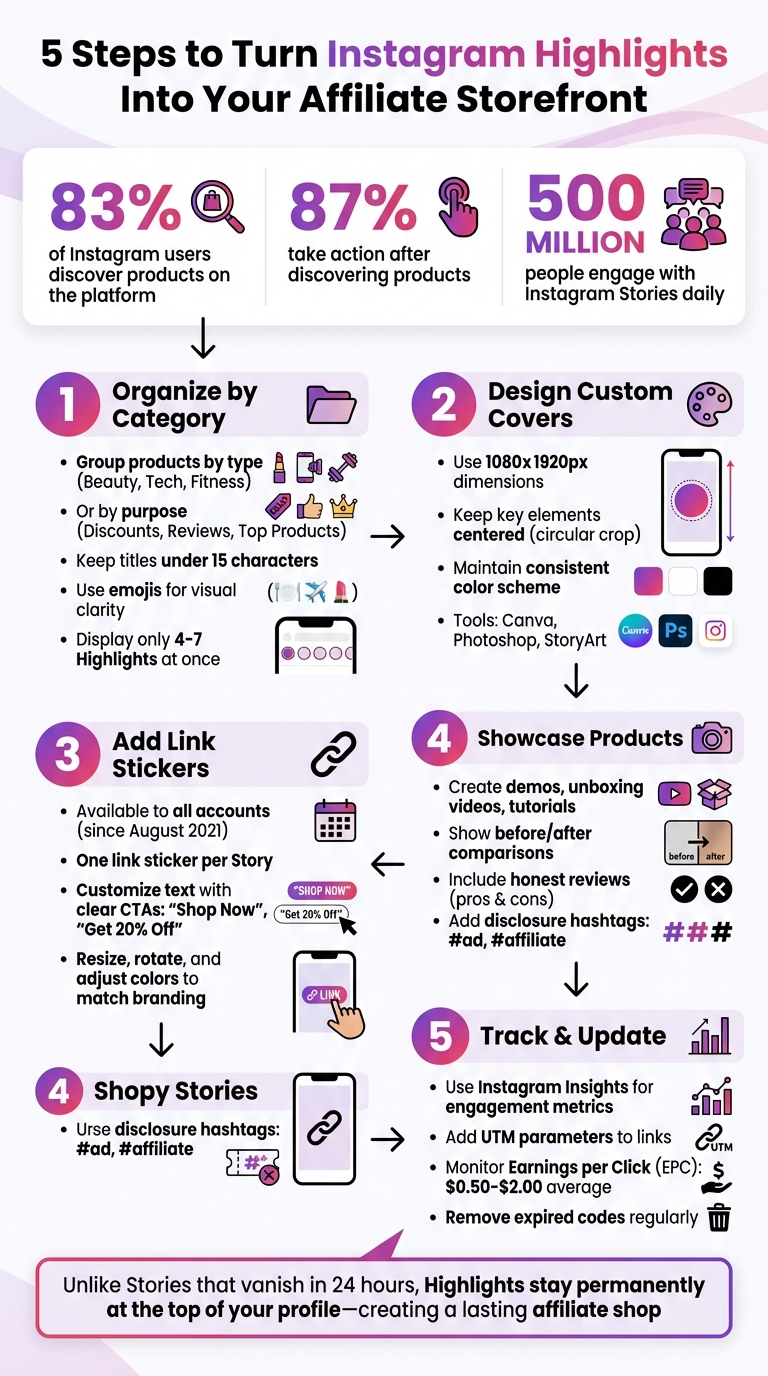
5-Step Guide to Setting Up Instagram Highlights for Affiliate Marketing
Think of your Instagram Highlights as a well-organized menu, guiding followers to the most relevant content - whether that’s product reviews, discount codes, or tutorials. These categories are key to turning your profile into a mini affiliate shop. Since Instagram only displays 4–7 Highlights at a glance, focus on the ones that prompt immediate action from followers.
Start by analyzing your affiliate catalog. Group products by type or purpose. If you promote a variety of items, categories like "Beauty", "Tech", "Fitness", or "Home Decor" can work well. For niche-focused content, try goal-oriented categories like "Start Here", "Reviews", "Top Products", or "Current Sales." This layout mimics a sales funnel: new visitors can get to know you, check out social proof, browse popular items, and grab promo codes - all from your profile. Well-organized categories can lead to better click-through rates.
"Think of them in terms of your website. Every website has a navigation menu – think about what is in your navigation menu and re-create them as highlights." - Shannon Shipman
The way you group your affiliate products should align with how your audience shops. For example, product-focused categories like "Skincare", "Camera Kit", or "Daily Essentials" are ideal if you promote multiple brands within a niche. On the other hand, goal-driven categories like "Tutorials", "Discounts", or "Testimonials" are perfect for building trust and driving conversions. Including personal touches like an "About Me" or "BTS" (Behind the Scenes) section can also help create a stronger connection with your audience.
Keep Highlight titles short and consider adding emojis for clarity and visual appeal - like 🍽️ for "Menu" or ✈️ for "Travel". Regularly update your Highlights to remove expired codes or outdated content. This ensures your profile stays fresh and relevant.
Once you’ve set up your categories, it’s time to design eye-catching covers to tie everything together.
Custom Highlight covers can elevate your profile’s appearance, making it look polished and cohesive. Tools like Canva, Photoshop, or StoryArt are great for creating covers with the recommended 1080x1920px Instagram Story dimensions. Since the covers are cropped into circles, make sure key elements - like icons or text - are centered and leave plenty of space around the edges to avoid cropping issues.
Stick to a consistent color scheme and style across all your covers. Brands like Sephora use specific icons to quickly communicate what each Highlight is about, while Daniel Wellington incorporates its logo into its covers for a unified look. If you’re unsure about color schemes, search for ideas like "warm color palettes" or "pastel color palettes" on Google or Pinterest to find options that resonate with your brand. To upload covers, go to "Edit Highlight", then "Edit Cover", and select an image from your phone’s gallery.
"By choosing a design that reflects the content while adding a more professional touch, you can increase views and encourage followers to click through your Highlight." - Rebecca Barnatt-Smith, Tapfiliate
Using organized Highlight categories as a foundation, you can turn Instagram Stories into lasting sales opportunities by adding affiliate links through Link Stickers. Since August 2021, Instagram replaced the swipe-up feature with Link Stickers, making this tool available to all accounts - not just those with 10,000+ followers. This shift has opened up affiliate marketing to a broader audience. Link Stickers also offer more flexibility, allowing you to resize, rotate, and adjust colors to match your branding. Plus, they enable viewers to react or reply to your Story, something the swipe-up feature didn’t allow.
With over 500 million people engaging with Instagram Stories daily, adding affiliate links can significantly boost traffic to your product pages. The trick is to make your links both noticeable and appealing.
Adding a link to your Story is simple. Start by tapping the plus sign to create a Story. Design your content, then tap the Sticker icon at the top of the screen. Select Link, paste your affiliate URL, and use the Customize sticker text option to write clear Instagram call-to-action captions like "Shop Here", "Limited Offer", or "See why." Avoid vague phrases like "Link", as specific CTAs tend to perform better.
"Instagram link stickers are the easiest way to drive traffic to external content and products on Instagram."
– Hootsuite
You can tap the sticker repeatedly to adjust its color for better visual alignment with your content. For a more polished look, consider creating a custom button as a PNG file with a transparent background. Upload it as an image and layer it over the standard link sticker. Keep in mind that Instagram allows only one link sticker per Story, so prioritize your most important affiliate link. To stay compliant with FTC guidelines, always include a disclosure like "#ad" or use the "Paid partnership with" label.
Once your Story includes a Link Sticker, make it last by saving it to your Highlights.
Stories disappear after 24 hours, but saving them to Highlights ensures your affiliate links remain visible indefinitely. To do this, open your Story and tap the Highlight icon (a heart symbol) at the bottom of the screen. Add it to an existing category or create a new one to keep it organized and easily accessible at the top of your profile.
"Unlike Stories, which are designed to disappear after 24 hours, a Highlight permanently sits at the top of your profile. This offers endless opportunities to provide value to your audience and ensure that affiliate links remain visible."
– Tapfiliate
It’s a good idea to regularly update your Highlights by removing expired codes or broken links. For older Stories saved before the Link Sticker update, Instagram has preserved the "See More" clickable link at the bottom, so these still function.
Once you've organized your Highlight categories, it's time to actively use them to showcase affiliate products. Think of your Highlights as a permanent storefront where followers can browse your recommendations. The trick is to go beyond static images - show products in action. Why? Because potential buyers are always asking themselves, "How will this actually work for me?" Demonstrations answer that question. On top of that, offering discount codes or special deals creates urgency, giving followers a reason to click your affiliate link immediately. Let’s break down how to make your products stand out.
Showcasing products in real-life scenarios is a game changer. For example, if you're promoting a beauty product, create a step-by-step tutorial. Selling clothing? Record a styling video with various outfit combinations. Tech products? Use screen recordings paired with voiceovers to highlight standout features.
"Product demos are an incredibly valuable type of content for Instagram followers to come across."
– Tapfiliate
Honesty is key here. Reviews that highlight both the pros and cons build trust over time. Consider including unboxing videos, before-and-after comparisons, or walkthroughs of the product in use, or use other Instagram Stories hacks to keep your content fresh. These formats not only engage your audience but also show the value of the product. Don’t forget to add a Link Sticker with a clear call-to-action like "Shop Now" and always include disclosure hashtags like #ad or #affiliate to stay compliant with FTC guidelines.
While demonstrations build trust and interest, discount-focused Highlights can drive immediate sales.
Create a Highlight specifically for discounts and promo codes. Put your best deal front and center to grab attention. Use customized Link Sticker text, such as "Get 20% Off" or "Claim Deal", to make the offer stand out from generic phrases.
For time-sensitive promotions, adding a countdown sticker to your Story before saving it to a Highlight can create urgency and encourage quick action. Unique affiliate codes make tracking transactions easier, and it’s important to regularly update your Highlight to remove expired or inactive links.
Your Instagram Highlights can do more than just showcase content - they can function as a mini affiliate shop, helping followers discover and purchase products with ease. By organizing them thoughtfully, you can streamline the browsing experience and boost affiliate revenue.
Position your most effective Highlights at the far left of your profile. This prime spot is ideal for limited-time promotions or popular product categories, ensuring they grab attention right away.
Think beyond basic product groupings - arrange Highlights to guide new visitors through a natural flow: discovery, trust-building, and purchase. Keep Highlight titles short (15 characters max) and use emojis for clarity (e.g., ✈️ for Travel, 🏠 for Home, 💄 for Beauty). This approach not only improves navigation but also adds a visual cue that’s instantly recognizable. Sephora, for example, uses branded Highlight covers with icons to clearly define categories, making it simple for users to find specific products.
Once your Highlights are organized, focus on visuals and calls-to-action to convert interest into sales.
A cohesive visual style across your Highlights gives your profile a polished, professional look. Create custom covers with branded icons, colors, or designs that align with your overall aesthetic. Glossier, for instance, uses a "#GlossierIRL" Highlight to showcase behind-the-scenes content and real customer photos, blending authenticity with their signature branding.
To drive clicks, make your calls-to-action (CTAs) impossible to miss. Place Link Stickers within Stories above the caption area, and use visual cues like arrows or text such as "Tap to shop". Customize the sticker text to fit the offer - phrases like "Get 20% Off" or "Shop My Favorites" are far more engaging than generic options. Balance product promotions with authentic content, such as honest reviews or behind-the-scenes glimpses, to build trust and relatability.
"The best Instagram affiliate content is typically in the form of recommendations and real-life product applications, not sales pitches"
– Hector Ruiz, Founder of BBQ Grill Academy
Once you've fine-tuned your Instagram Highlights, it's time to focus on two critical aspects: staying compliant and tracking how well your efforts perform. Transparency isn't just about following the rules - it builds trust, which can lead to better engagement and higher conversions.
The Federal Trade Commission (FTC) requires that influencers and brands disclose any material connection - whether it's a commission, free products, or other forms of compensation. In 2023, the FTC issued over 700 warning letters to those who failed to comply. Since Highlights are a lasting part of your profile, every Story frame in a Highlight must include a clear and visible disclosure.
Use hashtags like #Ad, #Sponsored, or #Affiliate prominently at the start of your captions or as text overlays on your visuals. Avoid vague terms such as #sp, #collab, or #partner, as they don't meet the FTC's clarity requirements. For videos, make sure disclosures are not only visible on-screen but also mentioned verbally at the beginning. Instagram’s "Paid Partnership" label is a helpful tool, but it should always be paired with your own on-screen disclosures to ensure full compliance.
"Disclosure on a profile page, rather than a post, is insufficient. It should be placed when it is clearly visible."
– IZEA Worldwide, Inc.
Once your disclosures are in place, the next step is evaluating how effectively they, along with your affiliate links, drive user engagement.
Disclosures are only part of the equation - understanding how your Highlights perform is just as important. With a Business or Creator account, you can use Instagram Insights to track key metrics. Simply swipe up on any Story in your Highlight to view stats like interactions, link clicks, and exits. If you notice a high exit rate, it might be a sign that your call-to-action (CTA) needs improvement.
For deeper insights beyond Instagram's built-in tools, add UTM parameters to your affiliate links. For example: ?utm_source=instagram&utm_medium=highlights&utm_campaign=skincare. Pairing these parameters with unique discount codes for specific Highlights can help you track performance more accurately, even if users switch devices or tracking pixels fail. Monitoring metrics like Earnings per Click (EPC) can also provide valuable insights into which Highlights are driving the best return on investment (ROI).
Lastly, keep your Highlights updated. Remove any expired links to maintain a seamless user experience and ensure your data remains accurate. By combining clear disclosures with performance tracking, you can fine-tune your Highlights for ongoing affiliate success.
With well-organized categories and transparent disclosures, your Instagram Highlights can effectively boost both engagement and sales.
Instagram Highlights serve as a permanent affiliate storefront. Unlike Stories that disappear after 24 hours, Highlights keep your top product recommendations, demonstrations, and affiliate links visible at the top of your profile. This makes it easy for visitors to find and purchase products right away.
To make navigation simple, group Highlights strategically by product category, season, or specific use cases - like "Travel Essentials" or "Top Picks". Add custom covers that reflect your brand for a cohesive, polished look that encourages clicks. Inside each Highlight, aim for a balance between authenticity and promotion. Instead of focusing solely on sales, showcase real product demonstrations and user-generated content. Hector Ruiz, Founder of BBQ Grill Academy, emphasizes this approach:
"The best Instagram affiliate content is typically in the form of recommendations and real-life product applications, not sales pitches".
Transparency and performance tracking are critical. Use clear disclosures such as #ad or #affiliate to comply with FTC guidelines and maintain trust with your audience. Leverage Instagram Insights to track metrics like click-through rates, engagement, and conversions for each Highlight. Key performance indicators, such as Earnings per Click (EPC), which often range from $0.50 to $2.00 for successful Instagram affiliate campaigns, can help you measure success.
Keep your Highlights fresh by removing expired discount codes, broken links, and outdated promotions regularly. A well-maintained Highlight strategy ensures a smooth user experience, driving consistent sales and engagement.
Your Highlight categories should focus on content that grabs attention and aligns with your niche and affiliate products. Think about categories like Best Products, Customer Reviews, How-To Guides, or Promotions. These are excellent ways to encourage clicks and conversions while offering value to your audience.
For example, you can spotlight top-performing affiliate products, share behind-the-scenes insights, or feature testimonials. These types of content not only build trust but also help showcase the benefits of the products you're promoting.
To include UTM tracking in your affiliate links, you simply add UTM parameters such as utm_source, utm_medium, and utm_campaign to the URL. Here's an example of how it looks:
https://youraffiliate.com/product?utm_source=Instagram&utm_medium=affiliate&utm_campaign=SummerSale.
You can either edit the link manually or use tools provided by platforms to create UTM links automatically. These parameters are essential for tracking performance in analytics tools like Google Analytics, giving you detailed insights into how your affiliate campaigns are performing.
FTC disclosures in Highlights need to be easy to spot and understand to meet legal standards. Make sure they are placed where viewers can’t miss them - like on the cover image or within the first few slides. Use straightforward on-screen text or audible statements in videos, and ensure captions include disclosures that appear above the 'See More' section. Don’t hide disclosures; keeping them visible is key to following FTC rules.


