
Ultimate Guide to Instagram Scheduling with Analytics
Use analytics-driven scheduling to automate posts, find your best posting times, and increase engagement, saves, and follower growth.
Use analytics-driven scheduling to automate posts, find your best posting times, and increase engagement, saves, and follower growth.
4.98 /5 - from 58k reviews
Trusted by 50,000+ creators — get real engagement delivered to your profile in minutes, not days.
Want to grow your Instagram faster and smarter? Combining scheduling tools with analytics is the way to do it. Analytics reveal when your audience is most active, while scheduling tools ensure your posts go live at the perfect time. Together, they can help you:
For example, a fitness influencer in 2026 increased her reach by 340% in just 12 weeks by shifting her posts to her audience’s most active time (6:30 AM).
The key? Use tools that combine Instagram analytics and scheduling to maximize results. Let’s break down how to make it work for you.
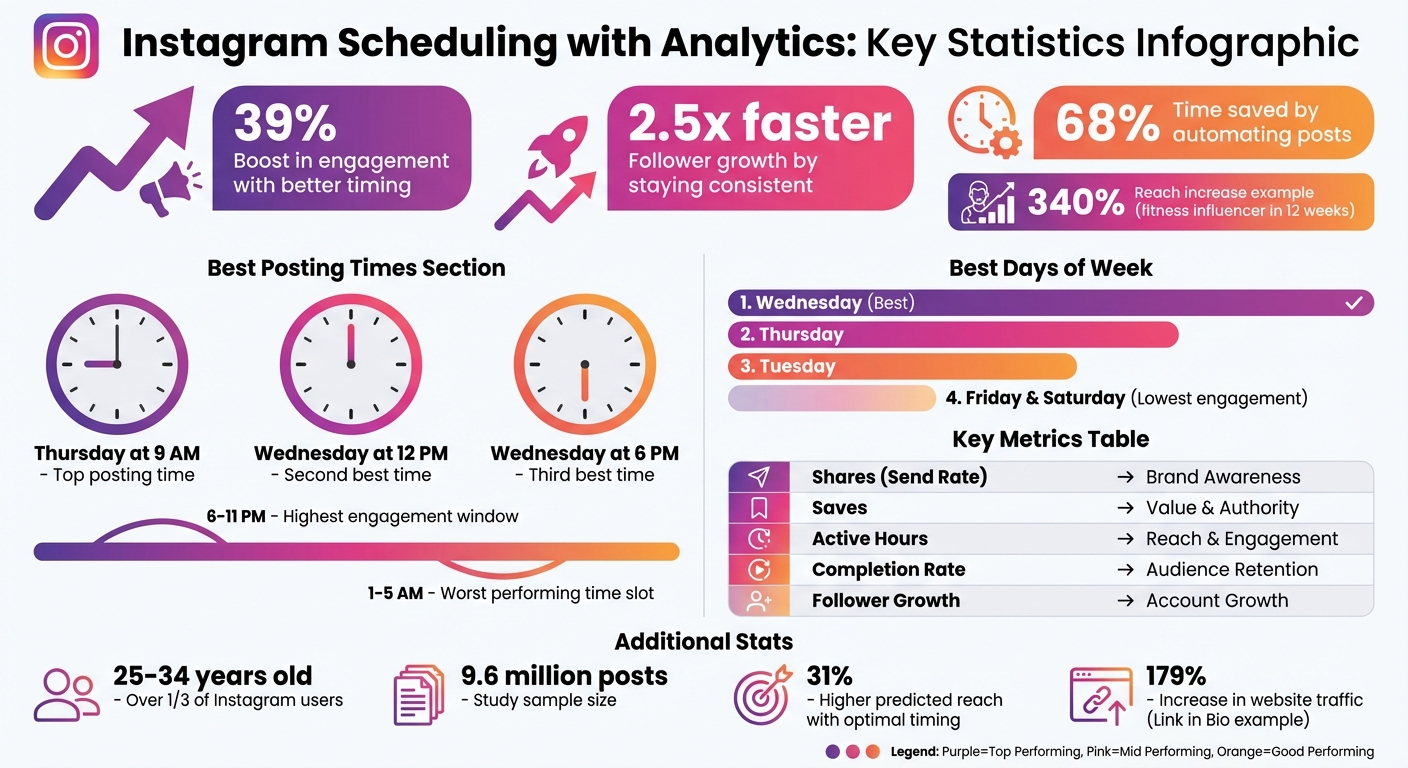
Instagram Scheduling Benefits: Key Statistics and Metrics
To fine-tune your Instagram posting schedule, focus on metrics that uncover what your audience prefers and when they're most active. Instagram head Adam Mosseri highlights average watch time, like rate, and send rate as key indicators to measure whether your content resonates and if your timing is effective.
Think of every post as a learning opportunity. Instagram Coach Elise Darma shares this perspective:
"Every post is data, even the ones that seem to flop. Instead of getting caught up in day-by-day numbers, use each post as an experiment."
This approach shifts your attention from superficial metrics to meaningful insights that can shape your posting strategy.
Certain engagement metrics can provide actionable insights into what works best for your audience:
| Metric | Significance for Scheduling | Goal Alignment |
|---|---|---|
| Shares (Send Rate) | Highlights viral potential; guides boosting | Brand Awareness |
| Saves | Points to evergreen content | Value & Authority |
| Active Hours | Identifies peak times for visibility | Reach & Engagement |
| Completion Rate | Optimizes the number of Story frames to post | Audience Retention |
| Follower Growth | Indicates if your posting strategy is working | Account Growth |
These metrics provide a roadmap for refining your posting schedule to maximize impact.
Understanding your audience's demographics is essential for determining the best times to post. For example, over one-third of Instagram users are aged 25–34, a group that often checks Instagram in the evenings to relax. If your audience differs in age or location, their activity patterns might vary.
Your Professional Dashboard offers insights into "Most Active Times", showing when your followers are online and which content formats perform better at specific times. For instance, entertainment-focused Reels might do well at 9 p.m., while educational carousels could thrive around noon during lunch breaks.
Pay attention to how timing affects engagement with different content types. Your audience's habits, routines, and location provide personalized insights that generic advice can't match.
A study analyzing 9.6 million Instagram posts found some general trends, though your audience's behavior may differ. The study identified Thursday at 9 a.m., Wednesday at 12 p.m., and Wednesday at 6 p.m. as top posting times. Evenings (6–11 p.m.) tend to see the highest engagement, while posts shared between 1 a.m. and 5 a.m. perform the worst across all days.
In terms of days, Wednesday is the best for engagement, followed by Thursday and Tuesday. On the other hand, Friday and Saturday typically see lower engagement rates.
As Kirsti Lang from Buffer puts it:
"Timing isn't as critical as it was in the chronological-feed days... but it still plays a role in your social media marketing strategy."
Instead of relying solely on general recommendations, use tools to schedule Instagram posts that analyze your account's historical data to suggest the best times for your specific audience.
Pairing advanced analytics with scheduling tools is key to turning your Instagram strategy into measurable growth. Once you’ve identified the metrics that matter most, the next step is selecting a scheduling platform that can effectively use those insights. The best tools connect directly to Instagram’s API, pulling real-time data to guide your posting decisions. This eliminates the need to rely solely on Instagram’s native Insights, which can lag behind by 24–48 hours.
Auto-publishing is non-negotiable. Your scheduling tool should automatically post at the best times for engagement. Look for platforms with drag-and-drop visual grid planning, which allows you to preview how your feed will look before publishing.
Data-driven timing features are another must-have. These tools analyze your engagement history and follower activity to recommend the ideal posting windows. Features like Sprout’s "ViralPost" or PostNext’s "Smart Schedule" help creators post during peak engagement periods, leading to noticeable growth.
Consider tools with link in bio integration as well. For example, HighSnobiety’s Editorial Director reported a 179% increase in Instagram-driven website traffic using Later’s "Link in Bio" tool. This feature tracks click-through rates and traffic directly within the scheduling platform, making it easier to measure results.
Advanced metrics should go beyond surface-level numbers. Look for tools that track Story completion rates, saves, shares, and "taps back/forward". These deeper insights reveal how users interact with your content. Note that Instagram API restrictions limit demographic data for accounts with fewer than 100 followers.
Once you’ve chosen a scheduling tool, make sure it’s connected to your Instagram Business or Creator profile. If you’re still using a personal account, switch to a Business or Creator profile first. This step is essential since Instagram’s API doesn’t provide analytics for personal accounts.
After upgrading to a professional profile, link it to your scheduling platform through the API. This connection allows the platform to pull in data for calculating engagement rates, tracking follower growth, and identifying top-performing posts. With this setup, you’ll gain access to insights tailored to your audience, such as the "Best Time to Post", which is based on when your followers are most active - not just generic averages.
Pay attention to metrics like "Saves" within your dashboard. This data highlights content that resonates long-term with your audience. Once your analytics are synced and auto-publishing is enabled, focus on tools that ensure daily consistency.
Consistency is crucial for building audience trust and signaling to Instagram’s algorithm that you’re an active creator. Understanding how the Instagram algorithm works can help you further refine your posting strategy for better reach. Scheduling tools make it easier to stick to a regular posting schedule, even during busy times or off-hours. Enabling auto-publish ensures your posts go live at consistent times.
Use features like first comment scheduling to keep your captions clean. By placing hashtags in the first comment, you can maintain a polished look while still boosting reach.
Chloe Pedersen, Art Director at Ranch & Coast Magazine, shares her experience:
"Later's hashtag tools are so simple. Adding a first comment barely adds a step to my process but it's so invaluable. It helps improve the look and feel of my post and drives reach at the same time."
Monitor Story exits through your analytics to see where viewers drop off. Use this information to adjust the length and content of future Stories. Regularly review which hashtags drive the most impressions and engagement, and update your pre-built hashtag lists accordingly. Research suggests using 20–30 hashtags per post for maximum reach and engagement.
For a comprehensive solution, platforms like UpGrow combine advanced analytics with streamlined scheduling. These tools help you make informed decisions that can elevate your Instagram growth strategy.
Managing multiple Instagram accounts can be challenging. It requires systems that simplify approvals, reduce security risks, and demonstrate ROI effectively. Professional scheduling tools not only address these issues but also make handling multiple accounts far more manageable. Let’s dive into how teams and agencies can streamline their workflows for better scheduling efficiency.
Role-based permissions are key to maintaining a smooth content creation process. Assign specific roles for drafting, reviewing, and publishing to ensure consistency in brand voice and compliance before posts go live.
Multi-step approval processes allow team leads and clients to review content before scheduling. Tools with drag-and-drop visual calendars make it easy for everyone to preview the upcoming grid, ensuring that the aesthetic stays on-brand. Features like "Save as Draft" and internal commenting simplify collaboration, enabling quick iterations on captions and visuals. Setting clear deadlines further enhances this workflow.
Instagram's native app limits users to five active logins per device and can trigger security warnings when switching accounts frequently. Professional scheduling tools, however, can handle up to 50 accounts from a single dashboard. By using Meta’s official APIs, these tools help avoid account suspensions or shadowbanning issues.
These tools also centralize engagement management, consolidating DMs, comments, mentions, and story replies from all client accounts into one interface. Features like independent time zone configurations for each account ensure posts reach audiences during their peak activity hours, no matter where they are. Internal campaign tags make it easy to track performance across accounts, while bulk scheduling weeks of content ensures consistency. These capabilities not only save time but also allow for more strategic planning.
Over 7,000 agencies now rely on automated platforms to pull data directly from Instagram’s API. These tools allow for white-label customization, letting agencies incorporate their branding, logos, and client-specific colors into reports for a polished, professional touch. AI-powered features can generate executive summaries and highlight key wins, making reports easier for clients to understand.
Paul Echols, Creative Director at Square 205, emphasizes the importance of tailored reporting:
"Customizable report templates allow our team to deliver the metrics and data that our clients care about. That gives them the best understanding of the success of their campaigns while ensuring all data is at their fingertips."
The frequency of reporting should align with campaign goals - monthly for general updates, weekly for fast-paced launches, and quarterly for long-term strategies. Including competitor benchmarks helps clients see how they stack up against industry standards. Framing results around tangible business outcomes, like linking follower growth to website traffic, conversions, and revenue, provides a clearer and more impactful picture of success.
Since Instagram’s native app only retains insights for 90 days, third-party tools are essential for maintaining historical data for annual reporting. Real-time analytics dashboards, like the one offered by UpGrow, provide the performance tracking needed to measure campaign success accurately. These insights justify scheduling strategies and demonstrate measurable growth, giving agencies a powerful tool to showcase their value.
Using analytics-driven scheduling transforms Instagram from a guessing game into a well-oiled, data-supported growth machine. This approach allows you to shift your energy toward creative strategy instead of spending hours crunching numbers. By identifying the best posting times through personalized analytics, you can achieve a predicted reach that’s 31% higher than the average hourly reach for the week.
To put this into action, start by setting clear goals. Whether you’re aiming to expand your reach, increase website traffic, or boost engagement, having a defined objective helps you focus on the metrics that matter most. Think of every post as a mini-experiment. Even posts that don’t perform as expected can offer valuable insights about your audience.
Getting started is straightforward: leverage tools that analyze your historical engagement data to pinpoint your optimal posting times. Keep in mind that audience behavior evolves, so it’s a good idea to revisit and refine these posting windows every few months. Prioritize metrics that indicate meaningful interactions, like saves and shares, instead of focusing solely on surface-level metrics like likes.
For a more streamlined approach, platforms like UpGrow offer real-time analytics dashboards that not only track performance but also support organic growth through AI-powered targeting. When your scheduling tools are aligned with precise analytics, you build a system that reinforces the strategies outlined in this guide.
Let data take on the heavy lifting of analyzing trends and patterns. By trusting analytics to guide your scheduling, you create a system that not only grows your account but also gives you the freedom to concentrate on crafting the content your audience truly enjoys.
To determine the best times to post on Instagram, focus on two critical metrics: audience activity patterns and engagement rates. By understanding when your followers are most active, you can time your posts to boost visibility and interaction. Using AI tools can take this a step further by offering tailored recommendations based on these insights, helping you schedule your content for peak performance.
To identify the best times to post, dive into Instagram Insights to see when your audience is most active. While general guidelines can be helpful, here's a quick breakdown:
Adjusting these timings based on your audience's habits can make a big difference in engagement.
When choosing an Instagram scheduler, prioritize one that offers real-time analytics. This will allow you to track important metrics like reach, engagement rates, follower growth, and overall content performance. A good tool should help you pinpoint the best posting times to maximize visibility and interaction.
Additionally, look for features that let you analyze audience demographics, so you can customize your content to resonate with your followers. It’s also helpful if the scheduler identifies which content formats - like reels, stories, or carousels - are driving the most engagement.
Make sure the platform is user-friendly, integrates scheduling seamlessly, and aligns with Instagram’s policies to ensure accurate and reliable data tracking.


