Ultimate Guide to Instagram Pinned Posts
How to pin up to three Instagram posts, order and manage them, and use pinned content to boost engagement, showcase reviews, and guide profile visitors.
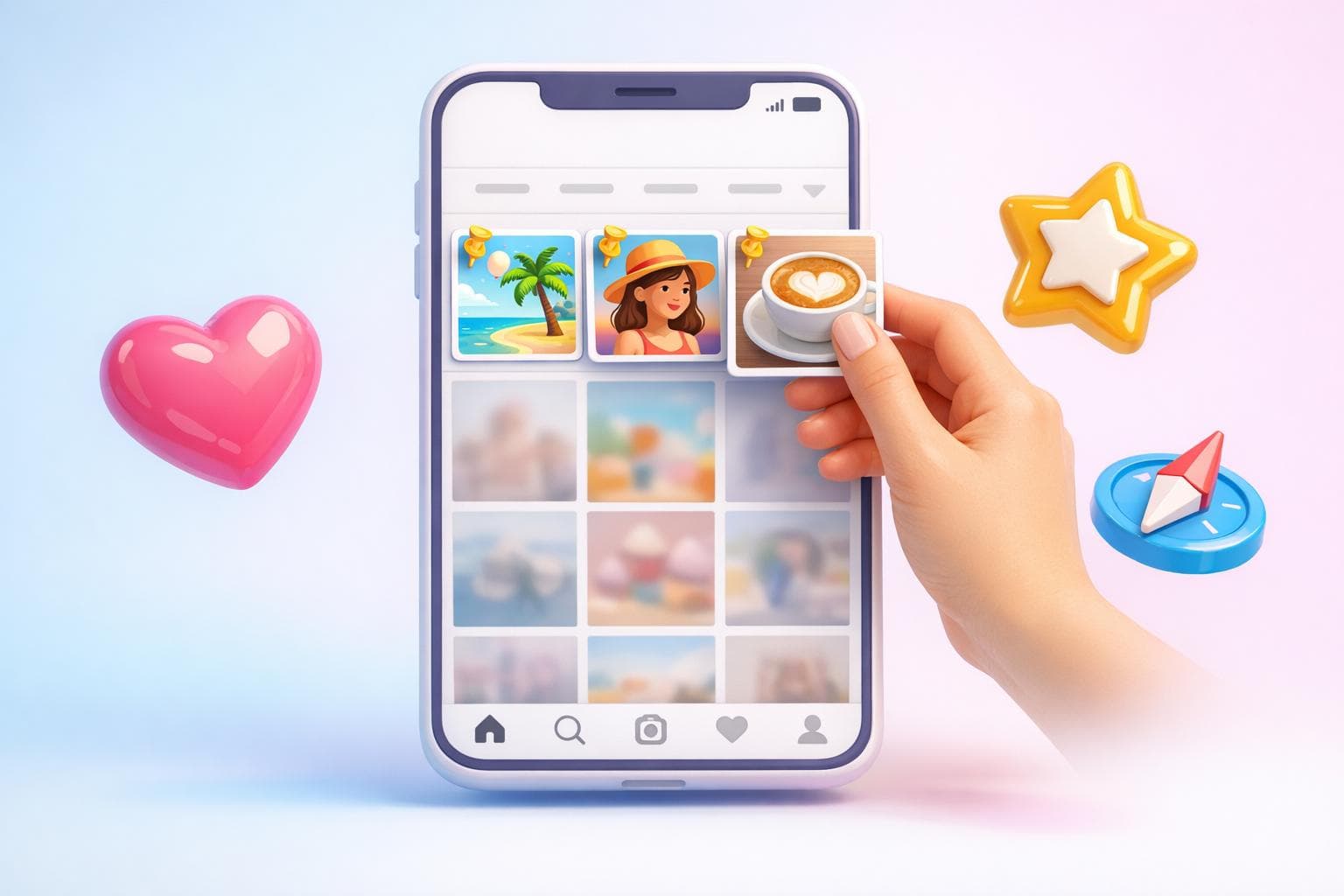
Instagram pinned posts let you highlight up to three specific posts at the top of your profile grid. This feature, launched in June 2022, ensures important content stays visible, no matter when it was originally shared. Pinned posts are marked with a small white pin icon and allow you to showcase photos, videos, carousels, or Reels - but not Stories or Highlights.
Key Benefits of Pinned Posts:
- Visibility: Keep essential content at the top of your profile.
- Control: Choose what visitors see first.
- Versatility: Pin posts with offers, testimonials, or brand messages.
- Engagement: Use calls-to-action to drive clicks or conversions.
To pin a post, go to your profile, tap the three dots on the post, and select "Pin to your profile." You can also pin comments to highlight specific feedback. Managing pinned posts is simple - you can unpin or replace them anytime.
Use pinned posts strategically to showcase your best-performing content, maintain a visually consistent profile grid, and guide visitors through your brand's story.
Instagram Pinned Posts: 3 strategies to optimize your Instagram profile
What Are Instagram Pinned Posts?
Instagram pinned posts are specific pieces of content - whether they’re images, Reels, or carousels - that stay locked at the very top of your profile grid, no matter when you originally shared them. Think of this space as prime digital real estate, sitting right beneath your bio and Story Highlights.
You can pin up to three posts at a time, giving you control over what visitors notice first when they check out your profile. As Adam Mosseri, Head of Instagram, puts it: "Your profile is your space, so we're looking for more ways to give you control over that experience."
How Pinned Posts Work
When you pin a post, it automatically moves to the top of your profile grid. The most recent pinned post takes the top-left spot, while older pinned posts follow to the right. Unpinning a post simply sends it back to its original place in your feed, based on when it was first published.
Pinned posts are marked with a small white pin icon in the upper-right corner, making them easy to spot. You can pin single images, videos, multi-image carousels, main feed Reels, and collaboration posts. However, Stories, Live videos, and Profile Highlights can’t be pinned.
This feature is available through the Instagram mobile app on both iOS and Android, but it’s not accessible on desktop computers.
By organizing your profile this way, you can highlight key content to increase Instagram engagement.
Why Use Pinned Posts
Pinned posts are a great way to spotlight your best content, share important updates, or reinforce your brand message. They help ensure that your profile makes a strong first impression on new visitors.
"Pinned posts function as digital billboards that showcase your most important content, announcements, or value propositions to every profile visitor." - PostNext
Here’s a quick comparison of pinned posts versus regular posts:
| Feature | Pinned Posts | Regular Posts |
|---|---|---|
| Position | Fixed at the top | Moves down with new content |
| Order | Based on pinning sequence | Strictly chronological |
| Impact | High; grabs attention instantly | Decreases over time |
| Quantity | Limited to 3 | Unlimited |
| Purpose | Highlights key content | Serves as daily updates |
How to Pin and Manage Posts on Instagram
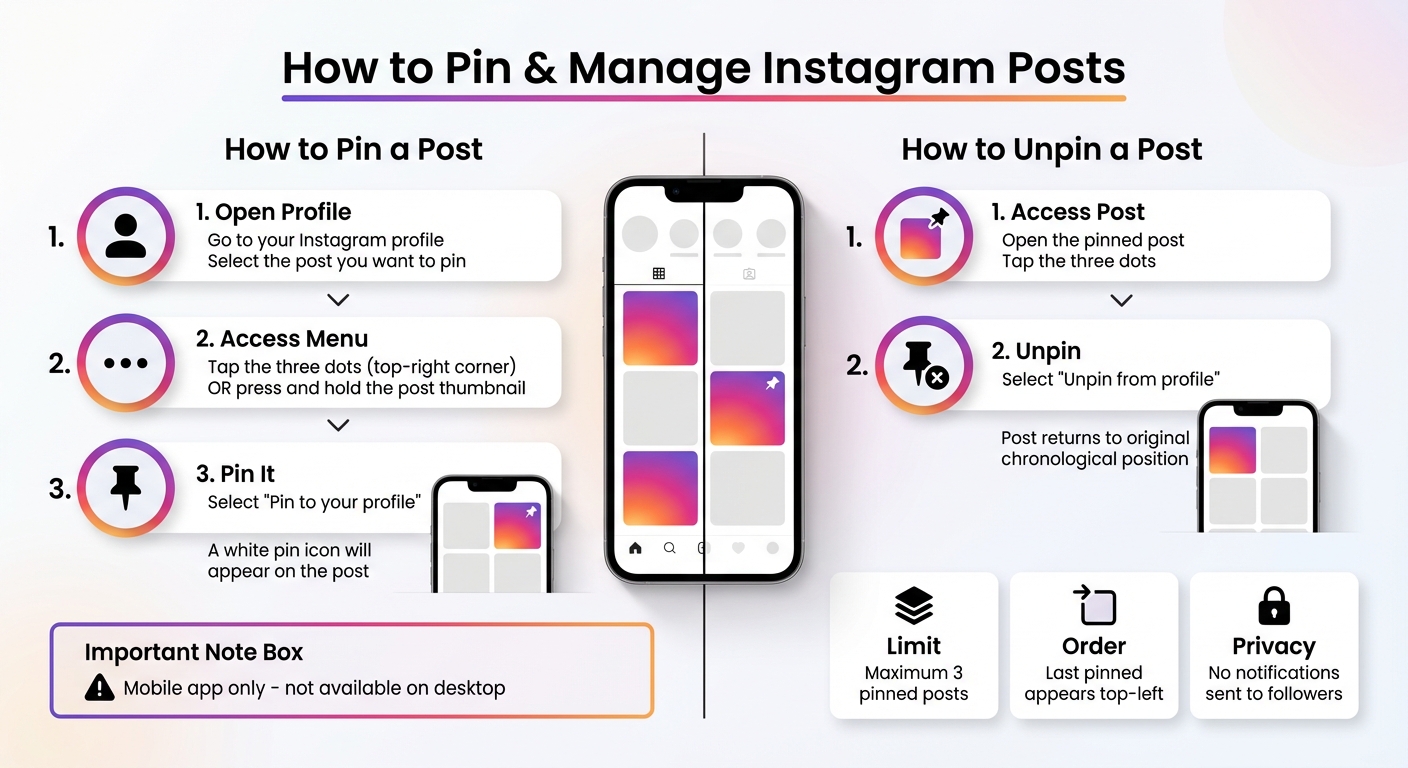
How to Pin and Manage Instagram Posts: Step-by-Step Guide
How to Pin a Post
To pin a post on Instagram, open the app, head to your profile, and select the post you want to pin. Tap the three dots in the top-right corner and choose "Pin to your profile." Alternatively, you can press and hold the post's thumbnail to access the pin option directly.
Keep in mind that this feature is only available through the Instagram mobile app - pinning posts isn't supported on the desktop version. Once you've pinned a post, a small white pin icon will appear in the top-right corner of the post's thumbnail.
How to Replace or Remove Pinned Posts
Managing your pinned posts is just as easy. To unpin a post, open it, tap the three dots, and select "Unpin from profile." Alternatively, you can press and hold the pinned post's thumbnail on your grid and choose "Unpin from profile" from the pop-up menu.
When you unpin a post, it returns to its original spot in your grid based on the date it was first published. It’s worth noting that followers aren’t notified when you pin or unpin a post, and unpinned posts won’t reappear in their feeds.
If you’ve already pinned three posts and try to add a fourth, Instagram will notify you with a "Pin limit reached" message. You can tap "Confirm" to replace the oldest pinned post automatically. If you'd prefer to decide which post gets replaced, unpin one of your current posts before pinning the new one.
Instagram doesn’t currently allow you to rearrange pinned posts with a drag-and-drop feature. To change their order, you’ll need to unpin all three posts and then re-pin them in your desired order. The last post you pin will always appear in the top-left corner of your profile grid, helping you maintain a consistent Instagram aesthetic.
Best Ways to Use Pinned Posts
Pin Your Best-Performing Content
Showcase your most engaging and timeless posts to strengthen your brand’s image and establish trust. Highlight content that consistently resonates with your audience, such as brand introductions, detailed guides, or FAQs. These posts not only provide value but also help new visitors quickly grasp what your brand is all about.
Make it a habit to refresh your pinned posts regularly - whether monthly or whenever your priorities shift. This keeps your profile dynamic and aligned with your current goals.
Maintain Visual Consistency
Your pinned posts are often the first thing visitors see, so they should work together to tell a unified visual story. Since these posts appear side-by-side at the top of your grid, choose images that complement each other in terms of color, design, and style. Think of them as a mini-gallery that showcases your brand’s personality at a glance.
"Pinned posts leverage the psychological primacy effect, where first-seen information disproportionately influences overall perception." – PostNext
Also, keep in mind that the order of your pinned posts matters. The most recently pinned post will appear on the far left, which is where people naturally look first. Use this space wisely by placing your strongest visual or most important message in that spot.
Add Calls-to-Action in Pinned Posts
Turn your pinned posts into action drivers by including clear calls-to-action. For example, you could use phrases like "Shop our new collection now", "Click the link in bio to learn more", or "Join our email list today." These simple prompts can transform your pinned content into powerful tools for engagement and conversion.
Tailor your pinned posts to match your goals. If you’re launching a product, pin a post that highlights it to boost sales. Want to build trust? Pin a customer review. Need to reduce repetitive questions? Use an educational carousel to address FAQs. Whether your focus is on brand awareness, lead generation, or closing sales, make sure your pinned content aligns with your current objectives.
These strategies will help you make a lasting impression and set the foundation for further growth.
sbb-itb-3c55afb
Using Pinned Posts to Tell a Story
Take your pinned posts strategy to the next level by using them to share your brand story in a way that feels engaging and memorable.
Create a Sequence With Your 3 Pinned Posts
Think of your three pinned posts as chapters of a story that guide visitors through your brand's journey. For example, a skincare brand might showcase a three-step routine with posts titled "Cleanse", "Tone", and "Moisturize." A business coach could focus on themes like "Goal Setting", "Productivity", and "Work-Life Balance" to highlight their expertise and approach.
Here’s a pro tip: Instagram displays the most recently pinned post on the far left. To create a natural left-to-right flow, pin your posts in reverse order. Start with the post meant for the rightmost position, then pin the middle, and finally the leftmost one.
This strategy works across different industries. An interior designer might pin an "About Me" post, followed by their "Proudest Project", and end with "Who I Work With." Similarly, Airbnb hosts could highlight a "Property Introduction", move to a "Guest Review", and finish with "Local Activities". The idea is to lead visitors through a compelling narrative that encourages them to dive deeper into your content or take action.
Once your story flow is in place, amplify its impact by incorporating real customer voices.
Pin Customer Reviews and User Content
Showcasing testimonials and user-generated content can instantly boost credibility and trust. This approach taps into the primacy effect, where the first things people see leave a lasting impression.
"The sequential order of your pinned posts can guide visitors through a narrative, making your profile more interactive and encouraging people to explore your content more deeply." – RBOA
To maximize impact, pin reviews or user posts that already have strong engagement - likes and comments act as social proof for new visitors. Add clear calls-to-action, like "Shop our best-sellers" or "Link in bio", to turn that trust into meaningful actions.
Tools to Grow Your Instagram Profile
Pinned posts are great for showcasing your standout content, but to make the most of them, you need tools that help the right audience find you. Growth tools are key to attracting authentic followers and increasing engagement on your top posts.
How UpGrow Can Boost Your Instagram Growth
UpGrow combines AI-driven targeting with human expertise to help you grow your Instagram organically. Since 2016, it has supported over 100,000 users and boasts an impressive 4.98/5 rating from more than 58,000 reviews.
With its Smart Auto Targeting, UpGrow filters followers based on factors like location, age, gender, language, interests, and hashtags. This ensures your pinned posts reach the most engaged audience possible. Early users of the UpGrow Boost™ feature saw a 275% increase in followers and grew 10 times faster compared to traditional methods [14,16].
UpGrow also offers a real-time analytics dashboard to track which posts drive the most engagement. Plus, its AI Profile Optimization tool suggests ways to enhance your profile grid for maximum impact.
For those who prefer a hands-off approach, the Turbo plan ($129/month) includes a dedicated Instagram Manager, tailored content strategies, active community engagement, and access to a Viral Content Library filled with trending ideas. If you're just starting, plans begin at $39/month and come with a Growth-Guarantee.
Conclusion
Instagram pinned posts act like digital billboards, showcasing your most important content and shaping that all-important first impression. They can spotlight key updates, answer FAQs, feature glowing customer reviews, or guide visitors through a carefully crafted journey that encourages action.
Think of your pinned posts as tools to boost engagement. Highlight content that's already performing well to work with the Instagram algorithm, include clear calls-to-action to encourage clicks or conversions, and update your selections regularly to keep your profile fresh. Whether you're using an FAQ carousel to cut down on direct messages or sharing user-generated content to build trust, pinned posts help reinforce your brand's message and purpose.
But even the best-pinned posts need the right audience to thrive. That’s where growth tools come into play. Platforms like UpGrow combine AI-driven targeting with expert strategies to ensure your curated content reaches followers who are genuinely interested - all while staying compliant with Instagram’s guidelines.
Don’t let those three pinned slots go to waste. Use them strategically to turn curious visitors into loyal, engaged followers. They’re some of the most valuable real estate your profile has to offer.
FAQs
How can pinned posts improve engagement on Instagram?
Pinned posts are a powerful way to boost engagement on Instagram by keeping your most important content front and center. Think of them as digital spotlights, showcasing key announcements, promotions, or messages you want every visitor to notice first. This approach not only leaves a strong impression but also encourages more likes, comments, and shares over time.
When used strategically, pinned posts can steer visitors toward content that supports your goals - whether it’s increasing followers, spotlighting a product, or driving traffic to your website. They allow you to shape the story of your profile, ensuring your most valuable content gets the attention it deserves while amplifying engagement and strengthening your brand’s voice.
How can I change the order of my pinned posts on Instagram?
If you want to rearrange the order of your pinned posts on Instagram, the process is simple. All you need to do is unpin the posts and then pin them again in the sequence you want. Instagram organizes pinned posts based on the most recent pinning, so this lets you customize the appearance of your profile with ease. It’s a fast and hassle-free way to control how your content is displayed to visitors.
What kind of content works best for Instagram pinned posts?
Instagram pinned posts are a great way to highlight important content you want visitors to notice right away. These posts could include:
- Major announcements, like new product launches or updates
- Timeless content that remains relevant no matter when someone visits
- Posts that define your brand, showcasing your values or unique story
- Promotions, such as sales, events, or special offers
Pinning the right posts lets you control first impressions, encourage engagement, and direct visitors toward actions like following your account or exploring your profile further.
Related Blog Posts
- Instagram’s Extended 3-Minute Reels: How to Increase Your Engagement
- How to Turn on Instagram’s New Content Tagging: A Hack to Dominate Niche Markets Fast
- How to Schedule Instagram Posts & Reels for FREE in 2025 (Using Meta Business Suite)
- Pin-It-and-Win-It: Keeping Promo Codes Visible with Instagram’s New Pinned Messages