
Ultimate Guide to AI Visual Effects for Instagram
Use AI visual effects to create attention-grabbing Instagram Reels, Stories, and posts with tools, workflows, and growth tactics.
Use AI visual effects to create attention-grabbing Instagram Reels, Stories, and posts with tools, workflows, and growth tactics.
4.98 /5 - from 58k reviews
Trusted by 50,000+ creators — get real engagement delivered to your profile in minutes, not days.
AI visual effects make creating striking Instagram content easier and faster. These tools let you design effects like background removal, face tracking, or generative edits by simply describing what you want. This technology is perfect for Reels, Stories, and posts, helping creators grab attention and boost engagement in seconds. This is a vital part of any marketing on Instagram strategy.
AI tools simplify video production, letting creators focus on their ideas while achieving polished, professional results.
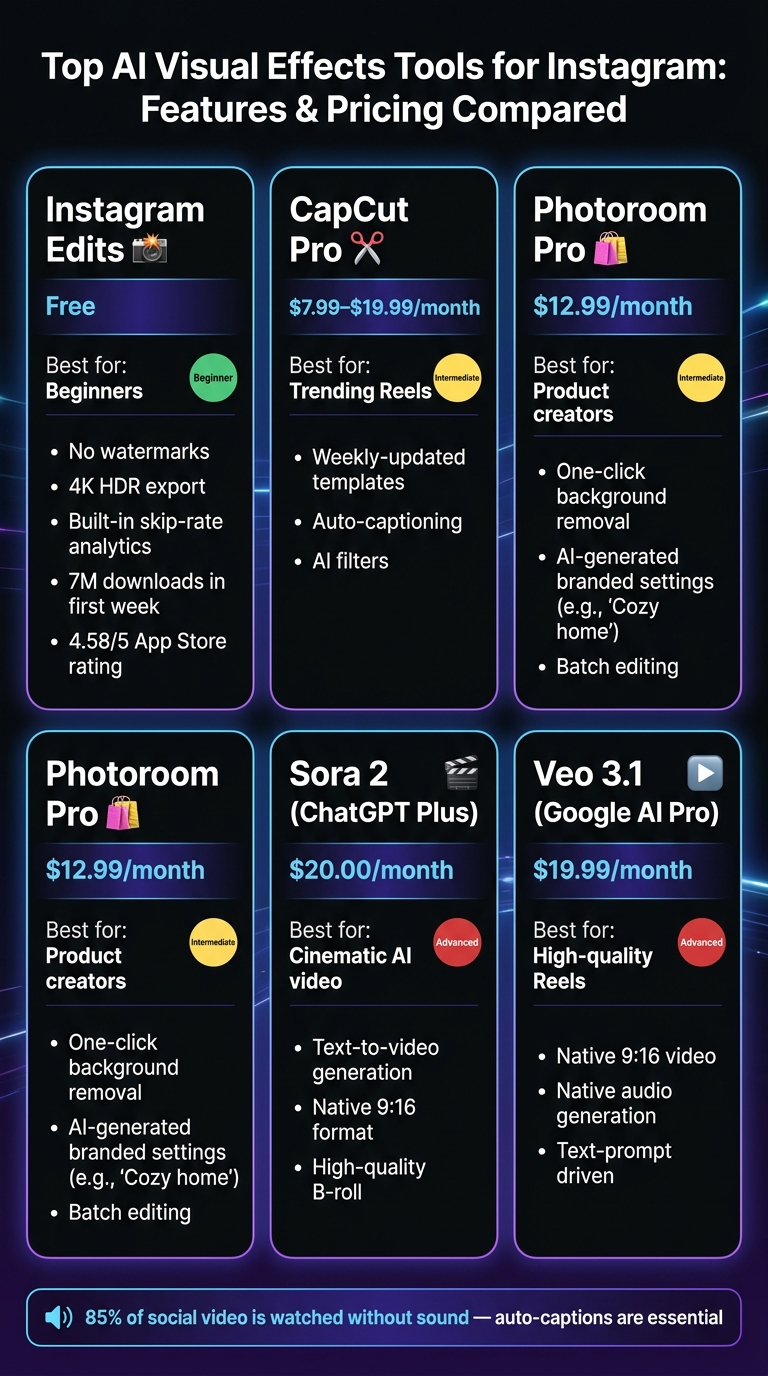
Top AI Visual Effects Tools for Instagram: Features & Pricing Compared
Knowing the core techniques can help you choose the right approach for each post. For example, background removal (automated compositing) lets you instantly remove or replace backgrounds, perfect for clean product shots or travel photos. Generative Expand is another handy tool - it extends your image outward, allowing you to fill a 9:16 Reel frame from a square photo without awkward cropping.
Face tracking overlays are a game-changer, attaching masks, glowing effects, or animated text directly to a subject's face, seamlessly following every movement. Then there's auto-captioning, which automatically syncs text to speech. This is especially important since about 85% of social video is watched without sound. Pair this with AI-detected beat markers to align cuts with music for visually engaging, high-retention Reels.
"AI VFX is not one thing... it democratizes visual effects for short-form content, social media, and marketing videos." - vibeeffect.ai
To make the most of these techniques, you'll need the right tools, each suited for different creative goals.
The market offers a variety of AI tools to suit different needs and budgets. Instagram Edits is a standout free option, offering no watermarks, 4K HDR export, and built-in skip-rate analytics. It’s wildly popular, with 7 million downloads in its first week, reaching the #1 spot in 25 countries, and earning a 4.58/5 rating on the App Store.
For creators focusing on viral Reels, CapCut is a favorite, thanks to its weekly-updated trending templates and robust auto-captioning features. Photoroom is another excellent choice for product creators, providing one-click background removal and AI-generated branded settings like “Cozy home” scenes. For more cinematic, high-quality B-roll, tools like Sora 2 (available via ChatGPT Plus for $20/month) and Veo 3.1 (available via Google AI Pro for $19.99/month) can generate native 9:16 video from text prompts.
| Tool | Monthly Cost | Best For |
|---|---|---|
| Instagram Edits | Free | Beginners, native analytics, no watermarks |
| CapCut Pro | $7.99–$19.99 | Trending Reels templates, auto-captions |
| Photoroom Pro | $12.99 | Product backgrounds, batch editing |
| Sora 2 (ChatGPT Plus) | $20.00 | Cinematic AI video from text prompts |
| Veo 3.1 (Google AI Pro) | $19.99 | High-quality 9:16 Reels with native audio |
Once you understand what these tools offer, picking one that matches your experience level is the next step. Beginners might gravitate toward Instagram Edits or the free version of CapCut, which provide essential features like templates, auto-captions, and watermark-free exports. For talking-head videos, Instagram Edits also helps with teleprompting and silence removal, making retakes less of a hassle.
Intermediate creators looking for more control might opt for Lightroom Mobile, which offers AI masking and color grading, or upgrade to CapCut Pro for its expanded AI filter options. Advanced editors working on professional campaigns can explore tools like Adobe Photoshop's Generative Fill for precise object manipulation or Runway for more intricate compositing tasks. As Aisha Owolabi, Content Marketing Manager at Photoroom, explains: "While AI is no replacement for human authenticity and creativity, it can certainly help augment it."
With these tools in your arsenal, you’re better equipped to create Instagram content that resonates with your audience and aligns with your brand. To jumpstart your visibility, you can also get free Instagram followers to build social proof alongside your new visual style.
Start by defining the goals of your Instagram posts - whether you want to drive shares, spark direct messages, or establish yourself as an authority in your niche. Your objective will determine which visual effects work best. For instance, a finance-focused account may thrive with clean, minimal designs, while a travel or lifestyle brand could benefit from vivid, high-saturation visuals.
A popular strategy among professional creators is the "Reference-First" pipeline. Here’s how it works: dedicate about 70% of your pre-production time to crafting a "Master Reference Image." This image should capture your brand's visual identity - its lighting, color palette, wardrobe, and setting. Once finalized, use this image as a guiding reference for all AI-generated content, ensuring a consistent look across different tools and formats.
"The goal is no longer just to generate a video, but to engineer a visual experience that aligns with high-end brand identities." - Hailuo AI
With your brand's visual style locked in, you can focus on creating reels that grab attention right from the start.
Once your brand goals are clear, structuring your reel becomes the next priority. A simple three-part framework can help: start with a 0–3 second hook, follow with a 3–25 second value segment, and finish with a clear call to action. Use an eye-catching AI effect right at the beginning to captivate viewers. Early engagement is critical - if people scroll past your reel within the first few seconds, Instagram’s algorithm will limit its reach.
Keep your reels between 7 and 15 seconds whenever possible, as Instagram prioritizes completion rates when ranking content. For longer stories, break them into 4-to-6-second micro-scenes (e.g., hook → context → reveal) instead of cramming everything into one continuous clip. Posting 4 or more reels per week can accelerate follower growth by 35% compared to accounts that stick to static feed posts.
Good preparation is the backbone of high-quality AI-enhanced content. The better your input, the stronger your output. Always shoot in 9:16 aspect ratio with a resolution of 1080 x 1920 pixels, and aim for simple, uncluttered backgrounds. Busy scenes can introduce noise, leading to blurry visuals or unwanted artifacts.
| Specification | Requirement |
|---|---|
| Aspect Ratio | 9:16 (Vertical) |
| Resolution | 1080 x 1920 pixels |
| File Format | MP4 or MOV |
| Codec | H.264 |
| Frame Rate | 30 FPS (standard) or 24 FPS (cinematic) |
For seamless scene transitions, try the "Last Frame" technique: take the final frame of one AI-generated clip and use it as the starting reference for the next clip. This method creates smooth, cohesive visuals without abrupt changes. Creator Jacob Burke applied a similar approach with a HeyGen digital twin, recording a 5-minute sample to replicate his likeness. This strategy helped him grow his Instagram following from 60 to over 23,000 in just 30 days.
"The most successful creators treat AI not as a 'magic button,' but as a highly sophisticated Virtual Studio." - Hailuo AI
Once you've crafted your AI-enhanced visuals, the next step is getting them in front of the right audience. UpGrow helps your creative work go further by ensuring your AI-powered Reels reach viewers who are genuinely interested in your niche, rather than just racking up passive views.
Start with a striking AI-enhanced clip, refine your caption and hashtags, and let UpGrow's Smart AI-Targeting do the rest. This feature allows you to pinpoint your audience based on location, demographics, language, and interests. For instance, if you're a U.S.-based fashion creator showcasing surreal AI transitions, you could target English-speaking users in major metro areas who already engage with fashion or Reels content. This approach not only increases views but also boosts meaningful engagement. It’s a perfect combination of creative innovation and precise audience targeting.
To take things up a notch, UpGrow's Boost™ tool uses pattern recognition to amplify high-performing posts. Beta users have reported a 275% increase in monthly followers after using this feature. The key to making the most of this tool lies in starting with visually captivating content - exactly what polished AI visual effects deliver.
Once your AI-enhanced content is live, UpGrow's real-time dashboard lets you track its performance instantly. You can monitor follower growth, profile visits, and engagement metrics as they happen.
A smart tactic is to test your content: publish one Reel with standard editing and another with AI-enhanced visuals, then compare their performance using UpGrow's dashboard. Pay attention to metrics like saves, shares, watch time, and profile visits - these are the factors the Instagram algorithm currently favors for Reels distribution. Additionally, UpGrow provides downloadable PDF reports, making it easy to keep a long-term record of what works and refine your strategy accordingly.
"Track your growth in real-time with our award-winning dashboard." - UpGrow
UpGrow's Viral Content Library is a treasure trove for creators looking to identify trending visual styles in their niche. It highlights popular post formats, templates, and visual patterns, giving you a data-driven edge instead of relying on guesswork.
The idea isn’t to copy trends outright but to uncover repeatable elements - like pacing, color grading, transition timing, or text placement - that consistently drive engagement. For example, you might notice that quick before-and-after reveals or high-contrast cinematic effects resonate better with your audience than overly stylized animations. Incorporate these insights into your AI workflow to refine your style and strengthen your brand identity. Over time, this transforms creative experimentation into a reliable system for producing engaging content.
"In just 3 months, we've gained over 20,000+ new followers - all potential customers!" - Jennifer Khan
With a 4.98 out of 5 rating from over 58,000 reviews, UpGrow is widely praised for delivering real, organic follower growth. Plans start at $39/month, and you can try it for free - no credit card required.
Once your production process is in place, focus on refining it by analyzing essential Instagram metrics. Platforms like Instagram reward content that drives DM shares, saves, and high watch-time completion rates - not just likes. To gauge effectiveness, check post performance about 48 hours after publishing and identify what worked.
Key benchmarks include a 5–8% save rate and a 3–5% share rate relative to your post's reach. Additionally, achieving a watch-time completion rate above 70% can significantly boost the distribution of your Reels. If a post doesn’t perform well, don’t scrap it entirely. Instead, use AI inpainting to tweak specific elements like the background, color scheme, or transitions. This approach helps refine your visual style while staying aligned with your brand’s goals.
When experimenting with different visual styles - say, surreal versus photorealistic - keep your brand identity intact by using fixed prompt blocks for elements like lighting, color, and character. Only adjust the variable components to test new ideas.
Meta now labels AI-generated content with "Made with AI" tags, so it’s a good idea to add your own disclosure. A simple note like "Visuals created with AI tools; concept and edit by me" ensures compliance.
"Identifying as an AI creator will not impact how Instagram's recommendations algorithm will distribute their content across the platform." - Jay Kim, Miraflow AI
For commercial content, use AI platforms that clearly outline licensing terms to avoid intellectual property disputes. It’s also smart to keep a record of your prompts and export timestamps. This log can serve as proof of your original contributions if any rights issues arise. One non-negotiable rule? Never use prompts involving celebrity likenesses or competitor logos.
A structured workflow is essential for scaling AI-driven content production effectively. By streamlining your process, you can cut production time by 60–70% and post 3× to 5× more frequently. Maintaining a cohesive visual identity can also improve audience retention by 18% and boost engagement by up to 23%.
To maximize efficiency, batch-produce content in sessions. For example, create 3 feed posts, 2 Reels, and 1 carousel at a time using a fixed prompt formula: Subject Identity, Setting, Camera/Composition, Lighting/Mood, and Platform Intent. Stick to 3–5 recurring themes, such as educational tips, behind-the-scenes content, or product showcases, to keep your feed engaging yet organized.
"The winning approach for AI content on Instagram is using AI to handle the production while you bring the ideas, perspective, and value." - Jay Kim, Miraflow AI
Store and organize all assets in a single folder to maintain consistency across your posts. These strategies will help you scale your AI-enhanced content while staying true to your brand’s vision and growth objectives.
The most effective AI effects will vary depending on your niche and what you're trying to achieve. If your goal is discovery and engagement, go for eye-catching effects like reality glitches or neon edges - these are perfect for grabbing attention quickly. For conversions, stick to polished edits such as subtle crossfades and professional color grading, which create a more refined and trustworthy look. Want to build a sense of connection? Use personality-driven effects like talking-head captions to make your content feel more relatable. In beauty and lifestyle niches, practical effects like hairstyle or makeup changers can encourage saves and boost interactions.
To maintain a consistent look for your brand, stick to reusable prompt structures. Use the same subject type and consistently apply 3–5 style modifiers. Stick with a specific color palette and lighting style - like warm studio light or golden hour. Define your composition clearly, such as focusing on a clean subject, using the rule of thirds or centering, and avoiding clutter. Also, specify the mood you want to convey.
Here’s an example prompt: “[subject] in [setting], [composition], [lighting], [color palette], [mood], [style].” Following this formula ensures your visuals feel cohesive across all your posts.
Track engagement metrics to understand how your Reels are performing. Focus on key indicators like 3-second views to measure how well your content grabs attention, and completion rate or average watch time to see if viewers stick around until the end. Pay attention to replays, saves, and shares to gauge how much your audience values the content.
For a more detailed analysis, try publishing identical Reels with only the AI effects changed, then compare these key performance indicators (KPIs). Additionally, keep an eye on follows per reach to determine if your effects are turning viewer interest into new followers.


