
Ultimate Guide to AI Art for Instagram
Create and scale AI-generated visuals for Instagram—tools, formats, engagement tips, workflows, and ethics for creators and brands.
Create and scale AI-generated visuals for Instagram—tools, formats, engagement tips, workflows, and ethics for creators and brands.
4.98 /5 - from 58k reviews
Trusted by 50,000+ creators — get real engagement delivered to your profile in minutes, not days.
AI art is transforming Instagram with tools that create stunning visuals in seconds. From stylized portraits to synthetic photography, creators and businesses are using AI to boost engagement and streamline content production. Here's what you need to know:
Whether you're an influencer, a brand, or a solo creator, AI art can simplify your workflow and enhance your Instagram presence.
AI-generated art refers to digital creations made using artificial intelligence, specifically neural networks and deep learning algorithms. These systems are trained to interpret text prompts or analyze existing images, which they then use to produce entirely new visuals. The process often relies on diffusion models to transform random noise into coherent images and transformers to decode intricate prompts.
The process is simple: you provide a descriptive text prompt - detailing aspects like the subject, style, color palette, and lighting - and the AI generates multiple iterations. You can further refine the results using techniques like "inpainting" (editing specific areas) or "outpainting" (extending the image). For example, typing "oil painting of a sunset over mountains in impressionist style" can yield a polished image in seconds.
This technology is perfectly aligned with Instagram's rapid and visually driven nature, making it an ideal tool for creators.
AI art thrives on Instagram because of its ability to produce professional-quality visuals almost instantly. This speed helps creators stick to a consistent posting schedule, which is essential for staying in sync with Instagram's algorithm. Plus, it's a budget-friendly option compared to hiring designers or purchasing stock images, making it a practical choice for individual creators and small businesses.
Another key advantage is the level of customization. AI art tools can align with specific visual trends, adapt to a brand's color palette, and create content that resonates with Instagram's aesthetic standards. As Calli Zarpas from Skillshare explains:
"Combining the power of human creativity and artificial intelligence can help artists generate unique and unexpected ideas and enhance their creative expression".
AI art’s flexibility has led to the rise of several popular trends on Instagram.
Stylized portraits are a standout favorite, with apps like Lensa leading the way. These tools transform selfies into anime characters, futuristic personas, or even fairy-tale-inspired figures, creating highly shareable content that boosts engagement.
Another growing trend is synthetic photography. Platforms like Leonardo.Ai generate hyper-realistic images for fashion or product design that are nearly indistinguishable from professional photos. Generative animation is also gaining momentum, with creators using tools like Runway Gen-2 to craft short animated clips and dynamic videos for Instagram Reels.
Lastly, style transfer remains a perennial favorite. This feature lets users apply iconic art styles - such as watercolor, impressionism, or cubism - to their photos, adding a creative twist to everyday images.
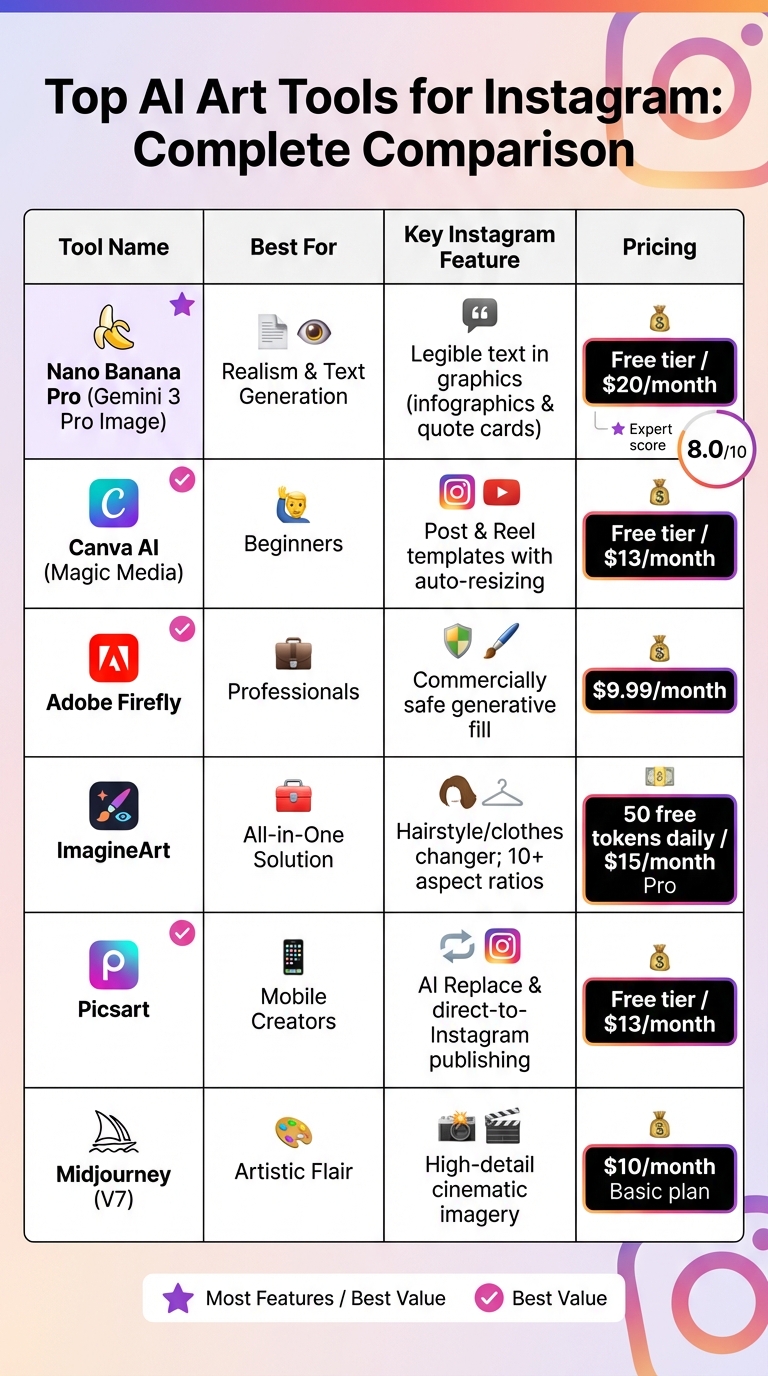
AI Art Tools for Instagram: Features and Pricing Comparison
Nano Banana Pro (Gemini 3 Pro Image) is known for its impressive character consistency and photorealistic results, earning an expert score of 8.0/10. One of its standout features is the ability to generate clear, legible text within images, making it perfect for Instagram infographics and quote cards. As Katelyn Chedraoui from CNET puts it:
"Nano banana pro is the best program for generating text in images, like infographics... it's miles ahead of any other AI image generator".
Canva AI (Magic Media) is a go-to tool for transforming simple prompts into Instagram-ready content. Whether it's posts, Reels covers, or carousels, Canva AI offers built-in brand kits and automatic resizing for formats like square 1:1 posts or vertical 9:16 Reels. Pricing starts at $13/month, and there's a free tier for those just starting out.
Midjourney (V7) delivers cinematic, highly detailed imagery, making it an excellent choice for creators who want stylized and visually striking content. Subscriptions begin at $10/month for the Basic plan.
ImagineArt provides a comprehensive suite tailored for Instagram. It includes tools like an AI hairstyle changer, clothes changer, and support for more than 10 aspect ratios. Saba Sohail, a SaaS Marketing Specialist at ImagineArt, highlights its collaborative features:
"ImagineArt truly stands out in Instagram content creation because of its team collaboration features and node-based workflow".
The platform offers 50 free tokens daily, with Pro plans starting at $15/month.
Some platforms go beyond creation, offering tools to refine content and publish directly to Instagram.
Picsart combines AI-powered generation with a vast library of stickers and fonts, plus an "AI Replace" option that lets you swap objects in images seamlessly. With direct-to-Instagram publishing, you can create, edit, and post without switching apps. Membership starts at $13/month, and a free tier is also available.
Adobe Firefly is a favorite among professionals who need content that's "commercially safe." Since it's trained exclusively on licensed Adobe Stock images, it's perfect for those concerned with copyright issues. Integrated with Photoshop and Illustrator, it includes advanced tools like generative fill and text effects. Plans start at $9.99/month.
Zebracat focuses on video content, turning text prompts or blog posts into Instagram Reels complete with AI-generated voiceovers, music, and captions. This is especially useful given Instagram's heavy focus on short-form video.
| Tool | Best For | Instagram Feature | Pricing |
|---|---|---|---|
| Nano Banana Pro | Realism & Text | Legible text in graphics | Free / $20/mo |
| Canva AI | Beginners | Post & Reel templates | Free / $13/mo |
| Adobe Firefly | Professionals | Commercially safe generative fill | $9.99/mo |
| ImagineArt | All-in-One | Hairstyle/clothes changer; 10+ ratios | Free / $15/mo |
| Picsart | Mobile Creators | AI Replace & direct publishing | Free / $13/mo |
| Midjourney | Artistic Flair | High-detail creative imagery | $10/mo |
Whether you're a beginner, professional, or content creator with specific needs, there's an AI tool to match your goals. Canva's templates are great for newcomers, Adobe Firefly is ideal for those needing licensed materials, and Nano Banana Pro shines for anyone prioritizing text clarity in their Instagram graphics.
Grabbing attention on Instagram starts with capturing users' interest within the first 3 seconds. Quick motion or a bold visual reveal is key to making someone pause their scroll. For static posts, go with vertical images - they take up more screen space and stand out.
Stick to a consistent style so your account becomes instantly recognizable. Whether you're into cubism, impressionism, or futuristic designs, this consistency helps build your brand. Posts that invite interaction, like "Version 1 vs. Version 2" comparisons, naturally encourage comments and engagement.
Carousels are a great way to tell a story. Start with a short, looping video of your art to grab attention, followed by static images and even the specific prompts you used to create your piece. Sharing your creative process, including AI-generated "fails" or earlier iterations, makes your content feel more relatable and shareable.
Formatting matters - vertical orientation is a must. Instagram's algorithm tends to favor this format. Carousels and Reels also outperform single-image posts in terms of visibility, so focus on these formats.
For Reels, aim for seamless loops that restart without users noticing. This can boost watch time, signaling to the algorithm that your content is worth promoting. Use AI tools to resize your art to fit Instagram's preferred dimensions for a polished look.
Don't forget to include ALT text that describes your AI artwork. This not only improves accessibility but also signals content quality to Instagram.
Instagram allows up to 30 hashtags per post, but quality beats quantity. Depending on your goal, use 3–5 specific hashtags for niche visibility or go for 20–30 to reach a broader audience. Be precise - hashtags like #abstractimpressionism are far more effective than generic ones like #art.
The first 30 minutes after posting are crucial. During this period, Instagram tests your post with a small group of users, and their reactions determine how widely your post gets shown. Replying to the first few comments within 3 minutes can further boost engagement.
Use features like "Add Yours" stickers in Reels to kick off challenges that encourage organic participation. Collaborative posts now allow up to four co-authors, which can dramatically expand your reach. For an extra push, post a teaser Story just a few minutes before your main feed post. This helps Instagram show your new post to those who've recently interacted with your Stories.
These techniques can help you grow your Instagram presence while showcasing your AI art in ways that resonate with your audience.
Creating Instagram content in batches can save you hours of work. With AI tools, you can generate weeks' worth of posts in one go, crafting multiple versions from a single idea. Think different visuals, captions, and hashtags - all tailored to see what clicks with your audience.
Modern AI platforms make this process even smoother by integrating all your creative tasks. For example, ImagineArt (starting at $15/month) combines campaign planning, image generation, video editing, and voiceover creation into one tool. These platforms handle the repetitive stuff, leaving you free to focus on storytelling.
AI also makes repurposing content a breeze. A blog post can transform into a short-form Reel, and one AI-generated image can adapt for Stories, Carousels, or feed posts. Smart scheduling tools take it further by analyzing audience data to recommend the best posting times. They can even recycle evergreen content that performed well. This approach not only saves time but also helps build a cohesive and recognizable brand presence.
Consistency is key to building recognition on Instagram. Tools like Canva Pro ($15/month) and Holo ($19/month) help maintain a unified look by storing your brand's logos, fonts, and colors. Holo can even scan your website to learn your brand's voice and style, applying it to new posts automatically.
When batch-creating content, the secret to staying on-brand lies in your prompts. Be specific about your desired artistic style, color scheme, lighting, and mood to ensure your visuals align with your brand. If an AI-generated image doesn’t hit the mark, refining the prompt and regenerating it is usually faster than manual adjustments. This approach ensures your content stands out on Instagram’s highly visual platform.
For fine-tuning, tools like Adobe Firefly ($9.99/month) offer features like generative fills, allowing you to tweak specific elements in batch-created images without starting from scratch. Quick edits to captions and visuals can also prevent your content from feeling too generic, keeping your audience engaged and interested.
Using a mix of AI tools can turn your content creation into a seamless production line. For instance, you can rely on ChatGPT Plus for captions, Midjourney for artwork, and Buffer for scheduling. This combination ensures your workflow moves smoothly from idea to publication.
AI hashtag generators add another layer of precision, helping you find niche tags that match your image content. This makes your posts more targeted and effective compared to generic hashtags. For video content, tools like Zebracat and Lumen5 can transform text scripts into polished Reels, complete with AI voiceovers and music. These tools are perfect for scaling your video output without compromising quality.
Once your content is live, growth tools can help expand your reach. UpGrow, an AI-powered Instagram growth service, uses smart targeting and real-time analytics to connect your posts with the right audience. Starting at $39/month, it guarantees growth by helping you gain engaged, organic followers. By combining these tools, you create a workflow that’s efficient, creative, and designed to drive both quality and engagement on Instagram.
AI-generated art often benefits from a human touch to avoid looking overly generic or artificial. Carefully review each image for typical AI errors - such as extra limbs, strange textures, or mismatched backgrounds - to ensure the final product feels polished and credible.
To make your visuals stand out, weave in elements that reflect your brand's identity. This could include specific color schemes, custom overlays, or storytelling that aligns with your brand's voice. These touches help avoid bland, cookie-cutter outputs.
When crafting prompts, be as detailed as possible. Specify art styles (like surrealism or minimalism), lighting effects (such as "golden hour"), or the mood you want to evoke. If certain elements feel out of place, use negative prompts to exclude them and refine the composition.
Navigating copyright for AI-generated art can be tricky. In the U.S., copyright applies to "original works of authorship", meaning the work must be independently created and show sufficient creativity. When using AI art tools, you generally own the copyright to the final product if you've contributed enough creative input - whether through detailed prompt engineering or manual edits.
Before using AI-generated art commercially, always double-check the licensing terms of the platform you’re using. For instance, Adobe Firefly ensures "commercially safe" outputs by relying on licensed or public domain images, while other platforms that scrape content from the broader internet might raise copyright issues.
Transparency is key. Clearly label your images as AI-generated to build trust with your audience. As Katelyn Chedraoui from CNET points out:
"It's extremely important to label your images as AI-created content... to distinguish it from human-created art and photography".
For added clarity, include the name of the AI tool used in captions, credits, or alt-text. This not only builds transparency but also helps set clear expectations.
AI can be a great tool for sparking ideas quickly, but the magic happens when you blend automation with your personal creative vision. By refining and polishing AI-generated outputs, you ensure your content feels authentic and unique.
Sharing your creative process can also strengthen your connection with your audience. For example, you could use Instagram Carousels to showcase the journey of a piece - from the initial AI prompt to the final polished artwork. Sharing funny or unexpected "fails" from AI tools can also make your process more relatable and engaging.
To maintain consistency, consider developing a "Signature Prompt Template" that includes recurring elements like specific lighting, color schemes, or themes. This ensures your AI-generated content has a recognizable style. Authenticity matters - 74% of consumers are skeptical of brands that appear inauthentic, and influencer fraud costs businesses $1.3 billion annually. By combining the speed of AI with your own creativity, you can create scalable, trustworthy content that resonates with your audience.
AI art tools are transforming the way creators approach Instagram content. With their ability to produce eye-catching visuals in seconds, these tools not only save time but also cut down on design expenses, making it easier to maintain a consistent posting schedule. Whether you're crafting surreal landscapes with Midjourney, ensuring commercially safe designs with Adobe Firefly, or making quick edits with Canva, these tools take care of the technical work, leaving you free to focus on storytelling and strategy.
Success on Instagram comes from blending automation with a personal touch. Use AI to create your base images, but don’t forget to customize them with your brand’s colors, voice, and creative flair. Share behind-the-scenes content in carousels, respond to comments promptly (ideally within 30 minutes), and create smooth looping Reels to engage both your audience and Instagram’s algorithm. Remember, those first 30 minutes are crucial for maximizing reach, so timely engagement and promotion can make all the difference.
While creating great visuals is important, connecting with the right audience is just as essential. Pair your AI-generated content with smart audience targeting to boost your impact. Tools like UpGrow’s AI-powered targeting system can help you reach real, engaged followers, turning casual viewers into dedicated fans.
Experiment with different AI art generators and optimize your images for Instagram’s formats (1080x1350px for feed posts, 1080x1920px for Reels). The combination of striking visuals and smart targeting can turn your content into a powerful tool for growing your audience and building lasting connections.
AI art tools can elevate your Instagram game by helping you create posts that are visually compelling and impossible to scroll past. These tools leverage generative AI to craft high-quality visuals that pop in crowded feeds, boosting the likelihood of likes, comments, and shares. By aligning AI-generated artwork with trending topics or your audience's tastes, you can make your content feel fresh and engaging.
Beyond aesthetics, using AI art wisely can give you an edge with Instagram's algorithm. Posts that grab attention and spark quick engagement often get more visibility, increasing their reach. Combine this with a smart growth strategy - like fine-tuning your profile and posting at optimal times - and AI art tools can play a key role in growing your account naturally over time.
To get the most out of AI-generated art on Instagram, focus on crafting visually striking and engaging posts that connect with your audience. Timing matters - share your content when your followers are most active to spark early engagement. Pair your posts with attention-grabbing captions or clear calls to action to encourage likes, comments, and shares.
Make full use of Instagram’s tools like hashtags, stories, and reels to boost your visibility. Dive into niche hashtags with the help of AI tools to pinpoint the right audience and increase your chances of being discovered. Regularly post high-quality, distinctive AI art and actively interact with your followers through comments and direct messages to foster a sense of community.
Keep an eye on Instagram trends and tweak your content strategy to stay fresh and relevant. This not only broadens your reach but also helps your AI-generated art shine in a crowded social media landscape.
Yes, sharing AI-generated art on Instagram can bring up copyright concerns. The legal landscape around AI-created works is still developing, and the rules can differ depending on where you are. One major issue is whether the AI tool you’re using was trained on copyrighted material without proper permissions. If the art you generate ends up resembling copyrighted works too closely, it could result in copyright infringement.
To steer clear of these problems, make sure you’re familiar with copyright laws and verify that the AI tools you use adhere to licensing guidelines. Taking these steps can help safeguard your rights and reduce the chances of running into legal trouble when posting your creations on social media.


