
Instagram Highlight Personalization with AI
AI-driven tools pick top Stories, create branded covers, and personalize Instagram Highlights to boost engagement, save time, and grow followers.
AI-driven tools pick top Stories, create branded covers, and personalize Instagram Highlights to boost engagement, save time, and grow followers.
4.98 /5 - from 58k reviews
Trusted by 50,000+ creators — get real engagement delivered to your profile in minutes, not days.
Instagram Highlights are no longer just a visual feature - they’re a powerful tool for engagement and conversions. By using AI, you can streamline everything from selecting top-performing Stories to designing covers that align with your brand. Here’s what AI can do for your Instagram Highlights:
AI takes the guesswork out of designing and organizing Highlights, making it easier to turn casual visitors into loyal followers. Whether you’re a business, influencer, or creator, these tools can help you stand out on Instagram.
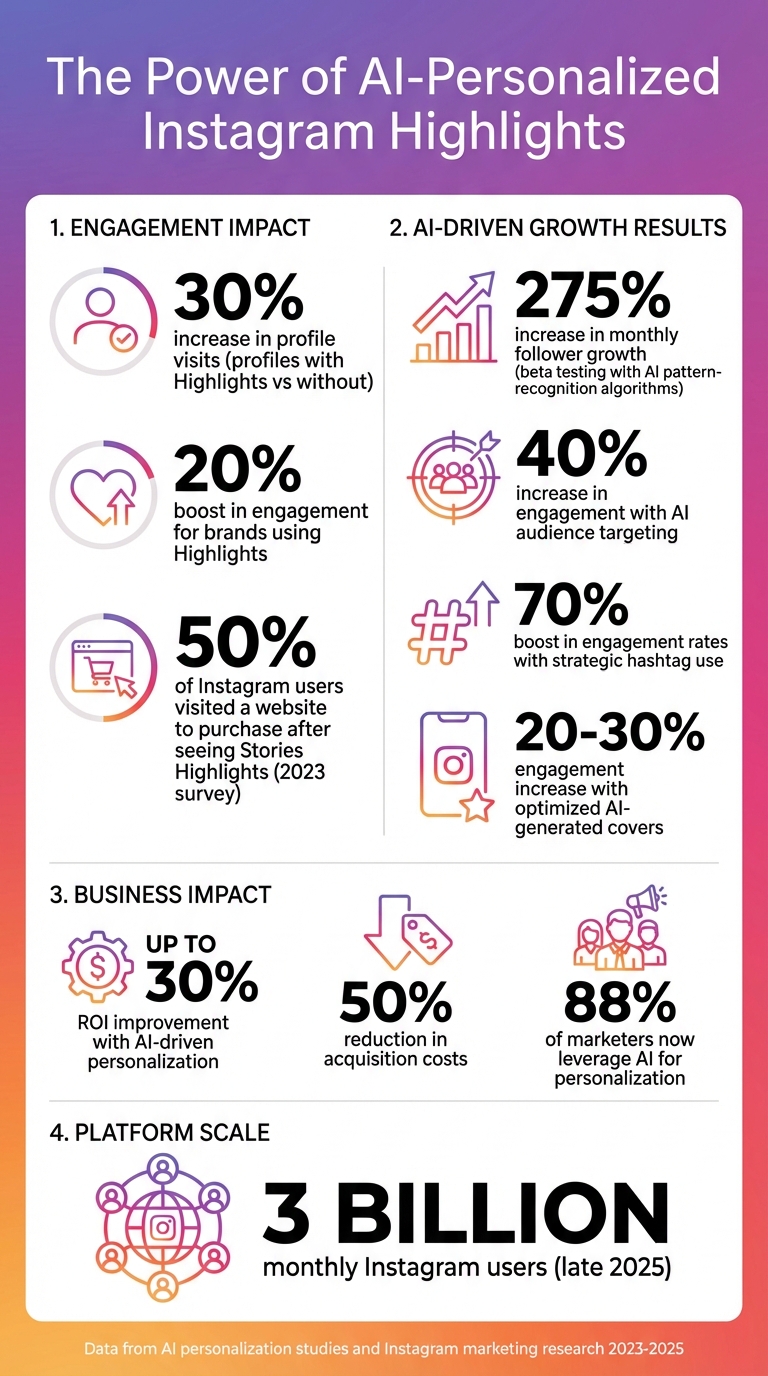
Instagram Highlights AI Personalization Impact Statistics and Key Metrics
Instagram Highlights allow you to take your Stories - normally gone after 24 hours - and turn them into permanent fixtures on your profile. Think of them as a way to make temporary content work overtime. Instead of disappearing, these Highlights sit right below your bio, offering a snapshot of what you or your brand is all about, 24/7.
As Sing Weist puts it, “Instagram highlights live under your Instagram profile About section. Highlights are considered the table of contents to your stories”. Whether you’re showcasing products, sharing customer testimonials, or spotlighting services, these curated circles instantly communicate your message to anyone who visits your profile.
Each Highlight can have a custom cover and a descriptive name to make it even more appealing. And here’s the kicker: Profiles with Highlights see a 30% increase in visits, and brands using them experience a 20% boost in engagement compared to those without them. Even more compelling? A 2023 survey found that 50% of Instagram users visited a website to make a purchase after seeing a product or service featured in Stories Highlights. Clearly, Highlights are more than just a nice touch - they’re a powerful tool for driving action.
Now, let’s take this a step further. While Highlights are already effective, AI can turn them into an even sharper tool by personalizing them based on audience data like location, age, gender, language, and interests. AI doesn’t just help you organize - it helps you optimize. By analyzing user behavior and essential Instagram metrics, AI can identify which Stories perform best and ensure they’re permanently featured where they’ll make the biggest impact.
Roos Moolhuijsen explains it well: “AI solutions transform Instagram content creation by automating repetitive tasks while enhancing creative capabilities”. In practice, this means AI can handle tasks like designing on-brand Highlight covers, generating customizable templates tailored to specific audience segments, and even writing captions that resonate. During beta testing, AI tools using pattern-recognition algorithms boosted monthly follower growth by as much as 275%. That’s not just efficiency - it’s results.
The beauty of AI-driven personalization is how it scales. Instead of creating generic, one-size-fits-all content, AI adapts a single template into dozens of variations tailored to different audience segments. This ensures your Highlights feel personal and relevant to every viewer. With 88% of marketers now leveraging AI for personalization across customer touchpoints, it’s clear this technology isn’t just a trend - it’s a necessity for staying competitive on Instagram.
Want to make your Instagram Highlight covers stand out? The right AI tools can help you go from bland to eye-catching in just minutes. Forget spending hours on manual design - these platforms use AI to craft custom visuals that match your brand's vibe effortlessly.
Canva's Magic Studio is packed with AI-powered features that make designing branded Highlight covers a breeze. With Magic Media, you can turn simple text prompts into unique static images or 4-second silent clips, giving you access to icons that go way beyond the usual stock options. Already have some brand visuals? The Dream Lab tool can take your reference images and generate fresh designs that stay true to your aesthetic. Plus, Magic Edit lets you tweak colors or swap out backgrounds with ease, while Magic Eraser removes unwanted elements for cleaner, professional-looking thumbnails.
When working on your designs, always keep key icons and text within Instagram's "safe zone" - the center circle of your 1,080 x 1,920-pixel canvas. Remember, Instagram's circular cropping will cut out anything outside this area. Also, include specific details in your prompts, like hex codes or style keywords such as "minimalist" or "line art." Before uploading, test your design at 100 x 100 pixels to ensure it looks sharp when scaled down. If it’s unclear, simplify your design.
If you're looking to create eye-catching video-based Highlight covers or animations, CapCut Web's AI Video Maker is a fantastic option. This tool can take a script - whether you write it yourself or let AI handle it - and turn it into vertical (9:16) stories, perfect for Instagram Highlights. Its Match Stock Media feature pairs stock footage or your own clips with the script, creating cohesive and visually appealing stories. For static covers, use CapCut’s image editor with an 800 x 800-pixel canvas to ensure a perfect fit. You can also use its AI background removal tool to create custom designs. The best part? CapCut is free to use, and you don’t even need a credit card to get started.
While Canva and CapCut are great for creating covers from scratch, Pictory shines when it comes to repurposing your existing content into engaging Instagram Highlights. This tool scans your long-form content - whether it’s a blog post, video, or other media - and identifies the best moments to turn into short, digestible clips. It’s a huge time-saver, sparing you the hassle of manually sifting through hours of material.
| Tool | Best For | Key AI Feature | Recommended Size |
|---|---|---|---|
| Canva Magic Studio | Static icons and branded graphics | Magic Media (Text to Graphic/Image) | 1,080 x 1,920 px |
| CapCut AI | Dynamic video stories and animations | AI Video Maker (Script to Video) | 800 x 800 px |
| Pictory | Repurposing long-form content into clips | AI content curation and editing | Standard story dimensions |
These tools provide everything you need to create personalized Instagram Highlights, setting the stage for the customization techniques coming up next.
Want to use AI to transform your Instagram Highlights? This guide will walk you through the process step by step, from analyzing your audience to designing custom covers, curating content, and optimizing your profile layout - all with the help of smart automation tools.
Before diving into design, start by analyzing your audience's behavior. AI analytics tools can review your Stories and pinpoint which themes and content types resonate most. These tools help identify patterns in engagement, making it easier to decide which Story categories deserve a permanent spot in your Highlights.
Begin by checking AI-generated performance reports that break down engagement rates across your Stories. Focus on the top 10% of your best-performing content - these are your strongest candidates for "Best Of" Highlights. Some AI platforms even compare your content to millions of verified creators, offering insights into trends within your niche. For example, beta users of AI-powered pattern recognition have reported a 275% increase in monthly followers, proving that data-driven decisions can yield impressive results.
With these insights in hand, you're ready to move on to the creative part: designing covers that align with your brand.
Once you've decided on your Highlight categories, it's time to create visually appealing covers. Start by defining your key categories - like "About", "Shop", or "Reviews" - and gather your brand elements, such as hex codes and style preferences. For a cohesive look, use the exact color codes from your recent posts and include them in your AI design prompts.
AI design tools like ArtSmart.ai and Adobe Express allow you to describe what you want in detail. For instance, you could input a prompt like "minimalist line art icons in sage green and cream" to create designs that match your aesthetic. If you're looking for speed, Canva offers pre-made templates that you can tweak using AI features. These tools make the design process faster and easier.
For consistency, use one prompt or template to create all your covers. Before uploading, test your designs at 100 x 100 pixels to ensure the icons are clear at smaller sizes. If needed, simplify the design. Export the final covers at 1,080 x 1,920 pixels in PNG format for the best quality.
Now that your covers are ready, it’s time to curate the content for your Highlights. AI video editing tools can scan your Stories and identify the most engaging moments, saving you the hassle of manually sorting through months of content. These tools can also trim unnecessary footage, adjust colors for a consistent look, and add captions or text overlays to reinforce your message.
The goal is to create polished and cohesive Highlight reels that tell a clear story for each category. Whether you're featuring customer testimonials, product demos, or behind-the-scenes moments, AI tools can help you craft professional-looking content.
The final step in your AI-powered strategy is to organize your Highlights for maximum impact. AI profile optimization tools analyze your account's performance and suggest layouts that boost visibility and engagement. These tools can recommend which Highlights to place first based on your audience's preferences.
For example, UpGrow’s AI-assisted Boost™ feature uses pattern recognition and smart growth strategies to help users arrange their profiles effectively. This tool has helped over 100,000 users grow their accounts up to 10 times faster by combining AI technology with input from real human experts.
When naming your Highlights, keep titles short and descriptive - words like "Shop", "Tips", or "Reviews" work better than longer phrases. AI tools can also suggest keywords that resonate with your audience, helping you choose names that encourage clicks and engagement.
Once you’ve nailed the basics, advanced AI techniques can take your Instagram Highlight reels to the next level. These strategies focus on targeting specific audience segments, boosting visibility, and fine-tuning your approach in real time. By building on earlier methods, you can create even more personalized and impactful Highlights.
Advanced targeting features, like those offered by UpGrow, allow you to craft Instagram Highlights tailored to specific follower groups. UpGrow’s AI-targeting tools use sophisticated algorithms to identify and engage the most relevant segments of your audience. This means you can customize content to match diverse interests, which has been shown to increase engagement by up to 40% while meeting the personalization expectations of 71% of consumers.
UpGrow’s filtering system is highly detailed, letting you target followers by factors like location, age, gender, language, interests, and even hashtags. For instance, if the AI detects a growing interest in sustainable fashion among your followers, you can dedicate a Highlight to that niche. Similarly, location-based data can inspire Highlights like "Local Favorites" or "Community Picks" to connect with nearby audiences. For multilingual creators, offering separate Highlights such as "Tutorials – EN" and "Tutorials – ES" can help strengthen bonds with diverse groups. Use the UpGrow dashboard to monitor which audience segments are expanding the fastest and adjust your Highlights to match. Notably, UpGrow’s AI-assisted Boost™ feature has a stellar 4.98/5 rating from over 58,000 reviews, proving its effectiveness in helping users achieve targeted growth.
Hashtags are more than just trendy add-ons - they’re essential for improving the visibility of your Highlights. By 2026, hashtags are expected to function as metadata that helps Instagram’s AI categorize and recommend content. For video-heavy Highlights like Reels, hashtags act as subtle signals that guide the algorithm toward the right audience.
"Reels are discovery-driven. Instagram uses your hashtags to help understand what the Reel is about so it can show it to the right people. They act as context signals, not search terms." - Liam Derbyshire, CEO, Influize
AI tools can pinpoint niche-specific and community-focused hashtags that create a sense of connection while improving discoverability. Posts that use strategic hashtags have been shown to boost engagement rates by as much as 70%. To get the most out of your hashtags, follow the 80/20 rule: dedicate 80% to niche hashtags and 20% to broader, more popular ones. Prioritize medium-volume hashtags (10,000–500,000 posts) and stick to 3–5 hashtags per post to avoid looking spammy. These strategies align perfectly with targeted content and lay the groundwork for real-time optimization.
AI-powered analytics are crucial for fine-tuning your Instagram Highlight strategy. These tools track key metrics like engagement, completion rates, and audience growth, giving you the insights needed to optimize your content. For example, monitoring story completion rates can reveal how many viewers watch your entire Highlight and where they drop off, helping you adjust content length accordingly. Engagement velocity can indicate the best times to update or rotate your Highlights, while click-through rates (CTR) can guide A/B testing for AI-generated covers and titles.
"AI reveals exactly which types of content, hashtags, and timing drive the strongest results." - Joe Crosby, Typecast
AI-driven personalization doesn’t just improve user experiences - it can also boost ROI by up to 30% and cut acquisition costs by as much as 50%. You can even set up behavioral triggers, like automatically recommending a "Reviews" Highlight after someone interacts with a product post. Gathering feedback on these personalized experiences ensures your strategy stays sharp and effective.
If you don’t track your data, it’s nearly impossible to figure out which Highlights are hitting the mark and which ones need tweaking. That’s where AI-powered analytics come in. These tools give you the clarity needed to make smart decisions and fine-tune your strategy. With this level of insight, you can make precise adjustments that actually work.
To measure the performance of your Highlights, keep an eye on these metrics: views (both total and unique), engagement rate (like taps forward, taps back, replies, and shares), completion rate (the percentage of viewers who watch the entire Highlight), and follower growth tied to profile visits from those Highlights. For example, a fitness influencer might aim for 10,000 views and a 15% engagement rate on their "Workouts" Highlight to gauge success.
One critical metric to watch is exit rates - if viewers are leaving your Highlight too quickly, it’s a sign your content isn’t holding their attention, and your personalization strategy may need a revamp. Also, track profile visits and spikes in followers after updating your Highlights to see how AI-driven changes are impacting your growth. Checking in on these metrics weekly is a good habit - it helps you spot trends and make timely updates.
Here's a quick breakdown of the key metrics and why they matter:
| Metric | What It Measures | Why It Matters |
|---|---|---|
| Views | Total impressions on Highlights | Shows how many people are seeing them |
| Engagement Rate | Taps, replies, shares, exits | Reveals how viewers are interacting |
| Completion Rate | Percentage watching fully | Indicates how engaging and relevant it is |
| Follower Growth | New followers from profile visits | Tracks conversion from Highlights to follows |
AI can take your A/B testing game to the next level, helping you refine your Highlights based on audience behavior. For instance, you can use tools like Canva Magic Studio or Template.net's AI generator to create different cover designs. Test a minimalist icon against a bold, colorful design by uploading both to duplicate Highlights. Then, compare metrics like views and taps over a 7-day period. Small changes like these can lead to big results - optimized covers have been shown to boost engagement by 20-30%.
AI tools like Pictory and CapCut AI can also help you repurpose content. For example, you can experiment with short video clips versus static images and track completion rates to see which format keeps viewers engaged longer. A fashion brand using UpGrow’s AI-targeting saw a 40% increase in follower growth and 35% more views by creating audience-specific Highlights like "Summer Looks". Similarly, influencers testing Canva AI covers reported 22% higher taps when they used personalized icons instead of generic ones.
To keep improving, establish a routine: review AI analytics weekly using dashboards like UpGrow’s, A/B test underperforming Highlights, refresh covers with AI tools, and aim for at least a 10% engagement increase.
AI has completely changed the game for Instagram Highlights, turning them from a simple archive into a dynamic tool for engagement and growth. By using AI-driven tools like Canva Magic Studio, CapCut AI, and Pictory alongside smart analytics, you can create Highlights that not only grab attention but also turn casual viewers into loyal followers.
For example, beta users of UpGrow's AI-assisted Boost™ feature reported a staggering increase in monthly followers - over 275% growth. And with Instagram now boasting 3 billion monthly users as of late 2025, the competition for visibility is fiercer than ever. In this crowded space, standing out requires more than just attractive covers or randomly curated Stories. It calls for hyper-personalized content shaped by real-time behavior and intent.
"In 2026, personalization will move far beyond first names... AI-driven marketing platforms will analyze real-time behavior, emotional cues, and intent signals to deliver dynamic, one-to-one experiences at scale."
This highlights the importance of weaving AI into your Instagram growth strategy.
The success of personalized Highlight strategies shows that AI tools can optimize every detail - from designing eye-catching covers to targeting the right audience. Take UpGrow as an example. Rated 4.98/5 by more than 58,000 users, it offers AI-powered targeting based on location, age, gender, and interests, all backed by 24/7 real-time analytics. With plans starting at $39/month and a current 60% discount, it’s a budget-friendly option that could replace the need for an entire marketing team - all while staying fully compliant with Instagram’s rules.
Think of your Highlights as a digital storefront. Test different cover designs, keep a close eye on your metrics, and let AI guide your decisions. With the right approach, your Highlights can become a powerful tool for boosting engagement and driving organic growth.
AI leverages sophisticated data analysis to break down audiences into smaller, more specific groups based on their behaviors, interests, and preferences. This helps brands create Instagram Highlights that feel personalized and relevant to each segment, making them more engaging and impactful.
By examining details like demographics, engagement habits, and user intent in real time, AI empowers brands to tweak their Highlight content dynamically. This means brands can offer tailored experiences that truly connect with their audience, encouraging stronger relationships and driving more interactions.
AI tools simplify the process of creating Instagram Highlight covers that look polished and eye-catching. Thanks to advanced algorithms, you can craft custom designs in just a few minutes - even if graphic design isn’t your forte.
Many AI-driven platforms offer pre-made templates and design suggestions that align with your brand’s style. These features not only save you time but also help bring fresh ideas to the table while ensuring your Highlight covers seamlessly match your Instagram aesthetic. It’s an easy way to achieve professional, cohesive visuals with minimal hassle.
AI analytics can take your Instagram Highlights to the next level by providing real-time insights into what your audience loves and how they engage with your content. With this information, you can figure out which posts hit the mark and adjust your Highlights to keep viewers hooked.
Using AI, you can spot trends, refine your storytelling, and make sure your Highlights match your audience's preferences. This smarter approach doesn’t just improve engagement - it also helps solidify your presence on Instagram.


