
How AI Upscales UGC Videos to 4K
AI upscales user-generated videos to 4K by reducing noise, fixing compression, stabilizing motion, and restoring detail for sharper social media-ready content.
AI upscales user-generated videos to 4K by reducing noise, fixing compression, stabilizing motion, and restoring detail for sharper social media-ready content.
4.98 /5 - from 58k reviews
Trusted by 50,000+ creators — get real engagement delivered to your profile in minutes, not days.

AI upscaling transforms low-quality user-generated videos into sharp, professional-looking 4K content by using deep learning to add missing details, reduce noise, and fix compression issues. Unlike traditional methods that stretch pixels, AI analyzes patterns in video frames to rebuild textures and enhance clarity. This process is critical for social media platforms like Instagram and TikTok, where high-quality visuals improve engagement and organic reach. With tools that are cost-effective and easy to use, even amateur footage can look polished without expensive equipment or long editing hours.
Key Benefits of AI Upscaling:
How It Works:
Pro Tip: Start with the best version of your video and clean it up before upscaling for optimal results. Use a preview to fine-tune settings and ensure the final output looks sharp without appearing unnatural.
AI-powered tools make it simple to elevate the quality of user-generated content, ensuring it stands out in today’s competitive digital landscape.
AI video upscaling uses deep learning to rebuild textures and fill in missing details in video footage. By training on millions of low-resolution and high-resolution frame pairs, AI learns to identify patterns and reconstruct details that are usually lost in lower-quality videos. Unlike traditional upscaling, which simply stretches existing pixels, AI creates entirely new details for each frame, making the output far more refined.
User-generated content (UGC) often comes with its own set of challenges. Many videos are shot on older devices or in less-than-ideal conditions, leading to low resolutions like SD or 720p, noticeable motion blur, shaky footage, and sensor noise. When these videos are displayed on modern 4K TVs or high-resolution screens, they often look pixelated, blurry, or unpolished. To make matters worse, social media platforms apply heavy compression, which introduces blocky edges and strips away even more detail. These quality issues can hurt the credibility of customer testimonials or product reviews, making them less engaging and impactful. This is where a tool that not only boosts resolution but also enhances overall clarity becomes crucial.
AI upscaling addresses these common issues by transforming UGC from casual, amateur footage into professional-quality visuals. It sharpens details, stabilizes shaky footage, enhances textures, and reduces noise, motion blur, and compression artifacts - all without requiring expensive gear or hours of manual editing.
| Feature | Traditional Upscaling | AI Video Upscaling |
|---|---|---|
| Method | Pixel interpolation (stretching) | Deep learning |
| Visual Result | Blurry, blocky, pixelated | Sharp, detailed, and clear |
| Detail | No new information created | Reconstructs textures and edges |
| Artifacts | Creates halos and jagged edges | Reduces noise and compression artifacts |
Jason Miller, a Post-Production Supervisor, highlights the practical benefits of AI upscaling:
"The resolution boost and cleanup tools helped us deliver sharper edits with less manual fixing. It's become part of our weekly workflow."
For brands that rely on user-generated content on platforms like Instagram, achieving high-quality visuals is non-negotiable. As social platforms increasingly prioritize polished, high-resolution videos, ensuring customer-created content looks professional is key. This is especially important when you consider that 79% of consumers say content from real customers influences their purchasing decisions.
AI upscaling transforms video quality by analyzing each frame and using deep learning to recreate missing details. Instead of simply stretching pixels, it digitally reconstructs them. This is achieved by training AI models on millions of low-resolution and high-resolution video pairs, teaching the system to recognize patterns like skin textures, architectural details, and facial features. For instance, if you're upscaling a customer testimonial recorded on an older smartphone, the AI can identify faces and enhance features like eyes, teeth, and skin textures, giving the footage a polished, professional appearance.
The AI also tracks motion patterns and vectors across frames, ensuring smooth and consistent details without introducing flickering. These enhancements serve as the foundation for additional quality improvements that refine the overall result before the final upscale.
Before the content is upscaled to 4K, AI tools address common problems often found in user-generated videos. One of the first steps is removing compression artifacts - those blocky distortions or mosquito-like noise caused by file compression during uploads. The AI carefully removes these flaws while preserving important details.
Noise reduction is another key step. The AI can separate unwanted grain, often seen in low-light footage, from actual textures, leaving the essential elements intact. For footage captured with shaky handheld devices, AI stabilization corrects camera movements without the need for heavy cropping. The result? Video that looks like it was shot with professional-grade equipment, even if it came from a smartphone.
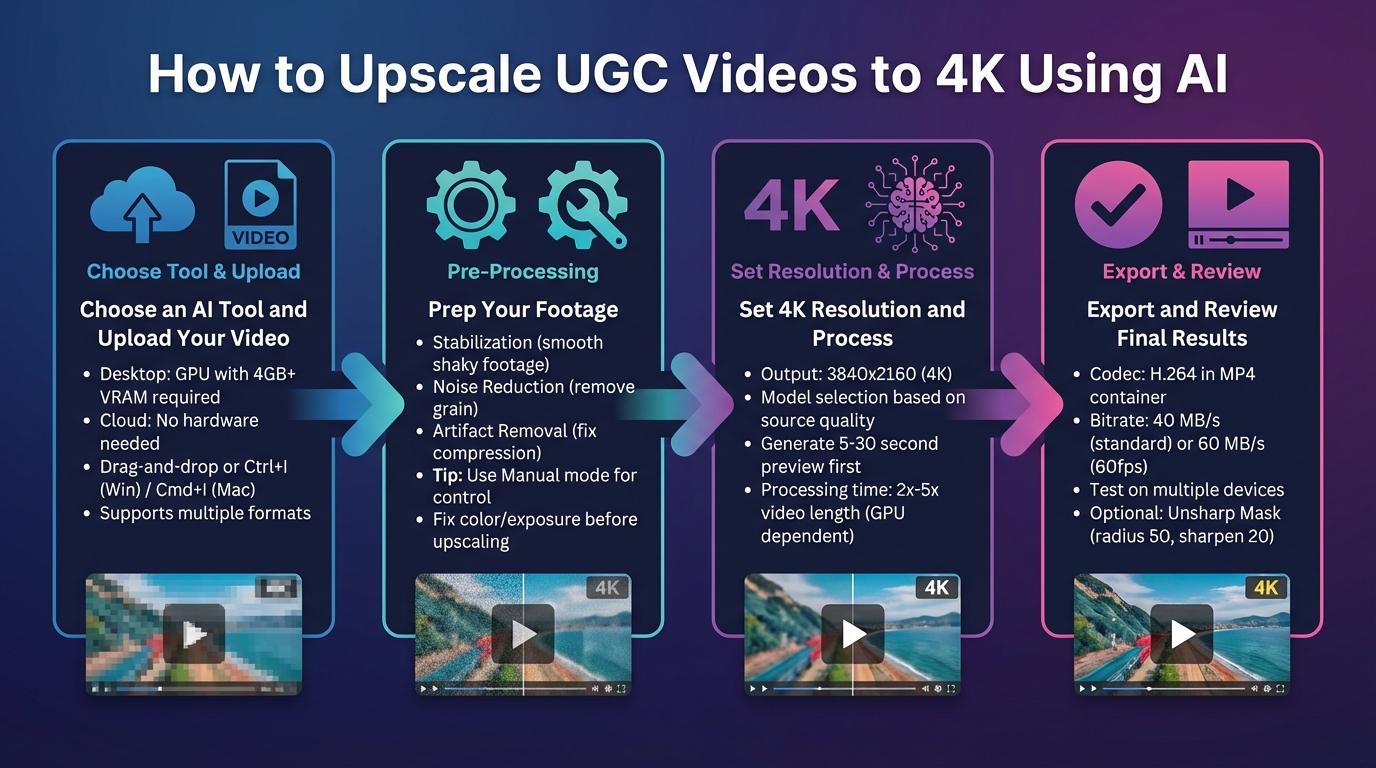
4-Step AI Video Upscaling Process from Upload to 4K Export
Start by picking an AI-based upscaling tool that matches your needs and hardware setup. If you're using a desktop tool, make sure your system has a dedicated GPU with at least 4GB of VRAM. If that's not an option, many online tools work entirely in the cloud and don't rely on your hardware. Tools in this space range from free to premium, catering to different budgets and requirements.
Once you've chosen your tool, upload your video. Most platforms allow drag-and-drop uploads or keyboard shortcuts (Ctrl+I for Windows, Cmd+I for Mac). These tools typically support a broad range of formats, so whether your footage comes from a smartphone or a social media download, compatibility shouldn't be a problem.
Before jumping into the upscale process, clean up your video to give the AI the best starting point. Begin by addressing common issues like shaky footage, graininess, and compression artifacts. Here are three key improvements to focus on:
If you're using tools like Topaz Video AI, switch to "Manual" mode instead of relying on automatic settings. This gives you more control, especially since user-generated content often has inconsistent lighting and compression.
For videos in poor condition, you may need to process them in two stages: first, clean up noise and artifacts, and then apply the 4K upscale. If your footage has issues with color or exposure, adjust brightness and contrast at this stage. It's far easier to fix these problems before upscaling rather than afterward.
Once your footage is prepped, set the resolution to 3840x2160 (4K) in the tool's output settings. If the software offers model options, choose one based on the quality of your source video. For instance:
Fine-tune settings for compression, sharpness, detail, and noise reduction. Before processing the entire video, generate a 5-to-30-second preview and use the zoom tool to check for sharpness and natural-looking results. This preview step is crucial because processing a full video can take hours depending on your hardware. For example, an RTX 3070 GPU processes at roughly 2x the video's original length, while a GTX 1660 might take 4x to 5x as long. If the preview looks good, proceed with the full upscale.
Export your video using a codec and settings that ensure consistent quality. The H.264 codec in an MP4 container is a solid choice, with a constant bitrate of 40 MB/s for standard 4K videos or 60 MB/s for 60fps content.
After exporting, review the final video on different devices, such as a computer monitor, smartphone, and a 4K TV. Take a close look at facial features and textures to ensure they’re sharp without looking unnatural or overly processed. If the output seems a bit soft, you can apply an Unsharp Mask in your video editor with a radius of 50 and a sharpen amount of 20 for a subtle final touch.
AI upscaling works best when you start with clean, high-quality source footage. Since the process can't magically create details out of thin air, it's crucial to use the best version of your video as a starting point. If you're dealing with heavily degraded footage, it's a good idea to clean it up first before attempting any upscaling.
This technology is particularly useful for breathing new life into older content. For example, if you shot a video in 1080p on your smartphone a year ago and now want to use it in a modern campaign, upscaling it to 4K can give it a fresh, polished appearance - no need for a costly reshoot. This is especially handy when repurposing a single clip into multiple formats, like turning a 30-second video into a Reel, a Story, and a Feed post. Upscaling ensures the visuals stay sharp and consistent, even across different crops and aspect ratios.
For degraded footage, a two-step process is recommended: first, clean up noise and artifacts at the original resolution, and then apply the 4K upscale. The goal isn't to make user-generated content (UGC) look like a blockbuster movie, but to enhance its technical quality - improving resolution, reducing noise, and stabilizing the image - while keeping the authentic, relatable vibe that makes UGC so effective. By maintaining this balance, you enhance the quality without losing the natural appeal that resonates with audiences.
These improvements not only make your videos look better but also set the stage for higher engagement on platforms like Instagram.
High-resolution 4K visuals do more than just look good - they grab attention and align with Instagram's preference for sharp, high-quality content. Videos in 4K not only stand out to viewers but also signal quality to Instagram's algorithm, which can help boost your content's reach.
Combining 4K UGC with smart AI tools can take your growth to the next level. For instance, platforms like UpGrow (https://upgrow.com) use AI to target audiences based on location, age, gender, and interests, ensuring your polished content reaches genuinely engaged users. With real-time analytics and a live dashboard, tools like this turn your high-quality videos into measurable audience growth. The crisp clarity of 4K visuals, paired with precise targeting, maximizes your reach and impact.
Brands that rely on UGC often experience up to 4x higher engagement compared to traditional branded content. To maintain the authenticity that makes UGC so effective, your upscaled videos should keep their original smartphone-like qualities - natural depth of field, handheld angles, and all. This balance of quality and authenticity is key to making your content resonate with viewers.
Even with advanced AI tools, avoiding common mistakes is essential to keep your visuals looking natural and engaging.
Pushing video resolution too far can backfire. For instance, jumping from 480p straight to 8K often leads to digital artifacts and an overly smooth, almost "plastic" appearance. Similarly, applying too much sharpening can make your video look unnatural and distracting. A better approach? Opt for logical resolution upgrades, like moving from 1080p to 4K, which helps maintain a realistic and polished look. As Brenda Peng, Editor at Digiarty Software, puts it:
"Upscaling won't magically turn a poor-quality clip into a perfect 4K masterpiece, but with the right tool, it can make older or low-resolution videos look far better".
While technical accuracy is critical, pairing your upscaled videos with effective growth strategies can amplify their impact.
High-quality 4K videos not only captivate viewers but also tend to perform better with Instagram's algorithm. As mentioned earlier, improving video quality enhances its appeal and helps increase organic reach on platforms like Instagram. To maximize this, combine your upgraded videos with AI-driven growth tools. For example, platforms like UpGrow (https://upgrow.com) use smart targeting and real-time analytics to ensure your top-notch content reaches the right audience. With features like a live dashboard, you can monitor performance and adjust your strategy, creating a winning formula for boosting engagement and measurable growth.
AI upscaling transforms raw user-generated content (UGC) into stunning 4K videos while maintaining its original character. Instead of merely stretching pixels, these advanced tools use deep learning to fill in missing details, meeting the high production standards that today’s platforms demand.
As discussed, high-quality video plays a critical role in building trust with viewers and improving platform performance. Uploading in 4K triggers advanced codecs like VP9 or AV1, which deliver sharper playback - even at 1080p resolution. This translates to longer watch times and better retention rates, which platform algorithms reward with greater visibility and engagement.
Beyond aesthetics, enhanced video quality can significantly expand your reach when paired with smart growth tools. For example, UpGrow (https://upgrow.com) combines technical video improvements with data-driven strategies to maximize impact. Offering features like AI-powered targeting, location-based filters, and a live performance dashboard, it ensures your polished 4K content reaches the right audience at the right time. With plans starting at $39/month and a money-back growth guarantee, UpGrow makes it easier to turn high-quality visuals into measurable results.
AI video upscaling takes a completely different approach compared to traditional methods. Instead of just enlarging existing pixels, as conventional upscalers do, it goes a step further. Traditional techniques, like nearest-neighbor or bicubic scaling, rely on blending nearby pixel values to increase the size. While this can make the video appear larger, it often leaves the image looking blurry and lacking in detail.
AI-powered upscalers, on the other hand, use neural networks trained on extensive datasets to analyze patterns and fill in the gaps with new, realistic details. This means AI doesn't just resize the video - it enhances it by adding sharper edges, intricate textures, and visuals that look more lifelike. The result is a significantly clearer and more detailed image, far surpassing what traditional upscaling methods can achieve.
When using AI to upscale videos, setting up your footage correctly from the start can make a big difference in the final result. Begin by recording in vertical or square aspect ratios, as these formats maximize the number of usable pixels for mobile viewing. For lighting, stick to natural sources like daylight or ambient light - this helps create cleaner footage with less noise, which is easier for the AI to enhance. To avoid shaky footage that can complicate the upscaling process, use a tripod or place your camera on a stable surface.
Sharp, focused frames are also crucial. Reduce motion blur by keeping your camera steady and ensuring your lighting is sufficient. Always record at the highest resolution and bitrate your device allows, and resist compressing the original file. The AI performs best when it has access to as much unaltered data as possible during the upscaling process.
AI upscaling takes low-resolution videos and enhances them to stunning 4K quality, instantly making your content more eye-catching and engaging. By filling in missing details and sharpening visuals, it ensures your videos grab attention in busy social media feeds, encouraging viewers to pause and interact.
Crystal-clear videos also perform better across devices, minimizing pixelation and delivering a seamless viewing experience. This keeps audiences watching longer, which can lead to more likes, comments, and shares. Plus, social media platforms often prioritize content with higher watch times, helping your videos reach more people. With AI upscaling, your content gains a polished, professional look that captures attention and drives organic growth.


